
zensical-gradient-theme



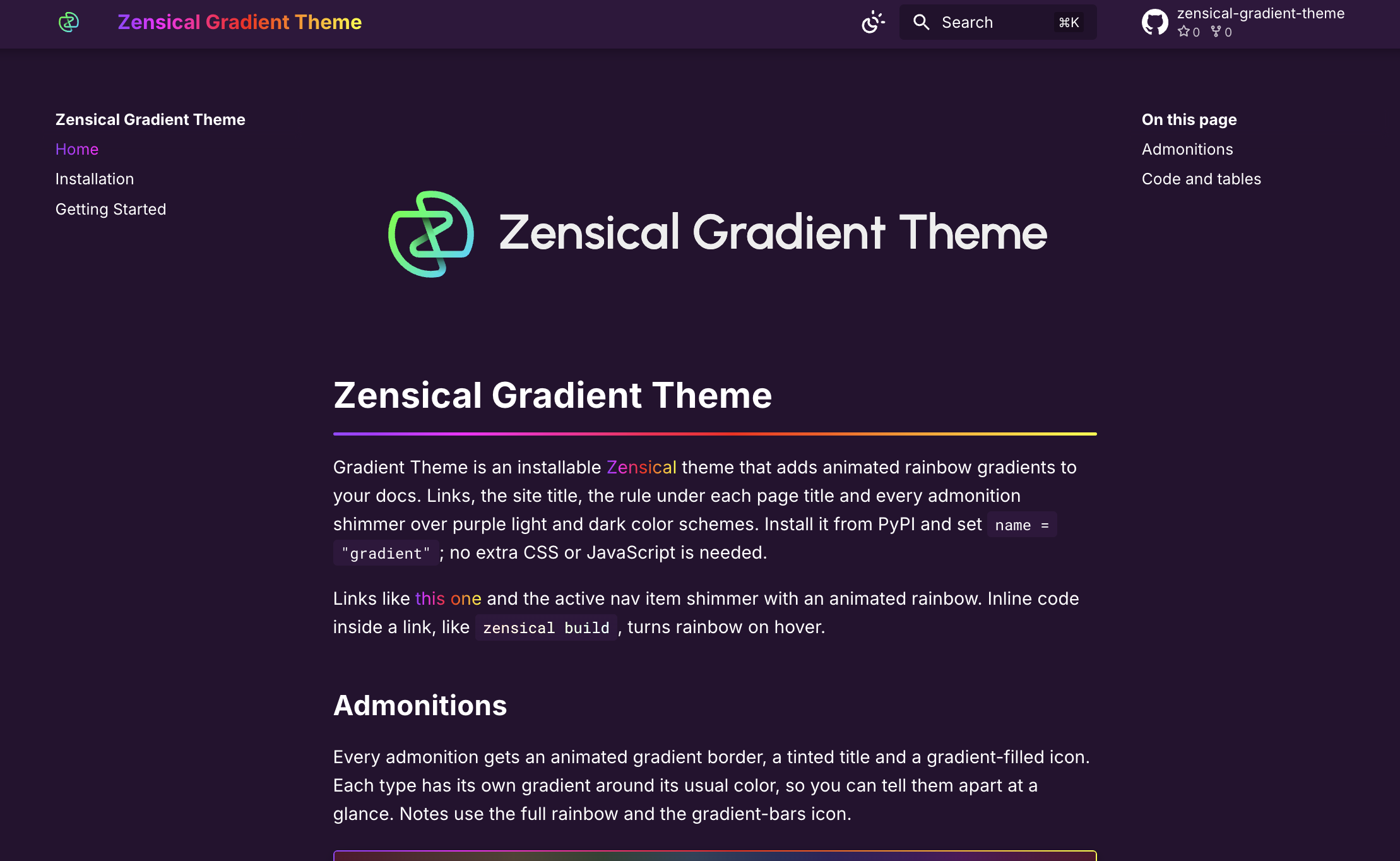
Gradient Theme is an installable Zensical theme that adds animated rainbow gradients to your docs. Links, the site title, the rule under each page title and every admonition shimmer over purple light and dark color schemes. Install it from PyPI and set name = "gradient"; no extra CSS or JavaScript is needed.
See it in action in the documentation.
What it gives you:
gradient-darkandgradient-lightcolor schemes, with a system / light / dark toggle- Animated rainbow text on links, the active nav item and the site title, plus a rainbow rule under each
h1 - Admonitions and collapsible blocks with an animated gradient border, tinted title and gradient-filled icon. Each type has its own gradient around its usual color (warnings stay orange); notes use the full rainbow.
- All animation stops when the reader asks for reduced motion
- Calm, card-style API reference pages for mkdocstrings output
- Inter and Roboto Mono fonts, the classic variant, and a sensible feature list (instant navigation, code copy, search suggestions and more)
- Copy-to-clipboard links with a toast
Install
The theme is on PyPI. Add it to the dependency group that holds Zensical:
uv add --group docs zensical-gradient-theme
Or with pip:
pip install zensical-gradient-theme
To track unreleased changes, install from GitHub instead:
uv add --group docs "zensical-gradient-theme @ git+https://github.com/maxludden/zensical-gradient-theme"
Use
In zensical.toml:
[project.theme]
name = "gradient"
logo = "img/logo.svg"      # optional
favicon = "img/logo.svg"   # optional
That's all: the theme's stylesheet and script load automatically, so you don't need extra_css or extra_javascript entries for it. The same works in mkdocs.yml with theme: {name: gradient}.
Overriding defaults
The theme sets variant, font, palette and features. Any of these you set in your own [project.theme] replaces the theme's value as a whole. For example, setting features replaces the full list rather than adding to it. Copy the list from src/zensical_gradient_theme/templates/mkdocs_theme.yml and edit it.
To restyle further, add your own extra_css. It loads after the theme's stylesheet, so your rules win.
Copy links
<a class="copy-install" data-copy="uv add my-package" href="#">uv add my-package</a>
Clicking copies the data-copy text (or the link text, if there's no
data-copy) and shows a "Copied" toast.
Extra classes
| Class | Effect |
|---|---|
table.params |
Wide parameter table with a solid header |
.badges |
Centers a row of badge images |
.version |
Accent-colored version label |
.banner |
Full-width image |
img[src$="#only-dark"], #only-light |
Show an image in one scheme only |
Development
uv sync
uv run pytest      # builds a fixture site with the theme and checks the output
uv run ruff check
uv run mypy
uv run zensical serve   # preview the demo site in docs/
How the theme is found
Zensical loads installable themes from the mkdocs.themes entry-point group and copies everything in the theme directory into the built site. The entry point targets a small locator object whose __file__ sits in templates/, so only the templates and assets end up in sites, not the package's Python files. templates/mkdocs_theme.yml is the one config file that does get copied.
1 maintainer

Metadata
1 maintainer
Release files for zensical-gradient-theme 0.1.1
For a detailed explanation of source distributions (sdists) and built distributions (wheels), please see the package formats documentation.
Source distribution (sdist)
| File | Size | Uploaded | Provenance | Actions |
|---|---|---|---|---|
| zensical_gradient_theme-0.1.1.tar.gz | 13.9 kB | Without provenance | Details for zensical_gradient_theme-0.1.1.tar.gz |
Built distribution (wheel)
| File | Interpreter | ABI | Platform | Actions Reset |
|---|---|---|---|---|
| zensical_gradient_theme-0.1.1-py3-none-any.whl | Python 3 | none | any | Details for zensical_gradient_theme-0.1.1-py3-none-any.whl |
Total release size: 30.5 kB
Release files / zensical_gradient_theme-0.1.1.tar.gz
| Download URL | zensical_gradient_theme-0.1.1.tar.gz |
|---|---|
| Size | 13.9 kB |
| Tags | Source |
|
SHA-256 checksum How to use checksums |
4d0a5e854f1bef2881bce77ded838f425dfcd1f892bd10a9e7317c3e682a9615
|
|
BLAKE2b-256 checksum How to use checksums |
99b979f1bd5063eae9f5e945c3608ddc9797a651de65945095c3b941cfcb6ce9
|
| Upload date | |
|
Uploaded using Trusted Publishing? What is trusted publishing? |
No |
| Uploaded via |
uv/0.13.9 {"installer":{"name":"uv","version":"0.13.9","subcommand":["publish"]},"python":null,"implementation":{"name":null,"version":null},"distro":{"name":"macOS","version":null,"id":null,"libc":null},"system":{"name":null,"release":null},"cpu":null,"openssl_version":null,"setuptools_version":null,"rustc_version":null,"ci":null}
|
Release files / zensical_gradient_theme-0.1.1-py3-none-any.whl
| Download URL | zensical_gradient_theme-0.1.1-py3-none-any.whl |
|---|---|
| Size | 16.5 kB |
| Tags | Python 3 |
|
SHA-256 checksum How to use checksums |
d3c2b9d45722121370bf40ad33c6d2bd015df1e570a08da3d3355077974f8a67
|
|
BLAKE2b-256 checksum How to use checksums |
297945da9c8d00871afcbd2a6558f4731a1acee828f558b81a83367d3df85fb6
|
| Upload date | |
|
Uploaded using Trusted Publishing? What is trusted publishing? |
No |
| Uploaded via |
uv/0.13.9 {"installer":{"name":"uv","version":"0.13.9","subcommand":["publish"]},"python":null,"implementation":{"name":null,"version":null},"distro":{"name":"macOS","version":null,"id":null,"libc":null},"system":{"name":null,"release":null},"cpu":null,"openssl_version":null,"setuptools_version":null,"rustc_version":null,"ci":null}
|
Security for zensical-gradient-theme 0.1.1
Provenance
Provenance describes where a file came from. On PyPI, provenance is shared via attestations, which provide a verifiable record of the build or publishing details. View details, limitations and caveats.
No provenance found
None of the files in this release were uploaded with provenance metadata.
A note on package security
PyPI is a repository for distributing packages, not a service for auditing them. While third-party security researchers and our staff do their best to detect and remove malicious packages, PyPI cannot guarantee the quality, security or suitability of any given package.
To learn more about protecting yourself from malicious actors, visit our package security documentation.














