







ZephIR is a multiple object tracking algorithm based on image registration and built on PyTorch. Check out the publication and tutorial video!
Latest Updates in v1.0.6
- bug fixes for deprecated dependencies
- see release notes for full list of changes
About
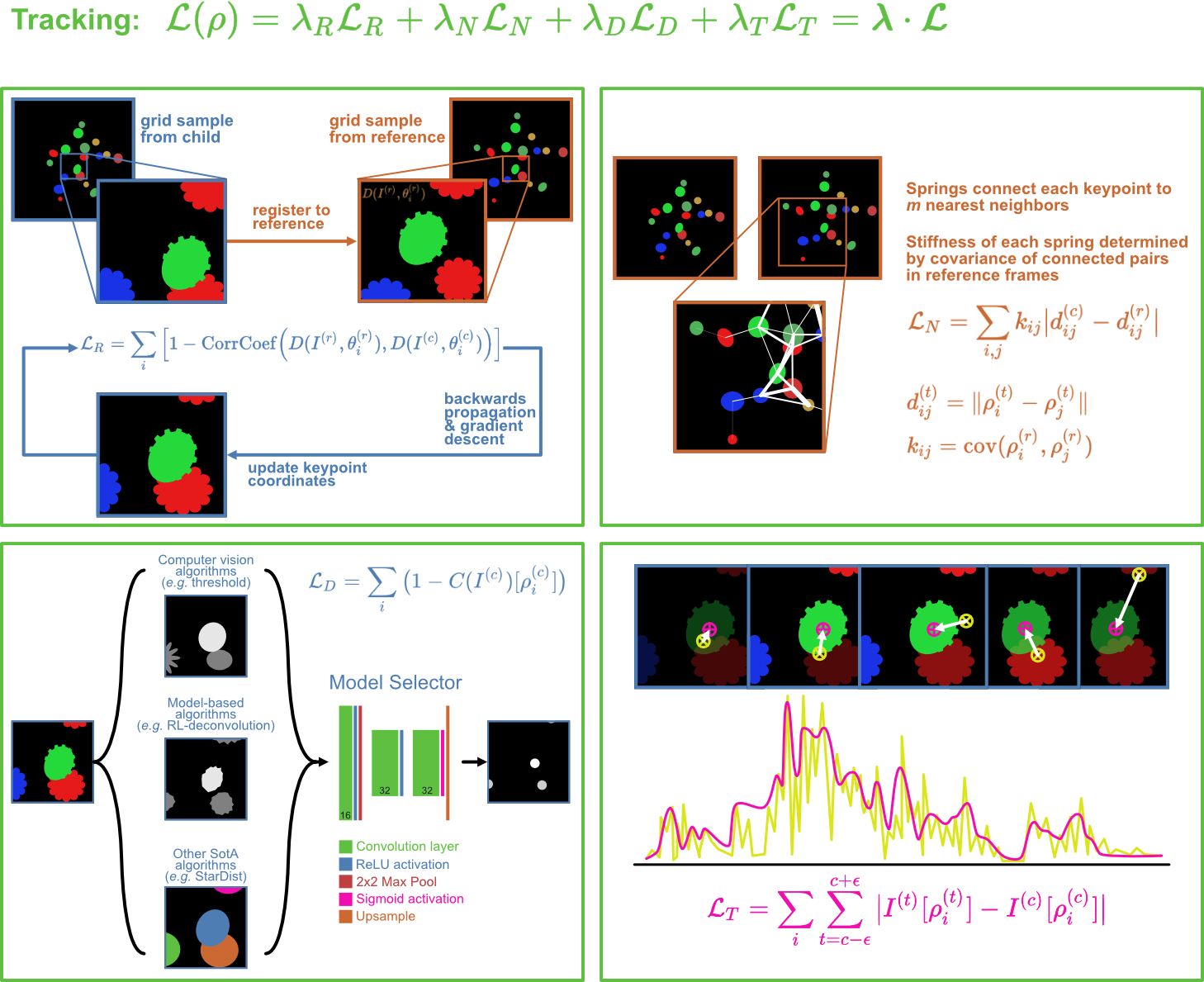
ZephIR tracks keypoints in a 2D or 3D movie by registering image descriptors sampled around each keypoint. Image registration loss is combined with three additional regularization terms:
- spring connections between neighboring objects allow a flexible spatial model of loosely correlated motion
- feature detection optimizes results towards centers of detected features
- temporal smoothing of pixel intensity a small patch of frames limit fluctuations in activity
Overview of tracking loss:
ZephIR is fast, efficient, and designed to run on laptops instead of powerful desktop workstations. It requires no prior training of any model weights, and it is capable of generalizing to a wide diversity of datasets with small tweaks to parameters. This makes ZephIR ideal for analyzing datasets that lack a large corpus of training data, and for tracking fluorescent sources in moving and deforming tissue, both of which create a particularly challenging environment for modern deep learning techniques. ZephIR can also serve as a data augmentation tool in some cases. We provide some support for exporting ZephIR results to DeepLabCut.
Installation
Quick start
pip install zephir
Dependencies
Make sure that Python (>=3.11) and the following packages are installed (prefer uv over pip):
- dataclasses (>=0.8)
- docopt-ng (>=0.9.0)
- flask (>=3.1.2)
- gevent (>=25.9.0)
- h5py (>=3.15.1)
- matplotlib (>=3.10.7)
- numpy (>=2.0)
- opencv-python (>=4.6.0)
- pandas (>=2.3.3)
- scikit-image (>=0.19.2)
- scikit-learn (>=1.7.2)
- scipy (>=1.16.0)
- setuptools (>=80.9.0)
- torch (>=2.9.0) (see PyTorch.org for instructions on installing with CUDA)
- tqdm (>=4.64.0)
NOTE: To enable GPU acceleration, you need to compile PyTorch with CUDA by following the instructions on PyTorch.org. Using the quick installation command will not install CUDA-enabled PyTorch automatically. This installation may also produce an
OMP: Error #15. If you run into this issue, check yournumpyandnumpy-baseversions and if they disagree, update one or the other to match.
NOTE: If you run into an issue when launching the annotator, you may need to downgrade
Flask(2.1.2) andPandas(1.4.2).
Build from source
- Clone git repository:
git clone https://github.com/venkatachalamlab/ZephIR.git
-
Navigate to the cloned directory on your local machine.
-
Checkout the current release:
git checkout v1.0.6
Use the following command to see what's new in the most recent release:
git show v1.0.6
- Install:
python3 -m pip install .
or install in development mode:
python3 -m pip install -e .
Getting Started
Run from command line:
zephir --dataset=. [options]
We provide a detailed guide for running ZephIR as well as some example workflows for using ZephIR here.
Parameters
For a list of all CLI options and user-tunable parameters, see here.
To help figure out what options may be right for you, check out the list of examples with explanations for the chosen parameters here.
Interfacing with Annotator
ZephIR includes an annotator GUI with custom Python macros for interacting with the data from the GUI.
Run from command line:
annotator --dataset=. [--port=5005]
Learn more about the annotator and its features here.
We also provide a more detailed user guide for using the GUI as a part of a ZephIR workflow here.
1 maintainer

Download files
Download the file for your platform. If you're not sure which to choose, learn more about installing packages.
Source Distribution
Built Distribution
Filter files by name, interpreter, ABI, and platform.
If you're not sure about the file name format, learn more about wheel file names.
Copy a direct link to the current filters
File details
Details for the file zephir-1.0.6.tar.gz.
File metadata
- Download URL: zephir-1.0.6.tar.gz
- Upload date:
- Size: 1.2 MB
- Tags: Source
- Uploaded using Trusted Publishing? No
- Uploaded via:
uv/0.6.17
File hashes
| Algorithm | Hash digest | |
|---|---|---|
| SHA256 |
8f283d43422b424d1cf1a104f1cb965710f45c8e84776b70d1002a7cb3100299
|
|
| MD5 |
20d44860cf283d95d71432495f540e5f
|
|
| BLAKE2b-256 |
79c396d28cc486548776753c418bf1abeb84cf682faa76d85345e59d54b03740
|
File details
Details for the file zephir-1.0.6-py3-none-any.whl.
File metadata
- Download URL: zephir-1.0.6-py3-none-any.whl
- Upload date:
- Size: 4.8 kB
- Tags: Python 3
- Uploaded using Trusted Publishing? No
- Uploaded via:
uv/0.6.17
File hashes
| Algorithm | Hash digest | |
|---|---|---|
| SHA256 |
4e17fe368fefd5f91124f2f9516520c4e12d0cdc23bf5b955370bd836db87900
|
|
| MD5 |
c3cb62925143962a96340ee2efe1b660
|
|
| BLAKE2b-256 |
298d469d2c22b832e08aecaabb70f98048c45e0c6fc38e28954e572b1ac788cb
|







