
Zern Class Documentation
This is a free library. This doesn't require any subscription to use.
Disclaimer: Please dont overload the server.
INSTALLATION
- get it the pip way
pip install zern
- build from here using build tool
git clone https://github.com/ExBlacklight/Zern.git
cd Zern
pip install build
python -m build
pip install "./dist/zern-0.0.22.tar.gz"
You can convert the inbuilt DataFrame to pandas. check it in the "INBUILT DATAFRAME" Section below.
SAMPLE SCRIPTS
- download data
from zern import Trader
from credentials import user_name, password, totp_key

#initiate trader
trader = Trader(user_name=user_name,password=password,totp_key=totp_key)

#retrieve 'INFOSYS' insrtrument token and get previous 10 days data
token = trader.get_instrument_token_equity('infy')
insToken = token['instrument_token']
df = trader.get_previous_data(insToken,days=10)

trader

# save the data
df.save('infy.dict')
- using realtime data and place orders
from zern import Trader
from credentials import user_name, password, totp_key

trader = Trader(user_name=user_name,password=password,totp_key=totp_key)

sleep(1)

token = trader.get_instrument_token_equity('infy')
insToken = token['instrument_token']

# you need to subscribe to this ticker process for live data
trader.ticker.subscribe(insToken)

# use loops or threads (preferably daemon threads) to fetch the ticker.last_msg from the ticker
# Note: 'trader.ticker.last_msg' and 'trader.ticker.last_msg_time' are the only
#       two variables which are updated in the background
while True:
    try:
        print(trader.ticker.last_msg[str(insToken)])
    except:
        pass
    sleep(1)
- placing a trade
from zern import Trader
from time import sleep
from credentials import user_name, password, totp_key

trader = Trader(user_name=user_name,password=password,totp_key=totp_key)

token = trader.get_instrument_token_equity('infy')
df = trader.get_previous_data(token['instrument_token'],days=10)

# import required Types for special use cases
from zern.utils.Types import EXCHANGE,ORDER_TYPE,PRODUCT,TRANSACTION_TYPE,VARIETY,VALIDITY


# Place order
# equities need to be in PRODUCT.CNC for long or PRODUCT.MIS for intraday
# options need to be in PRODUCT.NRML for long or PRODUCT.MIS for intraday
# futures need to be in PRODUCT.NRML for long or PRODUCT.MIS for intraday
#
# refer the source code for more specific orders like limit orders, stoploss orders etc
#
trader.place_order(token['tradingsymbol'],EXCHANGE.NSE,TRANSACTION_TYPE.BUY,1,PRODUCT.CNC)
sleep(5)
trader.place_order(token['tradingsymbol'],EXCHANGE.NSE,TRANSACTION_TYPE.SELL,1,PRODUCT.CNC)
Refer the documentation for setting up options and futures trades
Documentation
from zern import Trader
trader = Trader(user_name=YOUR_USERNAME,password=YOUR_PASSWORD,totp_key=YOUR_TOTP_KEY)
The Trader class is used to initiate the trading process and interact with the trading platform. It provides various methods to retrieve data, manage orders, and access trading information.
Check below in TOTP section if you need to get the totp key.
→ GET YOUR INSTRUMENTS TOKENS HERE (If Required)
trader.instruments #this will contain all the instrument tokens and symbols. feel free to search it as per your requirements. the helper functions also use this variable.
trader.instrument_details #this is cache of all the instruments, can check the prices and many things of many instruments at a time without having to overload the server.
Essential Methods
trader.historical_data(instrument_token, start_date, end_date, interval='5minute') #Retrieves historical data for a specific instrument within a specified time range.
instrument_token(int): The unique identifier of the instrument.start_date(str or datetime.datetime): The start date of the historical data (format: 'YYYY-MM-DD').end_date(str or datetime.datetime): The end date of the historical data (format: 'YYYY-MM-DD').interval(str, optional): The interval for data (default: '5minute').
trader.get_orders() # Retrieves the list of orders placed by the trader.
trader.get_positions() #Retrieves the current positions held by the trader.
trader.get_holdings() #Retrieves the holdings (securities owned) by the trader.
trader.get_margins() #Retrieves the margin details for the trader's account.
trader.get_profile() #Retrieves the trader's profile information.
trader.check_app_sessions() #Checks the active sessions for the trading application.
buy and sell order placement
trader.place_order(symbol, exchange, transaction_type, quantity) #Places an order for a specific security. returns order_id
required arguments:
symbol(str): The symbol of the security.exchange(str or zern.utils.Types.EXCHANGE): The exchange where the security is listed (e.g., zern.utils.Types.EXCHANGE.NSE, zern.utils.Types.EXCHANGE.NFO).transaction_type(str or zern.utils.Types.TRANSACTION_TYPE): The type of transaction (e.g., zern.utils.Types.TRANSACTION_TYPE.BUY , zern.utils.Types.TRANSACTION_TYPE.SELL).quantity(int): The quantity of securities to transact. optional keyword argumentsvariety(str or zern.utils.Types.VARIETY=VARIETY.REGULAR): if the order is regular, iceberg or cover order etc (e.g. VARIETY.REGULAR)product(str or zern.utils.Types.PRODUCT=PRODUCT.NRML): if order is normal or intraday (MIS) or cash n carry (CNC) (e.g. PRODUCT.NRML)order_type(str or zern.utils.Types.ORDER_TYPE=ORDER_TYPE.MARKET): if order is a type of market or limit order (e.g. ORDER_TYPE.MARKET)validity(str or zern.utils.Types.VALIDITY=VALIDITY.DAY): if order needs to be immediate (IOC) or in the day (DAY) (e.g. VALIDITY.DAY)price(str='0') : if order is limit order, it needs to be parsed into string.trigger_price(str='0') : if order is limit order, the price where it needs to trigger.stoploss(str='0') : if order needs a stoploss, the price where the stoploss is to be set.
HELPER FUNCTIONS
These are just helper functions which only use the cached variable which is "trader.instruments". if you have further requirements, please use the variable itself to get your own data as per your need.
trader.get_bnf_expiries() #Retrieves the expiry dates for BANKNIFTY derivatives.
trader.get_expiries(derivative_name) #Retrieves the expiry dates for a specific derivative.
derivative_name(str): The name of the derivative.
trader.get_derivatives_list() #Retrieves the list of available derivatives.
trader.get_current_expiries() #Retrieves the expiry dates for BANKNIFTY derivative.
trader.get_strikes(derivative_name,expiry) # retrieves the strikes for the derivative of the particular expiry
EASY INSTRUMENT TOKEN RETRIEVAL FUNCTIONS
trader.get_instrument_token_equity(symbol) #retrieve instrument token for a given equity symbol ex: 'INFY'
trader.get_instrument_token_option(symbol,expiry,strike,strike_type) #retrieve instrument token for a given derivative symbol.
#trader.get_instrument_token_option('BANKNIFTY','2024-05-29','49000.0','CE')
trader.get_instrument_token_index(symbol) #retrieve instrument token for a given index symbol ex: 'BANKNIFTY'
EASY HISTORICAL DATA FUNCTIONS
trader.get_previous_data(instrument_token,days=0,interval=INTERVAL.MINUTE_15) # function used to get an X number of days data from current day
trader.get_todays_data(instrument_token) # function used to get current day data only
INBUILT DATAFRAME (ORDERED LIST)
The data from the functions is of the type (zern.utils.OrderedList.OrderedList). this is a discount version of pandas only used to view the data. if you want to convert it to Pandas DataFrame use:
ins = trader.get_instrument_token_equity('infy')
ordered_list = trader.get_previous_data(ins,days=10)
pandas_df = pd.DataFrame.from_dict(ordered_list._data)
this ordered list can also be saved and loaded using:
from zern import load_dict

ordered_list = trader.get_previous_data(ins,days=10)
ordered_list.save(path)  # save the dataframe

loaded_ordered_list = load_dict(path) #load the dataframe
Live WebSocket Instructions (Important if you want to use Live Data)
when Trader is initatiated, a Ticker is also instantiated with it and is subscribed to BANKNIFTY and NIFTY50 at the start.
the data is then stored in trader.ticker.last_msg and the time recieved is recorded in trader.ticker.last_msg_time
the websocket updates these two variables trader.ticker.last_msg and trader.ticker.last_msg_time, so you you can keep a while loop fetching the variables as per your requirement.
Live Functions
trader.ticker.subscribe(tokens: Union[List[int], int],mode=MODE_STRING.modeLTPC) #subscribe the tokens as a list of instrument tokens or just an instrument token
tokens(list , int): Expects a list of integers (instrument tokens) or just an integer (one intrument token)mode(zern.utils.Types.MODE_STRING): Expects a MODE_STRING object which is usually a string. (inspect the zern.utils.Types for more information)
trader.ticker.unsubscribe(self, tokens: Union[List[int], int],mode=MODE_STRING.modeLTPC) #unsubscribes the tokens as a list of instrument tokens or just an instrument token
tokens(list , int): Expects a list of integers (instrument tokens) or just an integer (one intrument token)mode(zern.utils.Types.MODE_STRING): Expects a MODE_STRING object which is usually a string. (inspect the zern.utils.Types for more information)
Option chain subscription (one call)
subscribe_option_chain subscribes every CE and PE of an index whose strike is within span points of the current ATM strike. Spot is read live from the ticker (the index tokens are always subscribed), ATM is the nearest listed strike, expiry defaults to the nearest one.
# NIFTY: all CE+PE within ATM +/- 500, nearest expiry, full mode (depth, OI, volume)
trader.ticker.subscribe_nifty_option_chain()

# BANKNIFTY version
trader.ticker.subscribe_bnf_option_chain()

# any other index / underlying that Zerodha lists options for, e.g. FINNIFTY, MIDCPNIFTY, SENSEX
trader.ticker.subscribe_option_chain('FINNIFTY', span=300)

# all arguments
trader.ticker.subscribe_option_chain(symbol='NIFTY', span=500, expiry=None, mode=MODE_STRING.modeLTPC, spot=None)
symbol(str): underlying name as in the instruments list ('NIFTY','BANKNIFTY','FINNIFTY', ...)span(int): strikes fromATM - spantoATM + spanare subscribedexpiry(str, optional):'YYYY-MM-DD'; defaults totrader.get_expiries(symbol)[0](nearest)mode(MODE_STRING): tick mode for the option tokens; the base method defaults tomodeLTPC,subscribe_nifty_option_chain/subscribe_bnf_option_chaindefault tomodeFullspot(float, optional): pass your own spot instead of reading it from the ticker
After the call, trader.ticker.option_chain_tokens, option_chain_atm and option_chain_expiry hold what was subscribed.
Raw tick callback and switching off parsing
By default every frame is decoded into trader.ticker.last_msg (the existing behaviour, nothing changes for current users). If you only want the raw bytes -- e.g. to record ticks to disk, forward them to other processes, or decode with your own parser -- you can register a callback and optionally turn the built-in parsing off:
def on_tick(raw_bytes):
    # raw Kite binary frame, exactly as received. Runs on the websocket thread: keep it fast
    # (push to a queue / write to a buffered file), never block or do network calls here.
    store.write(raw_bytes)

trader.ticker.set_callback_ticks(on_tick)     # receives every data frame (heartbeats are skipped)
trader.ticker.dont_parse()                    # optional: skip parse_binary entirely (last_msg stops updating)
trader.ticker.keep_parse()                    # turn parsing back on
trader.ticker.stop_raw_ticks()                # remove the callback
trader.ticker.last_raw_msgalways holds the latest raw frame, with or without parsing.- Decode a stored frame later with
from zern.utils.parsing import parse_binary; parse_binary(raw_bytes). - Exceptions inside your callback are caught and logged; they never take the websocket down.
Chaining
The live methods return the ticker, so a full setup is one line:
trader.ticker.dont_parse().subscribe_nifty_option_chain().set_callback_ticks(store.write)
subscribe, unsubscribe, subscribe_option_chain, subscribe_nifty_option_chain, subscribe_bnf_option_chain, dont_parse, keep_parse, set_callback_ticks and stop_raw_ticks are all chainable.
Reconnection
The ticker reconnects on its own (same session, no re-login) when Zerodha closes the socket or no frame arrives for 5 seconds, and resubscribes everything that was subscribed. Nothing to configure. trader.ticker.is_connected(), trader.ticker.reconnect_count and the zern.ticker logger (logging.getLogger('zern.ticker')) tell you what happened; trader.ticker.on_reconnect = my_func gets called after each successful reconnect. If the session itself is invalidated (Zerodha sends a logout), auto-reconnect stops and you need a fresh Trader.
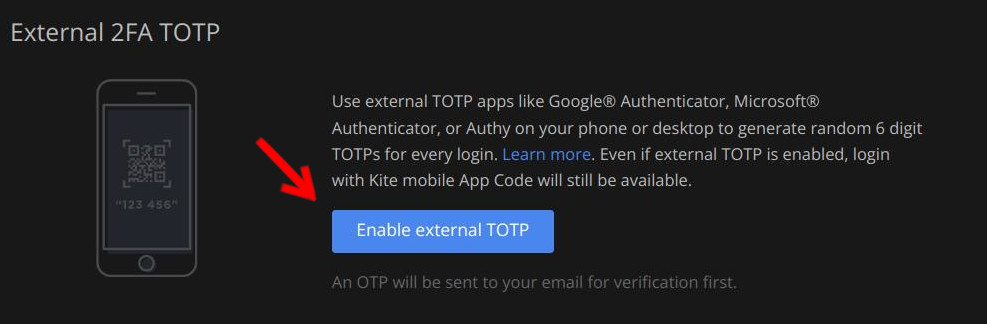
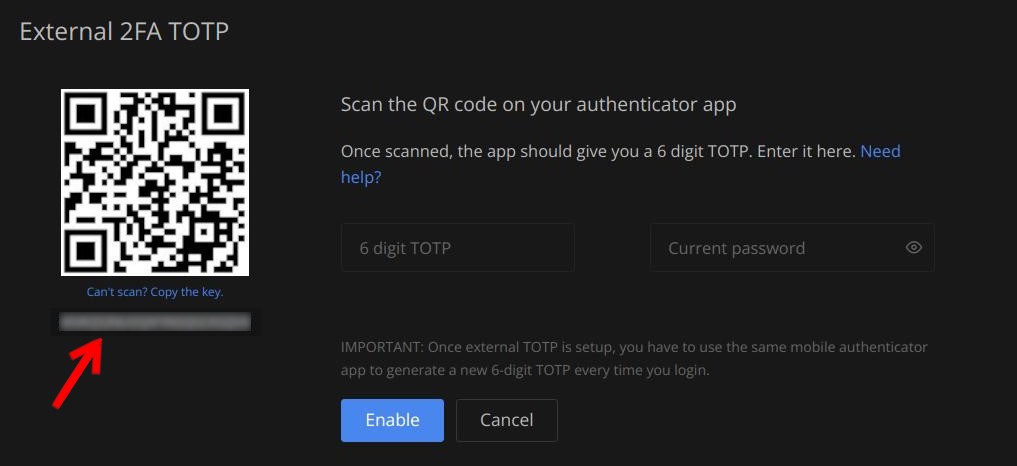
getting TOTP key
TOTP key can only be extracted from PC (mobile does not have it)
- go to MyProfile -> password and Security.
- copy key from there to your script and you can use it as TOTP key for automatic TOTP authentication.
- (Optional) if you already have TOTP enabled, you need to disable TOTP and do this process again to get the key, otherwise no other way.
1 maintainer

Download files
Download the file for your platform. If you're not sure which to choose, learn more about installing packages.
Source Distribution
Built Distribution
Filter files by name, interpreter, ABI, and platform.
If you're not sure about the file name format, learn more about wheel file names.
Copy a direct link to the current filters
File details
Details for the file zern-0.0.22.tar.gz.
File metadata
- Download URL: zern-0.0.22.tar.gz
- Upload date:
- Size: 24.6 kB
- Tags: Source
- Uploaded using Trusted Publishing? No
- Uploaded via:
twine/7.0.0 CPython/3.10.12
File hashes
| Algorithm | Hash digest | |
|---|---|---|
| SHA256 |
39555b77ced01b8f2538d0ee37597d3661e19e794a3063df40be8b4259d52b68
|
|
| MD5 |
dd7c509a4eeed3a7607cd946eeb013d7
|
|
| BLAKE2b-256 |
98aee92e0feace5b34fc4d28460ef38c746f9063c875b3e73edd6c9781776b35
|
File details
Details for the file zern-0.0.22-py3-none-any.whl.
File metadata
- Download URL: zern-0.0.22-py3-none-any.whl
- Upload date:
- Size: 21.1 kB
- Tags: Python 3
- Uploaded using Trusted Publishing? No
- Uploaded via:
twine/7.0.0 CPython/3.10.12
File hashes
| Algorithm | Hash digest | |
|---|---|---|
| SHA256 |
98a0abbf4ba876da84776ce2c340744d34a3155d4a85ff41a377834b56efee9b
|
|
| MD5 |
d6c42259d0120dbe219cd2b3d862fe7e
|
|
| BLAKE2b-256 |
c15cb2c4ad7c74f14629b516f1144bc0e5303f8228cb75d7d0b4a4210c6fbe7f
|







