
zeroruntime-teleops
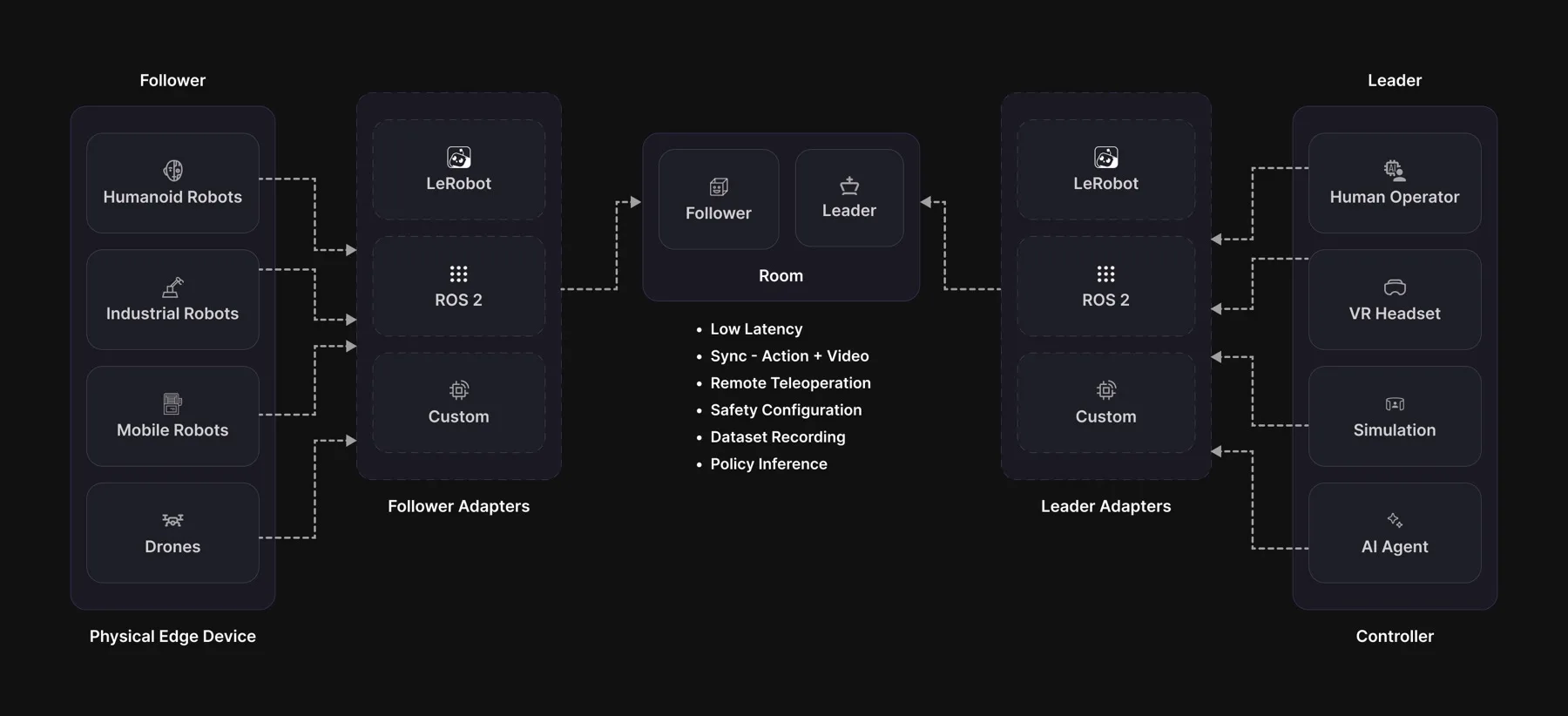
Drive any robot over the internet, and know exactly what the operator was looking at when they moved it.
A WebRTC transport for robot teleoperation, with frame-accurate observation/action correlation, a safety envelope that cannot be bypassed, and a recorder that turns every session into training data.
Install
pip install zeroruntime-teleops               # transport + cameras, ready to run
pip install "zeroruntime-teleops[lerobot]"    # + the lerobot adapters
pip install "zeroruntime-teleops[ros2]"       # + the ROS 2 bridge (into ROS's own Python; rclpy comes from apt)
Your robot, in three methods
Everything else is inherited: lease negotiation, clamping, the watchdog, the e-stop latch, correlation, recording.
from zeroruntime.teleops import Follower, SafetyConfig, single_group_descriptor

class MyArm(Follower):
    def descriptor(self):            return single_group_descriptor(...)
    def read_joints(self):           return {"shoulder": 12.4, "elbow": -3.1}
    def write_joints(self, joints):  ...        # RAISE on failure

MyArm("abcd-efgh-ijkl", safety=SafetyConfig(slew=0.75)).run(hz=200)
Already on lerobot? Wrap the device instead of subclassing:
from zeroruntime.teleops.adapters.lerobot import (SO101FollowerAdapter,
                                              SO101LeaderAdapter)

follower = SO101FollowerAdapter("abcd-efgh-ijkl", robot=arm, token=TOKEN)
Running a trained policy
A policy fine-tuned in the dashboard downloads by its training job id:
from zeroruntime.teleops import Policy
from lerobot.policies.smolvla.modeling_smolvla import SmolVLAPolicy

p = Policy.fetch("<training job id>")    # token: ZERORUNTIME_AUTH_TOKEN
policy = SmolVLAPolicy.from_pretrained(p.path)
p.task, p.fps, p.joints                  # what it was trained on
Cached under ~/.cache/zeroruntime; a second fetch works offline.
Run it locally, no robot needed
Runnable examples live in zrt-teleops-examples:
git clone https://github.com/ZeroRuntimeAI/zrt-teleops-examples
cd zrt-teleops-examples

python quickstart/remote_teleop.py --ticks 100   # full chain, in-process
python quickstart/my_arm.py                      # port your own arm
python quickstart/protocol_demo.py               # the correlation model, live
remote_teleop.py runs a real follower against a real leader: real gates,
real clamps, real correlation. Only the network is swapped for a loopback.
Safety
SafetyConfig(
    slew=0.75,                          # max change per joint per TICK:
                                        # at the default 200 Hz that is
                                        # 150 units/s, a full sweep in ~1.3 s
    watchdog_timeout_s=0.5,             # silence for this long -> failsafe
    max_staleness_ms=100.0,             # older commands are dropped
    require_deadman=True,
    on_starvation=FailsafeAction.HOLD,
    resume_requires_reclaim=False)
Every command is checked before it reaches the motors: who sent it, whether it arrived too late, and how far it moves the arm. If the operator stops sending, the arm holds where it is.
Recording
follower.start_recording("./sessions")
follower.start_episode("pick up the cube")
...                                          # your loop runs
follower.end_episode(success=True)
follower.stop_recording()
On the follower this captures pixels before an encoder or a network touched them. Episodes open and close on the deadman by default.
VideoSDK can also record the session in the cloud:
follower = MyArm("abcd-efgh-ijkl", cloud_recording=True)

follower.cloud_recording_state    # idle / requested / starting / ready / failed
If the cloud recorder never comes up, recording carries on locally and the state says so.
Documentation
Full documentation at docs.zeroruntime.ai.
Apache-2.0 · docs.zeroruntime.ai · examples
1 maintainer

Metadata
1 maintainer
Release files for zeroruntime-teleops 0.1.3
For a detailed explanation of source distributions (sdists) and built distributions (wheels), please see the package formats documentation.
Built distributions (wheels)
| File | Interpreter | ABI | Platform | Actions Reset |
|---|---|---|---|---|
| zeroruntime_teleops-0.1.3-py3-none-manylinux_2_34_x86_64.whl | Python 3 | none | Linux glibc 2.34+ x86-64 | Details for zeroruntime_teleops-0.1.3-py3-none-manylinux_2_34_x86_64.whl |
| zeroruntime_teleops-0.1.3-py3-none-manylinux_2_34_aarch64.whl | Python 3 | none | Linux glibc 2.34+ ARM64 | Details for zeroruntime_teleops-0.1.3-py3-none-manylinux_2_34_aarch64.whl |
| zeroruntime_teleops-0.1.3-py3-none-macosx_11_0_arm64.whl | Python 3 | none | macOS 11.0+ ARM64 | Details for zeroruntime_teleops-0.1.3-py3-none-macosx_11_0_arm64.whl |
Total release size: 24.9 MB
Release files / zeroruntime_teleops-0.1.3-py3-none-manylinux_2_34_x86_64.whl
| Download URL | zeroruntime_teleops-0.1.3-py3-none-manylinux_2_34_x86_64.whl |
|---|---|
| Size | 9.7 MB |
| Tags | Linux glibc 2.34+ x86-64 Python 3 |
|
SHA-256 checksum How to use checksums |
9ab8e8a5a02654b4e9fbac80c7a74e7e7eed88716c73fd77fa3973685437f84e
|
|
BLAKE2b-256 checksum How to use checksums |
3d686864408f85313e8eb760f7664f718cf1f6fb25e01d19583487e5a8487a47
|
| Upload date | |
|
Uploaded using Trusted Publishing? What is trusted publishing? |
No |
| Uploaded via |
twine/7.0.0 CPython/3.12.9
|
Release files / zeroruntime_teleops-0.1.3-py3-none-manylinux_2_34_aarch64.whl
| Download URL | zeroruntime_teleops-0.1.3-py3-none-manylinux_2_34_aarch64.whl |
|---|---|
| Size | 9.4 MB |
| Tags | Linux glibc 2.34+ ARM64 Python 3 |
|
SHA-256 checksum How to use checksums |
2ece5cff75b477a3e5ae69eef009aa09740cda96ecc9de1870a5d76ed196766f
|
|
BLAKE2b-256 checksum How to use checksums |
e4debd1c6c7abacf2a7e01108be95b3a47835925bde6ce4dfd978bbad98e1913
|
| Upload date | |
|
Uploaded using Trusted Publishing? What is trusted publishing? |
No |
| Uploaded via |
twine/7.0.0 CPython/3.12.9
|
Release files / zeroruntime_teleops-0.1.3-py3-none-macosx_11_0_arm64.whl
| Download URL | zeroruntime_teleops-0.1.3-py3-none-macosx_11_0_arm64.whl |
|---|---|
| Size | 5.8 MB |
| Tags | Python 3 macOS 11.0+ ARM64 |
|
SHA-256 checksum How to use checksums |
000a2a217bf6b441f9bc79dfbdea03df1a4840535765efeef3a5bf14571a216d
|
|
BLAKE2b-256 checksum How to use checksums |
390e9d3f388ee0a7b0413271e0a2b725ee7e086987841a919dae2c48ddc8f382
|
| Upload date | |
|
Uploaded using Trusted Publishing? What is trusted publishing? |
No |
| Uploaded via |
twine/7.0.0 CPython/3.12.9
|
Security for zeroruntime-teleops 0.1.3
Provenance
Provenance describes where a file came from. On PyPI, provenance is shared via attestations, which provide a verifiable record of the build or publishing details. View details, limitations and caveats.
No provenance found
None of the files in this release were uploaded with provenance metadata.
A note on package security
PyPI is a repository for distributing packages, not a service for auditing them. While third-party security researchers and our staff do their best to detect and remove malicious packages, PyPI cannot guarantee the quality, security or suitability of any given package.
To learn more about protecting yourself from malicious actors, visit our package security documentation.














