
It the number

Project description
Zexture (A Hand Gesture Detection Module)

Table of Contents
Description
Jesture is openCV based hand gesture detection module.
It uses the mediapipe library to detect hands by returning a set of 21 landmarks for each camera frame which contains a hand.
These 21 landmarks are extensively used by our team in order to build a module that can efficiently used by anyone to build IOT based applications which might need hand gestures to process instructions
Technologies Used
- Python
- JSON
Python Libraries Used
- OpenCV
- Mediapipe
- sklearn
- model_selection
- metrics
- ensemble
- Basic (Numpy, pandas, pickle)
How To Use
What to download?
You would require to clone this repository branch to your local device
Also you will need to run these commands in order to use the required libraries
pip install mediapipepip install opencv-pythonpip install sklearnpip install pickle
What to do?
Pictures are given in accordance to VSCode setup. You could follow in the same procedure for any other python runnable IDE
When you open the cloned repo, the folder structure would look something like this
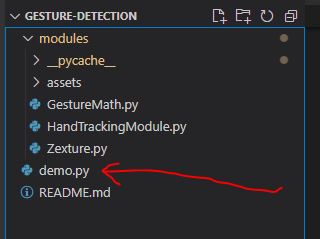
You have been provided with a demo.py to see how you would be able to use the module methods
Run the file as it is to test the built-in gestures
These are all the built-in available gestures
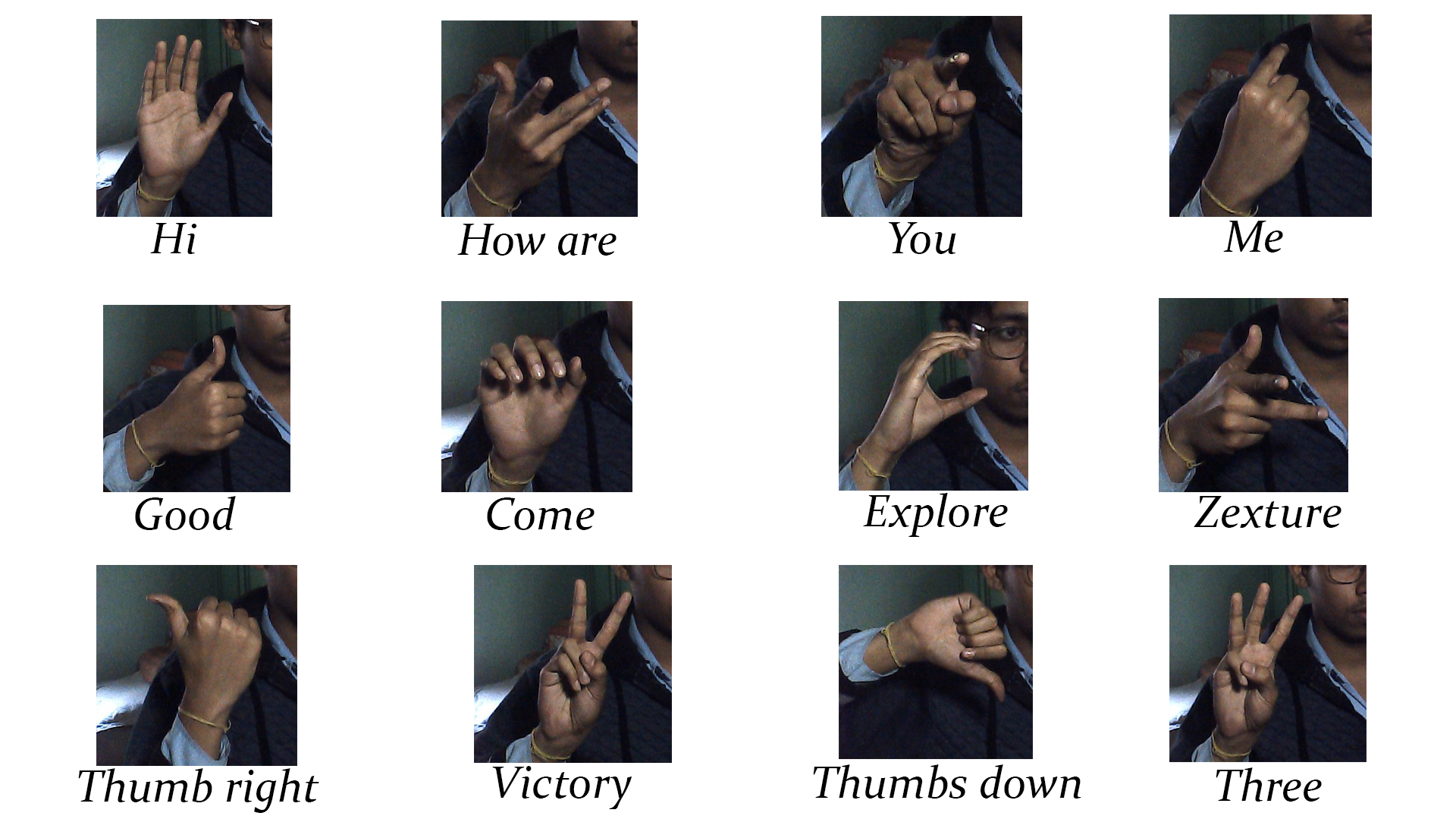
If it doesn't work, go to Troubleshooting section.
All types of posible tweaks can be seen by hovering over statMode() method or by going to the zexture/statMode.py
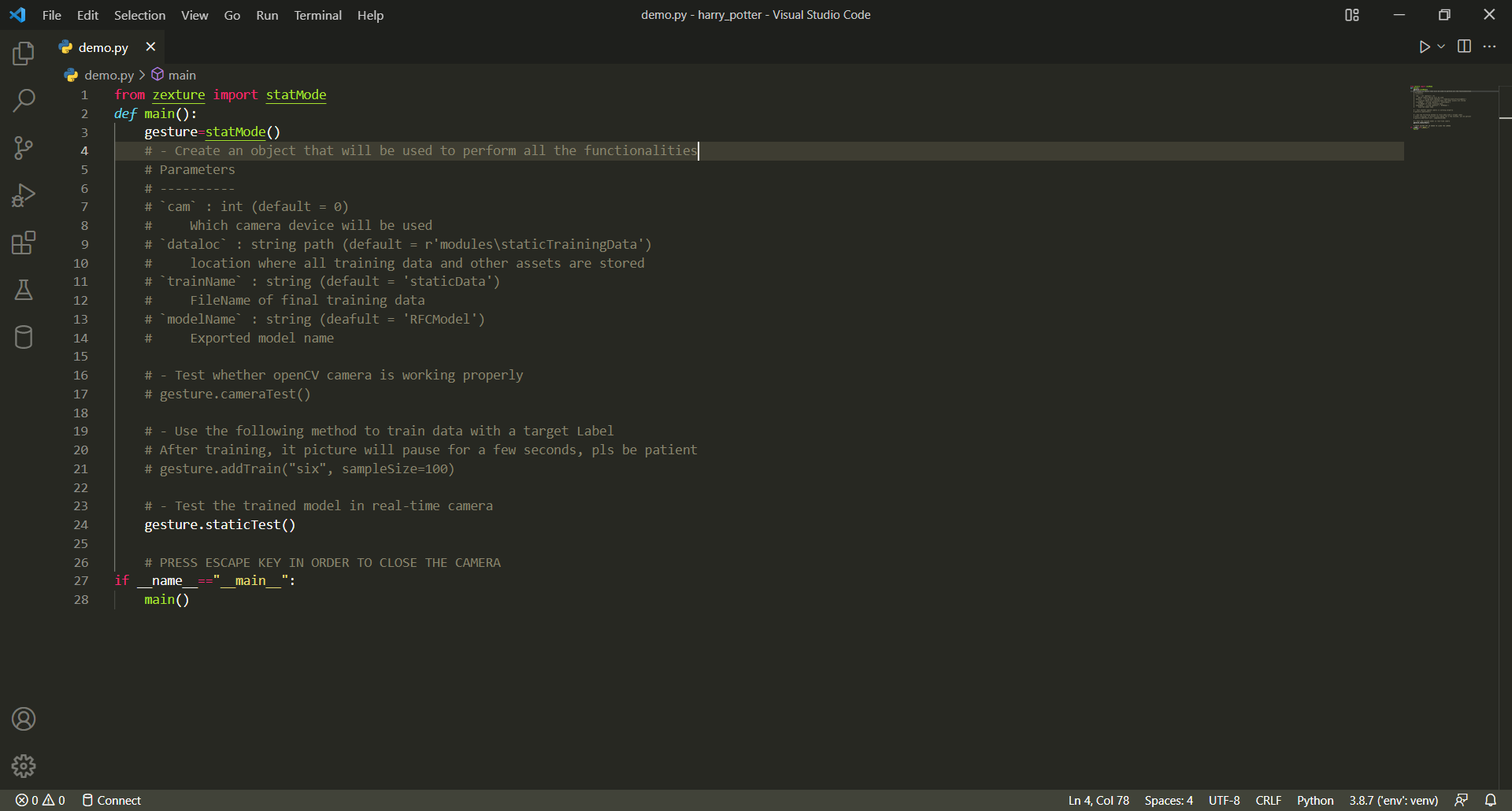
Lets make some training data
Comment the gesture.staticTest() statement and uncomment the gesture.addTrain("Your_Label")
Replace the label string and run the file. It would run for 500 frames where your hand is visible.
Make sure you move your hand gesture in a fasion so that it covers all perspectives of that hand gesture
Now, reverse the last step by commenting the gesture.addTrain("Your_Label") statement and uncommenting the gesture.staticTest()
Run the demo.py file and you would be able to see the gesture recognised.
All the available gestures can seen in the gestures.json in modules/assets
Let's move on to how can you use it for your own projects
A method called testImage() exists which takes in openCV image of numpy.ndarray type as parameter and returns a string label by using the model file RFCModel.sav
First use, delete the gestures you don't need from modules/assets/staticTrainingData, then use addTrain() method to input all gestures you want and check/test it using staticTest()
Working of Project
... Under Construction 🔨⚒🛠🚧🚧⚒🔨
Troubleshooting
If the camera is not opening, you can try with different cam values of the StaticGesture()
Also you can use the cameraTest() method which is a simple check of camera compatibility
References
This project is inspired from the code of Murtaza's Workshop. His Youtube Channel is extremely educational.
Big Thanks to his high quality code. Please take your time to check his videos if you want.
Author Info
We are a group a three final year students pursuing B-Tech Degree.
Release history Release notifications | RSS feed

Download files
Download the file for your platform. If you're not sure which to choose, learn more about installing packages.
Source Distribution
Built Distribution
Filter files by name, interpreter, ABI, and platform.
If you're not sure about the file name format, learn more about wheel file names.
Copy a direct link to the current filters
File details
Details for the file zexture-1.0.1.tar.gz.
File metadata
- Download URL: zexture-1.0.1.tar.gz
- Upload date:
- Size: 10.9 kB
- Tags: Source
- Uploaded using Trusted Publishing? No
- Uploaded via: twine/3.8.0 pkginfo/1.8.2 readme-renderer/34.0 requests/2.27.1 requests-toolbelt/0.9.1 urllib3/1.26.8 tqdm/4.63.0 importlib-metadata/4.11.3 keyring/23.5.0 rfc3986/2.0.0 colorama/0.4.4 CPython/3.8.7
File hashes
| Algorithm | Hash digest | |
|---|---|---|
| SHA256 |
3aeca2912bfe163a11aa0988ef145e8cc16536a90af0ce4b7fa128f4a1540096
|
|
| MD5 |
c0f1ecce98d0e8c9f8aa9096dabe6d4c
|
|
| BLAKE2b-256 |
9ad1309c2cc50202c525b5faa5b72705da75f52d1e562d59e50d797424e86499
|
File details
Details for the file zexture-1.0.1-py3-none-any.whl.
File metadata
- Download URL: zexture-1.0.1-py3-none-any.whl
- Upload date:
- Size: 9.8 kB
- Tags: Python 3
- Uploaded using Trusted Publishing? No
- Uploaded via: twine/3.8.0 pkginfo/1.8.2 readme-renderer/34.0 requests/2.27.1 requests-toolbelt/0.9.1 urllib3/1.26.8 tqdm/4.63.0 importlib-metadata/4.11.3 keyring/23.5.0 rfc3986/2.0.0 colorama/0.4.4 CPython/3.8.7
File hashes
| Algorithm | Hash digest | |
|---|---|---|
| SHA256 |
b6a69673c22dda98c1a195715db8dbde4264c42de0a7efdb55bf85644f2d5fef
|
|
| MD5 |
bba711fe8b6e9ae3140c8a7bbc5e3a18
|
|
| BLAKE2b-256 |
dbdc9abcbff5a8c05bae90503c3ad3d9b00d1475e0106fc086a4e8b49d6583b1
|






