
Perse


Perse converts HTML to JSON using a mix of traditional html parsing and LLM based data extraction.
Features
It's core features includes:
- Identify important fields to extract from html
- Building a JSON schemas that handles nested fields
- Process html tokens and fill the JSON schema object
You can install Perse using pip:
pip install zf-perse
export PERSE_OPENAI_API_KEY="your-openai-api-key"
And run it from CLI:
perse --url https://google.com
Optimizations
It performs a few optimizations after fetching the html while preventing any accidental removal of important data.
These optimizations includes:
- Removal of styling, scripting and svg tags
- Collapsing Tags (e.g. divs) with only one child
Comparison
There are a few other libraries but none of them provide a solution for reliable data extraction from html.
HTML to JSON
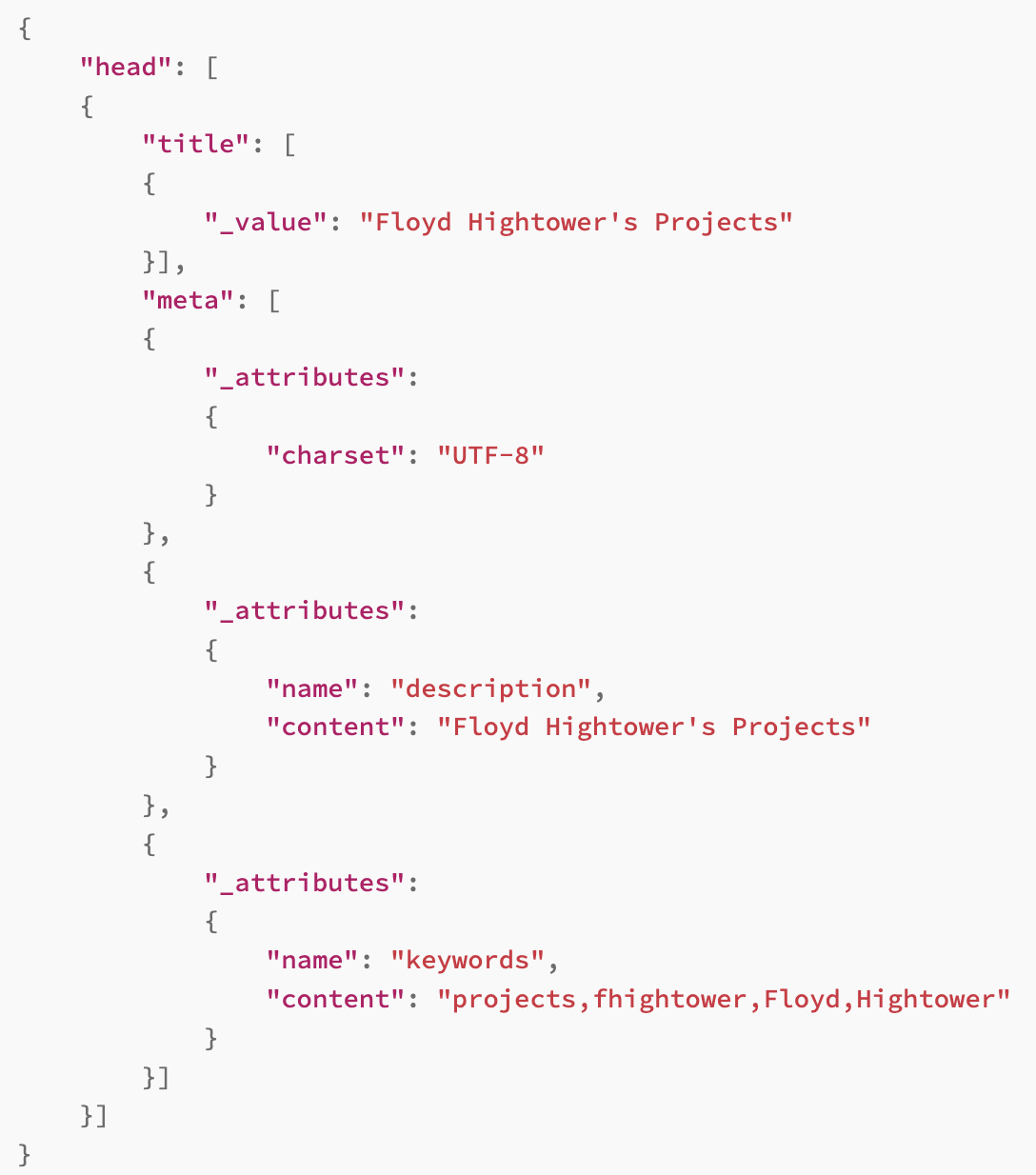
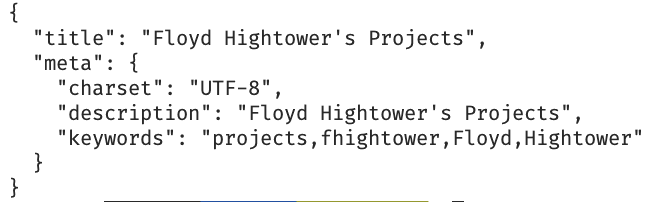
html2json library is a simple html to json converter that doesn't handle nested fields, nor does it remove unnecessary tags.
When ran on exactly the same html, Perse provides a more structured and cleaner output and at least 50% less verbose output.
| HTML to JSON | Perse |
|---|---|
|
|
HTML to Markdown
Reader-LM is a language model that converts html to markdown. It doesn't provide a json output catering only to the reader mode which is not suitabel for data extraction, analysis and automations.
Usage
Process HTML content and get a Dictionary
html_content = "<html>...</html>"
json_dict = perse(html_content)
print(json_dict)
Process HTML content and get a JSON string
html_content = "<html>...</html>"
json_string = perses(html_content)
print(json_string)
Exclude specific tags from the JSON output
html_content = "<html>...</html>"
json_dict = perse(html_content, exclude_tags={"script", "style"})
print(json_dict)
Clean up the HTML content for side usage
html_content = "<html>...</html>"
clean_soup = simmer(html_content) # or use simmers for a string output
print(clean_soup.prettify())
Examples
Google's Homepage
$ perse --url https://google.com

{
  "image": "/images/branding/googleg/1x/googleg_standard_color_128dp.png",
  "title": "Google",
  "search_form": {
    "action": "/search",
    "method": "GET",
    "autocomplete": "off",
    "query": "",
    "buttons": [
      {
        "button_1": {
          "label": "Google Search",
          "value": "Google Search"
        },
        "button_2": {
          "label": "I'm Feeling Lucky",
          "value": "I'm Feeling Lucky"
        }
      }
    ]
  }
}
Zeff Muks's Homepage
$ perse --url https://zeffmuks.com

{
  "title": "Zeff Muks",
  "description": "Antifragile Entropy Assassin \ud83e\udd77",
  "og_data": {
    "type": "website",
    "title": "Zeff Muks",
    "description": "Antifragile Entropy Assassin \ud83e\udd77",
    "url": "https://zeffmuks.com/",
    "image": "https://www.zeffmuks.com/images/ZeffMuks-1920.png",
    "site_name": "Zeff Muks"
  },
  "twitter_data": {
    "card": "summary_large_image",
    "site": "@zeffmuks",
    "title": "Zeff Muks",
    "description": "Antifragile Entropy Assassin \ud83e\udd77",
    "image": "https://www.zeffmuks.com/images/ZeffMuks-1920.png"
  },
  "user_section": {
    "header": {
      "profile_image_url": "/images/ZeffMuks-6912.png",
      "title": "Antifragile Entropy Assassin \ud83e\udd77",
      "signature": ""
    },
    "builds": [
      {
        "date": "08/30/2024",
        "name": "Cursor Git",
        "description": "Enhanced Git for Cursor AI Editor",
        "download_link": "https://zf-static.s3.us-west-1.amazonaws.com/cursor-git-0.1.12.vsix",
        "preview_image": "https://zf-static.s3.us-west-1.amazonaws.com/cursor-git-logo128.png",
        "alternative_link": ""
      },
      {
        "date": "08/18/2024",
        "name": "PyZF",
        "description": "Enhancements for Python",
        "download_link": "https://pypi.org/project/PyZF",
        "preview_image": "https://zf-static.s3.us-west-1.amazonaws.com/pyzf-logo128.png",
        "alternative_link": ""
      },
      {
        "date": "08/05/2024",
        "name": "Xanthus",
        "description": "X (formerly Twitter) Assistant",
        "download_link": "https://pypi.org/project/zf-xanthus",
        "preview_image": "https://zf-static.s3.us-west-1.amazonaws.com/xanthus-logo128.png",
        "alternative_link": ""
      },
      {
        "date": "07/24/2024",
        "name": "Jenga",
        "description": "Fast JSON5 Python Library",
        "download_link": "https://pypi.org/project/zf-jenga",
        "preview_image": "",
        "alternative_link": ""
      },
      {
        "date": "07/12/2024",
        "name": "Pegasus",
        "description": "Next Generation Tech Stack",
        "download_link": "https://zf-static.s3.us-west-1.amazonaws.com/pegasus.zip",
        "preview_image": "https://zf-static.s3.us-west-1.amazonaws.com/pegasus-logo128.png",
        "alternative_link": ""
      },
      ...
      {
        "date": "11/01/2023",
        "name": "Z",
        "description": "Next Generation Content Platform",
        "download_link": "https://x.com/zeffmuks/status/1718507463321010429",
        "preview_image": "https://zf-static.s3.us-west-1.amazonaws.com/z-logo128.png",
        "alternative_link": "https://alpha.thez.ai/try"
      }
    ]
  }
}
License
1 maintainer

Metadata
1 maintainer
Release files for zf-perse 2.3.1
For a detailed explanation of source distributions (sdists) and built distributions (wheels), please see the package formats documentation.
Source distribution (sdist)
| File | Size | Uploaded | Provenance | Actions |
|---|---|---|---|---|
| zf_perse-2.3.1.tar.gz | 13.0 kB | Without provenance | Details for zf_perse-2.3.1.tar.gz |
Built distribution (wheel)
| File | Interpreter | ABI | Platform | Actions Reset |
|---|---|---|---|---|
| zf_perse-2.3.1-py3-none-any.whl | Python 3 | none | any | Details for zf_perse-2.3.1-py3-none-any.whl |
Total release size: 25.4 kB
Release files / zf_perse-2.3.1.tar.gz
| Download URL | zf_perse-2.3.1.tar.gz |
|---|---|
| Size | 13.0 kB |
| Tags | Source |
|
SHA-256 checksum How to use checksums |
60371dbb006c354c8d9bdffd8010972bc944f09bc05d8a763959149d82922ee1
|
|
BLAKE2b-256 checksum How to use checksums |
1740852cf7102609e9ffdb08382a87077927d28252db3c6a74cc5bdb556ab5e9
|
| Upload date | |
|
Uploaded using Trusted Publishing? What is trusted publishing? |
No |
| Uploaded via |
twine/4.0.2 CPython/3.11.9
|
Release files / zf_perse-2.3.1-py3-none-any.whl
| Download URL | zf_perse-2.3.1-py3-none-any.whl |
|---|---|
| Size | 12.3 kB |
| Tags | Python 3 |
|
SHA-256 checksum How to use checksums |
5f02ca680e34ac75e3c3e5f11282b34b8393e1d7bd684b1910694cd068616c66
|
|
BLAKE2b-256 checksum How to use checksums |
6c1b8aeff48c17de0a149f8f64ac3117eb8d196eeb2437355c13bccb572cb09b
|
| Upload date | |
|
Uploaded using Trusted Publishing? What is trusted publishing? |
No |
| Uploaded via |
twine/4.0.2 CPython/3.11.9
|
Security for zf-perse 2.3.1
Provenance
Provenance describes where a file came from. On PyPI, provenance is shared via attestations, which provide a verifiable record of the build or publishing details. View details, limitations and caveats.
No provenance found
None of the files in this release were uploaded with provenance metadata.
A note on package security
PyPI is a repository for distributing packages, not a service for auditing them. While third-party security researchers and our staff do their best to detect and remove malicious packages, PyPI cannot guarantee the quality, security or suitability of any given package.
To learn more about protecting yourself from malicious actors, visit our package security documentation.














