
zfl-ai


目次
詳細
djangoプロジェクトでインストールできるDjangoアプリです。
使用方法は以下からご覧ください。
インストールとDjangoプロジェクト作成
実行環境は「Python3.7」、「Django2.2.5」です。
$ python3 --version
Python 3.7.0
Djangoアプリはpipでインストールします。
$ pip install zfl-ai
Djangoプロジェクトを作成
$ django-admin startproject myproject .
言語を設定します。
myproject/settings.py
# Internationalization
# https://docs.djangoproject.com/en/4.2/topics/i18n/

LANGUAGE_CODE = 'ja'

TIME_ZONE = 'Asia/Tokyo'

USE_I18N = True

USE_TZ = True
Djangoプロジェクトにプラグイン
Djangoアプリを設定します。
myproject/settings.py
INSTALLED_APPS = [
    ...,
    "ai",
]
プロジェクト直下のtemplatesを読み込むように設定。
TEMPLATES = [
    {
        ...
        'DIRS': [os.path.join(BASE_DIR, 'templates')],
        ...
    },
]
myproject/urls.py
...
from django.urls import path, include

urlpatterns = [
    ...,
    path('', include('ai.urls')),
]
zfl-aiのテンプレートである「index.html」ではテンプレートタグ「{% extends '...' %}」で「base.html」を読み込むように設定しているので、「templates/base.html」を作成する必要があります。
$ mkdir templates && touch templates/base.html
base.htmlの内容
{% load static %}
<html lang="ja" prefix="og: http://ogp.me/ns#">
  <head>

    <!-- BootStrap CSS Link -->
    <link rel="stylesheet" href="https://stackpath.bootstrapcdn.com/bootstrap/4.3.1/css/bootstrap.min.css" integrity="sha384-ggOyR0iXCbMQv3Xipma34MD+dH/1fQ784/j6cY/iJTQUOhcWr7x9JvoRxT2MZw1T" crossorigin="anonymous">


    <!-- StaticFiles CSS -->
    {% block ai-style %}{% endblock %}

  </head>
  <body>

    <!-- Djangoテンプレートタグ -->

    {% block content %}
    {% endblock %}

    <!-- BootStrap jQuery -->
    <script src="https://code.jquery.com/jquery-3.3.1.slim.min.js" integrity="sha384-q8i/X+965DzO0rT7abK41JStQIAqVgRVzpbzo5smXKp4YfRvH+8abtTE1Pi6jizo" crossorigin="anonymous"></script>
    <script src="https://cdnjs.cloudflare.com/ajax/libs/popper.js/1.14.7/umd/popper.min.js" integrity="sha384-UO2eT0CpHqdSJQ6hJty5KVphtPhzWj9WO1clHTMGa3JDZwrnQq4sF86dIHNDz0W1" crossorigin="anonymous"></script>
    <script src="https://stackpath.bootstrapcdn.com/bootstrap/4.3.1/js/bootstrap.min.js" integrity="sha384-JjSmVgyd0p3pXB1rRibZUAYoIIy6OrQ6VrjIEaFf/nJGzIxFDsf4x0xIM+B07jRM" crossorigin="anonymous"></script>

  </body>
</html>
サーバーを起動します。
$ python3 manage.py runserver
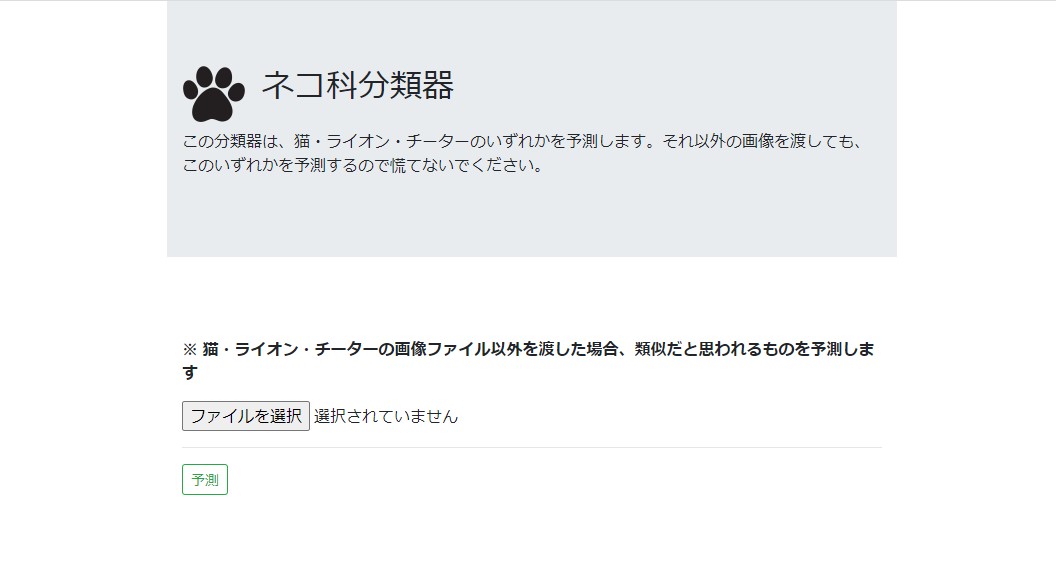
127.0.0.1:8000/ai/にアクセスします。
License
zfl-ai is distributed under the terms of the MIT license.
1 maintainer

Metadata
1 maintainer
Release files for zfl-ai 0.0.15
For a detailed explanation of source distributions (sdists) and built distributions (wheels), please see the package formats documentation.
Source distribution (sdist)
| File | Size | Uploaded | |
|---|---|---|---|
| zfl_ai-0.0.15.tar.gz | 30.2 MB | Details |
Built distribution (wheel)
| File | Interpreter | ABI | Platform | Reset |
|---|---|---|---|---|
| zfl_ai-0.0.15-py3-none-any.whl | Python 3 | none | any | Details |
Total release size: 60.5 MB
Release files / zfl_ai-0.0.15.tar.gz
| Download URL | zfl_ai-0.0.15.tar.gz |
|---|---|
| Size | 30.2 MB |
| Tags | Source |
|
SHA-256 checksum How to use checksums |
46b00440766d1f3267c215799d51140d8050c739066c495f4770c48dd6c1b276
|
|
BLAKE2b-256 checksum How to use checksums |
37e4a30d1c764268ab4dd417cb30263a9ec5e6fa7848bdbfb026d63e9cc6b80e
|
| Upload date | |
|
Uploaded using Trusted Publishing? What is trusted publishing? |
No |
| Uploaded via |
python-httpx/0.24.1
|
Release files / zfl_ai-0.0.15-py3-none-any.whl
| Download URL | zfl_ai-0.0.15-py3-none-any.whl |
|---|---|
| Size | 30.2 MB |
| Tags | Python 3 |
|
SHA-256 checksum How to use checksums |
17000130c8200dc68feeba8517805849d2b5248a64be11baaba542c95ed7ddf4
|
|
BLAKE2b-256 checksum How to use checksums |
900f464d2ea380aa3f5dc9d9e934b2d928ac373d0fc479b1e4ff2d428e343f6f
|
| Upload date | |
|
Uploaded using Trusted Publishing? What is trusted publishing? |
No |
| Uploaded via |
python-httpx/0.24.1
|














