
zharp-logs
Send your Python app's logs and uncaught exceptions to Zharp. No dependencies —
only the standard library — and Python 3.8 and up. Works in scripts, web apps (Django, Flask,
FastAPI), workers (Celery, RQ) and anything that uses Python's logging.
Full documentation: zharp.io/docs/sdks/python
1. Install
pip install zharp-logs
2. Get an API key
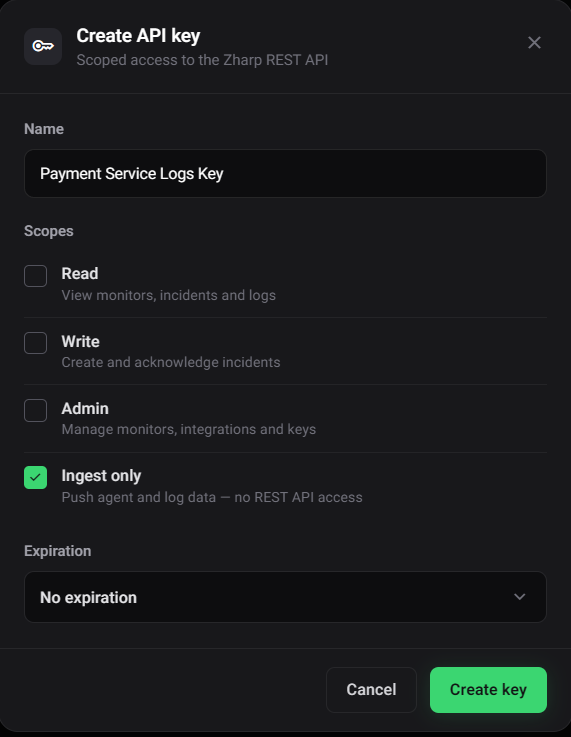
- In Zharp, open Integrations & API and choose Main API keys.
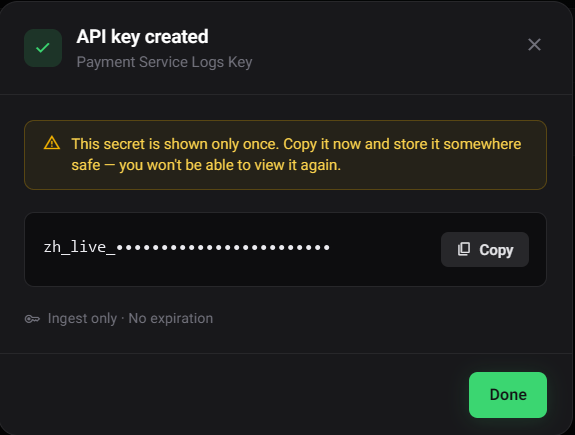
- Click Create API key, give it a name, and tick Ingest only. That key can send logs but can't read anything, so it's safe in a server's environment.
- Click Create key and copy the key — it's shown only once.
3. Start it
Call init() once, as early as possible. Give it your key in code, or let it read the key from the
environment — either works.
In code:
import zharp_logs

zharp_logs.init(api_key="your-ingest-only-key", service="checkout-api", environment="production")
From the environment — set the variables and call init() with nothing:
ZHARP_API_KEY=your-ingest-only-key
ZHARP_SERVICE=checkout-api
ZHARP_ENV=production
zharp_logs.init()
You can mix them: what you pass to init() is used, and anything you leave out is read from the
environment. Without a service name, the name in your pyproject.toml is used when one is found.
When it starts, it prints one line to stderr so you know it's working:
[Zharp] Logging active — service "checkout-api", environment "production"
With no API key anywhere it prints how to give it one and sends nothing — it never raises.
4. Log
zharp_logs.info("User signed in", {"user_id": 42})
zharp_logs.warn("Slow network detected", {"latency_ms": 3200})
zharp_logs.error("Payment failed", {"order_id": 99, "reason": "insufficient_funds"})
debug and fatal are there too (and warning and critical, the names logging uses). The dict
is optional and is kept with the log. A caught exception brings its type and full traceback — causes
included — by itself:
try:
    charge(order)
except Exception as e:
    zharp_logs.exception("Payment failed", {"order_id": order.id})   # the exception being handled
    zharp_logs.error(e)                                              # or the exception itself
    zharp_logs.error("Payment failed", exc=e)                        # or your message, with it
Logs are sent from a background thread in batches every 5 seconds; error and fatal go at once,
and everything left is sent when the program exits. Logging never blocks on the network and never
raises.
5. See your logs
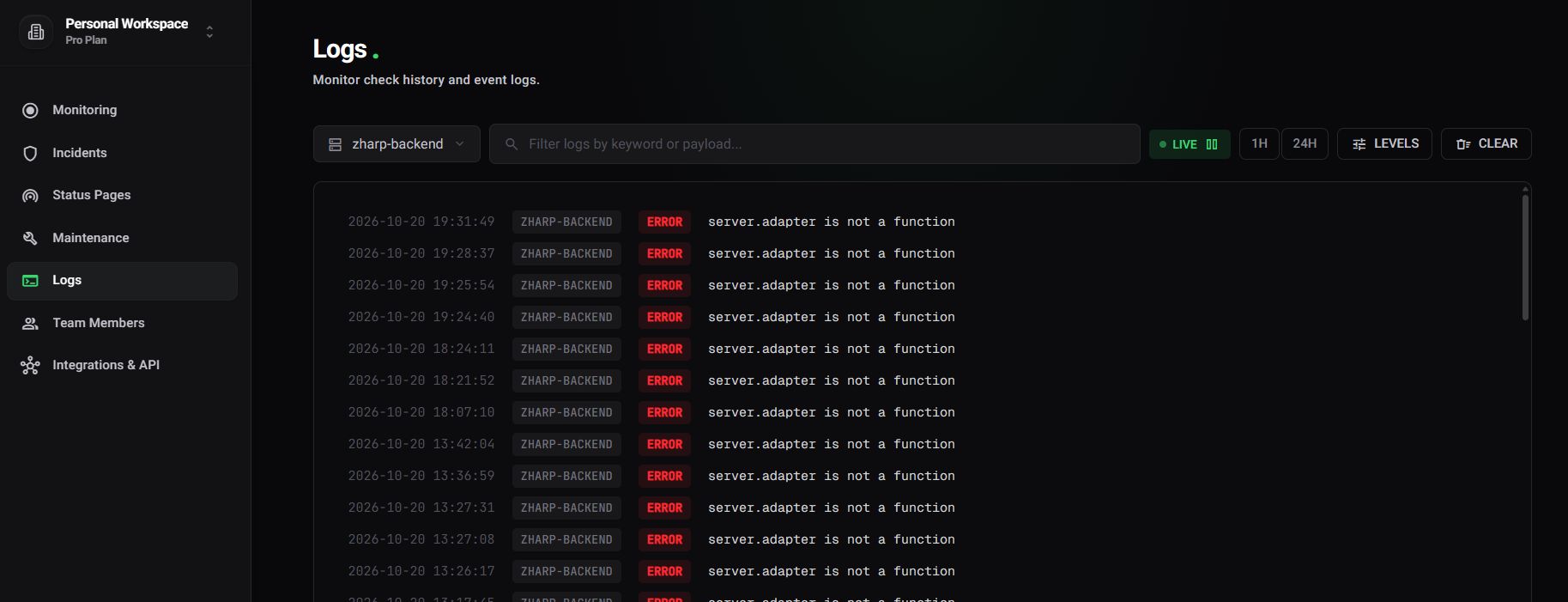
Sign in at zharp.io, open Logs, and pick your service in the service dropdown.
Python's logging
Most apps already log through logging. Send it to Zharp with the handler:
import logging
import zharp_logs

zharp_logs.init()
logging.getLogger().addHandler(zharp_logs.ZharpHandler(logging.INFO))
Or let init() attach it to the root logger: zharp_logs.init(capture_logging=True) (INFO and up)
or capture_logging="WARNING", or set ZHARP_CAPTURE_LOGGING. Levels map as you'd expect —
WARNING → warn, CRITICAL → fatal. Each log carries the logger's name and any fields you pass
with extra={...}, and logger.exception(...) brings its traceback.
Django — in settings.py:
import zharp_logs

zharp_logs.init()

LOGGING = {
    "version": 1,
    "disable_existing_loggers": False,
    "handlers": {"zharp": {"class": "zharp_logs.ZharpHandler", "level": "INFO"}},
    "root": {"handlers": ["zharp"], "level": "INFO"},
}
Flask / FastAPI — call zharp_logs.init(capture_logging=True) where the app is created.
Where the Zharp agent already collects your app's output
(Docker, journald, Kubernetes), send logging through one of them, not both, or every line arrives
twice.
Uncaught exceptions
From the moment init() succeeds, an uncaught exception is sent with its traceback — fatal in
the main thread, error in another thread — then Python prints it and the program ends as it would
have. Turn it off with capture_exceptions=False. An exception your web framework catches and turns
into a 500 isn't uncaught; log those with the logging handler (frameworks log them at ERROR).
Options
| Option | Environment variable | Default |
|---|---|---|
api_key |
ZHARP_API_KEY |
— |
service |
ZHARP_SERVICE, then OTEL_SERVICE_NAME |
the name in your pyproject.toml, else unknown-service |
environment |
ZHARP_ENV |
none |
app_version |
ZHARP_VERSION |
none |
source |
ZHARP_SOURCE |
none |
endpoint |
ZHARP_ENDPOINT |
https://api.zharp.io/api/v1 |
capture_logging |
ZHARP_CAPTURE_LOGGING |
off |
capture_exceptions |
— | on |
flush_interval |
— | 5 seconds |
max_batch_size |
— | 50 |
An option passed to init() wins. ZHARP_DISABLED=true turns the SDK off.
What's sent automatically
Every log carries a session ID (the same for one run of the program) and where it ran: hostname,
process ID, Python version, platform and OS. Add your own fields to every log with
zharp_logs.set_context({"region": "eu-west"}); start a new session ID with
zharp_logs.reset_session_id().
Workers and forks
Safe in gunicorn, uWSGI, Celery and multiprocessing workers: a process forked after init() starts
its own sender on its first log. zharp_logs.flush() sends what's queued and waits (up to 5 seconds
by default) — useful at the end of a job or a serverless function. zharp_logs.close() sends
everything and stops.
License
MIT © Zharp
1 maintainer

Metadata
1 maintainer
Release files for zharp-logs 0.1.0
For a detailed explanation of source distributions (sdists) and built distributions (wheels), please see the package formats documentation.
Source distribution (sdist)
| File | Size | Uploaded | Provenance | |
|---|---|---|---|---|
| zharp_logs-0.1.0.tar.gz | 23.3 kB | Without provenance | Details |
Built distribution (wheel)
| File | Interpreter | ABI | Platform | Reset |
|---|---|---|---|---|
| zharp_logs-0.1.0-py3-none-any.whl | Python 3 | none | any | Details |
Total release size: 42.9 kB
Release files / zharp_logs-0.1.0.tar.gz
| Download URL | zharp_logs-0.1.0.tar.gz |
|---|---|
| Size | 23.3 kB |
| Tags | Source |
|
SHA-256 checksum How to use checksums |
700642746036440cd1e7284335d613eb78b19db0fd2932002cd2f8676186e1e9
|
|
BLAKE2b-256 checksum How to use checksums |
dd874c4a058af2decd44df5d8fdb7d31d8f7eee9a21e9ef76306117ca21662b5
|
| Upload date | |
|
Uploaded using Trusted Publishing? What is trusted publishing? |
No |
| Uploaded via |
twine/7.0.0 CPython/3.13.7
|
Release files / zharp_logs-0.1.0-py3-none-any.whl
| Download URL | zharp_logs-0.1.0-py3-none-any.whl |
|---|---|
| Size | 19.6 kB |
| Tags | Python 3 |
|
SHA-256 checksum How to use checksums |
98db4814d9e232fe76f5d01d589f26e9dec92328e736daf4913c718ea482c4f1
|
|
BLAKE2b-256 checksum How to use checksums |
b2687443780d854f997bfa42da09d88ff5889a085f97800ec2d912d6ee8fa79f
|
| Upload date | |
|
Uploaded using Trusted Publishing? What is trusted publishing? |
No |
| Uploaded via |
twine/7.0.0 CPython/3.13.7
|
Security for zharp-logs 0.1.0
Provenance
Provenance describes where a file came from. On PyPI, provenance is shared via attestations, which provide a verifiable record of the build or publishing details. View details, limitations and caveats.
No provenance found
None of the files in this release were uploaded with provenance metadata.
A note on package security
PyPI is a repository for distributing packages, not a service for auditing them. While third-party security researchers and our staff do their best to detect and remove malicious packages, PyPI cannot guarantee the quality, security or suitability of any given package.
To learn more about protecting yourself from malicious actors, visit our package security documentation.














