
Terrain Zigger

Project description
TerrainZigger: Procedural 3D World Builder
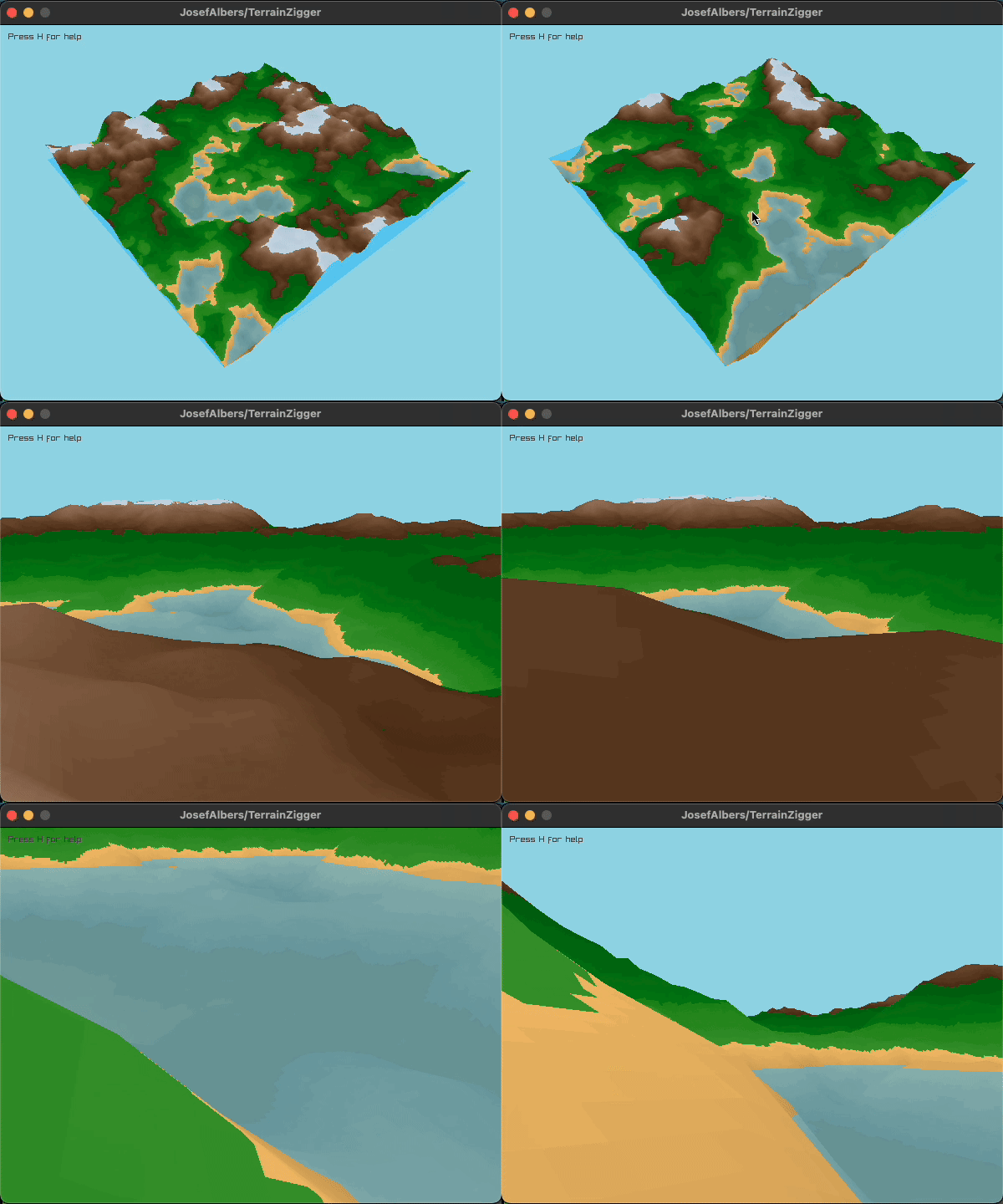
A lightweight, cross-platform 3D terrain generator and game engine built in Zig with Python scripting support. Create procedural worlds—from noise-based terrain to wave function collapse dungeons—and bring them to life with dynamic NPCs, pathfinding, and interactive dialogues. Powered by Raylib for high-performance 3D rendering.
Why TerrainZigger?
- Performance-First: Zig's compile-time safety meets runtime speed for smooth real-time 3D
- Scriptable: Python integration via ctypes for AI behaviors, events, and gameplay logic
- Procedural Generation: Perlin/FBM noise terrain, Poisson disk foliage distribution, and wave function collapse dungeons
- Interactive: Built-in raycasting, pathfinding, unit selection, and dialogue system
- Cross-Platform: Runs on macOS, Linux, and Windows with configurable build options
Features
- Terrain Generation: Procedural noise-based terrain with support for custom base maps and biomes
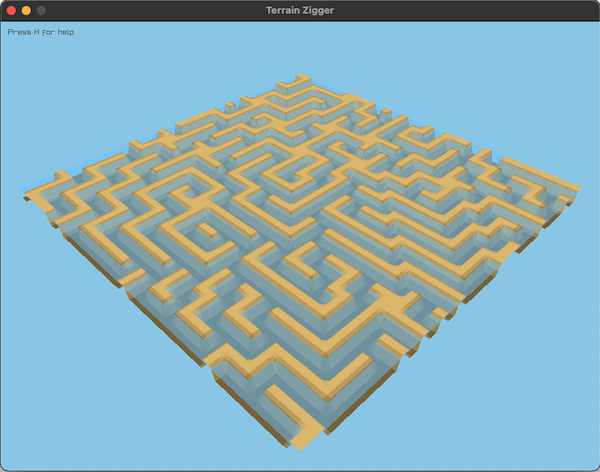
- Dungeon Generation: Six dungeon archetypes (rooms, rogue, cavern, maze, labyrinth, arena) using wave function collapse
- Object System: Spawn and animate humans, birds, particles, and 3D primitives
- Camera Modes: Orbit camera for overview, first-person mode for exploration
- User Interactions: Click-to-select units, drag selection boxes, ground targeting
- Python Hooks: Event callbacks for clicks, chat submissions, and game ticks
- Web Export: WASM-ready for browser-based demos
Quick Start
Prerequisites
Installation
# Clone the repository
git clone https://github.com/JosefAlbers/TerrainZigger.git
cd TerrainZigger

# Build and run the main application
zig build run

# For Python scripting support
pip install zigger
Build Commands
| Command | Description |
|---|---|
zig build run |
Main terrain application |
zig build run-chat |
Standalone chat UI test |
zig build run-object |
3D object/primitive viewer |
zig build run-dungeon |
Dungeon generation demo |
Build Options
Customize your build with runtime configuration options:
# Random terrain (default)
zig build run

# Rogue dungeon with custom seed
zig build run -Ddungeon-type=1 -Dseed=12345

# Large cavern map with bigger window
zig build run -Ddungeon-type=2 -Dmap-size=256 -Dwindow-width=1920 -Dwindow-height=1080

# Arena with custom magnification
zig build run -Ddungeon-type=5 -Ddungeon-magnify=8
Available Options:
-Dmap-size=<size>- Terrain grid size (default: 128)-Ddungeon-type=<type>- Dungeon archetype: -1=none, 0=rooms, 1=rogue, 2=cavern, 3=maze, 4=labyrinth, 5=arena (default: -1)-Ddungeon-magnify=<factor>- Dungeon upscaling factor (default: 4)-Dseed=<number>- Initial random seed (0=timestamp, default: 0)-Dwindow-width=<pixels>- Window width (default: 800)-Dwindow-height=<pixels>- Window height (default: 600)-Draylib-include=<path>- Custom raylib include directory-Draylib-lib=<path>- Custom raylib library directory
Cross-Platform Setup
macOS (Homebrew):
brew install raylib
zig build run -Draylib-include=/opt/homebrew/include -Draylib-lib=/opt/homebrew/lib
Linux:
sudo apt install libraylib-dev  # Debian/Ubuntu
zig build run -Draylib-include=/usr/include -Draylib-lib=/usr/lib
Windows (MSYS2):
pacman -S mingw-w64-x86_64-raylib
zig build run -Draylib-include=C:/msys64/mingw64/include -Draylib-lib=C:/msys64/mingw64/lib
Python Integration
Use the zigger Python package to script behaviors, load real-world topography, and control the game:
from zigger import Zigger

# Initialize with custom terrain size
game = Zigger(size=128)

# Load procedural or real topographic data
game.load_map(get_base_map(128, 'N42W071'))

# Spawn objects (type_id: 0=human, 1=bird, 2=house, etc.)
game.spawn(object_id=1, type_id=0, x=64, z=64, y_offset=0.5)

# Register event callbacks
@game.on_click
def handle_click(x, y, z):
    print(f"Ground clicked at: {x}, {y}, {z}")

# Start the game loop
game.start()
Controls
- H - Toggle help overlay
- Right Mouse - Regenerate terrain with new seed
- Left Mouse - Rotate camera (or select units with Shift held)
- Mouse Wheel - Zoom in/out
- Middle Mouse - Toggle first-person mode
- WASD - Move in first-person mode
- Z - Reset camera to initial position
- , / . - Decrease/increase water level
- [ / ] - Decrease/increase terrain roughness
- F / C - Increase/decrease texture scale
- D / N - Lighter/darker sky
Project Structure
TerrainZigger/
├── walk.zig          # Main application and game state
├── terrain.zig       # Procedural terrain generation
├── dungeon.zig       # Wave function collapse dungeon generator
├── object.zig        # 3D object rendering and animation
├── chat.zig          # Dialogue system UI
└── build.zig         # Build configuration
Contributing
Contributions are welcome! Please feel free to submit a Pull Request.
License
This project is licensed under the Apache License 2.0.
Acknowledgments
- Terrain generation inspired by Perlin Noise and FastNoiseLite
- Dungeon generation using Wave Function Collapse
- 3D rendering powered by Raylib
- Zig programming language by Zig Software Foundation
Release history Release notifications | RSS feed


Download files
Download the file for your platform. If you're not sure which to choose, learn more about installing packages.
Source Distribution
File details
Details for the file zigger-0.0.1a1.tar.gz.
File metadata
- Download URL: zigger-0.0.1a1.tar.gz
- Upload date:
- Size: 37.3 kB
- Tags: Source
- Uploaded using Trusted Publishing? No
- Uploaded via: twine/6.2.0 CPython/3.12.8
File hashes
| Algorithm | Hash digest | |
|---|---|---|
| SHA256 |
89aadff0d4caf6c997c94978906221e73f33258c3dc1f82de69a5212719b8b7a
|
|
| MD5 |
86ee70664d92114f53bf42b0bc3def81
|
|
| BLAKE2b-256 |
2c2147c7a23834f1db645933275913c03096d55016723ca9f2ff6ebf556ef55e
|






