
CLI tool to migrate Zigbee devices from ZHA to Zigbee2MQTT in Home Assistant
Verified details
These details have been verified by PyPIProject links
GitHub Statistics
Maintainers

Project description
zigporter





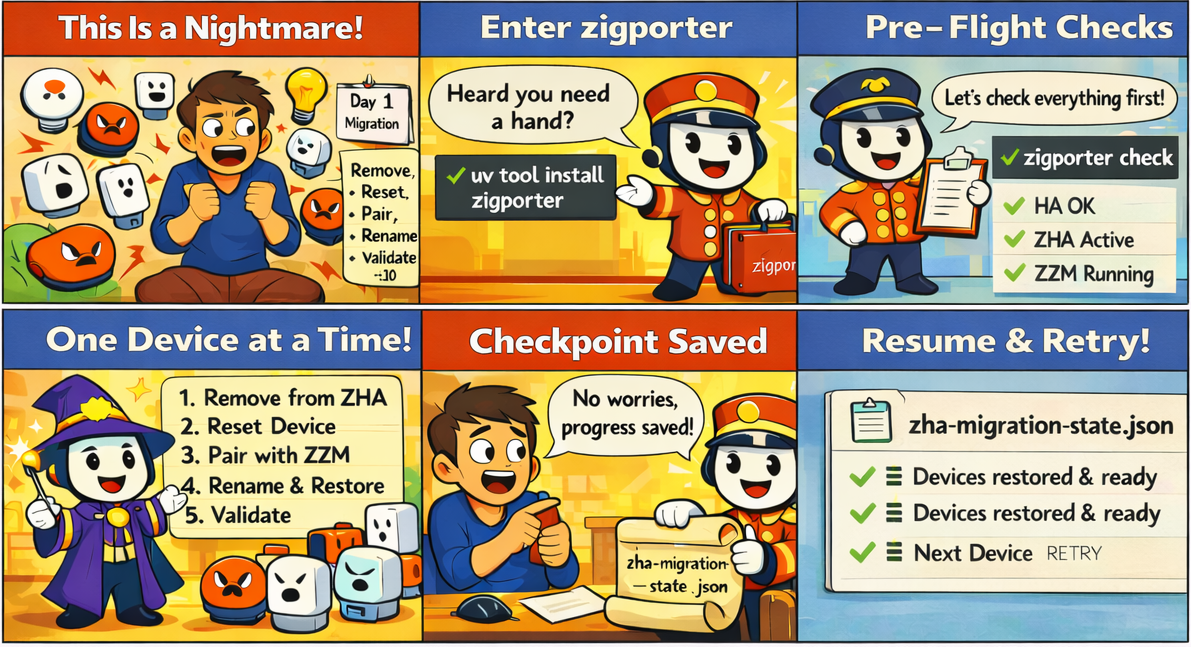
Because migrating 30 Zigbee devices in Home Assistant by hand is a special kind of misery.
CLI tool that automates the ZHA → Zigbee2MQTT migration in Home Assistant — one device at a time, with checkpoints so you can stop and pick up where you left off.
Early Development Notice — Only tested with
HA OS 2026.2.3·Supervisor 2026.02.2·Zigbee2MQTT 2.8.0-1. Feedback very welcome — please open an issue or submit a PR if you test with a different configuration.
Requirements
- Python 3.12+
- uv
- Home Assistant with ZHA and Zigbee2MQTT add-on
Installation
uv tool install zigporter
Configuration
Option 1 — Setup wizard (recommended)
zigporter setup
Prompts for all values and saves to ~/.config/zigporter/.env.
Option 2 — Manual config file
Create ~/.config/zigporter/.env (see .env.example for the template):
mkdir -p ~/.config/zigporter
cp .env.example ~/.config/zigporter/.env
# edit the file with your values
Option 3 — Environment variables
Export directly in your shell or add to ~/.zshenv / ~/.bashrc:
export HA_URL=https://your-ha-instance.local
export HA_TOKEN=your_token
export Z2M_URL=https://your-ha-instance.local/abc123_zigbee2mqtt
| Variable | Required | Description |
|---|---|---|
HA_URL |
Yes | Home Assistant URL |
HA_TOKEN |
Yes | Long-Lived Access Token |
HA_VERIFY_SSL |
No | true / false (default: true; use false for self-signed certs) |
Z2M_URL |
Yes | Zigbee2MQTT ingress URL |
Z2M_MQTT_TOPIC |
No | Z2M base topic (default: zigbee2mqtt) |
Usage
# Verify your setup before migrating (recommended first step)
zigporter check

# Run the migration wizard (runs checks automatically on first run)
zigporter migrate

# Check migration progress without entering the wizard
zigporter migrate --status

# (Optional) manually export your ZHA device inventory
zigporter export

# (Optional) inspect what's already in Z2M
zigporter list-z2m
zigporter migrate handles everything automatically on first run:
- Runs pre-flight checks (HA reachable, ZHA active, Z2M running)
- Prompts you to back up Home Assistant and your ZHA network
- Fetches a ZHA export if one is not found, or offers to refresh an existing one
- Opens the interactive migration wizard
All files are stored in ~/.config/zigporter/ so the tool works from any directory.
Use --skip-checks on subsequent runs to skip the pre-flight checks.
How it works
The wizard migrates one device at a time through five steps:
- Remove from ZHA — confirms deletion in the HA registry
- Reset device — prompts you to factory-reset the physical device
- Pair with Z2M — opens a 120 s permit-join window and polls by IEEE address
- Rename — applies the original ZHA name and area in Z2M and HA
- Validate — polls HA entity states until all are online
State is written to zha-migration-state.json after every step. Ctrl-C marks the device FAILED — rerun to retry.
See the wiki for detailed diagrams and architecture docs.
Development
uv sync --dev
uv run pytest
uv run ruff check .
uv run ruff format .
License
MIT — see LICENSE.
Project details
Verified details
These details have been verified by PyPIProject links
GitHub Statistics
Maintainers
Release history Release notifications | RSS feed


Download files
Download the file for your platform. If you're not sure which to choose, learn more about installing packages.
Source Distribution
Built Distribution
Filter files by name, interpreter, ABI, and platform.
If you're not sure about the file name format, learn more about wheel file names.
Copy a direct link to the current filters
File details
Details for the file zigporter-0.1.2.tar.gz.
File metadata
- Download URL: zigporter-0.1.2.tar.gz
- Upload date:
- Size: 27.5 kB
- Tags: Source
- Uploaded using Trusted Publishing? Yes
- Uploaded via: uv/0.10.7 {"installer":{"name":"uv","version":"0.10.7","subcommand":["publish"]},"python":null,"implementation":{"name":null,"version":null},"distro":{"name":"Ubuntu","version":"24.04","id":"noble","libc":null},"system":{"name":null,"release":null},"cpu":null,"openssl_version":null,"setuptools_version":null,"rustc_version":null,"ci":true}
File hashes
| Algorithm | Hash digest | |
|---|---|---|
| SHA256 |
8a1c7686be2b2d5e1a9823dbb33b261f602389dbfe135ff719bf81ce243be333
|
|
| MD5 |
b67cd94d476edc4d1fa37cd2cdcbe970
|
|
| BLAKE2b-256 |
b6e457236d7ae47d65ba6fc20f5941475517bef5efc07b6555b1691251125110
|
File details
Details for the file zigporter-0.1.2-py3-none-any.whl.
File metadata
- Download URL: zigporter-0.1.2-py3-none-any.whl
- Upload date:
- Size: 35.3 kB
- Tags: Python 3
- Uploaded using Trusted Publishing? Yes
- Uploaded via: uv/0.10.7 {"installer":{"name":"uv","version":"0.10.7","subcommand":["publish"]},"python":null,"implementation":{"name":null,"version":null},"distro":{"name":"Ubuntu","version":"24.04","id":"noble","libc":null},"system":{"name":null,"release":null},"cpu":null,"openssl_version":null,"setuptools_version":null,"rustc_version":null,"ci":true}
File hashes
| Algorithm | Hash digest | |
|---|---|---|
| SHA256 |
86ca2b6788583122e5e27d54c12f4a9022c47214406427998d2459feeb78d0a7
|
|
| MD5 |
caededc47392cba98a3cce0a1d7f6447
|
|
| BLAKE2b-256 |
7d1dbb9ffe3ab4e19679e400685c04f816c3e4fe115aca53323725fb0c1d7589
|






