

The backtesting engine built for AI agents
Vibe-code trading strategies. Verify them like a quant. Trade them live.
Zipline, rebuilt from scratch on Polars — with a native MCP server, so Claude, Cursor, Codex or any agent can research, backtest and deploy strategies on stocks, ETFs and futures.
One file for backtest and live. No glue code. No copy-paste.




Connect your AI · Try in browser · Python quick start · Docs · Community
Why this exists
LLMs write trading strategies in seconds. Most of them are wrong in ways that look right: lookahead bias, survivorship bias, fills that never happen, a Sharpe of 4 that evaporates on the first day of live trading.
And every tool makes you the glue: copy code out of the chat, fix imports, wrangle data, run, paste results back, repeat.
Ziplime flips it. The agent proposes. The engine proves.
Your AI gets a real backtester as a tool — point-in-time data, realistic execution, versioned results, a live-readiness check — and you get strategies that survived contact with reality instead of a chat transcript.
Ziplime is not a wrapper around an LLM. It is a production-grade backtesting and live-trading engine that any LLM can drive.
⚡ Connect your AI in 30 seconds
Works with Claude Desktop, Claude Code, Cursor, Codex, Windsurf — anything that speaks MCP.
{
  "mcpServers": {
    "ziplime": {
      "url": "https://ziplime.limex.com/mcp"
    }
  }
}
Then just talk to your agent:
You: Backtest a 20/50 SMA crossover on NVDA for 2020–2025 and tell me if it beats buy-and-hold.
Agent: searches the ticker → writes the strategy → runs the backtest → pulls metrics → compares to benchmark
"CAGR 31% vs 68% for buy-and-hold, max drawdown 24% vs 66%. Lower return, much smoother ride. Want me to add a volatility filter and rerun?"
Prefer everything on your own machine?
pip install "ziplime[mcp]"
ziplime mcp        # local MCP server over stdio — no account, no cloud
{
  "mcpServers": {
    "ziplime": { "command": "ziplime", "args": ["mcp"] }
  }
}
⚠️ The local server lets the agent write a strategy file and run it — that is arbitrary Python executing on your machine with your permissions.
check_strategy_codecatches mistakes, it is not a sandbox. Review what the agent writes, or run the server in a container.
🛠 What your agent can do
The hosted MCP server exposes the whole quant workflow — not just "run backtest".
| Stage | Tools the agent gets |
|---|---|
| Research | search_tickers · screen_market · analyze_signal · get_stock_factors · list_themes |
| Build | create_strategy · check_strategy_code · get_strategy_language_reference · copy_strategy |
| Test | run_backtest · get_backtest_metrics · get_backtest_trades · compare_backtests · compare_execution_costs |
| Ship | assess_live_readiness · prepare_deployment_plan · create_live_deployment · get_live_deployment_activity |
40+ tools. The agent can run the full loop on its own: idea → screen → strategy → backtest → iterate → live — and explain every step.
The local ziplime mcp server is the engine on your machine: 14 tools to ingest data, write and check strategies, and run backtests. It places no orders.
🍋 Zipline, rebuilt for 2026
Zipline was the gold standard of backtesting — until it was abandoned on pandas 0.x and Python 3.6. Dozens of forks patched it. None rebuilt it.
Ziplime keeps the API you know and replaces everything underneath:
- Polars instead of pandas/NumPy — Parquet-native, 2–5× faster, screaming on Apple Silicon
- Full asyncio — the engine is async end to end
- Any frequency — 1-minute, hourly, daily, weekly, monthly, or your own custom bars
- OHLCV + point-in-time fundamentals — P/E, revenue, margins, earnings, as they were known at the time
- Python 3.12+, modern packaging, active releases
Benchmark: 5 years daily data, 500 assets, SMA crossover strategy

Ziplime (Polars)  ████████░░░░░░░░░░░░░░░░░░  12.4s
Zipline (pandas)  █████████████████████████░  38.7s
Backtrader        ████████████████████████████ 52.1s
Apple Silicon M3, Python 3.12. Reproduce it: python benchmarks/sma_500.py
📈 Stocks, ETFs, futures — one portfolio, one file
- Equities & ETFs — US markets out of the box
- Futures — contract specs, multipliers, roll handling
- Mixed portfolios — hold SPY, ES and a basket of single names in the same algorithm
- Multiple data sources:
| Source | Type | Cost |
|---|---|---|
| Yahoo Finance | Historical OHLCV | Free |
| CSV files | Any custom data | Free |
| Lime Trader SDK | Real-time & historical | Broker account |
| LimexHub | Professional-grade data + fundamentals | Subscription |
🔴 Backtest → live in zero lines
The same algorithm file. The same logic. Just change the runner.
# Backtest (see the quick start below for the one-time data setup)
ziplime run -f my_strategy.py -b quickstart -s AAPL --start-date 2023-01-03 --end-date 2023-12-29
# Live, via Lime Trader SDK (needs a Lime brokerage account)
import datetime
from ziplime.core.run_live_trading import run_live_trading

run_live_trading(algorithm_file="my_strategy.py", trading_calendar="XNYS",
                 total_cash=100_000, emission_rate=datetime.timedelta(minutes=1))
No adapter classes. No "paper trading wrapper." No rewrite.
Your backtest is your live strategy — and on the hosted server your agent can deploy it (create_live_deployment) after assess_live_readiness says it's safe.
🐍 Python quick start
pip install ziplime
1. Write a strategy.
# my_strategy.py
from ziplime.finance.execution import MarketOrder

async def initialize(context):
    context.asset = await context.symbol("AAPL")
    context.invested = False

async def handle_data(context, data):
    if not context.invested:
        await context.order_target_percent(
            asset=context.asset, target=1.0, style=MarketOrder()
        )
        context.invested = True
2. Load data once. Instruments first — every bundle refers to them — then daily bars from Yahoo Finance (free, no key):
ziplime ingest-assets      # instrument catalogue into ~/.ziplime/assets.sqlite, about a minute
ziplime ingest -b quickstart -s AAPL --start-date 2023-01-01 --end-date 2023-12-31
3. Run it.
ziplime run -f my_strategy.py -b quickstart -s AAPL --start-date 2023-01-03 --end-date 2023-12-29
  sessions      250  (2023-01-03 .. 2023-12-29)
  return        +53.66%
  max drawdown  -15.03%
Orders fill on the next bar by default, so a strategy cannot trade on a price it has not seen yet.
The same run from Python
import asyncio
import datetime

from ziplime.assets.domain.asset_type import AssetType
from ziplime.assets.entities.asset_symbol import AssetSymbol
from ziplime.core.ingest_data import get_asset_service
from ziplime.core.run_simulation import run_simulation
from ziplime.utils.bundle_utils import get_bundle_service
from ziplime.utils.calendar_utils import get_calendar
from ziplime.utils.date_utils import normalize_datetime


async def main():
    calendar = get_calendar("XNYS")
    start = normalize_datetime(datetime.datetime(2023, 1, 3), calendar.tz)
    end = normalize_datetime(datetime.datetime(2023, 12, 29), calendar.tz)

    asset_service = get_asset_service()  # ~/.ziplime/assets.sqlite, filled by `ziplime ingest-assets`
    [aapl] = await asset_service.get_exchange_assets_by_symbols(
        symbols=[AssetSymbol(symbol="AAPL", mic=None)], asset_type=AssetType.EQUITY)
    market_data, _ = await get_bundle_service().load_bundle(
        bundle_name="quickstart", bundle_version=None, assets=[aapl],
        start_date=start, end_date=end, frequency=datetime.timedelta(days=1),
        asset_service=asset_service)

    result = await run_simulation(
        algorithm_file="my_strategy.py",
        start_date=start,
        end_date=end,
        trading_calendar="XNYS",
        emission_rate=datetime.timedelta(days=1),
        total_cash=100_000,
        market_data_source=market_data,
        custom_data_sources=[],
        asset_service=asset_service,
        stop_on_error=True,
        same_bar_execution=False,  # fill on the next bar: no lookahead
    )
    print(result.perf[["portfolio_value", "algorithm_period_return"]].tail())


asyncio.run(main())
Optional features install as extras: ziplime[mcp] (local MCP server), ziplime[huggingface] (hf:// point-in-time datasets), ziplime[options] (option pricing), ziplime[numba] (compiled vector kernel), or ziplime[all].
Coming from Zipline? Most algorithms port by adding async/await. See the migration guide.
🧭 Pick your door
| You are… | Start here |
|---|---|
| A trader who doesn't want to code | ziplime.limex.com — chat, backtest, deploy in the browser. Nothing to install. |
| A quant or Python developer | pip install ziplime — the engine, local, yours. |
| Building agents or AI products | MCP server — give your agent a real backtester in one config line. |
⚔️ How it compares
| Ziplime | zipline-reloaded | backtrader | vectorbt | nautilus_trader | |
|---|---|---|---|---|---|
| Native MCP server (agent-driven) | ✅ | — | — | — | — |
| Data engine | Polars / Parquet | pandas / HDF5 | pandas | NumPy / Numba | Rust |
| Live trading built in | ✅ | — | ✅ | — | ✅ |
| Same file: backtest → live | ✅ | — | ✅ | — | ✅ |
| Futures | ✅ | partial | ✅ | — | ✅ |
| Point-in-time fundamentals | ✅ | — | — | — | — |
| Hosted, no-install version | ✅ | — | — | — | — |
| Actively maintained | ✅ | ✅ | ⚠️ | ✅ | ✅ |
🤝 Community
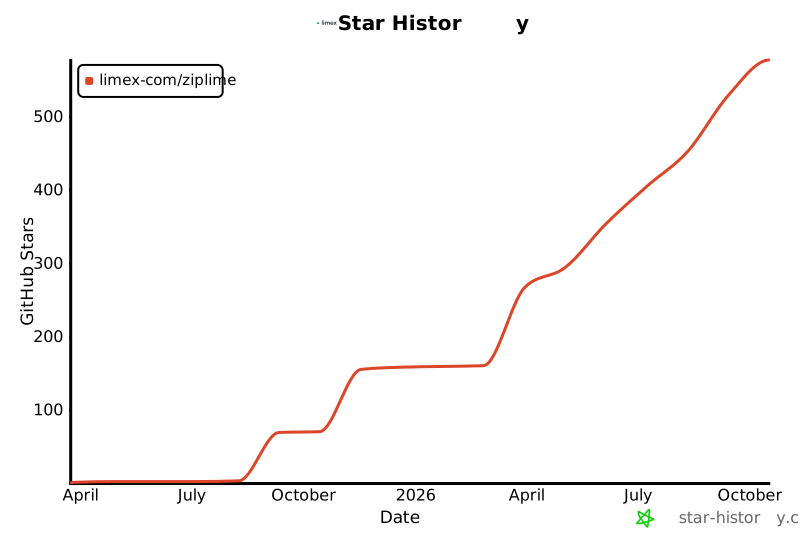
- ⭐ Star the repo — it's how new people find us
- 💬 Discord / Telegram
- 📖 Documentation
- 🐛 Issues · Good first issues
- 🏠 Built by Limex
License
Ziplime engine is open source under GPL-3.0. The hosted platform at ziplime.limex.com has its own terms.
Zipline is dead. Long live Ziplime. 🍋
1 maintainer

Metadata
1 maintainer
Release files for ziplime 2.10.3
For a detailed explanation of source distributions (sdists) and built distributions (wheels), please see the package formats documentation.
Source distribution (sdist)
| File | Size | Uploaded | |
|---|---|---|---|
| ziplime-2.10.3.tar.gz | 613.2 kB | Details |
Built distribution (wheel)
| File | Interpreter | ABI | Platform | Reset |
|---|---|---|---|---|
| ziplime-2.10.3-py3-none-any.whl | Python 3 | none | any | Details |
Total release size: 1.4 MB
Release files / ziplime-2.10.3.tar.gz
| Download URL | ziplime-2.10.3.tar.gz |
|---|---|
| Size | 613.2 kB |
| Tags | Source |
|
SHA-256 checksum How to use checksums |
5151c257f5c042bacbade2a99b2cc9b5964991ff720a03bb297117011eafc57f
|
|
BLAKE2b-256 checksum How to use checksums |
6bd1ee4342719f8afb6bbadcb7251046d753efdb910e148f91568d7381ad720a
|
| Upload date | |
|
Uploaded using Trusted Publishing? What is trusted publishing? |
No |
| Uploaded via |
poetry/2.5.1 CPython/3.12.3 Linux/6.17.0-1022-azure
|
Release files / ziplime-2.10.3-py3-none-any.whl
| Download URL | ziplime-2.10.3-py3-none-any.whl |
|---|---|
| Size | 809.8 kB |
| Tags | Python 3 |
|
SHA-256 checksum How to use checksums |
8c43fa3d6a8cc31cf2750c770ccdd806455e14143b6c1d23098e56a47cc6e171
|
|
BLAKE2b-256 checksum How to use checksums |
814296aa1d2d96b3babaf03b1626ef18b09aa04ba4c3ec753201bd9d32752eed
|
| Upload date | |
|
Uploaded using Trusted Publishing? What is trusted publishing? |
No |
| Uploaded via |
poetry/2.5.1 CPython/3.12.3 Linux/6.17.0-1022-azure
|














