
A Pythonic backtester for trading algorithms

Project description
Installation
Used packages and environment
- Main package: Zipline
- Python 3.9 or above (currently support up to 3.12)
- Microsoft Windows OS or macOS or Linux
- Other Python dependency packages: Pandas, Numpy, Logbook, Exchange-calendars, etc.
How to install Zipline Reloaded modified by TEJ
- We're going to illustrate under anaconda environment, so we suggest using Anaconda as development environment.
Simple install
-
In Anaconda CLI, we can use pip install zipline-tej to install.
-
In Jupyter Notebook, we can use !pip install zipline-tej to install.
Full environment install
- Download dependency packages.
-
Windows (zipline-tej.yml)
- Start an Anaconda (base) prompt, create an virtual environment and install the appropriate versions of packages: (We strongly recommand using virtual environment to keep every project independent.) (reason)
Windows Users
# change directionary to the folder exists zipline-tej.yml
$ cd <C:\Users\username\Downloads>

# create virtual env
$ conda env create -f zipline-tej.yml

# activate virtual env
$ conda activate zipline-tej
Mac Users
# change directionary to the folder exists zipline-tej_mac.yml
$ cd <C:\Users\username\Downloads>

# create virtual env
$ conda env create -f zipline-tej_mac.yml

# activate virtual env
$ conda activate zipline-tej
Also, if you are familiar with Python enough, you can create a virtual environment without zipline-tej.yml and here's the sample :
# create virtual env
$ conda create -n <env_name> python=3.11

# activate virtual env
$ conda activate <env_name>

# download dependency packages
$ pip install zipline-tej
While encountering environment problems, we provided a consistent and stable environment on Docker hub.
For users that using docker, we briefly introduce how to download and use it.
First of all, please download and install docker-desktop.
1. Start docker-desktop. (Registration is not must.)

2. Select the "images" on the leftside and search "tej87681088/tquant" and click "Pull".

3. After the image was downloaded, click the "run" icon the enter the optional settings.

3-1. Contaner-name: whatever you want.

3-2. Ports: the port to connect, "8888" is recommended.

3-3. Volumes: the place to store files. (You can create volume first on the left side.)

e.g. created a volume named "data", host path enter "data", container path "/app" is recommended.

4. Select the "Containers" leftside, the click the one which its image name is tej87681088/tquant

5. In its "Logs" would show an url like
http://127.0.0.1:8888/tree?token=XXXXXXXXXXXXXXXXXXXXXXXXXXXXXX

6. Go to your browser and enter "http://127.0.0.1:<port_you_set_in_step_3-2>/tree?token=XXXXXXXXXXXXXXXXXXXXXXXXXXXXXX"

6-1. If your port is 8888, you can just click the hyperlink.

7. Start develop your strategy!

NOTICE: Next time, we just need to reproduce step4 to step6.
Quick start
CLI Interface
The following code implements a simple buy-and-hold trading algorithm.
from zipline.api import order, record, symbol

def initialize(context):
    context.asset = symbol("2330")

def handle_data(context, data):
    order(context.asset, 10)
    record(TSMC=data.current(context.asset, "price"))

def analyze(context=None, results=None):
    import matplotlib.pyplot as plt

    # Plot the portfolio and asset data.
    ax1 = plt.subplot(211)
    results.portfolio_value.plot(ax=ax1)
    ax1.set_ylabel("Portfolio value (TWD)")
    ax2 = plt.subplot(212, sharex=ax1)
    results.TSMC.plot(ax=ax2)
    ax2.set_ylabel("TSMC price (TWD)")

    # Show the plot.
    plt.gcf().set_size_inches(18, 8)
    plt.show()
You can then run this algorithm using the Zipline CLI. But first, you need to download some market data with historical prices and trading volumes:
- Before ingesting data, you have to set some environment variables as follow:
# setting TEJAPI_KEY to get permissions loading data
$ set TEJAPI_KEY=<your_key>
$ set TEJAPI_BASE=https://api.tej.com.tw

# setting download ticker
$ set ticker=2330 2317

# setting backtest period
$ set mdate=20200101 20220101
- Ingest and run backtesting algorithm
$ zipline ingest -b tquant
$ zipline run -f buy_and_hold.py  --start 20200101 --end 20220101 -o bah.pickle --no-benchmark --no-treasury
Then, the resulting performance DataFrame is saved as bah.pickle, which you can load and analyze from Python.
More useful zipline commands
Before calling zipline in CLI, be sure that TEJAPI_KEY and TEJAPI_BASE were set. Use zipline --help to get more information.
For example : We want to know how to use zipline run, we can run as follow:
zipline run --help
Usage: zipline run [OPTIONS]
  Run a backtest for the given algorithm.

Options:
  -f, --algofile FILENAME         The file that contains the algorithm to run.
  -t, --algotext TEXT             The algorithm script to run.
  -D, --define TEXT               Define a name to be bound in the namespace
                                  before executing the algotext. For example
                                  '-Dname=value'. The value may be any python
                                  expression. These are evaluated in order so
                                  they may refer to previously defined names.
  --data-frequency [daily|minute]
                                  The data frequency of the simulation.
                                  [default: daily]
  --capital-base FLOAT            The starting capital for the simulation.
                                  [default: 10000000.0]
  -b, --bundle BUNDLE-NAME        The data bundle to use for the simulation.
                                  [default: tquant]
  --bundle-timestamp TIMESTAMP    The date to lookup data on or before.
                                  [default: <current-time>]
  -bf, --benchmark-file FILE      The csv file that contains the benchmark
                                  returns
  --benchmark-symbol TEXT         The symbol of the instrument to be used as a
                                  benchmark (should exist in the ingested
                                  bundle)
  --benchmark-sid INTEGER         The sid of the instrument to be used as a
                                  benchmark (should exist in the ingested
                                  bundle)
  --no-benchmark                  If passed, use a benchmark of zero returns.
  -bf, --treasury-file FILE       The csv file that contains the treasury
                                  returns
  --treasury-symbol TEXT          The symbol of the instrument to be used as a
                                  treasury (should exist in the ingested
                                  bundle)
  --treasury-sid INTEGER          The sid of the instrument to be used as a
                                  treasury (should exist in the ingested
                                  bundle)
  --no-treasury                   If passed, use a treasury of zero returns.
  -s, --start DATE                The start date of the simulation.
  -e, --end DATE                  The end date of the simulation.
  -o, --output FILENAME           The location to write the perf data. If this
                                  is '-' the perf will be written to stdout.
                                  [default: -]
  --trading-calendar TRADING-CALENDAR
                                  The calendar you want to use e.g. TEJ_XTAI.
                                  TEJ_XTAI is the default.
  --print-algo / --no-print-algo  Print the algorithm to stdout.
  --metrics-set TEXT              The metrics set to use. New metrics sets may
                                  be registered in your extension.py.
  --blotter TEXT                  The blotter to use.  [default: default]
  --help                          Show this message and exit.
Difference of tquant and fundamentals
-
Basically,
tquantis the one that only contain OHLCV and cash dividend date. Andfundamentalsis the data that exclude from OHLCV, like EPS, gross margin, operating income, etc. -
So in both fundamentals and tquant, we can add tickers as follow :
Add tickers
$ zipline add -t "<ticker_wants_to_add>"
If tickers are more than 1 ticker, split them apart by " " or "," or ";".
[fundamentals only] Add fields
$ zipline add -f "<field_wants_to_add>"
- NOTICE that you
CAN'Tadd field and ticker simultaneously.
For more detail use zipline add --help .
Display bundle-info
$ zipline bundle-info
To show what the tickers are there in newest bundle.
For more detail use zipline bundle-info --help .
Switch bundle
Before using switch, use zipline bundles to get the timestamp of each folder.
$ zipline switch -t "<The_timestamp_of_the_folder_want_to_use>"
Due to zipline only using the newest folder, switch can make previous folder become newest.
For more detail use zipline switch --help .
Update bundle
- You can either update
tquantorfundamentalsby using -b to select which one you want to update the bundle information to newest date.[DEFAULT:tquant]
$ zipline update -b tquant
$ zipline update -b fundamentals
For more detail use zipline update --help .
Jupyter Notebook
Change Anaconda kernel
- Since we've downloaded package "nb_conda_kernels", we should be able to change kernel in jupyter notebook.
How to new a notebook using specific kernel
(1) Open anaconda prompt
(2) Enter the command as follow :
# First one can be ignore if already in environment of zipline-tej
$ conda activate zipline-tej
# start a jupyter notebook
$ jupyter notebook
(3) Start a notebook and select Python[conda env:zipline-tej]
(4)(Optional) If you have already written a notebook, you can open it and change kernel by clicking the "Kernel" in menu and "Change kernel" to select the specfic kernel.
Set environment variables TEJAPI_KEY, ticker and mdate
* ticker would be your target ticker symbol, and it should be a string. If there're more than one ticker needed, use " ", "," or ";" to split them apart.
* mdate refers the begin date and end date, use " ", "," or ";" to split them apart.
In[1]:
import os
os.environ['TEJAPI_KEY'] = <your_key>
os.environ['ticker'] ='2330 2317'
os.environ['mdate'] ='20200101 20220101'
Call ingest to download data to ~\.zipline
In[2]:
!zipline ingest -b tquant
[Out]:
Merging daily equity files:
[YYYY-MM-DD HH:mm:ss.ssssss] INFO: zipline.data.bundles.core: Ingesting tquant.
Design the backtesting strategy
In[3]:
from zipline.api import order, record, symbol

def initialize(context):
    context.asset = symbol("2330")

def handle_data(context, data):
    order(context.asset, 10)
    record(TSMC=data.current(context.asset, "price"))

def analyze(context=None, results=None):
    import matplotlib.pyplot as plt

    # Plot the portfolio and asset data.
    ax1 = plt.subplot(211)
    results.portfolio_value.plot(ax=ax1)
    ax1.set_ylabel("Portfolio value (TWD)")
    ax2 = plt.subplot(212, sharex=ax1)
    results.TSMC.plot(ax=ax2)
    ax2.set_ylabel("TSMC price (TWD)")

    # Show the plot.
    plt.gcf().set_size_inches(18, 8)
    plt.show()
Run backtesting algorithm and plot
In[4]:
from zipline import run_algorithm
import pandas as pd
from zipline.utils.calendar_utils import get_calendar
trading_calendar = get_calendar('TEJ_XTAI')

start = pd.Timestamp('20200103', tz ='utc' )
end = pd.Timestamp('20211230', tz='utc')

result = run_algorithm(start=start,
                  end=end,
                  initialize=initialize,
                  capital_base=1000000,
                  handle_data=handle_data,
                  bundle='tquant',
                  trading_calendar=trading_calendar,
                  analyze=analyze,
                  data_frequency='daily'
                  )
[Out]:
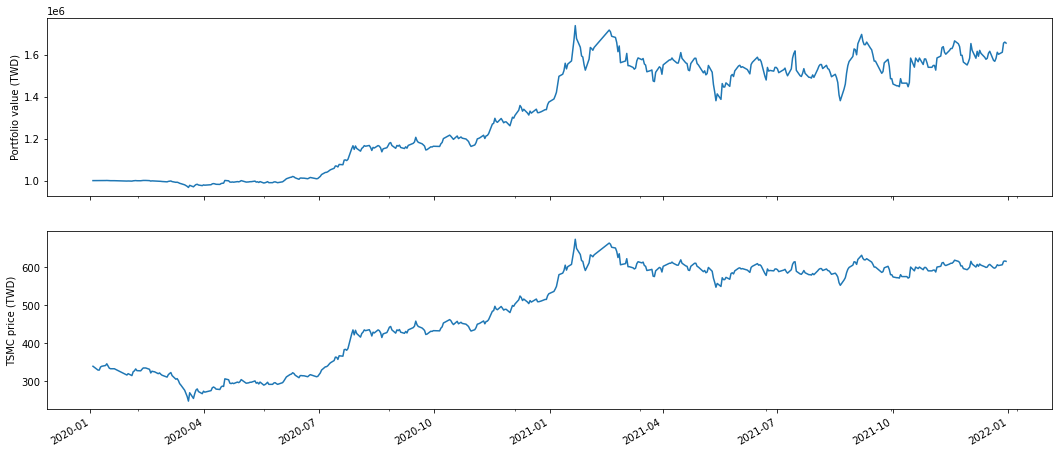
Show trading process
In[5]:
result
[Out]:
| period_open | period_close | starting_value | ending_value | starting_cash | ending_cash | portfolio_value | longs_count | shorts_count | long_value | ... | treasury_period_return | trading_days | period_label | algo_volatility | benchmark_period_return | benchmark_volatility | algorithm_period_return | alpha | beta | sharpe | |
|---|---|---|---|---|---|---|---|---|---|---|---|---|---|---|---|---|---|---|---|---|---|
| 2020-01-03 05:30:00+00:00 | 2020-01-03 01:01:00+00:00 | 2020-01-03 05:30:00+00:00 | 0.0 | 0.0 | 1.000000e+06 | 1.000000e+06 | 1.000000e+06 | 0 | 0 | 0.0 | ... | 0.0 | 1 | 2020-01 | NaN | 0.0 | NaN | 0.000000 | None | None | NaN |
| 2020-01-06 05:30:00+00:00 | 2020-01-06 01:01:00+00:00 | 2020-01-06 05:30:00+00:00 | 0.0 | 3320.0 | 1.000000e+06 | 9.966783e+05 | 9.999983e+05 | 1 | 0 | 3320.0 | ... | 0.0 | 2 | 2020-01 | 0.000019 | 0.0 | 0.0 | -0.000002 | None | None | -11.224972 |
| 2020-01-07 05:30:00+00:00 | 2020-01-07 01:01:00+00:00 | 2020-01-07 05:30:00+00:00 | 3320.0 | 6590.0 | 9.966783e+05 | 9.933817e+05 | 9.999717e+05 | 1 | 0 | 6590.0 | ... | 0.0 | 3 | 2020-01 | 0.000237 | 0.0 | 0.0 | -0.000028 | None | None | -10.038514 |
| 2020-01-08 05:30:00+00:00 | 2020-01-08 01:01:00+00:00 | 2020-01-08 05:30:00+00:00 | 6590.0 | 9885.0 | 9.933817e+05 | 9.900850e+05 | 9.999700e+05 | 1 | 0 | 9885.0 | ... | 0.0 | 4 | 2020-01 | 0.000203 | 0.0 | 0.0 | -0.000030 | None | None | -9.298128 |
| 2020-01-09 05:30:00+00:00 | 2020-01-09 01:01:00+00:00 | 2020-01-09 05:30:00+00:00 | 9885.0 | 13500.0 | 9.900850e+05 | 9.867083e+05 | 1.000208e+06 | 1 | 0 | 13500.0 | ... | 0.0 | 5 | 2020-01 | 0.001754 | 0.0 | 0.0 | 0.000208 | None | None | 5.986418 |
| ... | ... | ... | ... | ... | ... | ... | ... | ... | ... | ... | ... | ... | ... | ... | ... | ... | ... | ... | ... | ... | ... |
| 2021-12-24 05:30:00+00:00 | 2021-12-24 01:01:00+00:00 | 2021-12-24 05:30:00+00:00 | 2920920.0 | 2917320.0 | -1.308854e+06 | -1.314897e+06 | 1.602423e+06 | 1 | 0 | 2917320.0 | ... | 0.0 | 484 | 2021-12 | 0.232791 | 0.0 | 0.0 | 0.602423 | None | None | 1.170743 |
| 2021-12-27 05:30:00+00:00 | 2021-12-27 01:01:00+00:00 | 2021-12-27 05:30:00+00:00 | 2917320.0 | 2933040.0 | -1.314897e+06 | -1.320960e+06 | 1.612080e+06 | 1 | 0 | 2933040.0 | ... | 0.0 | 485 | 2021-12 | 0.232577 | 0.0 | 0.0 | 0.612080 | None | None | 1.182864 |
| 2021-12-28 05:30:00+00:00 | 2021-12-28 01:01:00+00:00 | 2021-12-28 05:30:00+00:00 | 2933040.0 | 2982750.0 | -1.320960e+06 | -1.327113e+06 | 1.655637e+06 | 1 | 0 | 2982750.0 | ... | 0.0 | 486 | 2021-12 | 0.233086 | 0.0 | 0.0 | 0.655637 | None | None | 1.237958 |
| 2021-12-29 05:30:00+00:00 | 2021-12-29 01:01:00+00:00 | 2021-12-29 05:30:00+00:00 | 2982750.0 | 2993760.0 | -1.327113e+06 | -1.333276e+06 | 1.660484e+06 | 1 | 0 | 2993760.0 | ... | 0.0 | 487 | 2021-12 | 0.232850 | 0.0 | 0.0 | 0.660484 | None | None | 1.243176 |
| 2021-12-30 05:30:00+00:00 | 2021-12-30 01:01:00+00:00 | 2021-12-30 05:30:00+00:00 | 2993760.0 | 2995050.0 | -1.333276e+06 | -1.339430e+06 | 1.655620e+06 | 1 | 0 | 2995050.0 | ... | 0.0 | 488 | 2021-12 | 0.232629 | 0.0 | 0.0 | 0.655620 | None | None | 1.235305 |
488 rows × 38 columns
More Zipline Tutorials
- For more tutorials
Suggestions
- To get TEJAPI_KEY (link)
- TEJ Official Website
Release history Release notifications | RSS feed


Download files
Download the file for your platform. If you're not sure which to choose, learn more about installing packages.
Source Distributions
Built Distributions
Filter files by name, interpreter, ABI, and platform.
If you're not sure about the file name format, learn more about wheel file names.
Copy a direct link to the current filters
File details
Details for the file zipline_tej-2.2.2-cp312-cp312-win_amd64.whl.
File metadata
- Download URL: zipline_tej-2.2.2-cp312-cp312-win_amd64.whl
- Upload date:
- Size: 2.1 MB
- Tags: CPython 3.12, Windows x86-64
- Uploaded using Trusted Publishing? No
- Uploaded via: twine/6.1.0 CPython/3.13.7
File hashes
| Algorithm | Hash digest | |
|---|---|---|
| SHA256 |
4ce00d9d93ed39ca9aa299ab56b79c26194cf0933e5b982b5db6083d690fd81b
|
|
| MD5 |
88255b124c72934c2f3026d0e71d1b94
|
|
| BLAKE2b-256 |
cf3d825d0fdd218ba2a9caa7e6993cb05bf43eb0ab6c8e0e30ebadf45ba3d3a2
|
File details
Details for the file zipline_tej-2.2.2-cp312-cp312-manylinux_2_17_x86_64.manylinux2014_x86_64.whl.
File metadata
- Download URL: zipline_tej-2.2.2-cp312-cp312-manylinux_2_17_x86_64.manylinux2014_x86_64.whl
- Upload date:
- Size: 8.9 MB
- Tags: CPython 3.12, manylinux: glibc 2.17+ x86-64
- Uploaded using Trusted Publishing? No
- Uploaded via: twine/6.1.0 CPython/3.13.7
File hashes
| Algorithm | Hash digest | |
|---|---|---|
| SHA256 |
d21f43464cb98265668554d4a23a7e56af33a162f8b1cde45564149a7635fc03
|
|
| MD5 |
5d6d33e7e559d32b4096d7fd8da96b07
|
|
| BLAKE2b-256 |
8c631094cb76e4fe73de867bb9f9ccd062b2678811da2c42a9140b503cb04538
|
File details
Details for the file zipline_tej-2.2.2-cp312-cp312-macosx_11_0_arm64.whl.
File metadata
- Download URL: zipline_tej-2.2.2-cp312-cp312-macosx_11_0_arm64.whl
- Upload date:
- Size: 2.3 MB
- Tags: CPython 3.12, macOS 11.0+ ARM64
- Uploaded using Trusted Publishing? No
- Uploaded via: twine/6.1.0 CPython/3.13.7
File hashes
| Algorithm | Hash digest | |
|---|---|---|
| SHA256 |
9f3855d7267e087e3c8ec90b37b67e42899a929f30a703233d4fd36f417e0773
|
|
| MD5 |
abacfcca1cefc71242d51d7a75892533
|
|
| BLAKE2b-256 |
6e117f8ab348f4c44c10e378520a1d1c4bb7e0b0ea6d98ffe6609b08383a3061
|
File details
Details for the file zipline_tej-2.2.2-cp312-cp312-macosx_10_15_x86_64.whl.
File metadata
- Download URL: zipline_tej-2.2.2-cp312-cp312-macosx_10_15_x86_64.whl
- Upload date:
- Size: 2.3 MB
- Tags: CPython 3.12, macOS 10.15+ x86-64
- Uploaded using Trusted Publishing? No
- Uploaded via: twine/6.1.0 CPython/3.13.7
File hashes
| Algorithm | Hash digest | |
|---|---|---|
| SHA256 |
ec1b673b7f727bd0e99064108c9135a6c5edfb427db2fed22f0d16fc0422c362
|
|
| MD5 |
62fb7a0a0fc2ca3f5b4688502cd9bd51
|
|
| BLAKE2b-256 |
23bfdf190ed155668d8392556d6a43b0b22ab62bdc2ef83a8791c19bb9a9e0f6
|
File details
Details for the file zipline_tej-2.2.2-cp311-cp311-win_amd64.whl.
File metadata
- Download URL: zipline_tej-2.2.2-cp311-cp311-win_amd64.whl
- Upload date:
- Size: 2.1 MB
- Tags: CPython 3.11, Windows x86-64
- Uploaded using Trusted Publishing? No
- Uploaded via: twine/6.1.0 CPython/3.13.7
File hashes
| Algorithm | Hash digest | |
|---|---|---|
| SHA256 |
0d7e0529445ad3cc025664a9b98d1847ff17ac73d2dc31b5982dba38d9c14cf6
|
|
| MD5 |
84c9f1ba55f2d6c5e2b81feb1751afa6
|
|
| BLAKE2b-256 |
933f480b3514fc5a5912610f102120324bcd00e7432484a2bb4687db891bfda3
|
File details
Details for the file zipline_tej-2.2.2-cp311-cp311-manylinux_2_17_x86_64.manylinux2014_x86_64.whl.
File metadata
- Download URL: zipline_tej-2.2.2-cp311-cp311-manylinux_2_17_x86_64.manylinux2014_x86_64.whl
- Upload date:
- Size: 9.0 MB
- Tags: CPython 3.11, manylinux: glibc 2.17+ x86-64
- Uploaded using Trusted Publishing? No
- Uploaded via: twine/6.1.0 CPython/3.13.7
File hashes
| Algorithm | Hash digest | |
|---|---|---|
| SHA256 |
ec8a369c36cda8dd8d1d7c05df8355598a72b00de20b683aa4385eafa835da89
|
|
| MD5 |
606a498d0877a40249fc5f5d5c026eb2
|
|
| BLAKE2b-256 |
89ccc575c0f79728d2172ab1589a37132730dd26ba0cf5574a43ba74c13dbf4a
|
File details
Details for the file zipline_tej-2.2.2-cp311-cp311-macosx_11_0_arm64.whl.
File metadata
- Download URL: zipline_tej-2.2.2-cp311-cp311-macosx_11_0_arm64.whl
- Upload date:
- Size: 2.3 MB
- Tags: CPython 3.11, macOS 11.0+ ARM64
- Uploaded using Trusted Publishing? No
- Uploaded via: twine/6.1.0 CPython/3.13.7
File hashes
| Algorithm | Hash digest | |
|---|---|---|
| SHA256 |
afd30a96324e52ae5837bb742b1dfca0d6c320a943d04623b40db74029e11f55
|
|
| MD5 |
49c5483ffaf66923ea7a07a26620d555
|
|
| BLAKE2b-256 |
b8e2a8a2aed5d124449294045980b6dc7d9629836e82ed45eaff6084bf4663b1
|
File details
Details for the file zipline_tej-2.2.2-cp311-cp311-macosx_10_15_x86_64.whl.
File metadata
- Download URL: zipline_tej-2.2.2-cp311-cp311-macosx_10_15_x86_64.whl
- Upload date:
- Size: 2.3 MB
- Tags: CPython 3.11, macOS 10.15+ x86-64
- Uploaded using Trusted Publishing? No
- Uploaded via: twine/6.1.0 CPython/3.13.7
File hashes
| Algorithm | Hash digest | |
|---|---|---|
| SHA256 |
8813a6f3b4367b0456710b7f18111fffbfc7c1225c855f6e7d97b0aa5dc687f4
|
|
| MD5 |
db5ab7782eb2d0a0f45b85954e884fe7
|
|
| BLAKE2b-256 |
3f432ff30bf87aca4a5351e6ec552f874597df8978b6160f344643da8dd7224a
|
File details
Details for the file zipline_tej-2.2.2-cp310-cp310-win_amd64.whl.
File metadata
- Download URL: zipline_tej-2.2.2-cp310-cp310-win_amd64.whl
- Upload date:
- Size: 2.1 MB
- Tags: CPython 3.10, Windows x86-64
- Uploaded using Trusted Publishing? No
- Uploaded via: twine/6.1.0 CPython/3.13.7
File hashes
| Algorithm | Hash digest | |
|---|---|---|
| SHA256 |
82447227e96f9ed06d3700b1fd21829280de8f8178f8c27f58b69fe041cc77ba
|
|
| MD5 |
97abe2bbc9474dcc411bd7accf722bda
|
|
| BLAKE2b-256 |
f428353a54ddb51ab08d4b138cdfcf880c2ee626a1e185e5bca0e2ebc88d9f9d
|
File details
Details for the file zipline_tej-2.2.2-cp310-cp310-manylinux_2_17_x86_64.manylinux2014_x86_64.whl.
File metadata
- Download URL: zipline_tej-2.2.2-cp310-cp310-manylinux_2_17_x86_64.manylinux2014_x86_64.whl
- Upload date:
- Size: 8.4 MB
- Tags: CPython 3.10, manylinux: glibc 2.17+ x86-64
- Uploaded using Trusted Publishing? No
- Uploaded via: twine/6.1.0 CPython/3.13.7
File hashes
| Algorithm | Hash digest | |
|---|---|---|
| SHA256 |
188d7dbe84b55750a963d19683688621cd688a9be7ccddeadb4f2a1dab60b615
|
|
| MD5 |
bc1cd81a824dda4d0a5584a847cd616f
|
|
| BLAKE2b-256 |
afe86af8701a5d68dd09674579041897b6dde186cae08989a2d3c08c7b699835
|
File details
Details for the file zipline_tej-2.2.2-cp310-cp310-macosx_11_0_arm64.whl.
File metadata
- Download URL: zipline_tej-2.2.2-cp310-cp310-macosx_11_0_arm64.whl
- Upload date:
- Size: 2.3 MB
- Tags: CPython 3.10, macOS 11.0+ ARM64
- Uploaded using Trusted Publishing? No
- Uploaded via: twine/6.1.0 CPython/3.13.7
File hashes
| Algorithm | Hash digest | |
|---|---|---|
| SHA256 |
8072d44ed8310a7d77d27108dddb8469e30427a35dd6126e3e40bc4bfd3e68ce
|
|
| MD5 |
f2eb01d079d3e7697e93f3185d8593d8
|
|
| BLAKE2b-256 |
7309df45ab15327726d08d877a6f40026d71e74222331d4a33b365445bfb87df
|
File details
Details for the file zipline_tej-2.2.2-cp310-cp310-macosx_10_15_x86_64.whl.
File metadata
- Download URL: zipline_tej-2.2.2-cp310-cp310-macosx_10_15_x86_64.whl
- Upload date:
- Size: 2.3 MB
- Tags: CPython 3.10, macOS 10.15+ x86-64
- Uploaded using Trusted Publishing? No
- Uploaded via: twine/6.1.0 CPython/3.13.7
File hashes
| Algorithm | Hash digest | |
|---|---|---|
| SHA256 |
9797bbcdaf8cc32799c9fdf47dffb8fe2e64b7a36ea9ba8a75d5ade6ac1b1fa4
|
|
| MD5 |
9e1dc0e88d654046e7ba56f7faf64e45
|
|
| BLAKE2b-256 |
646cc3512747635ed0fc95b41878a9ebccf7bfc17fb8e46c06658e419cc52798
|
File details
Details for the file zipline_tej-2.2.2-cp39-cp39-win_amd64.whl.
File metadata
- Download URL: zipline_tej-2.2.2-cp39-cp39-win_amd64.whl
- Upload date:
- Size: 2.1 MB
- Tags: CPython 3.9, Windows x86-64
- Uploaded using Trusted Publishing? No
- Uploaded via: twine/6.1.0 CPython/3.13.7
File hashes
| Algorithm | Hash digest | |
|---|---|---|
| SHA256 |
34a6954a1df74f50da039763697fd024f992204a32a33d5c54c558d37450acb7
|
|
| MD5 |
c28f4ca645d5792486fa61fce90adb79
|
|
| BLAKE2b-256 |
48de9f1474eef874f3b328d2115c164f10ec4e5150b48365016a526a4dcbbd25
|
File details
Details for the file zipline_tej-2.2.2-cp39-cp39-manylinux_2_17_x86_64.manylinux2014_x86_64.whl.
File metadata
- Download URL: zipline_tej-2.2.2-cp39-cp39-manylinux_2_17_x86_64.manylinux2014_x86_64.whl
- Upload date:
- Size: 8.4 MB
- Tags: CPython 3.9, manylinux: glibc 2.17+ x86-64
- Uploaded using Trusted Publishing? No
- Uploaded via: twine/6.1.0 CPython/3.13.7
File hashes
| Algorithm | Hash digest | |
|---|---|---|
| SHA256 |
624fbad22751d63f897ed8c107f4dd91cc661da48c78e5fbd2ab93bd9ba7f1bb
|
|
| MD5 |
f9329cdba7a8c025449068066c19ba15
|
|
| BLAKE2b-256 |
2199bc9fdf6d4cb1981ad5c6517c4e972af53d959ee16bb0ec4a99862607f42b
|
File details
Details for the file zipline_tej-2.2.2-cp39-cp39-macosx_11_0_arm64.whl.
File metadata
- Download URL: zipline_tej-2.2.2-cp39-cp39-macosx_11_0_arm64.whl
- Upload date:
- Size: 2.3 MB
- Tags: CPython 3.9, macOS 11.0+ ARM64
- Uploaded using Trusted Publishing? No
- Uploaded via: twine/6.1.0 CPython/3.13.7
File hashes
| Algorithm | Hash digest | |
|---|---|---|
| SHA256 |
57a3986bb77f933fe7a22ee57f561236384235d1e6dae40d440ba7ee82ae948d
|
|
| MD5 |
4563a5c93185a6d9342700bc2db00e19
|
|
| BLAKE2b-256 |
c51e3f0dff5516d822a954f8fcf94b8fe6b2d383cfbe8599c2d0debb270c7b91
|
File details
Details for the file zipline_tej-2.2.2-cp39-cp39-macosx_10_15_x86_64.whl.
File metadata
- Download URL: zipline_tej-2.2.2-cp39-cp39-macosx_10_15_x86_64.whl
- Upload date:
- Size: 2.3 MB
- Tags: CPython 3.9, macOS 10.15+ x86-64
- Uploaded using Trusted Publishing? No
- Uploaded via: twine/6.1.0 CPython/3.13.7
File hashes
| Algorithm | Hash digest | |
|---|---|---|
| SHA256 |
ba38b6f74432114fc0981589daeb490c86f4569e024b3fcc9aa8418dc7c1f50c
|
|
| MD5 |
d234e4025c12a590a6756cd5915b8d08
|
|
| BLAKE2b-256 |
afc2311ac49249a09e2d9507e584b821ae2520a682a6594e034ad3a997480ecc
|






