
Eink display manager

Project description
ZlsNasDisplay
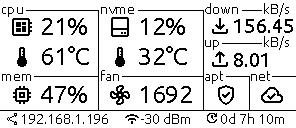

The ZlsNasDisplay application renders various system statistics onto the e-ink display, providing users with real-time insights into the Raspberry Pi-based NAS device's performance and connectivity. Here's a breakdown of the displayed information and their respective update frequencies:
- CPU Load and Temperature
Displayed Information: The current CPU load percentage and temperature.
Update Frequency: Updated every 30 seconds. - Available System Updates
Displayed Information: The number of available system updates.
Update Frequency: Checked every 3 hours. - Network Status
Displayed Information: Indicator of internet connectivity status.
Update Frequency: Checked every 30 seconds. - Signal Strength
Displayed Information: The signal strength of the Wi-Fi connection in dBm.
Update Frequency: Updated every minute. - Memory Usage
Displayed Information: The current memory usage percentage.
Update Frequency: Updated every minute. - NVMe Disk Usage and Temperature
Displayed Information: The NVMe disk usage percentage and temperature.
Update Frequency: Updated every minute. - Fan Speed
Displayed Information: The current fan speed in RPM (Revolutions Per Minute).
Update Frequency: Updated every 10 seconds. - IP Address
Displayed Information: The current IP address of the Raspberry Pi.
Update Frequency: Updated every hour. - System Uptime
Displayed Information: The system uptime in days, hours, and minutes.
Update Frequency: Updated every minute. - Current Network Traffic
Displayed Information: The current download and upload speeds in MB/s.
Update Frequency: Updated every 10 seconds.
Installation
sudo pip3 install zlsnasdisplay
Hardware
Raspberry Pi (5 tested)
Wiring
All necessary information about the wiring and operation is available on the waveshare wiki
Development
Dependencies
python: Python version required for the project (>=3.9).pillow,gpiozero,schedule,psutil,requests: Python dependencies with their respective versions required for the project.mypy,pre-commit,pytest,pytest-cov,ruff,tomli: Development dependencies for linting, testing, and formatting.
Build System
requires: Poetry core version required for the build system.build-backend: Specifies the backend used for building the project.
Mypy Configuration
check_untyped_defs: Checks untyped function definitions.disallow_untyped_defs: Disallows untyped function definitions.overrides: Overrides configuration for specific modules.
Pytest Configuration
minversion: Minimum required version of pytest.addopts: Additional options passed to pytest for coverage reporting.
Coverage Reporting
exclude_lines: Lines excluded from coverage reporting.
Ruff Configuration
line-length: Maximum line length.target-version: Target Python version for compatibility.fix: Automatically fix linting issues.lint: Configuration for linting rules, select options, and ignored rules.
To install the ZlsNasDisplay project using Poetry, you can follow these steps:
-
Clone the Repository: First, clone the repository containing the project's code from GitHub:
bashCopy code
git clone https://github.com/zales/ZlsNasDisplay.git -
Navigate to the Project Directory: Change your current directory to the root directory of the cloned project:
bashCopy code
cd ZlsNasDisplay -
Install Dependencies: Use Poetry to install the project's dependencies defined in the
pyproject.tomlfile:bashCopy code
poetry install -
(Optional) Create a Virtual Environment: If you prefer to isolate the project's dependencies, you can create a virtual environment with Poetry:
bashCopy code
poetry shell -
Run the Project: After installing the dependencies, you can run the ZlsNasDisplay project using Poetry. For example, if there's a script defined in the
pyproject.tomlfile under[tool.poetry.scripts], you can execute it as follows:bashCopy code
poetry run python3 zlsnasdisplay

Release history Release notifications | RSS feed


Download files
Download the file for your platform. If you're not sure which to choose, learn more about installing packages.
Source Distribution
Built Distribution
Filter files by name, interpreter, ABI, and platform.
If you're not sure about the file name format, learn more about wheel file names.
Copy a direct link to the current filters
File details
Details for the file zlsnasdisplay-2.0.3.tar.gz.
File metadata
- Download URL: zlsnasdisplay-2.0.3.tar.gz
- Upload date:
- Size: 5.2 MB
- Tags: Source
- Uploaded using Trusted Publishing? No
- Uploaded via: poetry/2.1.4 CPython/3.12.3 Linux/6.11.0-1018-azure
File hashes
| Algorithm | Hash digest | |
|---|---|---|
| SHA256 |
84f15cbb716cd7d0b6e7ee27360f09e26f7702e7dc51b485b4d2a50ba8297a32
|
|
| MD5 |
2d122854fe03b0abe826f619ce66413f
|
|
| BLAKE2b-256 |
b81a2b40b21ce04ade6e0fbded2a0baee791857bb35177951c0f9c9d254e1b42
|
File details
Details for the file zlsnasdisplay-2.0.3-py3-none-any.whl.
File metadata
- Download URL: zlsnasdisplay-2.0.3-py3-none-any.whl
- Upload date:
- Size: 5.3 MB
- Tags: Python 3
- Uploaded using Trusted Publishing? No
- Uploaded via: poetry/2.1.4 CPython/3.12.3 Linux/6.11.0-1018-azure
File hashes
| Algorithm | Hash digest | |
|---|---|---|
| SHA256 |
4fbe6ada48745f9d148d51b33076397e7d554a3a0784964e414cb493ee41deff
|
|
| MD5 |
cf5448f2b20bf2d9467dd8ebc12633ae
|
|
| BLAKE2b-256 |
d2a49e8dc90c2232122268554efb7c13502481356a0af33e18b607a3636a304a
|






