

ZMIP: Zoom-In Pipeline
Refine cell populations within each lineage after multi-sample integration.




Why zoom in? · Get started · Results · Documentation
ZMIP takes an annotated dataset from MSP, analyzes each lineage separately, and refines cell-type labels using marker genes and quality evidence. It writes updated annotations, records removed or reassigned cells, and produces reports for review.
Why zoom in?
Differences between major cell types can dominate a global analysis. Recomputing features, neighbors, and clusters within a lineage helps examine its finer populations. ZMIP uses this local view to refine labels and review remaining quality concerns. When there are too few cells for stable subgroup analysis, small lineages retain their existing annotations.
How it works
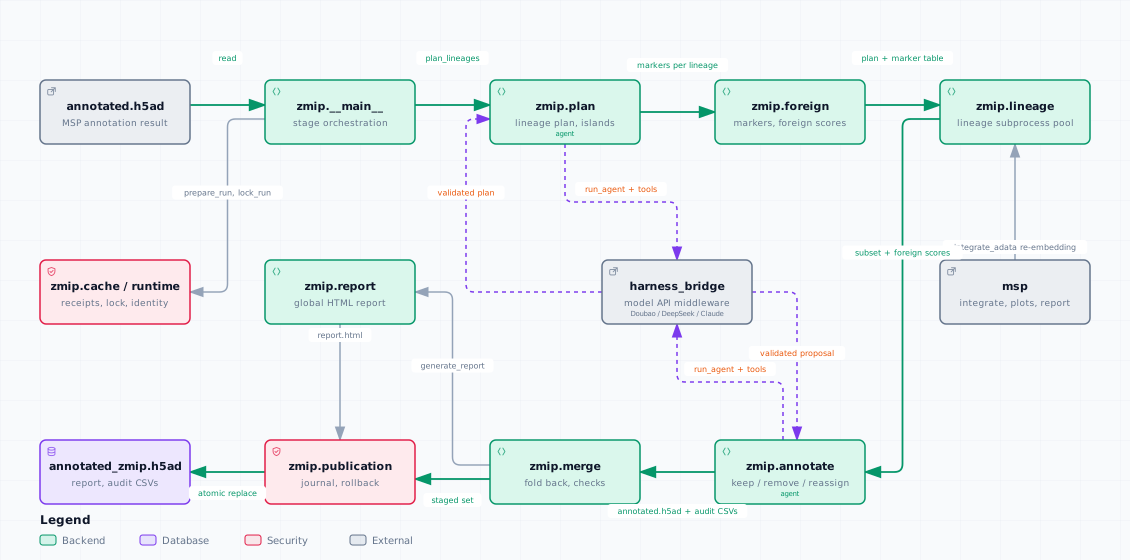
An AI assistant groups cells into lineages using the existing labels and embedding. Each selected lineage is re-embedded independently, then reviewed using marker genes, quality measurements, and signals from other lineages. The program checks the submitted decisions before merging the results back into the global dataset.
Click the diagram to open the interactive version, with pan, zoom, search, and guided views.
What you get
The output includes a refined H5AD, a global HTML report linking to detailed lineage reports, and cell-level records of removals and reassignments. Original MSP annotations remain available for comparison; retained cells keep their input expression, counts, and global embedding.
Get started
Start with MSP's annotated.h5ad, including its annotations, counts, batch
metadata, graph, and UMAP. Install from PyPI (Python 3.10 or newer; MSP and
the agent harness come with it), set your Volcengine Ark API key, then run:
python -m pip install zmip
export ARK_API_KEY="YOUR_ARK_API_KEY"
HARNESS=openai python -m zmip msp_out/annotated.h5ad --outdir zmip_out
Pass --design-context TEXT (same text as MSP's) when sample identity encodes the
study design, e.g. one FACS plate = one mouse x one sort gate; every lineage's
annotation agent sees it verbatim, so a sample-confined cluster is judged
against the design rather than as a batch artefact. Kept in zmip_out/design_context.txt.
Read your results
After a successful run, open zmip_out/report.html in your browser. Check
the lineage plan, follow the links to review local labels and supporting
genes, then inspect removed and reassigned populations. To share all reports,
copy the output directory with its subdirectories so the links still work.
| File | Contents |
|---|---|
report.html |
Global summary and links to lineage reports |
annotated_zmip.h5ad |
Retained cells with refined annotations |
zmip_removed.csv |
Removed cells and their recorded sources |
zmip_reassigned.csv |
Cells assigned to another lineage's coarse label |
<lineage>/report.html |
Local analysis, evidence, and annotation decisions |
Does ZMIP change my data?
Your input file stays unchanged. Cells removed by local filtering or the annotation agent are excluded from the final H5AD. Reassigned cells receive new labels; they are not re-embedded in the destination lineage during this run. Global plots retain MSP's embedding. See the input and output reference for fields and details.
Can I resume a run?
Repeat the same command to reuse completed, verified stages. Agent settings
such as --max-turns or --model may differ between runs; only unfinished
lineages use the new values. If you change the input, analysis settings, or
runtime, use a new output directory to keep both analyses, or add --force
to recompute the plan and all selected lineages. To rebuild only the global
report, run:
python -m zmip.report zmip_out
Validation
An isolated installation passed 99 tests, and an OpenAI/Doubao run completed the workflow on 256 Fu2022 cells, including independent data checks and resume without model calls. This checks the workflow at small scale; full-dataset performance and biological accuracy remain unvalidated. See validation records and remaining checks.
Further reading
ZMIP follows OSP for sample-level review and MSP for integration within the ECA-RSI workflow. See inputs and outputs for data conventions, runtime options for installation and configuration, and GitHub issues for questions or problems. ZMIP uses the MIT license.
1 maintainer

Metadata
1 maintainer
Release files for zmip 0.3.7
For a detailed explanation of source distributions (sdists) and built distributions (wheels), please see the package formats documentation.
Source distribution (sdist)
| File | Size | Uploaded | |
|---|---|---|---|
| zmip-0.3.7.tar.gz | 70.2 kB | Details |
Built distribution (wheel)
| File | Interpreter | ABI | Platform | Reset |
|---|---|---|---|---|
| zmip-0.3.7-py3-none-any.whl | Python 3 | none | any | Details |
Total release size: 125.2 kB
Release files / zmip-0.3.7.tar.gz
| Download URL | zmip-0.3.7.tar.gz |
|---|---|
| Size | 70.2 kB |
| Tags | Source |
|
SHA-256 checksum How to use checksums |
190e42aa32948385d83343ddcefece21a317fea41fad20debfda39f22412d9b0
|
|
BLAKE2b-256 checksum How to use checksums |
a772a533a9ac0f1d430595c00012e5620dacd8e0b2ff7a6e3bfce581557719a6
|
| Upload date | |
|
Uploaded using Trusted Publishing? What is trusted publishing? |
No |
| Uploaded via |
twine/7.0.0 CPython/3.12.1
|
Release files / zmip-0.3.7-py3-none-any.whl
| Download URL | zmip-0.3.7-py3-none-any.whl |
|---|---|
| Size | 55.0 kB |
| Tags | Python 3 |
|
SHA-256 checksum How to use checksums |
913cbaeb76db3bf87864e3276a2c1269f4a9ec3d45739880d66ef01a8276bbcf
|
|
BLAKE2b-256 checksum How to use checksums |
6c85ef56c0b437909cc3e4f1f95e2b058a3aa0faa205c1510c9698dab1a66ec0
|
| Upload date | |
|
Uploaded using Trusted Publishing? What is trusted publishing? |
No |
| Uploaded via |
twine/7.0.0 CPython/3.12.1
|














