
Zero-dependency, high-performance progress bar for HPC and workstations

Project description
zobar
Zero Overhead Bar



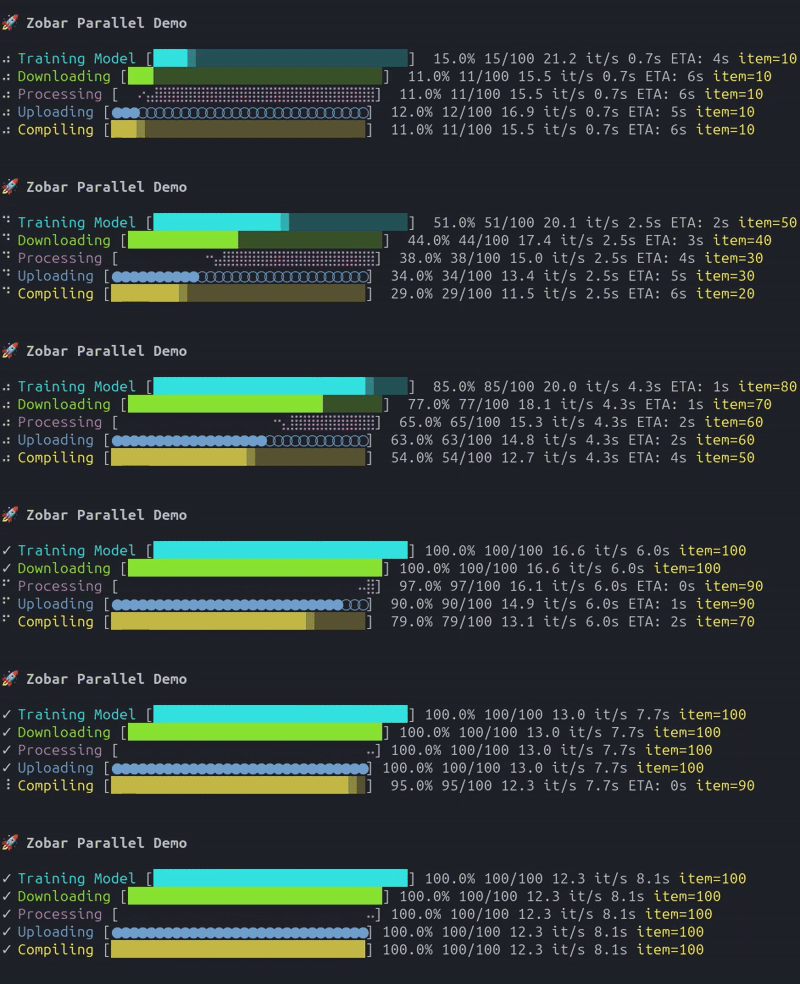
A zero-dependency, high-performance, hygienically correct progress bar for Python. Designed for HPC environments, workstations, and anywhere you need a progress bar that just works without breaking your terminal logs.
Features
- Zero Dependencies: strictly standard library (
sys,time,os,re). - Terminal Hygiene:
- Single ownership of stdout (logs go to stderr).
- Clears lines properly before redrawing.
- Clean exit with newline.
- Robust:
- ANSI-aware width calculation (doesn't break on colored text).
- Graceful degradation on non-TTY environments (e.g., piped output, CI/CD logs).
- Customizable: Supports various styles (classic, gradient, braille, etc.) and colors.
Installation
pip install zobar
Usage
Basic Usage
The simplest way to use it is with the progress_bar wrapper:
import time
from zobar import progress_bar

items = range(100)
for item in progress_bar(items, desc="Processing"):
    time.sleep(0.05)
Manual Control
For more control, use the AnimatedProgressBar context manager:
import time
from zobar import AnimatedProgressBar

total_steps = 50
with AnimatedProgressBar(total=total_steps, desc="Downloading", bar_style='braille', color='green') as pbar:
    for i in range(total_steps):
        time.sleep(0.1)
        pbar.update(1)
        if i % 10 == 0:
            pbar.set_suffix(f"Current file: {i}")
Parallel Progress Bars
For tracking multiple concurrent tasks, use ProgressBarGroup:
import time
from zobar import ProgressBarGroup

with ProgressBarGroup() as group:
    download = group.add_bar(total=100, desc="Download", color="green")
    process = group.add_bar(total=50, desc="Process", color="blue")
    upload = group.add_bar(total=75, desc="Upload", color="magenta")

    # Update each bar independently
    for i in range(100):
        download.update(1)
        if i % 2 == 0:
            process.update(1)
        if i > 50 and i % 3 == 0:
            upload.update(1)
        time.sleep(0.05)
Each bar can be updated independently, and the group handles all cursor positioning automatically.
Async Support
For async/await codebases, use the async context manager or async iterator:
import asyncio
from zobar import AnimatedProgressBar, async_progress_bar

# Async context manager
async with AnimatedProgressBar(total=100, desc="Processing") as pbar:
    for i in range(100):
        await asyncio.sleep(0.05)
        pbar.update(1)

# Async iterator wrapper
async for item in async_progress_bar(async_items, total=100, desc="Processing"):
    await process(item)
Indeterminate Progress Mode
For tasks where the total is unknown (streaming downloads, polling, etc.):
from zobar import AnimatedProgressBar

# Use total=None for indeterminate mode
with AnimatedProgressBar(total=None, desc="Streaming") as pbar:
    for item in stream_of_unknown_length():
        process(item)
        pbar.update(1)
In indeterminate mode, the bar shows a bouncing animation instead of percentage/ETA.
Unit Scaling
For large numbers, use auto-scaling to display human-readable units:
from zobar import AnimatedProgressBar

# Binary units for bytes (KiB, MiB, GiB)
total_bytes = 500 * 1024 * 1024  # 500 MiB
with AnimatedProgressBar(total=total_bytes, desc="Download", unit="B", unit_scale='binary') as pbar:
    for chunk in download_chunks():
        pbar.update(len(chunk))

# KMG units for large counts (K, M, B)
with AnimatedProgressBar(total=1500000, desc="Items", unit_scale='kmg') as pbar:
    for item in items:
        process(item)
        pbar.update(1)
Options for unit_scale:
'none'- No scaling (default)'kmg'- K/M/B suffixes (Kilo, Mega, Billion)'binary'- KiB/MiB/GiB suffixes (1024-based, for bytes)
Thread-Safe Usage
For multi-threaded applications, enable thread-safety with the thread_safe parameter:
from concurrent.futures import ThreadPoolExecutor
from zobar import AnimatedProgressBar

# Create a thread-safe progress bar
with AnimatedProgressBar(total=1000, desc="Processing", thread_safe=True) as pbar:
    with ThreadPoolExecutor(max_workers=4) as executor:
        def worker(items):
            for item in items:
                process(item)
                pbar.update(1)  # Safe to call from multiple threads

        # Distribute work among threads
        executor.submit(worker, items_chunk_1)
        executor.submit(worker, items_chunk_2)
        executor.submit(worker, items_chunk_3)
        executor.submit(worker, items_chunk_4)
Note: By default, progress bars are not thread-safe for better performance. Only enable thread_safe=True when using multiple threads. Each thread can safely call update() and set_suffix() on a thread-safe bar.
Styles
Available styles: classic, gradient, braille, circles, blocks.
Custom Colors
Beyond predefined colors, you can use RGB tuples or hex codes for unlimited color options:
from zobar import AnimatedProgressBar

# RGB tuple (red, green, blue) - values 0-255
with AnimatedProgressBar(total=100, desc="Custom", color=(255, 87, 51)):
    process()

# Hex color string (web-style)
with AnimatedProgressBar(total=100, desc="Brand", color="#FF5733"):
    process()

# Named colors still work
with AnimatedProgressBar(total=100, desc="Named", color="cyan"):
    process()
Named colors available: cyan, green, yellow, blue, magenta, red, white, black.
Available styles: classic, gradient, braille, circles, blocks.
API Reference
AnimatedProgressBar
The main progress bar class with full-featured display and control.
AnimatedProgressBar(
    total: int | None,
    desc: str = "",
    bar_style: BarStyleType = 'gradient',
    color: CustomColorInput = 'cyan',
    width: int = 35,
    unit: str = "it",
    unit_scale: UnitScaleType = 'none',
    smoothing: float = 0.3,
    log_interval: float = 30.0,
    log_timestamp: bool = False,
    thread_safe: bool = False,
)
Parameters:
total: Total items to process, orNonefor indeterminate modedesc: Description text shown before the barbar_style: Visual style -'classic','gradient','braille','circles','blocks'color: Color name, RGB tuple, or hex stringwidth: Width of progress bar in charactersunit: Unit label (e.g.,'it','B','file')unit_scale: Auto-scale units -'none','kmg','binary'smoothing: EMA smoothing factor for ETA (0=smooth, 1=instant)log_interval: Seconds between logs in non-TTY modelog_timestamp: Add timestamps to non-TTY log messagesthread_safe: Enable thread-safe operations with locking
Methods:
update(n=1): Increment progress by n stepsset_suffix(suffix): Set a suffix message to display
ProgressBarGroup
Manages multiple progress bars with automatic cursor positioning.
ProgressBarGroup(refresh_interval: float = 0.05)
Methods:
add_bar(total, desc="", ...): Add a new progress bar to the grouprefresh(): Force a refresh of all barsremove_bar(bar): Remove a bar from the group
progress_bar(iterable, desc="", total=None, **kwargs)
Synchronous iterator wrapper for progress tracking.
for item in progress_bar(items, desc="Processing"):
    process(item)
async_progress_bar(async_iterable, desc="", total=None, **kwargs)
Async iterator wrapper for progress tracking.
async for item in async_progress_bar(async_items, total=100):
    await process(item)
Migration from Other Libraries
From tqdm
# tqdm
from tqdm import tqdm
for item in tqdm(items, desc="Processing"):
    process(item)

# zobar (direct replacement)
from zobar import progress_bar
for item in progress_bar(items, desc="Processing"):
    process(item)
From rich.progress
# rich
from rich.progress import track
for item in track(items, description="Processing"):
    process(item)

# zobar (direct replacement)
from zobar import progress_bar
for item in progress_bar(items, desc="Processing"):
    process(item)
Key Differences:
- zobar has zero dependencies (vs rich's many dependencies)
- zobar logs to stderr (rich uses stdout)
- zobar has simpler API for most use cases
- rich offers more widgets/table formatting (use rich if you need those)
Changelog
v0.2.0
Major feature release with significant enhancements:
- Parallel Progress Bars: New
ProgressBarGroupclass for tracking multiple concurrent tasks - Async Support: Full async/await support with
async_progress_bar()and async context manager - Indeterminate Mode: Support for unknown totals with bouncing animation (
total=None) - Unit Scaling: Auto-format large numbers with K/M/B or KiB/MiB/GiB suffixes
- ETA Smoothing: Exponential moving average for stable time estimates
- Thread Safety: Optional locking for multi-threaded applications
- Custom Colors: RGB tuples and hex color codes for unlimited color options
- Timestamp Logging: Optional timestamps on non-TTY log messages
- Type Hints: Comprehensive type annotations throughout the codebase
- CI/CD: GitHub Actions workflow and pre-commit hooks
- API Documentation: Complete API reference and migration guide
v0.1.4
- Fixed suffix truncation by implementing multi-line wrapping and proper cursor management.
v0.1.3
- Added
log_intervalparameter for realtime logging in non-TTY environments (default: 30s).
v0.1.2
- Added suffix support in non-TTY logs.
License
MIT


Download files
Download the file for your platform. If you're not sure which to choose, learn more about installing packages.
Source Distribution
Built Distribution
Filter files by name, interpreter, ABI, and platform.
If you're not sure about the file name format, learn more about wheel file names.
Copy a direct link to the current filters
File details
Details for the file zobar-0.2.0.tar.gz.
File metadata
- Download URL: zobar-0.2.0.tar.gz
- Upload date:
- Size: 18.7 kB
- Tags: Source
- Uploaded using Trusted Publishing? No
- Uploaded via: twine/6.2.0 CPython/3.10.19
File hashes
| Algorithm | Hash digest | |
|---|---|---|
| SHA256 |
269913b723d3535511bfe60e2c9f97c53272ac5d8e2fdbaf2c26cea18430e3d8
|
|
| MD5 |
67f0c9de7ca6b577fd21a5cd216e31d8
|
|
| BLAKE2b-256 |
e397befd44b8812f41b44477d352d4fd3c4fbd791d29d4290749578280925887
|
File details
Details for the file zobar-0.2.0-py3-none-any.whl.
File metadata
- Download URL: zobar-0.2.0-py3-none-any.whl
- Upload date:
- Size: 13.8 kB
- Tags: Python 3
- Uploaded using Trusted Publishing? No
- Uploaded via: twine/6.2.0 CPython/3.10.19
File hashes
| Algorithm | Hash digest | |
|---|---|---|
| SHA256 |
b85dc2ddd056f349db69d89cd4774b48c191a5dcd0d5a5da8735f7e5d9ad6a5a
|
|
| MD5 |
044003ef849475a351870854d5931ef9
|
|
| BLAKE2b-256 |
ab46a1c968415171477e477c6d80add50baf20a202db44ba4e1d2f00d6d0d529
|






