
⚜ zoetty
What is zoetty?
zoetty turns terminal sessions into small, looping, animated clips made of plain SVG or HTML and CSS. No video, no GIF, no JavaScript.



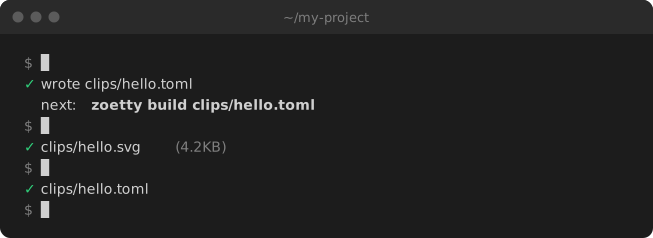
That's zoetty, recorded by zoetty. Every clip in this README is built from a spec in docs/clips/.
Why use zoetty?
Terminal GIFs go stale, weigh megabytes, look blurry, and have to be re-recorded by hand every time the output changes.
- Real output -
zoetty recordruns your commands in a real terminal and keeps their colours. - Small and sharp - A clip is a few KB of text, crisp at any size.
- Works in READMEs - The SVG is just an image: it plays on GitHub, PyPI and anywhere else that shows one.
- Or in your docs - The HTML fragment drops into any page, with selectable text.
- Kept in your repo - The spec is a short TOML file. When your tool changes, re-record and rebuild.
- Checked in CI -
zoetty checkfails if a clip is out of date.
Install
uv tool install zoetty
Or with pip:
pip install zoetty
zoetty needs Python 3.12 or later, and runs on macOS and Linux.
Quick start
zoetty init docs/clips/hello.toml    # write a starter spec
zoetty build docs/clips/hello.toml   # render it to docs/clips/hello.svg
Then put it in your README like any image:

A basic clip
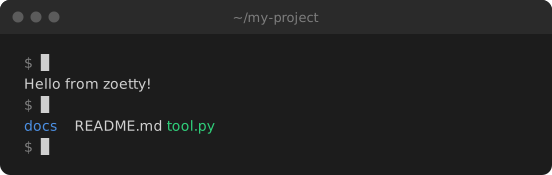
Two commands, with their output written by hand:
title = "~/my-project"
label = "Typing two commands in a terminal: echo prints a greeting, ls lists three files"
cols = 60

[[run]]
cmd = "echo 'Hello from zoetty!'"
lines = ["Hello from zoetty!"]

[[run]]
cmd = "ls"
lines = ["[blue]docs[/]  README.md  [green]tool.py[/]"]
Recording real output
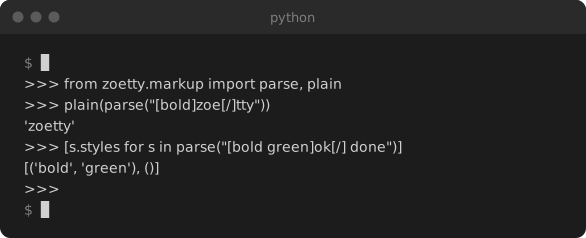
Give a run an output file and zoetty record runs the command for real and saves what it printed. input is typed into interactive programs, a line at a time, once each prompt is waiting:
title = "python"
label = "A Python REPL importing zoetty's markup parser and parsing some styled text"
cols = 64

[record]
env = { PYTHON_BASIC_REPL = "1" }

[[run]]
cmd = "python -q"
output = "captures/repl.ansi"
input = """
from zoetty.markup import parse, plain
plain(parse("[bold]zoe[/]tty"))
[s.styles for s in parse("[bold green]ok[/] done")]
"""
zoetty record docs/clips/repl.toml
zoetty build docs/clips/repl.toml
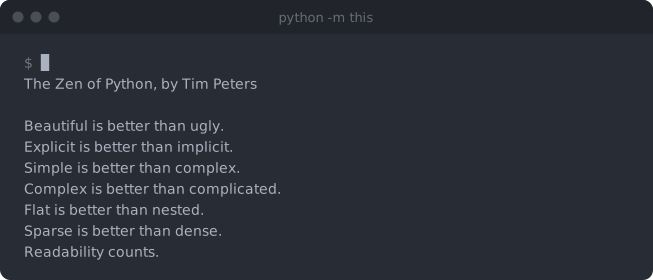
Long output scrolls once it passes rows, and [theme] recolours the whole window:
See more examples, including the HTML output and hand-timed clips.
Use it with your coding agent
zoetty is easy for coding agents to drive: specs are small text files, and every command says what it did. Paste this into Claude Code, Codex, Cursor or similar:
Use zoetty to add an animated terminal demo of this project to the README.
Read https://phalt.github.io/zoetty/agents/ first and follow it: install zoetty,
write a clip spec in docs/clips/ that shows the most useful commands, record the
real output with `zoetty record`, build it with `zoetty build`, look at the result,
embed the SVG in README.md, and add `zoetty check docs/clips/*.toml` to CI.
Documentation
👉 Read the full documentation for the clip format, every command, embedding clips and more examples.
Want to help? See CONTRIBUTING.md.
1 maintainer

Metadata
1 maintainer
Release files for zoetty 0.1.0
For a detailed explanation of source distributions (sdists) and built distributions (wheels), please see the package formats documentation.
Source distribution (sdist)
| File | Size | Uploaded | Provenance | Actions |
|---|---|---|---|---|
| zoetty-0.1.0.tar.gz | 133.0 kB | Without provenance | Details for zoetty-0.1.0.tar.gz |
Built distribution (wheel)
| File | Interpreter | ABI | Platform | Actions Reset |
|---|---|---|---|---|
| zoetty-0.1.0-py3-none-any.whl | Python 3 | none | any | Details for zoetty-0.1.0-py3-none-any.whl |
Total release size: 153.4 kB
Release files / zoetty-0.1.0.tar.gz
| Download URL | zoetty-0.1.0.tar.gz |
|---|---|
| Size | 133.0 kB |
| Tags | Source |
|
SHA-256 checksum How to use checksums |
3b41117c9dae65d4eb46c2625680377146844ed4e8af4884557aaf1323b2c17f
|
|
BLAKE2b-256 checksum How to use checksums |
088855de4b2b30305c0797bdd4ccca59c71e42735d32780b246ff05c3feb32b8
|
| Upload date | |
|
Uploaded using Trusted Publishing? What is trusted publishing? |
No |
| Uploaded via |
uv/0.13.7 {"installer":{"name":"uv","version":"0.13.7","subcommand":["publish"]},"python":null,"implementation":{"name":null,"version":null},"distro":{"name":"macOS","version":null,"id":null,"libc":null},"system":{"name":null,"release":null},"cpu":null,"openssl_version":null,"setuptools_version":null,"rustc_version":null,"ci":null}
|
Release files / zoetty-0.1.0-py3-none-any.whl
| Download URL | zoetty-0.1.0-py3-none-any.whl |
|---|---|
| Size | 20.4 kB |
| Tags | Python 3 |
|
SHA-256 checksum How to use checksums |
61f9058d7fcf40ce6626f46da06f8d141811d71014ec227c4867ed473f9ee60a
|
|
BLAKE2b-256 checksum How to use checksums |
8cf4fae8d36f691f41a4c733daa9a6e2f503bf7d3ba920fb3a2afa451cb9e445
|
| Upload date | |
|
Uploaded using Trusted Publishing? What is trusted publishing? |
No |
| Uploaded via |
uv/0.13.7 {"installer":{"name":"uv","version":"0.13.7","subcommand":["publish"]},"python":null,"implementation":{"name":null,"version":null},"distro":{"name":"macOS","version":null,"id":null,"libc":null},"system":{"name":null,"release":null},"cpu":null,"openssl_version":null,"setuptools_version":null,"rustc_version":null,"ci":null}
|
Security for zoetty 0.1.0
Provenance
Provenance describes where a file came from. On PyPI, provenance is shared via attestations, which provide a verifiable record of the build or publishing details. View details, limitations and caveats.
No provenance found
None of the files in this release were uploaded with provenance metadata.
A note on package security
PyPI is a repository for distributing packages, not a service for auditing them. While third-party security researchers and our staff do their best to detect and remove malicious packages, PyPI cannot guarantee the quality, security or suitability of any given package.
To learn more about protecting yourself from malicious actors, visit our package security documentation.













