
zomboid_rcon: Python RCON for Project Zomboid Servers
Version: 2.2.0
zomboid_rcon enables you to easily communicate with your Project Zomboid servers via RCON. With zomboid_rcon, you can send commands to your server, manage players, and more, all from within your Python script.
Installation
To get started, simply install zomboid-rcon using pip:
pip install zomboid-rcon
Usage
Using zomboid_rcon is easy. Here's a basic example:
from zomboid_rcon import ZomboidRcon

if __name__ == "__main__":
    pz = ZomboidRcon(ip='localhost', port=12345, password='myPassword')
    command = pz.servermsg("You dead yet?")
    print(command)
This example connects to a server running on your local machine and sends the message "You dead yet?".
zomboid_rcon provides several built-in methods for common server management tasks, such as getting a list of connected players:
from zomboid_rcon import ZomboidRcon

if __name__ == "__main__":
    pz = ZomboidRcon(ip='localhost', port=12345, password='myPassword')
    print(pz.players())
This example prints a list of all players currently connected to the server.
Available Commands
zomboid_rcon provides built-in methods for the available RCON commands within Project Zomboid.
These methods are aligned with the Project Zomboid Build 42.20.2 command list: https://pzwiki.net/wiki/Admin_commands.
General Commands
additem("user", "item"): Gives a player an item. Items can be found on the PZ wiki: https://pzwiki.net/wiki/Itemsadditem("user", "item", count): As above, with an optional item count.addkey("user", key_id): Gives a key to a player.addkey("user", key_id, "name"): Gives a named key to a player.addvehicle("vehiclescript", "target"): Spawns a vehicle near a player or atx,y,z.addxp("user", "perk", xp): Gives XP to a player.alarm(): Sounds a building alarm at the admin's position. Must be in a room.changeoption("option", "newOption"): Changes a server option.chopper(): Places a helicopter event on a random player.changepwd("pwd", "newPwd"): Changes your password.createhorde(count): Spawns a horde near you.createhorde(count, "username"): Spawns a horde near a specific player.createhorde2(*args): Runs the game's currently undocumentedcreatehorde2command.godmode("user"): Makes a player invincible (default: true).godmode("user", False): Removes invincibility from a player.godmodeplayer("user", value): Changes god mode for another player.gunshot(): Places a gunshot sound on a random player.help(): Lists native server commands.help("command"): Shows native help for a specific command.invisible("user"): Makes a player invisible to zombies (default: true).invisible("user", False): Makes a player visible to zombies again.invisibleplayer("user", value): Changes invisibility for another player.lightning(): Triggers a lightning strike on a random player.lightning("user"): Triggers a lightning strike on a specific player.log("type", "level"): Sets the log level for a log type.noclip("user"): Allows a player to pass through solid objects (default: true).noclip("user", False): Disables noclip for a player.quit(): Saves and quits the server.releasesafehouse(): Releases a safehouse you own.reloadlua("filename"): Reload a lua script on the server.reloadoptions(): Reloads server options.save(): Saves the current world.sendpulse(): Toggles sending server performance info to the client.showoptions(): Shows a list of current server options and values.startrain(): Starts rain on the server.startrain(intensity): Starts rain at a specific intensity (1–100).startstorm(): Starts a storm on the server.startstorm(duration): Starts a storm with a specific duration in game hours.stats("mode"): Sets server statistics mode (none/file/console/all).stats("mode", period): As above, with a reporting period.stoprain(): Stops rain on the server.stopweather(): Stops all weather on the server.teleport("user"): Teleports yourself to a player.teleport("user", "toUser"): Teleports one player to another.teleportplayer("user", "toUser"): Teleports one player to another using the Build 42-specific command.teleportto(x, y, z): Teleports to certain coordinates.thunder(): Triggers a thunder event on a random player.thunder("user"): Triggers a thunder event on a specific player.
Moderation Commands
addalltowhitelist(): Adds all current users connected with a password to the whitelist.addsteamid("SteamID"): Adds a Steam ID to the server's allowed list.addtosafehouse(*args): Runs the game's currently undocumentedaddtosafehousecommand.adduser("user", "pwd"): Adds a new user to the whitelist.addusertowhitelist("user"): Adds a single user connected with a password to the whitelist.removeuserfromwhitelist("user"): Removes a single user from the whitelist.banid("SteamID"): Bans a Steam ID.banip("IP"): Bans an IP address.unbanid("SteamID"): Unbans a Steam ID.unbanip("IP"): Unbans an IP address.banuser("user"): Bans a user.banuser("user", ip=True): Bans a user and their IP address.banuser("user", reason="reason"): Bans a user with a reason.banuser("user", ip=True, reason="reason"): Bans a user, their IP, with a reason.unbanuser("user"): Unbans a user.checkModsNeedUpdate(): Indicates whether a mod has been updated. Writes answer to log file.grantadmin("user"): Gives admin rights to a user.removeadmin("user"): Removes admin rights from a user.kickuser("user"): Kicks a user from the server.kickuser("user", reason="reason"): Kicks a user with a reason.kickfromsafehouse(*args): Runs the game's currently undocumentedkickfromsafehousecommand.list(*args): Runs the game's currently undocumentedlistcommand.players(): Lists all connected players.reloadalllua(): Reloads all Lua scripts.remove(*args): Runs the game's currently undocumentedremovecommand.removeitem("module.item", count): Removes items from the command issuer; zero removes all of that type.removemapsymbolsforuser("user"): Removes all shared map symbols for a user.removesteamid("SteamID"): Removes a Steam ID from the server's allowed list.removezombies(*args): Runs the game's currently undocumentedremovezombiescommand.servermsg("message"): Broadcast a message to all players. (Spaces are replaced with underscores for compatibility)setaccesslevel("user", [user | priority | observer | gm | moderator | admin]): Sets a player's Build 42 access level.setpassword("user", "newPassword"): Changes a user's password.voiceban("user", [-true | -false]): Ban a user from using the voice feature.worldgen([start | recheck | stop | status]): Controls Build 42's full world generator.
The Build 42 commands whose syntax is still undocumented accept positional string arguments unchanged, so they remain usable as their in-game help is completed.
Build 41 compatibility
Build 42 removed replay and no longer lists clear. Their methods remain available
for Build 41 servers as replay("user", "-record|-play|-stop", "filename") and
clear(), but emit UserWarning because Build 42 may reject them.
Command not listed?
You can execute any custom command using the command method:
pz.command("command", "arg1", "arg2", "etc")
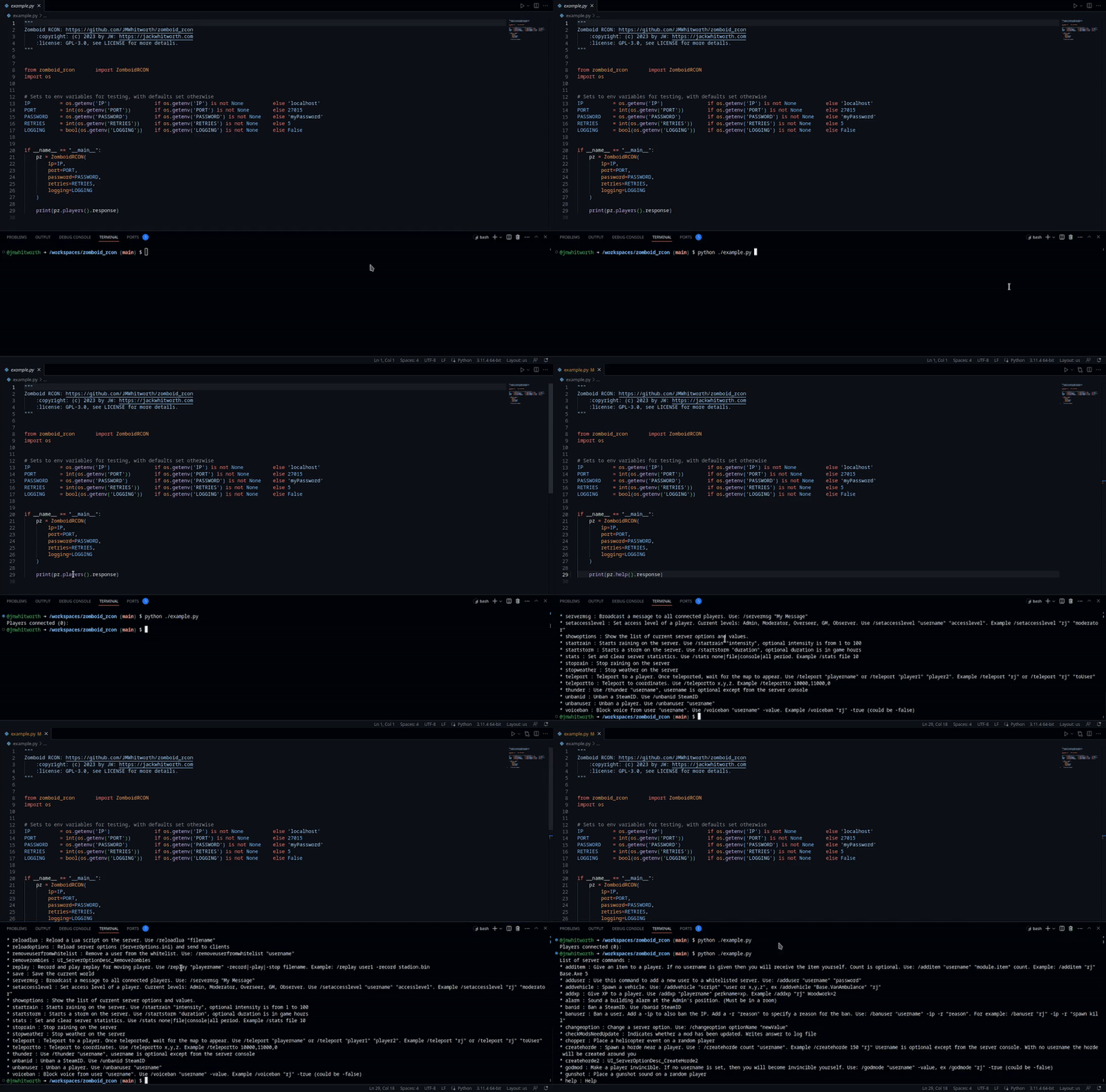
Demonstration
Known Issues
Please raise any issues in the GitHub repo.
Contributing
We welcome contributions from anyone! If you would like to contribute to the project, please open an issue or submit a pull request on Github.
Testing
Tests can be ran using unittest:
python -m unittest
License
zomboid_rcon is licensed under the GPL-3.0 license.
1 maintainer

Metadata
1 maintainer
Release files for zomboid-rcon 2.2.0
For a detailed explanation of source distributions (sdists) and built distributions (wheels), please see the package formats documentation.
Source distribution (sdist)
| File | Size | Uploaded | |
|---|---|---|---|
| zomboid_rcon-2.2.0.tar.gz | 52.7 kB | Details |
Built distribution (wheel)
| File | Interpreter | ABI | Platform | Reset |
|---|---|---|---|---|
| zomboid_rcon-2.2.0-py3-none-any.whl | Python 3 | none | any | Details |
Total release size: 88.4 kB
Release files / zomboid_rcon-2.2.0.tar.gz
| Download URL | zomboid_rcon-2.2.0.tar.gz |
|---|---|
| Size | 52.7 kB |
| Tags | Source |
|
SHA-256 checksum How to use checksums |
a13df7da02735a52f0d26e40ca265401e54e20fb6be68bdc8af6efec81705775
|
|
BLAKE2b-256 checksum How to use checksums |
02359ddb71da7d5f0157fc5235291708603b41443e9b82adf7d2d41181adda31
|
| Upload date | |
|
Uploaded using Trusted Publishing? What is trusted publishing? |
No |
| Uploaded via |
twine/6.2.0 CPython/3.9.25
|
Release files / zomboid_rcon-2.2.0-py3-none-any.whl
| Download URL | zomboid_rcon-2.2.0-py3-none-any.whl |
|---|---|
| Size | 35.7 kB |
| Tags | Python 3 |
|
SHA-256 checksum How to use checksums |
3d3c30edb7d5c19905e0f482e18eff3fbc6889dd4881a9a47ee757a476484819
|
|
BLAKE2b-256 checksum How to use checksums |
da61eaecf6df42c2fa579b80fb81fe42d44befe238f5c3bb039fb369b0c00fbc
|
| Upload date | |
|
Uploaded using Trusted Publishing? What is trusted publishing? |
No |
| Uploaded via |
twine/6.2.0 CPython/3.9.25
|














