
ZoomEye is a cyberspace search engine, users can search for network devices using a browser https://www.zoomeye.ai.
ZoomEye-python is a Python library developed based on the ZoomEye API. It provides the ZoomEye command line mode and can also be integrated into other tools as an SDK. The library allows technicians to search ZoomEye data more conveniently.
0x01 installation
It can be installed directly from pypi:
pip3 install zoomeyeai
or installed from github:
pip3 install git+https://github.com/zoomeye-ai/ZoomEye-python
0x02 how to use cli
After successfully installing ZoomEye-python, you can use the zoomeyeai command directly, as follows:
$ zoomeyeai -h
usage: zoomeyeai [-h] [-v] {init,info,search} ...
 positional arguments:
   {init,info,search}
     init                Initialize the token for ZoomEye-python
     info                Show ZoomEye account info
     search              Search the ZoomEye database

 optional arguments:
   -h, --help            show this help message and exit
   -v, --version         show program's version number and exit
1.initialize token
Before using the ZoomEye-python cli, the user token needs to be initialized. The credential is used to verify the user’s identity to query data from ZoomEye; only support API-KEY authentication methods.
You can view the help through zoomeyeai init -h, and use APIKEY to demonstrate below:
$ zoomeyeai init -apikey "01234567-acbd-00000-1111-22222222222"
successfully initialized
Role: developer
Quota: 10000
Users can login to ZoomEye and obtain APIKEY in personal information (https://www.zoomeye.ai/profile); APIKEY will not expire, users can reset in personal information according to their needs.
2.query quota
Users can query personal information and data quota through the info command, as follows:
$ zoomeyeai info
 "email": "",
 "username:": "",
 "phone", "",
 "created_at:": ""
 "quota": {
     "plan": "" ,                # service level
     "end_date": "",             # service end date
     "points": "",               # This month remaining free amount
     "zoomeye_points": "",       # Amount of remaining payment this month
 }
3.search
Search is the core function of ZoomEye-python, which is used through the search command. the search command needs to specify the search keyword (dork), let’s perform a simple search below:
$ zoomeyeai search "telnet"
 ip                  port             domain               update_time
 192.53.120.134      7766             [unknown]            2024-12-06T15:20:08

total: 1
Using the search command is as simple as using a browser to search in ZoomEye. by default, we display four more important fields. users can use these data to understand the target information:
1.ip             ip address
2.port           port
3.domain         domain of the target
4.update_time    update time of the target
In the above example, the number to be displayed is specified using the -pagesize parameter. in addition, search also supports the following parameters (zoomeyeai search -h) so that users can handle the data. we will explain and demonstrate below.
-h, --help            show this help message and exit
-facets facets        if this parameter is specified, the corresponding data
                      will be displayed at the end of the returned result.
                      supported : 'product', 'device', 'service', 'os',
                      'port', 'country', 'subdivisions', 'city'
-fields field=regexp  display data based on input fields please see:
                      https://www.zoomeye.ai/doc/
-sub_type {v4,v6,web,all}
                      specify the type of data to search
-page page            view the page of the query result
-pagesize pagesize    specify the number of pagesize to search
-figure {pie,hist}    Pie chart or bar chart showing data,can only be used
                      under facet and stat
4.graphical data
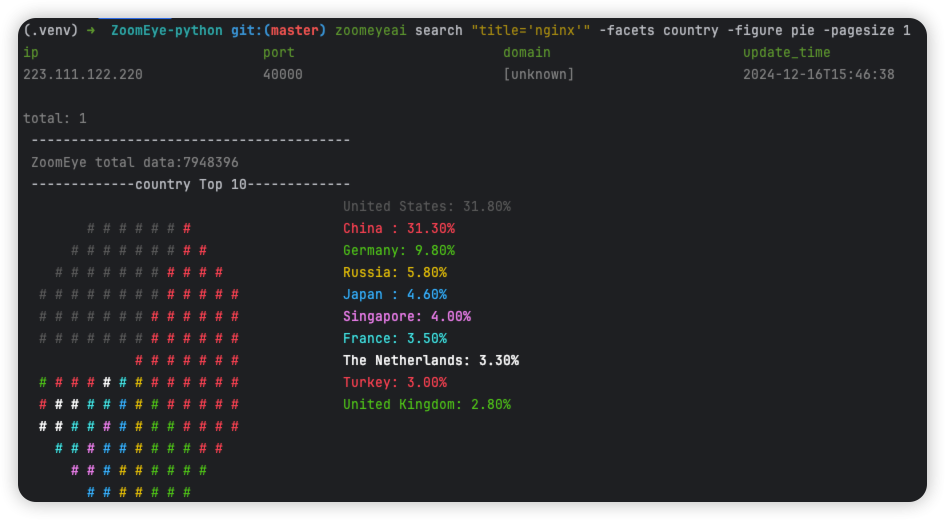
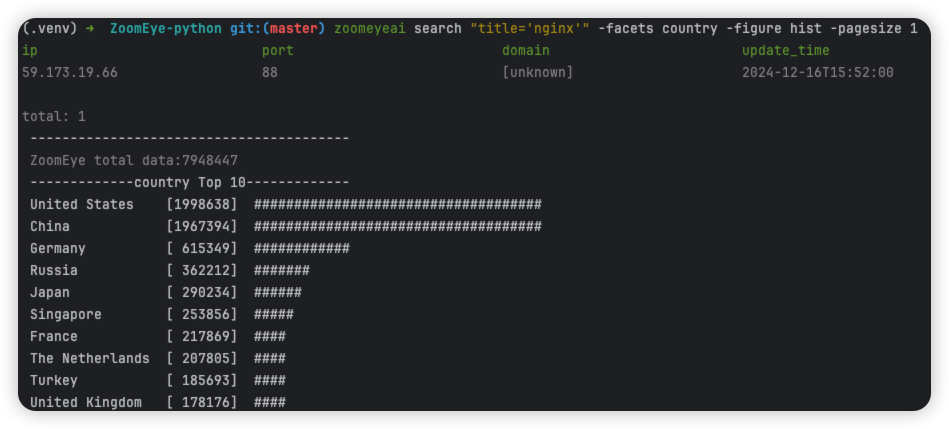
The -figure parameter is a data visualization parameter. This parameter provides two display methods: pie (pie chart) and hist (histogram). The data will still be displayed without specifying it. When -figure is specified , Only graphics will be displayed. The pie chart is as follows:
The histogram is as follows:
0x03 use SDK
1.initialize token
Similarly, the SDK also supports API-KEY authentication methods, APIKEY, as follows:
APIKEY
from zoomeyeai.sdk import ZoomEye

zm = ZoomEye(api_key="01234567-acbd-00000-1111-22222222222")
2.SDK API
The following are the interfaces and instructions provided by the SDK:
- ::
- 1.userinfo()
get current user information
- 2.search(dork, qbase64=’’, page=1, pagesize=20, sub_type=’all’, fields=’’, facets=’’)
get network asset information based on query conditions.
3.SDK example
$ python3
   >>> import zoomeyeai.sdk as zoomeye
   >>> # Use API-KEY search
   >>> zm = zoomeye.ZoomEye(api_key="01234567-acbd-00000-1111-22222222222")
   >>> data = zm.search('country=cn')
   ip                            port                          domain                        update_time
   192.53.120.134                7766                          [unknown]                     2024-12-06T15:20:08
...
0x04 issue

1 maintainer

Metadata
1 maintainer
Release files for zoomeyeai 3.0.1
For a detailed explanation of source distributions (sdists) and built distributions (wheels), please see the package formats documentation.
Source distribution (sdist)
| File | Size | Uploaded | Provenance | |
|---|---|---|---|---|
| zoomeyeai-3.0.1.tar.gz | 22.8 kB | Without provenance | Details |
Built distribution (wheel)
| File | Interpreter | ABI | Platform | Reset |
|---|---|---|---|---|
| zoomeyeai-3.0.1-py3-none-any.whl | Python 3 | none | any | Details |
Total release size: 46.2 kB
Release files / zoomeyeai-3.0.1.tar.gz
| Download URL | zoomeyeai-3.0.1.tar.gz |
|---|---|
| Size | 22.8 kB |
| Tags | Source |
|
SHA-256 checksum How to use checksums |
5815f87ce4d55fed007125e63b9011f0ab1d9524162739b0ea2d3fbaac8353a7
|
|
BLAKE2b-256 checksum How to use checksums |
93055df42ef6b19ccbc514d759764077ad3223ca655bc51e3c8f3c359af553c1
|
| Upload date | |
|
Uploaded using Trusted Publishing? What is trusted publishing? |
No |
| Uploaded via |
twine/6.1.0 CPython/3.13.1
|
Release files / zoomeyeai-3.0.1-py3-none-any.whl
| Download URL | zoomeyeai-3.0.1-py3-none-any.whl |
|---|---|
| Size | 23.4 kB |
| Tags | Python 3 |
|
SHA-256 checksum How to use checksums |
ea00f2e294646b688d87a7451d3ec207404387ada15a1ecced17cf820f65b0f4
|
|
BLAKE2b-256 checksum How to use checksums |
34b3395ff99b77dadf046c82bf3949fbfb5ece77d90a616a988a334d50bb7654
|
| Upload date | |
|
Uploaded using Trusted Publishing? What is trusted publishing? |
No |
| Uploaded via |
twine/6.1.0 CPython/3.13.1
|
Security for zoomeyeai 3.0.1
Provenance
Provenance describes where a file came from. On PyPI, provenance is shared via attestations, which provide a verifiable record of the build or publishing details. View details, limitations and caveats.
No provenance found
None of the files in this release were uploaded with provenance metadata.
A note on package security
PyPI is a repository for distributing packages, not a service for auditing them. While third-party security researchers and our staff do their best to detect and remove malicious packages, PyPI cannot guarantee the quality, security or suitability of any given package.














