

Search inside every PDF of your Zotero library, and land on the right page.







Why
Zotero's search tells you which items match. ZoteGrep shows where: every occurrence across the whole library, with its sentence and page number, and one click opens the PDF on that page with the match selected. It also understands what a literature search needs: phrases, exclusions, two words close to each other, regular expressions, and your own notes and annotations.
It runs on your computer, from the terminal or in your browser. Your PDFs and your index never leave it: the only server ZoteGrep talks to is the Zotero API.
Install
pipx install zotegrep # or: pip install zotegrep
Python 3.10 or newer, on Linux, macOS or Windows. For scanned PDFs, install
Tesseract too (apt install tesseract-ocr,
brew install tesseract, or the Windows installer): ZoteGrep finds it on its own and reads those pages with OCR.
Quick start
You need your Zotero user ID and an API key with read access, both on zotero.org/settings/security.
zotegrep library add 1234567 --key <your API key>   # --group for a group library (its ID is in its URL)
zotegrep sync                                       # download the PDFs and index every page
zotegrep search 'point adjust NEAR/5 F1'            # search from the terminal
zotegrep serve                                      # or in the browser, at http://localhost:21824
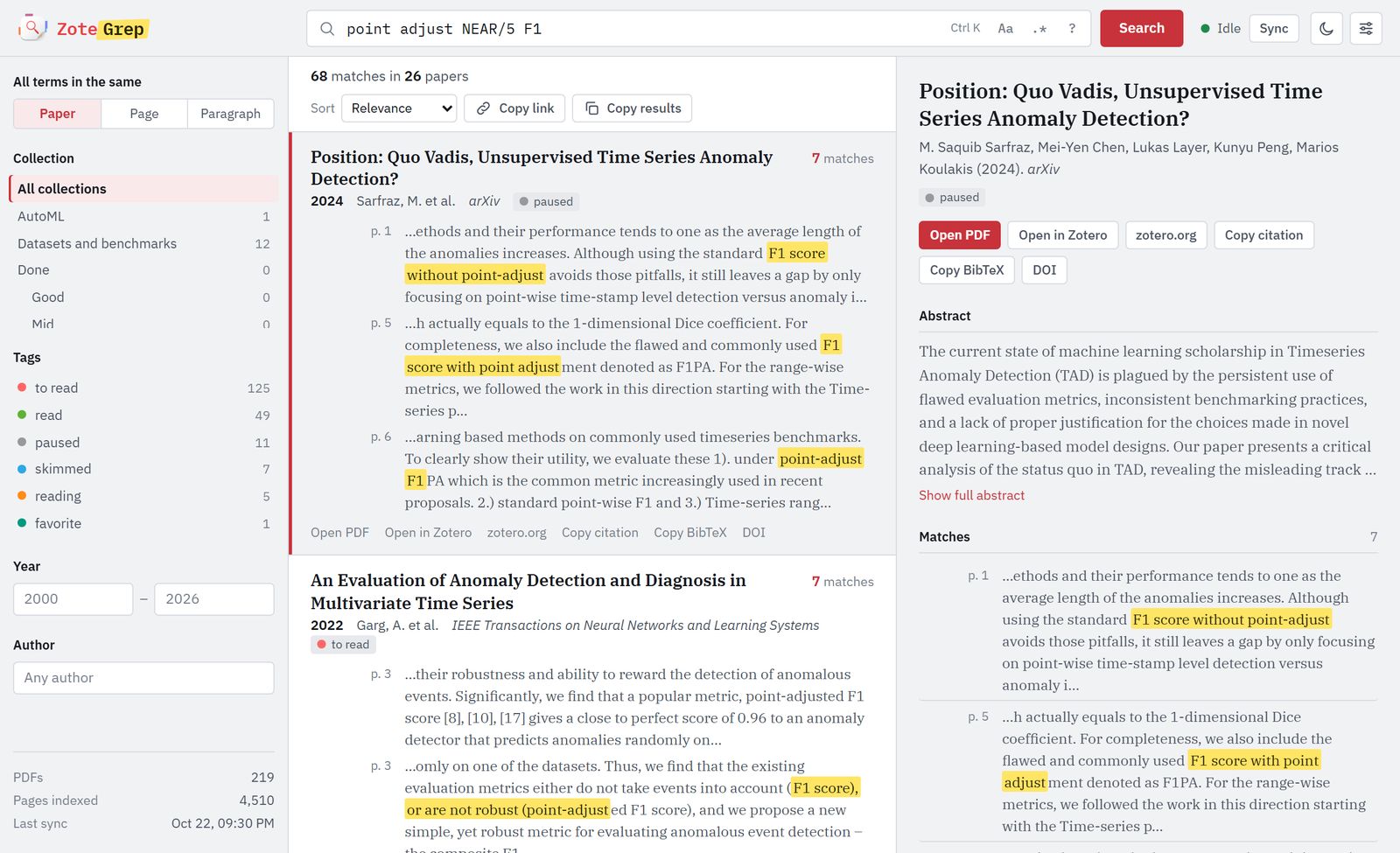
Position: Quo Vadis, Unsupervised Time Series Anomaly Detection?  7 matches
  2024 · Sarfraz, M. et al. · arXiv
      p. 1  ...Although using the standard F1 score without point-adjust avoids those pitfalls, it still...
      p. 5  ...we also include the flawed and commonly used F1 score with point adjustment denoted as F1PA...
  key 3XQ8ZK2M · 5 more · zotero://select/library/items/7HN4CW9T

An Evaluation of Anomaly Detection and Diagnosis in Multivariate Time Series  7 matches
  2022 · Garg, A. et al. · IEEE Transactions on Neural Networks and Learning Systems
      p. 3  ...we find that a popular metric, point-adjusted F1 score [8], [10], [17] gives a close to...
The web interface does the same, plus library settings, so you can also start with zotegrep serve and add
your library from its Settings button.
What you can type
| You type | You get |
|---|---|
time series |
time series, time-series, timeseries, Time Series; accents, curly quotes and dashes don't matter |
anomaly, transformer |
both, in the same paper, page or paragraph (you pick the scope) |
mamba OR s4 |
either one |
anomaly, -forecasting |
papers about anomalies that never mention forecasting (NOT works too) |
"RAG" |
the exact word or phrase: RAG, not fragment |
point adjust NEAR/5 F1 |
both within 5 words of each other, in any order |
regex mode (-E, or .* in the browser) |
the whole query is one regular expression |
The search covers the PDF text, titles, authors, abstracts, and your Zotero notes and annotations. It can be narrowed to a library, a collection (subcollections included), tags, years or an author; with no query, these filters simply list the matching papers.
In the browser
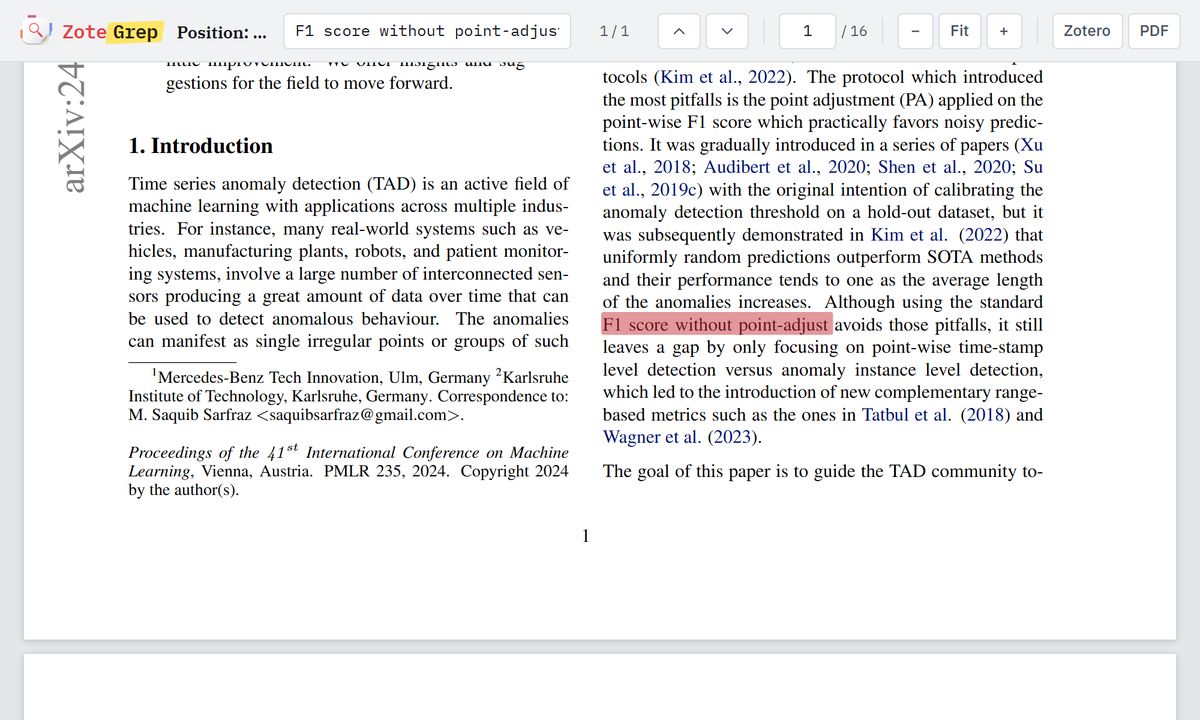
- Every match, in context. Papers come with their first snippets and page numbers; a side panel shows the abstract and all the matches. Clicking a snippet opens the built-in PDF viewer on that page.
- Filters that mirror Zotero. Collection tree, tags in their Zotero colors, years, authors, several libraries.
- Back to Zotero in one click. Open the item in the desktop app or on zotero.org, copy its APA citation or its BibTeX (generated by Zotero), follow its DOI.
- Results stream in as they are found, shareable URLs, keyboard navigation (Ctrl K,
arrows, Enter), light and dark themes, works on a phone. While
zotegrep serveruns, it syncs with Zotero every 10 minutes (configurable).
In the terminal
| Command | What it does |
|---|---|
zotegrep library add ID [--group] [--key KEY] [--name NAME] |
add a library (the key is asked for if omitted) |
zotegrep library list · edit ID · remove ID |
list, rename or re-key, remove (with its local data) |
zotegrep sync |
download new or changed PDFs and index them; Ctrl C stops cleanly |
zotegrep search QUERY |
search: --scope page, --collection, --tag, --since, --until, --author, -c case, -E regex, --sort, -n papers, -s snippets |
zotegrep search QUERY -l · --json |
only the matching papers, or one JSON object per paper for scripts |
zotegrep serve [--port N] [--no-browser] |
the web interface |
zotegrep status |
where things are, what is indexed, whether OCR is available |
Like grep, zotegrep search exits with 0 when something matched, 1 when nothing did, 2 on error.
How it works
flowchart LR
  Z["Zotero<br/>Web API"] --> X["New or changed PDFs,<br/>text of each page<br/>(OCR for scans)"]
  X --> N["Clean and fold<br/>ligatures, hyphens,<br/>accents, punctuation"]
  N --> I[("SQLite<br/>FTS5 trigram<br/>index")]
  I --> M["Exact patterns on<br/>candidate pages"]
  Q["Your query<br/>AND, OR, NOT,<br/>NEAR, regex"] --> M
  M --> R["Ranked papers,<br/>streamed as found"]
Matching works like grep, on substrings: the trigram index only narrows the search to the pages that can contain
every term. The patterns run on a folded copy of each page that has exactly the same length as the original, so
every match maps back to the very characters shown in the snippet and in the PDF. Relevance counts matches per page
with diminishing returns, weighs rare terms more and doubles title matches, so a 200-page thesis does not bury a
10-page paper about exactly your topic. On a Raspberry Pi, a search across 234 papers (4,868 pages) takes 0.2 to
0.8 s.
The sync only downloads new or changed PDFs, does not list the library again while its version stays the same, indexes duplicate files once, and simply retries later a PDF that Zotero has not uploaded yet. The PDFs must be stored on zotero.org (Zotero Storage): the Web API cannot reach linked files or WebDAV.
Configuration
Everything lives in two places, shown by zotegrep status: a config.json file (libraries, API keys, sync
interval) in your user configuration folder, and a data folder with the SQLite index and the downloaded PDFs.
Setting ZOTEGREP_HOME, or passing --home DIR, keeps both under one directory instead.
| Variable | Purpose |
|---|---|
ZOTEGREP_HOME |
one directory for the configuration and the data |
ZOTEGREP_OCR_LANGUAGES |
Tesseract languages, e.g. eng+deu (default: English and French when installed) |
TESSDATA_PREFIX |
where Tesseract's language data is, if it is not found automatically |
Security. There are no accounts: the web interface listens on 127.0.0.1 only, refuses requests whose Host
is not this machine (DNS rebinding) and writes coming from other websites. API keys never reach the browser, and
the configuration file is readable by your user only. zotegrep serve --host 0.0.0.0 opens it to your network,
with a warning, since anyone who reaches it can use it.
Development
git clone https://github.com/marcpinet/zotegrep && cd zotegrep
python -m venv .venv && .venv/bin/pip install -e ".[test]"      # Windows: .venv\Scripts\pip
.venv/bin/pytest
The tests run offline in a few seconds: a fake Zotero client and generated PDFs exercise the sync, the search, the
web API and the command line. To release, bump __version__ in src/zotegrep/__init__.py and push to main: the
pypi.yml workflow builds the package, tests the wheel, publishes it to PyPI and
creates the matching GitHub release.
src/zotegrep/
  cli.py       command line
  web.py       local web server and JSON API
  search.py    query language, FTS5 preselection, matching, relevance
  sync.py      Zotero sync: metadata, PDFs, collections, notes and annotations
  store.py     SQLite schema and queries
  text.py      PDF text extraction, OCR, normalization
  config.py    configuration file and paths
  static/      web interface, PDF viewer (PDF.js), fonts (IBM Plex)
License
AGPL-3.0-or-later. Bundled: PDF.js (Apache-2.0) and the IBM Plex fonts (SIL Open Font License 1.1).
1 maintainer

Metadata
1 maintainer
Release files for zotegrep 0.1.0
For a detailed explanation of source distributions (sdists) and built distributions (wheels), please see the package formats documentation.
Source distribution (sdist)
| File | Size | Uploaded | Provenance | |
|---|---|---|---|---|
| zotegrep-0.1.0.tar.gz | 2.5 MB | Without provenance | Details |
Built distribution (wheel)
| File | Interpreter | ABI | Platform | Reset |
|---|---|---|---|---|
| zotegrep-0.1.0-py3-none-any.whl | Python 3 | none | any | Details |
Total release size: 5.1 MB
Release files / zotegrep-0.1.0.tar.gz
| Download URL | zotegrep-0.1.0.tar.gz |
|---|---|
| Size | 2.5 MB |
| Tags | Source |
|
SHA-256 checksum How to use checksums |
8b6c2990fe54b1ad448f521e2012d8d9fa3615fa8d15e78ec146c4fd6a3d17c6
|
|
BLAKE2b-256 checksum How to use checksums |
7a911fcb62eaa48f826de2379028e0e75baf7f0655bdd044343cbc9ea47cf008
|
| Upload date | |
|
Uploaded using Trusted Publishing? What is trusted publishing? |
No |
| Uploaded via |
twine/7.0.0 CPython/3.13.16
|
Release files / zotegrep-0.1.0-py3-none-any.whl
| Download URL | zotegrep-0.1.0-py3-none-any.whl |
|---|---|
| Size | 2.6 MB |
| Tags | Python 3 |
|
SHA-256 checksum How to use checksums |
7e905cf9bfbed075d5ea597f8109ec6f11c668712d8b718d7b8e4be78267e36e
|
|
BLAKE2b-256 checksum How to use checksums |
3f029fc0790fd0a25be44ad6de398b87922d03964caecd635df2abbc3c235d0e
|
| Upload date | |
|
Uploaded using Trusted Publishing? What is trusted publishing? |
No |
| Uploaded via |
twine/7.0.0 CPython/3.13.16
|
Security for zotegrep 0.1.0
Provenance
Provenance describes where a file came from. On PyPI, provenance is shared via attestations, which provide a verifiable record of the build or publishing details. View details, limitations and caveats.
No provenance found
None of the files in this release were uploaded with provenance metadata.
A note on package security
PyPI is a repository for distributing packages, not a service for auditing them. While third-party security researchers and our staff do their best to detect and remove malicious packages, PyPI cannot guarantee the quality, security or suitability of any given package.
To learn more about protecting yourself from malicious actors, visit our package security documentation.













