
Your Automation Powerhouse

Project description

🤖 Zrb: Your Automation Powerhouse
Zrb (Zaruba) is a Python-based tool that makes it easy to create, organize, and run automation tasks. Think of it as a command-line sidekick, ready to handle everything from simple scripts to complex, AI-powered workflows.
Whether you're running tasks from the terminal or a sleek web UI, Zrb streamlines your process with task dependencies, environment management, and even inter-task communication.
Contribution Guidelines | Report an Issue
📑 Table of Contents
- 🔥 Why Choose Zrb?
- 🚀 Quickstart Part 1: Your First Basic Pipeline
- 🚀 Quickstart Part 2: AI-Powered Workflow
- 🖥️ Try the Web UI
- 💬 Interact with an LLM Directly
- 🧩 Program Your AI Agent
- ⚙️ Installation & Configuration
- 🤝 CI/CD Integration
- 🗺️ Documentation Directory
- 🎥 Demo Video
- 💖 Support Zrb
- 🎉 Fun Fact
🔥 Why Choose Zrb?
Zrb is designed to be powerful yet intuitive, offering a unique blend of features:
- 🤖 A Coding Agent You Program in Python: Zrb ships a turnkey AI coding assistant (
zrb llm chat), but its behavior is yours to shape in pure Python — custom tools, lifecycle hooks, dynamic prompts, permission policies, and history processors are all just code. And the agent drops straight into your task pipelines as a first-class node. - 🐍 Pure Python: Write your tasks in Python. No complex DSLs or YAML configurations to learn.
- 🔗 Smart Task Chaining: Define dependencies between tasks to build sophisticated, ordered workflows.
- 💻 Dual-Mode Execution: Run tasks from the command line for speed or use the built-in web UI for a more visual experience.
- ⚙️ Flexible Configuration: Manage inputs with defaults, prompts, or command-line arguments. Handle secrets and settings with environment variables from the system or
.envfiles. - 🗣️ Cross-Communication (XCom): Allow tasks to safely exchange small pieces of data.
- 🌍 Open & Extensible: Zrb is open-source. Feel free to contribute, customize, or extend it to meet your needs.
🚀 Quickstart Part 1: Your First Basic Pipeline in < 2 Minutes
Let's start with the absolute basics: defining simple units of work and chaining them together. You only need Python installed.
1. Define Your Tasks
Create a file named zrb_init.py in your project directory (or your home directory for global access!).
# zrb_init.py
from zrb import cli, CmdTask, Task

# 1. Define tasks.
# CmdTask is perfect for running shell commands.
prepare_env = CmdTask(
    name="prepare-env",
    cmd="echo 'Environment prepared!'"
)

# Task is for pure Python logic.
build_app = Task(
    name="build-app",
    action=lambda ctx: ctx.print("Building application in pure Python...")
)

deploy_app = CmdTask(
    name="deploy-app",
    cmd="echo 'Deploying app to the cloud ☁️'"
)

# 2. Register tasks to the main 'cli' object so Zrb knows about them
cli.add_task(prepare_env)
cli.add_task(build_app)
cli.add_task(deploy_app)

# 3. Define the execution order (The Directed Acyclic Graph - DAG)
# prepare-env runs first, then build-app, then deploy-app
prepare_env >> build_app >> deploy_app
2. Run Your First Pipeline!
Now, open your terminal and run:
zrb deploy-app
Zrb will see that deploy-app depends on build-app, which depends on prepare-env. It will automatically run them in the correct sequential order:
[prepare-env] Environment prepared!
[build-app] Building application in pure Python...
[build-app] Build complete.
[deploy-app] Deploying app to the cloud ☁️
Congratulations! You've just built and run your first Zrb automation pipeline.
🚀 Quickstart Part 2: Your First AI-Powered Workflow in < 5 Minutes
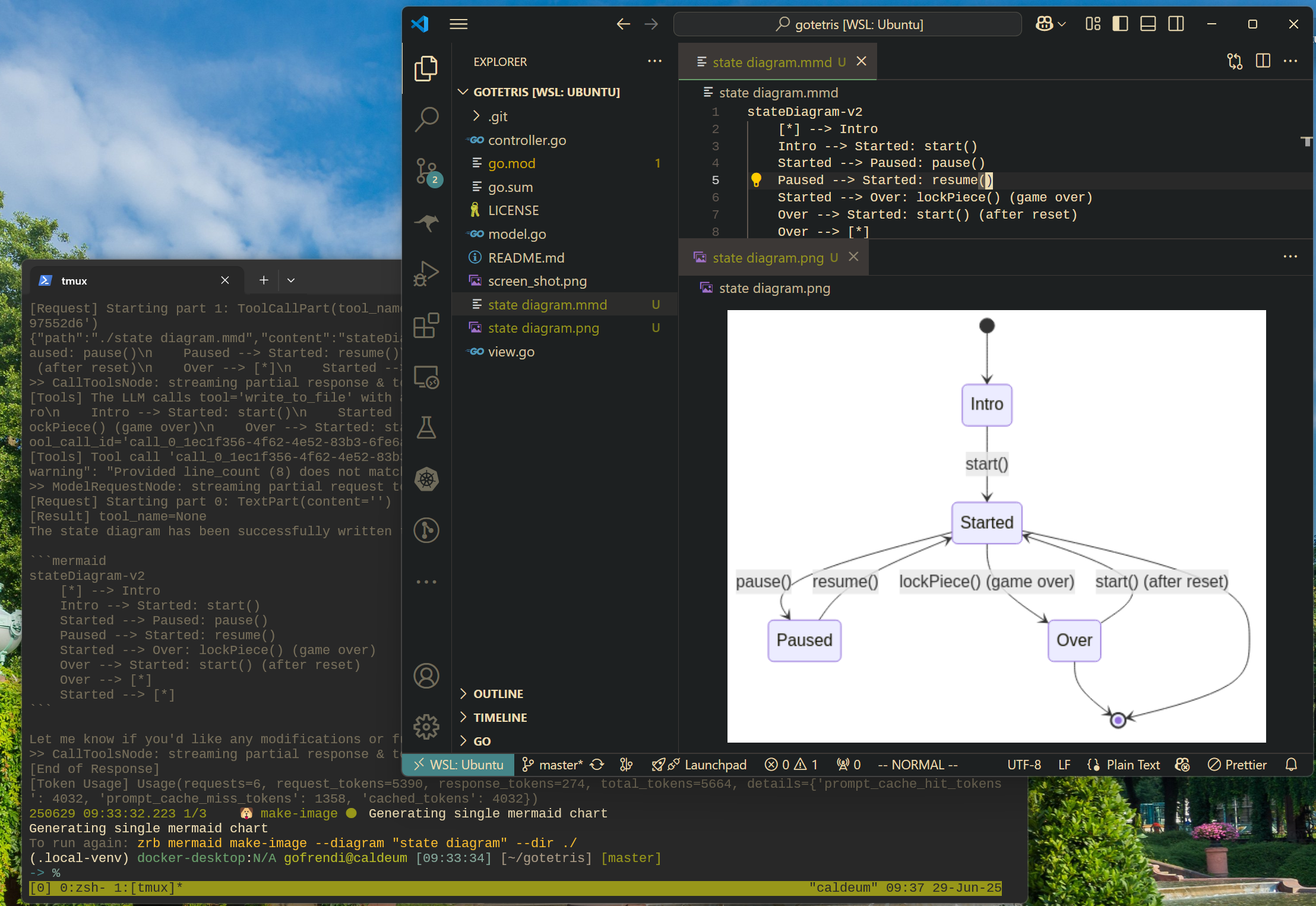
Now that you understand the basics, let's unleash Zrb's full power. This example uses an LLM to analyze your code and generate a Mermaid diagram, then converts that diagram into a PNG image.
1. Prerequisites
- An LLM API Key: Zrb needs an API key to talk to an AI model (OpenAI is default, but others are supported).
export OPENAI_API_KEY="your-key-here"
- Mermaid CLI: This tool converts Mermaid diagram scripts into images. Install it via npm:
npm install -g @mermaid-js/mermaid-cli
2. Update Your zrb_init.py
Add the following to your existing zrb_init.py file (or create a new one if you prefer to keep examples separate):
# zrb_init.py (continued)
from zrb import cli, LLMTask, CmdTask, StrInput, Group
from zrb.llm.tool.code import analyze_code
from zrb.llm.tool.file import write_file

# Create a group for Mermaid-related tasks
mermaid_group = cli.add_group(Group(
    name="mermaid",
    description="🧜 Mermaid diagram related tasks"
))

# Task 1: Generate a Mermaid script from your source code using an LLM
make_mermaid_script = mermaid_group.add_task(
    LLMTask(
        name="make-script",
        description="Create a mermaid diagram from source code in the current directory",
        input=[
            StrInput(name="dir", default="./"),
            StrInput(name="diagram", default="state-diagram"),
        ],
        message=(
            "Read all necessary files in {ctx.input.dir}, "
            "make a {ctx.input.diagram} in mermaid format. "
            "Write the script into `{ctx.input.dir}/{ctx.input.diagram}.mmd`"
        ),
        tools=[analyze_code, write_file],
    )
)

# Task 2: Convert the Mermaid script into a PNG image using CmdTask
make_mermaid_image = mermaid_group.add_task(
    CmdTask(
        name="make-image",
        description="Create a PNG from a mermaid script",
        input=[
            StrInput(name="dir", default="./"),
            StrInput(name="diagram", default="state-diagram"),
        ],
        cmd="mmdc -i '{ctx.input.diagram}.mmd' -o '{ctx.input.diagram}.png'",
        cwd="{ctx.input.dir}",
    )
)

# Set up the dependency: the image task runs after the script is created
make_mermaid_script >> make_mermaid_image
3. Run Your AI-Powered Workflow!
Navigate to any project with source code (e.g., a Python project). For instance, if you've cloned a repository:
git clone https://github.com/someuser/my-python-project.git
cd my-python-project
Now, run your new task:
zrb mermaid make-image
Zrb will interactively ask for the directory and diagram name. Just press Enter to accept the defaults (./ and state-diagram). The AI will analyze your code, generate the Mermaid script, and mmdc will convert it to a PNG. In moments, you'll have a beautiful diagram of your code!
🖥️ Try the Web UI
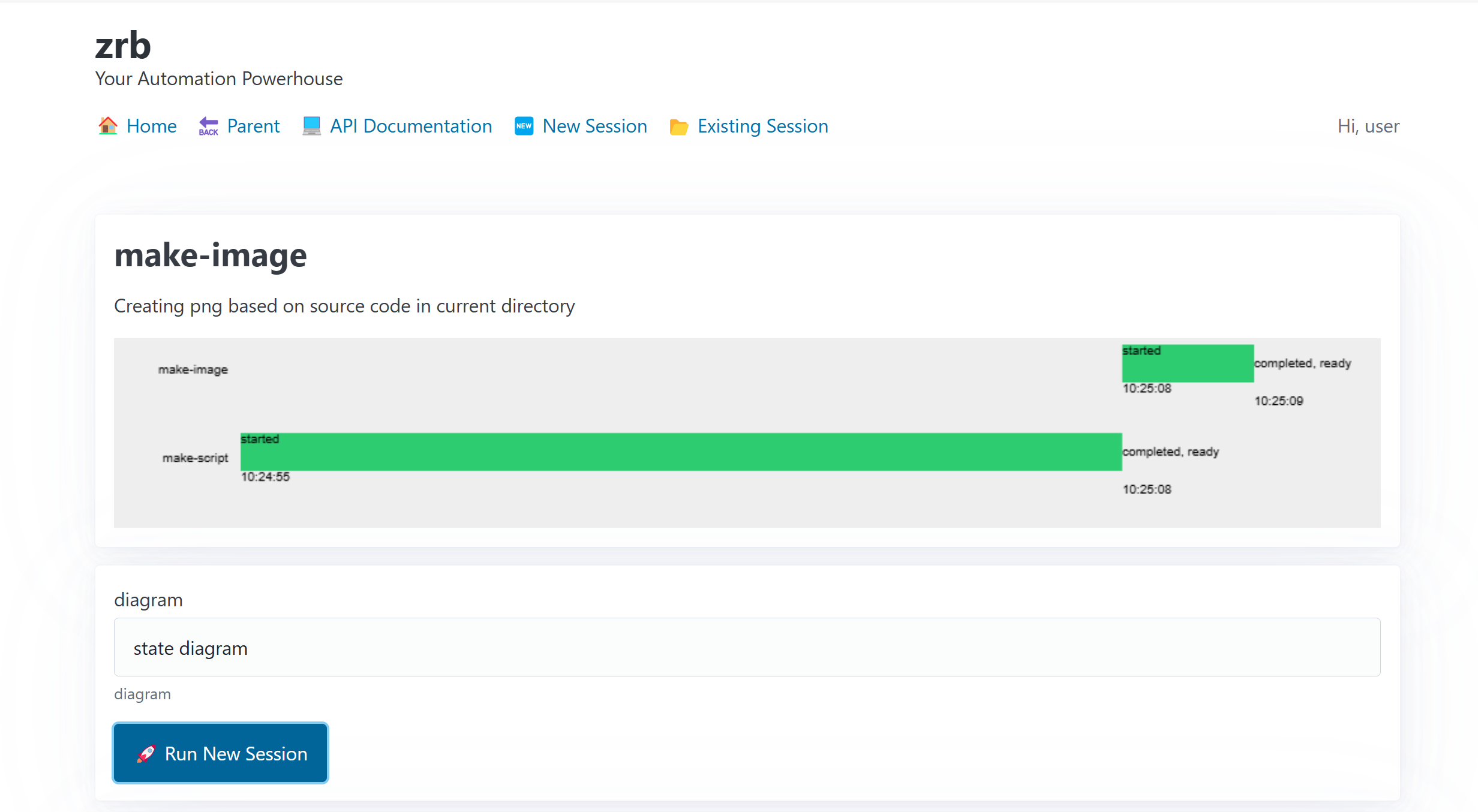
Prefer a graphical interface? Zrb has you covered. Explore the full details in the Web UI Guide.
zrb server start
Then open your browser to http://localhost:21213 to see your tasks in a clean, user-friendly interface.
💬 Interact with an LLM Directly
Zrb brings AI capabilities right to your command line. For full details on configuring and using the AI assistant, see the LLM Integration Guide.
Interactive Chat
Start a chat session with an LLM to ask questions, brainstorm ideas, or get coding help.
zrb llm chat
🧩 Program Your AI Agent
zrb llm chat works out of the box — but the moment you need it to do something specific, you don't reach for a config file or a separate SDK. You write Python, in the same file where you define the rest of your automation.
Every part of the agent is a value you can supply or a callable you can register:
| You want to… | You write a… |
|---|---|
| Give the agent abilities | custom tool — a plain Python function it can call in-process |
| React to what it does | lifecycle hook — fires on tool calls, prompts, session start/end |
| Gate dangerous actions | permission policy / async approval channel |
| Inject live context into the prompt | dynamic prompt section — a lambda ctx: ... evaluated per request |
| Keep long conversations affordable | history processor — prune, redact, or summarize the message history |
| Route by cost or task | a model callable — pick the model per request |
Example: a custom tool the agent calls in-process
from zrb import cli, LLMChatTask

# A normal Python function becomes a tool — typed args + docstring are the spec.
async def get_open_incidents(team: str) -> str:
    """Return the current open incidents for a given team."""
    return my_oncall_db.query(team)  # your code, running in-process

chat = LLMChatTask(name="ops-chat", tools=[get_open_incidents])
cli.add_task(chat)
The part nothing else does: the agent is a pipeline node
Because an LLMTask is just a Zrb task, you can wire it between deterministic steps. Its answer flows downstream through XCom, and your tools can call straight into your codebase:
fetch_ticket >> triage_with_llm >> route_to_team
👉 Full walkthrough and every hook in one place: Programming the Agent. Runnable example: examples/agent-in-pipeline.
⚙️ Installation & Configuration
Ready to dive deeper into getting Zrb set up and customized? Our comprehensive guides cover everything you need:
- Installation Guide: Details on
pipinstall, the automatedinstall.shscript, Docker images, and even running Zrb on Android (Termux/Proot). - Environment Variables & Overrides: An exhaustive list of all general environment variables to customize Zrb's behavior.
- LLM & Rate Limiter Configuration: Everything you need to configure your LLM provider, manage token budgets, and fine-tune AI behavior.
🤝 CI/CD Integration
Integrate Zrb into your Continuous Integration/Continuous Deployment pipelines for robust, automated workflows. See the CI/CD Integration Guide for examples with GitHub Actions, GitLab CI, and Bitbucket Pipelines.
🗺️ Documentation Directory
Zrb scales from simple scripts to massive automation ecosystems. Explore the documentation to unlock its full potential:
I. Core Concepts
The foundational pillars of the framework.
- Tasks & Execution Lifecycle
- CLI and Groups
- Inputs
- Environments (Envs)
- Session, Context & XCom
- The
@make_taskDecorator — full parameter reference - XCom Deep Dive — advanced patterns & pitfalls
II. Task Types
All task types available in Zrb, from basic to advanced.
- Task & CmdTask — Python actions and shell commands
- Custom Tasks — subclassing
BaseTaskwith async patterns - Readiness: HttpCheck & TcpCheck
- Automation: Triggers & Schedulers
- File Ops: Scaffolder & RsyncTask
- Built-in Helper Tasks (Git, Base64, UUID, HTTP, etc.)
III. LLM & AI Integration
- Programming the Agent — the overview: every way to shape agent behavior in Python (tools, hooks, dynamic prompts, history processors, agent-as-pipeline-node)
- LLM Assistant & AI Tasks —
LLMTask, tools, sub-agents, context management - Permission Policy System — fine-grained tool control & security gates
- Plan Mode — read-only discovery & strategy phase
- LLMChatTask API Reference — builder API, TUI configuration
- LLM Chat Request Lifecycle — end-to-end tour: CLI → agent run → UI → history persistence
- Hook System (Claude Code Compatible)
- MCP Support (Model Context Protocol)
- LSP Support (Language Server Protocol)
- Technical Spec: LLM Journal System
- Claude Code Compatibility
IV. Advanced Topics
- Architecture & Conventions — for maintainers and contributors
- Web UI Guide
- White-labeling: Create a Custom CLI
- CI/CD Integration
- Testing Zrb Tasks — mocking context, testing pipelines
- Upgrading Guide
- Maintainer Guide
V. Configuration
VI. Changelog
- Changelog — full release history
🎥 Demo Video
Watch a video demonstration of Zrb in action:
💖 Support Zrb
If you find Zrb valuable, please consider showing your support:

🎉 Fun Fact
Did you know? Zrb is named after Zaruba, a powerful, sentient Madou Ring that acts as a guide and support tool in the Garo universe.
Madou Ring Zaruba (魔導輪ザルバ, Madōrin Zaruba) is a Madougu which supports bearers of the Garo Armor. (Garo Wiki | Fandom)

Release history Release notifications | RSS feed


Download files
Download the file for your platform. If you're not sure which to choose, learn more about installing packages.
Source Distribution
Built Distribution
Filter files by name, interpreter, ABI, and platform.
If you're not sure about the file name format, learn more about wheel file names.
Copy a direct link to the current filters
File details
Details for the file zrb-2.35.3.tar.gz.
File metadata
- Download URL: zrb-2.35.3.tar.gz
- Upload date:
- Size: 1.6 MB
- Tags: Source
- Uploaded using Trusted Publishing? No
- Uploaded via: poetry/2.3.2 CPython/3.14.2 Darwin/25.5.0
File hashes
| Algorithm | Hash digest | |
|---|---|---|
| SHA256 |
320bd2d88beb5a305819fc4b1d94f9558a1395cf9657cd0f25295fbc52e8f08a
|
|
| MD5 |
281df9dbe8f3f4ffb6b70e59ca8113d6
|
|
| BLAKE2b-256 |
10ae74d0d675d839cb7c2b09bbbafc2aa3293465792c52244e82c4d1e0ca2f7f
|
File details
Details for the file zrb-2.35.3-py3-none-any.whl.
File metadata
- Download URL: zrb-2.35.3-py3-none-any.whl
- Upload date:
- Size: 1.8 MB
- Tags: Python 3
- Uploaded using Trusted Publishing? No
- Uploaded via: poetry/2.3.2 CPython/3.14.2 Darwin/25.5.0
File hashes
| Algorithm | Hash digest | |
|---|---|---|
| SHA256 |
82840378e7e57894e28a3f3e07243418bd8619c7bbc99062b979363724becde1
|
|
| MD5 |
16ba32f620790bac269da95f28fad99b
|
|
| BLAKE2b-256 |
7b28c484fc7d1246b984e25eb1bd4a7e14bc2483e400cb1b58af7bad50600fe3
|






