
A high-performance vector database engine with native C++ backend and Python bindings

Project description







🚀 Quickstart | 🏠 Home | 📚 Docs | 📊 Benchmarks | 🔎 DeepWiki | 🎮 Discord
Zvec is an open-source, in-process vector database — lightweight, lightning-fast, and designed to embed directly into applications. Built on Proxima (Alibaba's battle-tested vector search engine), it delivers production-grade, low-latency, scalable similarity search with minimal setup.
💫 Features
- Blazing Fast: Searches billions of vectors in milliseconds.
- Simple, Just Works: Install and start searching in seconds. No servers, no config, no fuss.
- Dense + Sparse Vectors: Work with both dense and sparse embeddings, with native support for multi-vector queries in a single call.
- Hybrid Search: Combine semantic similarity with structured filters for precise results.
- Runs Anywhere: As an in-process library, Zvec runs wherever your code runs — notebooks, servers, CLI tools, or even edge devices.
📦 Installation
Python
Requirements: Python 3.10 - 3.12
pip install zvec
Node.js
npm install @zvec/zvec
✅ Supported Platforms
- Linux (x86_64, ARM64)
- macOS (ARM64)
🛠️ Building from Source
If you prefer to build Zvec from source, please check the Building from Source guide.
⚡ One-Minute Example
import zvec

# Define collection schema
schema = zvec.CollectionSchema(
    name="example",
    vectors=zvec.VectorSchema("embedding", zvec.DataType.VECTOR_FP32, 4),
)

# Create collection
collection = zvec.create_and_open(path="./zvec_example", schema=schema)

# Insert documents
collection.insert([
    zvec.Doc(id="doc_1", vectors={"embedding": [0.1, 0.2, 0.3, 0.4]}),
    zvec.Doc(id="doc_2", vectors={"embedding": [0.2, 0.3, 0.4, 0.1]}),
])

# Search by vector similarity
results = collection.query(
    zvec.VectorQuery("embedding", vector=[0.4, 0.3, 0.3, 0.1]),
    topk=10
)

# Results: list of {'id': str, 'score': float, ...}, sorted by relevance
print(results)
📈 Performance at Scale
Zvec delivers exceptional speed and efficiency, making it ideal for demanding production workloads.
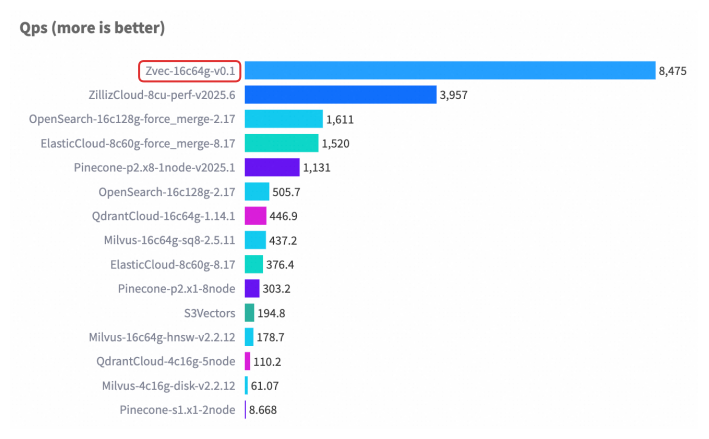
For detailed benchmark methodology, configurations, and complete results, please see our Benchmarks documentation.
🤝 Join Our Community
Stay updated and get support — scan or click:
| 💬 DingTalk | 🎮 Discord | |
|---|---|---|
 |
 |
 |
| Scan to join | Scan to join | Click to join |
❤️ Contributing
We welcome and appreciate contributions from the community! Whether you're fixing a bug, adding a feature, or improving documentation, your help makes Zvec better for everyone.
Check out our Contributing Guide to get started!
Release history Release notifications | RSS feed


Download files
Download the file for your platform. If you're not sure which to choose, learn more about installing packages.
Source Distributions
Built Distribution
Filter files by name, interpreter, ABI, and platform.
If you're not sure about the file name format, learn more about wheel file names.
Copy a direct link to the current filters
File details
Details for the file zvec-0.2.1b2.dev1-cp310-cp310-win_amd64.whl.
File metadata
- Download URL: zvec-0.2.1b2.dev1-cp310-cp310-win_amd64.whl
- Upload date:
- Size: 17.2 MB
- Tags: CPython 3.10, Windows x86-64
- Uploaded using Trusted Publishing? No
- Uploaded via: twine/6.2.0 CPython/3.11.9
File hashes
| Algorithm | Hash digest | |
|---|---|---|
| SHA256 |
231c632328fced3a443bce0547e5668551dba5638f2bbbe19ebdeb11e2adc3ba
|
|
| MD5 |
05207466021a0916900a208693ea9860
|
|
| BLAKE2b-256 |
7b75b61a41248c91a711bc3b0209e1641031b5851b498dedd3522fee3766cc6c
|






