
This project has been archived by its maintainers, and is no longer receiving any updates.
ZWO Minilang





Python toolkit for the ZWO minilang.
Installation
Install from PyPi with your favorite pip invocation:
$ pip install zwolang
You can confirm proper installation via the zwom CLI:
$ zwom --help

 Usage: zwom [OPTIONS] COMMAND [ARGS]...

+- Options -------------------------------------------------------------------+
| --help          Show this message and exit.                                 |
+-----------------------------------------------------------------------------+
+- Commands ------------------------------------------------------------------+
| batch    Discover and convert all `*.zwom` files in the given directory.    |
| single   Convert the specified `*.zwom` file to Zwift's `*.zwo`.            |
+-----------------------------------------------------------------------------+
The ZWOM File Specification
The primary purpose of this package is to provide a simple, human-readable format for constructing Zwift workouts that can be used to generate the actual workout XML. Let's call it a *.zwom file, or ZWOM.
ZWOM files are parsed using a Parsimonious grammar, as specified below:
workout   = ((comment / block) elws*)+ / elws
block     = tag ws "{" ((comment / params) / elws)+ "}"
params    = (message / value) ","?
value     = tag ws (string / range / rangeval)

message   = "@" ws duration ws string
range     = rangeval ws "->" ws rangeval
rangeval  = duration / numeric / zone
duration  = number ":" number
percent   = number "%"
zone      = ("Z" number) / "SS"
numeric   = percent / number
elws      = ws / emptyline

comment   = ~r"\;[^\r\n]*"
tag       = ~"[A-Z_]+"
string    = ~'"[^\"]+"'
number    = ~"\d+"
ws        = ~"\s*"
emptyline = ws+
Syntax & Keywords
Like Zwift's built-in workout builder, the ZWO minilang is a block-based system. Blocks are specified using a <tag> {<block contents>} format supporting arbitrary whitespace.
Inline comments are also supported, denoted by a leading ;.
Workout Metadata
Each ZWO file must begin with a META block containing comma-separated parameters:
| Keyword | Description | Accepted Inputs | Optional? |
|---|---|---|---|
NAME |
Displayed workout name | str |
No |
AUTHOR |
Workout author | str |
No |
DESCRIPTION |
Workout description | str1 |
No |
FTP |
Rider's FTP | int |
Maybe2 |
TAGS |
Workout tags | String of hashtags3 | Yes |
- Multiline strings are supported
- Zwift's workouts are generated using FTP percentages rather than absolute watts, so your FTP is required if you want to use absolute watts in your ZWOM
- Tags are capped at 31 total characters, including spaces and hashtags. Zwift also provides 4 built-in tags (
#RECOVERY,#INTERVALS,#FTP, and#TT) that may also be added and do not count against this total.
Workout Blocks
Following the META block are your workout blocks:
| Keyword | Description |
|---|---|
FREE |
Free ride |
COOLDOWN |
Cooldown |
INTERVALS |
Intervals |
RAMP |
Ramp |
SEGMENT |
Steady segment |
WARMUP |
Warmup |
NOTE: While there is no specific Ramp block in the workout building UI, some experimental observations have been made:
- If a ramp is at the very beginning of the workout, Zwift serializes it as a Warmup block
- If there are multiple blocks in a workout and a ramp is at the end, Zwift serializes it as a Cooldown block
- If there are multiple blocks in a workout and a ramp is not at the beginning or the end, Zwift serializes it as a Ramp block
When writing your *.zwom file, these 3 blocks can be used interchangably, and ZWOM will try to match this behavior when outputting its *.zwo file. Zwift may do its own normalization if edits are made in the workout UI.
Workout Block Metadata
Workout blocks can contain the following (optionally) comma-separated parameters:
| Keyword | Description | Accepted Inputs | Optional? |
|---|---|---|---|
DURATION |
Block duration | MM:SS, Range1 |
No |
CADENCE |
Target cadence | int, Range1,2 |
Yes |
REPEAT |
Number of intervals | int |
Only valid for intervals |
POWER |
Target power | int, int%, Zone3, Range1 |
Mostly no4 |
@ |
Display a message | @ MM:SS str5 |
Yes |
- For Interval & Ramp segments, the range syntax can be used to set values for the
<left> -> <right>segments (e.g.65% -> 120%orZ2 -> Z6) - Cadence ranges are only valid for Interval segments
- Zones may be specified as
Z1-7orSS - Power is ignored for Free segments
- Message timestamps are relative to their containing block
Repeating a Chunk of Blocks
The START_REPEAT and END_REPEAT meta blocks are provided to specify an arbitrary chunk of blocks to repeat. The START_REPEAT block must specify a REPEAT parameter; END_REPEAT accepts no parameters. Nested repeats are not currently supported.
For example:
SEGMENT {DURATION 2:00, POWER 65%}
RAMP {
    DURATION 2:00,
    POWER 120% -> 140%,
    @ 0:00 "Here goes the ramp!",
    @ 1:50 "10 seconds left!",
}
SEGMENT {DURATION 2:00, POWER 65%}
RAMP {
    DURATION 2:00,
    POWER 120% -> 140%,
    @ 0:00 "Here goes the ramp!",
    @ 1:50 "10 seconds left!",
}
Becomes:
START_REPEAT {REPEAT 2}
SEGMENT {DURATION 2:00, POWER 65%}
RAMP {
    DURATION 2:00,
    POWER 120% -> 140%,
    @ 0:00 "Here goes the ramp!",
    @ 1:50 "10 seconds left!",
}
END_REPEAT {}
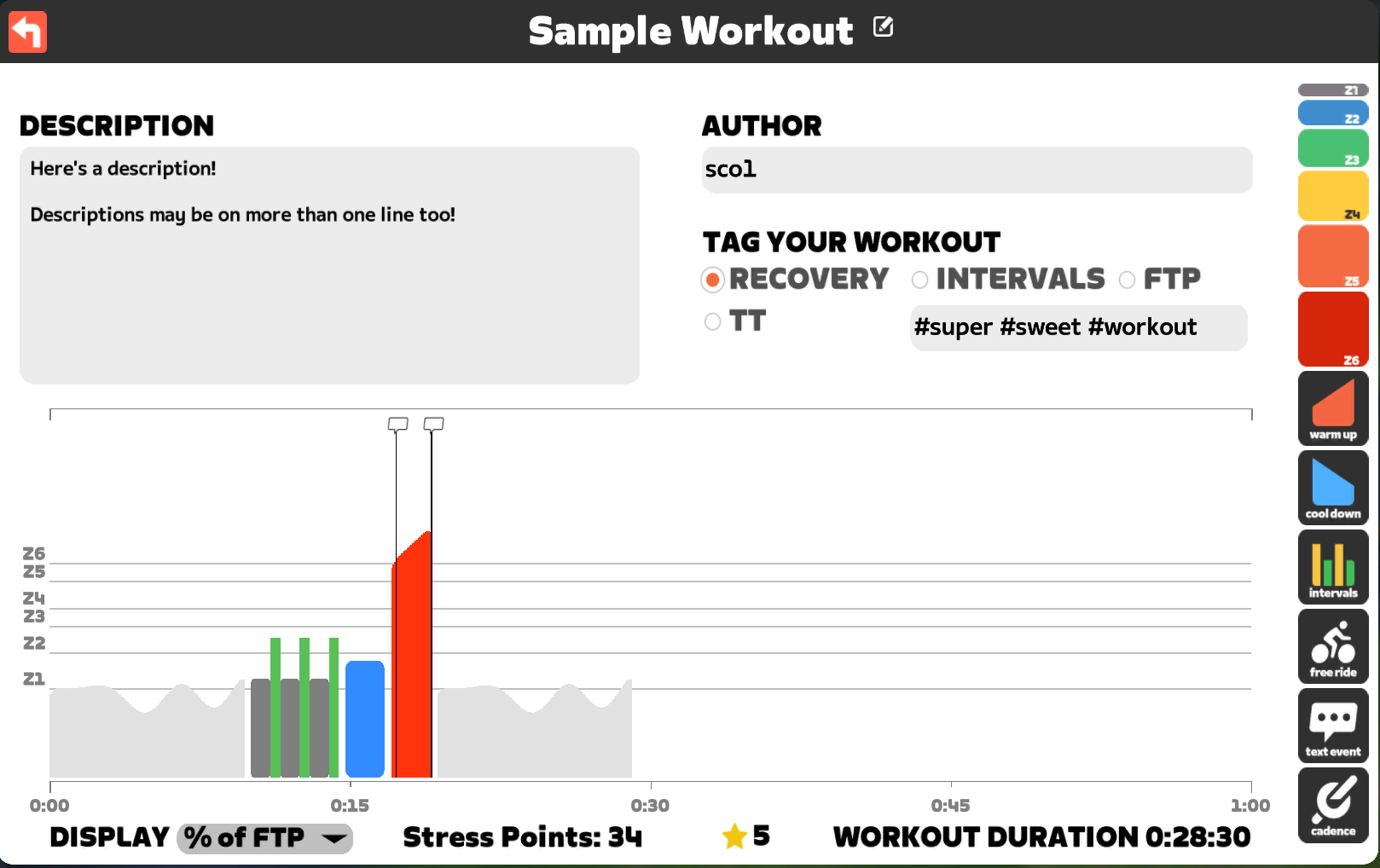
Sample Workout
; Here is a workout-level comment!
META {
    NAME "Sample Workout",
    AUTHOR "sco1",
    DESCRIPTION "Here's a description!

    Descriptions may be on more than one line too!",
    TAGS "#RECOVERY #super #sweet #workout",
    FTP 270,
}
FREE {DURATION 10:00}
INTERVALS {
    ; Here is a block-level comment!
    REPEAT 3,
    DURATION 1:00 -> 0:30,
    POWER 55% -> 78%,
    CADENCE 85 -> 110,
}
SEGMENT {DURATION 2:00, POWER 65%}
RAMP {
    DURATION 2:00,
    POWER 120% -> 140%,
    @ 0:00 "Here goes the ramp!",
    @ 1:50 "10 seconds left!",
}
FREE {DURATION 10:00}
1 maintainer

Metadata
1 maintainer
Release files for zwolang 0.3.0
For a detailed explanation of source distributions (sdists) and built distributions (wheels), please see the package formats documentation.
Source distribution (sdist)
| File | Size | Uploaded | |
|---|---|---|---|
| zwolang-0.3.0.tar.gz | 15.5 kB | Details |
Built distribution (wheel)
| File | Interpreter | ABI | Platform | Reset |
|---|---|---|---|---|
| zwolang-0.3.0-py3-none-any.whl | Python 3 | none | any | Details |
Total release size: 28.8 kB
Release files / zwolang-0.3.0.tar.gz
| Download URL | zwolang-0.3.0.tar.gz |
|---|---|
| Size | 15.5 kB |
| Tags | Source |
|
SHA-256 checksum How to use checksums |
d3088e1876dd04aae84386775fa5024752bbc2f478648d53da399a1ef7b8f769
|
|
BLAKE2b-256 checksum How to use checksums |
95df600596eaaea811da66327427397d3085a9bf4bb29fb62cc7b5029ec06d60
|
| Upload date | |
|
Uploaded using Trusted Publishing? What is trusted publishing? |
No |
| Uploaded via |
twine/4.0.1 CPython/3.9.15
|
Release files / zwolang-0.3.0-py3-none-any.whl
| Download URL | zwolang-0.3.0-py3-none-any.whl |
|---|---|
| Size | 13.3 kB |
| Tags | Python 3 |
|
SHA-256 checksum How to use checksums |
7b2feccfd6da5709d33a978dcde502edf5409f988bbe1537ecd0cc25065919fb
|
|
BLAKE2b-256 checksum How to use checksums |
7ef049ed21e4b0a477a02f4c433af977badb47a9fbd290c234550c235b8e476a
|
| Upload date | |
|
Uploaded using Trusted Publishing? What is trusted publishing? |
No |
| Uploaded via |
twine/4.0.1 CPython/3.9.15
|














