
Tools to manipulate files from ZX Spectrum

Project description






Here’s a set of utils to manipulate files that were copied from a TR-DOS diskette or from a tape.
Originally the tools were written to simplify the following workflow:
Grab diskette image using Hobeta tool.
Strip the file header and save the result to a new file.
Convert resulting Zeus Z80 assembler file to the plain text format.
TODO: I have future plans to implement some more tools I need to restore my old ZX Spectrum projects.
But you can use them in the way you need. And it’s very easy to use: download the package, run setup.py (or install via pip install zxtools), invoke in the following way:
$ python3 -m zxtools.hobeta strip input.hobeta result.zeus
$ python3 -m zxtools.zeus2txt result.zeus listing.asm --include-code
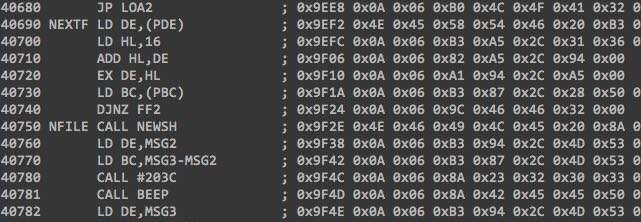
NOTE: Python 3 is required to use this package, and Python 2 is not supported but you are welcome to fix it.
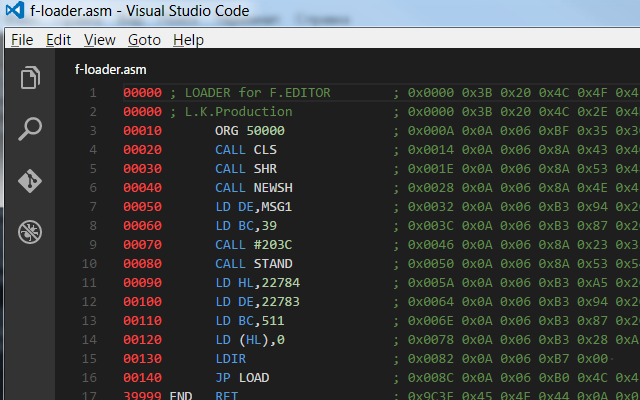
To view the resulting files with syntax colorization you can use special Visual Studio Code plugin:


Download files
Download the file for your platform. If you're not sure which to choose, learn more about installing packages.
Source Distribution
Built Distribution
Filter files by name, interpreter, ABI, and platform.
If you're not sure about the file name format, learn more about wheel file names.
Copy a direct link to the current filters
File details
Details for the file zxtools-1.0.24.tar.gz.
File metadata
- Download URL: zxtools-1.0.24.tar.gz
- Upload date:
- Size: 15.2 kB
- Tags: Source
- Uploaded using Trusted Publishing? No
- Uploaded via: twine/6.2.0 CPython/3.12.4
File hashes
| Algorithm | Hash digest | |
|---|---|---|
| SHA256 |
15c92c6c89a1736dcac3e14755e46ff3766e005ec898481899d7b948899a1da3
|
|
| MD5 |
b1843300eee39e382d43141d864e6b7d
|
|
| BLAKE2b-256 |
2974e7d0a89e85386d6ff2426c9920e8a624da8632ed7b58c089fabe400d14ee
|
File details
Details for the file zxtools-1.0.24-py3-none-any.whl.
File metadata
- Download URL: zxtools-1.0.24-py3-none-any.whl
- Upload date:
- Size: 9.8 kB
- Tags: Python 3
- Uploaded using Trusted Publishing? No
- Uploaded via: twine/6.2.0 CPython/3.12.4
File hashes
| Algorithm | Hash digest | |
|---|---|---|
| SHA256 |
c1098fc42aa0d50448b0a6213ff2b27033cfc2e369c17cae7eab3b8860735002
|
|
| MD5 |
41229120a0450aa752a45f1e303568e8
|
|
| BLAKE2b-256 |
49be1cca8fccb2c3836c09a704457ae1bc5cb16717250a1f17d7f8c4e3d7c18c
|






