

Eight super-bright RGB LED indicators, ideal for adding visual notifications to your Raspberry Pi on their own or on a pHAT stacking header.
Installing
Full install (recommended):
We’ve created an easy installation script that will install all pre-requisites and get your Blinkt! up and running with minimal efforts. To run it, fire up Terminal which you’ll find in Menu -> Accessories -> Terminal on your Raspberry Pi desktop, as illustrated below:
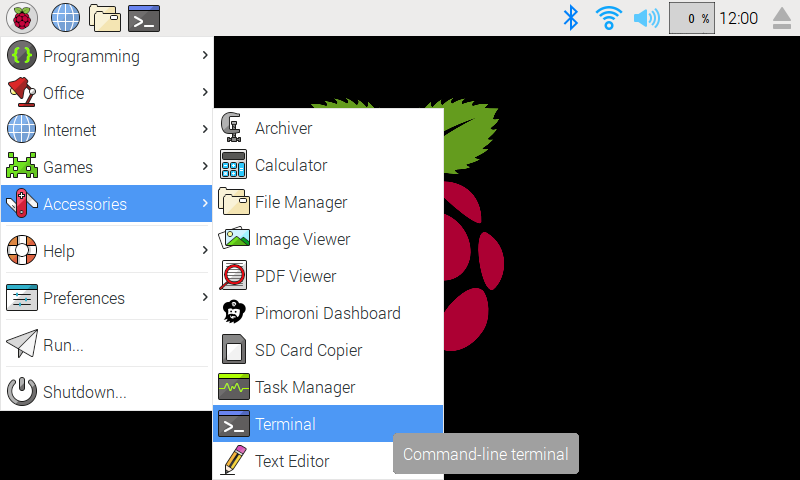
In the new terminal window type the command exactly as it appears below (check for typos) and follow the on-screen instructions:
curl https://get.pimoroni.com/blinkt | bashAlternatively, on Raspbian, you can download the pimoroni-dashboard and install your product by browsing to the relevant entry:
sudo apt-get install pimoroni(you will find the Dashboard under ‘Accessories’ too, in the Pi menu - or just run pimoroni-dashboard at the command line)
If you choose to download examples you’ll find them in /home/pi/Pimoroni/blinkt/.
Manual install:
Library install for Python 3:
on Raspbian:
sudo apt-get install python3-blinktother environments:
sudo pip3 install blinktLibrary install for Python 2:
on Raspbian:
sudo apt-get install python-blinktother environments:
sudo pip2 install blinktDevelopment:
If you want to contribute, or like living on the edge of your seat by having the latest code, you should clone this repository, cd to the library directory, and run:
sudo python3 setup.py install(or sudo python setup.py install whichever your primary Python environment may be)
Documentation & Support
Guides and tutorials - https://learn.pimoroni.com/blinkt
Function reference - http://docs.pimoroni.com/blinkt/
GPIO Pinout - https://pinout.xyz/pinout/blinkt
Get help - http://forums.pimoroni.com/c/support
Unofficial / Third-party libraries
Golang library & examples by Alex Ellis - https://github.com/alexellis/blinkt_go_examples
Java library by Jim Darby - https://github.com/hackerjimbo/PiJava
0.1.2
BugFix: Added sleep to data output, see: https://github.com/pimoroni/blinkt/issues/62
0.1.1
New: Added get_pixel to return colour and brightness of a single pixel
0.1.0
Removed try/except from RPi.GPIO import, output was misleading at best
Reverted default behaviour of clear on exit
0.0.9
Added set_all method to set all pixels
Changed default behaviour of clear on exit to reduce module side-effects
Move GPIO initialisation to show() to reduce module side-effects
0.0.8
Tweaked some methods to show intent as implementation detail only
Added docstrings detailing public methods
0.0.7
Fixed bug with APA102 pixels that have a small, black die (vs the larger, paler one)
0.0.6
set_clear_on_exit now method
0.0.5
Range clamping and coercion to integers
0.0.4
Various bug fixes
0.0.3
Switch to Python
0.0.2
Bug fixes for C Library
0.0.1
Original C Library
1 maintainer

Metadata
1 maintainer
Release files for blinkt 0.1.2
For a detailed explanation of source distributions (sdists) and built distributions (wheels), please see the package formats documentation.
Source distribution (sdist)
| File | Size | Uploaded | Provenance | Actions |
|---|---|---|---|---|
| blinkt-0.1.2.tar.gz | 5.2 kB | Without provenance | Details for blinkt-0.1.2.tar.gz |
Built distributions (wheels)
| File | Interpreter | ABI | Platform | Actions Reset |
|---|---|---|---|---|
| blinkt-0.1.2-py3-none-any.whl | Python 3 | none | any | Details for blinkt-0.1.2-py3-none-any.whl |
| blinkt-0.1.2-py2-none-any.whl | Python 2 | none | any | Details for blinkt-0.1.2-py2-none-any.whl |
Total release size: 18.3 kB
Release files / blinkt-0.1.2.tar.gz
| Download URL | blinkt-0.1.2.tar.gz |
|---|---|
| Size | 5.2 kB |
| Tags | Source |
|
SHA-256 checksum How to use checksums |
db8f54a22a7382476e4ac7531974fe01baee916b01f415bf3817c02820d59f3f
|
|
BLAKE2b-256 checksum How to use checksums |
c033fb5a3bfc2e9d467a6f9892088f08c0b88b4bbb0237a696b1b25cacab54d5
|
| Upload date | |
|
Uploaded using Trusted Publishing? What is trusted publishing? |
No |
Release files / blinkt-0.1.2-py3-none-any.whl
| Download URL | blinkt-0.1.2-py3-none-any.whl |
|---|---|
| Size | 6.6 kB |
| Tags | Python 3 |
|
SHA-256 checksum How to use checksums |
b090d1eccb5b8b5caaaeb25cfdb96f51cc12e98a8ab81c667c19b58b365f2818
|
|
BLAKE2b-256 checksum How to use checksums |
b924b8244726dd74e6d140a162e2587e6df7d65cac18558f5df7cad9e9f9f1ff
|
| Upload date | |
|
Uploaded using Trusted Publishing? What is trusted publishing? |
No |
Release files / blinkt-0.1.2-py2-none-any.whl
| Download URL | blinkt-0.1.2-py2-none-any.whl |
|---|---|
| Size | 6.6 kB |
| Tags | Python 2 |
|
SHA-256 checksum How to use checksums |
5a77cf0236c7257bf0045ecf67d6963d35baf2f070b1c1acaf752b676906c3a1
|
|
BLAKE2b-256 checksum How to use checksums |
e8bcff38ec1073c5570c058ce57820fb66613483d260b5470e786483916f9649
|
| Upload date | |
|
Uploaded using Trusted Publishing? What is trusted publishing? |
No |
Security for blinkt 0.1.2
Provenance
Provenance describes where a file came from. On PyPI, provenance is shared via attestations, which provide a verifiable record of the build or publishing details. View details, limitations and caveats.
No provenance found
None of the files in this release were uploaded with provenance metadata.
A note on package security
PyPI is a repository for distributing packages, not a service for auditing them. While third-party security researchers and our staff do their best to detect and remove malicious packages, PyPI cannot guarantee the quality, security or suitability of any given package.
To learn more about protecting yourself from malicious actors, visit our package security documentation.














