


Callisto
The fourth Galilean moon of Jupyter.
A command line utility to create kernels in Jupyter from virtual environments.
Installation
Callisto may be installed from pypi:
pip install callisto
Tested against python 2.7, 3.4, 3.5, 3.6.
Basic Usage.
Typical use is to just activate it inside a virtual environment:
$  virtualenv venv
...
$  source venv/bin/activate
(venv) $  callisto
Successfully installed a new jupyter kernel "venv":
{
  "env": {},
  "language": "python",
  "display_name": "venv",
  "argv": [
    "/Users/colin/venv/bin/python",
    "-m",
    "ipykernel",
    "-f",
    "{connection_file}"
  ]
}
See /Users/colin/Library/Jupyter/kernels/venv/kernel.json to edit.
Jupyter servers will now have an option for a kernel called venv.
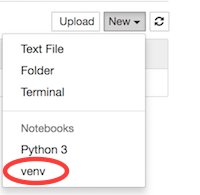
Naming the kernel.
You may also give kernels a more descriptive name:
(venv) $  callisto -n pete
Successfully installed a new jupyter kernel "pete":
{
  "env": {},
  "display_name": "pete",
  "argv": [
    "/Users/colin/venv/bin/python",
    "-m",
    "ipykernel",
    "-f",
    "{connection_file}"
  ],
  "language": "python"
}
See /Users/colin/Library/Jupyter/kernels/pete/kernel.json to edit.
Jupyter servers will now have an option for a kernel called venv, and pete.
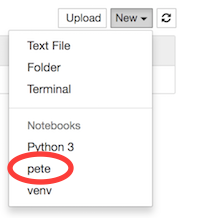
Deleting kernels.
Sometimes you may want to tidy kernels up a bit.
(venv) $  callisto -d
Deleted jupyter kernel "venv" from /Users/colin/Library/Jupyter/kernels/venv/kernel.json:
{
  "argv": [
    "/Users/colin/venv/bin/python",
    "-m",
    "ipykernel",
    "-f",
    "{connection_file}"
  ],
  "env": {},
  "language": "python",
  "display_name": "venv"
}
Jupyter servers will no longer have a kernel named venv.
Lacking courage.
Callisto doesn’t try to be too clever.
(venv) $  deactivate

$  callisto
Usage: callisto [OPTIONS]

Error: The environment variable VIRTUAL_ENV is not set (usually this is set
automatically activating a virtualenv).  Please make sure you are in a
virtual environment!
Viewing existing kernels.
If you forgot the informative message about the kernel information, you can see it later.
$  source venv/bin/activate

(venv) $  callisto --list
No kernel found at /Users/colin/Library/Jupyter/kernels/venv/kernel.json

(venv) $  callisto -l --name pete
Found kernel "pete" at /Users/colin/Library/Jupyter/kernels/pete/kernel.json:
{
  "display_name": "pete",
  "language": "python",
  "argv": [
    "/Users/colin/venv/bin/python",
    "-m",
    "ipykernel",
    "-f",
    "{connection_file}"
  ],
  "env": {}
}
Adjusting the PYTHONPATH.
With isolated kernels, you may wish to run all your notebooks from a single directory, but using code from the project directories.
(venv) $  callisto -n pete --path=$(pwd)
Successfully installed a new jupyter kernel "pete":

{
  "argv": [
    "/Users/colin/venv/bin/python",
    "-m",
    "ipykernel",
    "-f",
    "{connection_file}"
  ],
  "language": "python",
  "env": {
    "PYTHONPATH": "/Users/colin/projects/pete:PYTHONPATH"
  },
  "display_name": "pete"
}
See /Users/colin/Library/Jupyter/kernels/pete/kernel.json to edit.
Now the pete kernel will be able to import from the folder /Users/colin/projects/pete.
1 maintainer

Metadata
1 maintainer
Release files for callisto 0.7
For a detailed explanation of source distributions (sdists) and built distributions (wheels), please see the package formats documentation.
Built distribution (wheel)
| File | Interpreter | ABI | Platform | Actions Reset |
|---|---|---|---|---|
| callisto-0.7-py2.py3-none-any.whl | Python 2, Python 3 | none | any | Details for callisto-0.7-py2.py3-none-any.whl |
Release files / callisto-0.7-py2.py3-none-any.whl
| Download URL | callisto-0.7-py2.py3-none-any.whl |
|---|---|
| Size | 7.1 kB |
| Tags | Python 2 Python 3 |
|
SHA-256 checksum How to use checksums |
41ef963666741a75c44cd7dbf70a0762be496fa48b96181805cfebd7b51e71e4
|
|
BLAKE2b-256 checksum How to use checksums |
de6005d035ae76a2036e3008f5f5f7b14015a7e08ad6b4dc1c895a5f7eda1aa3
|
| Upload date | |
|
Uploaded using Trusted Publishing? What is trusted publishing? |
No |
Security for callisto 0.7
Provenance
Provenance describes where a file came from. On PyPI, provenance is shared via attestations, which provide a verifiable record of the build or publishing details. View details, limitations and caveats.
No provenance found
None of the files in this release were uploaded with provenance metadata.
A note on package security
PyPI is a repository for distributing packages, not a service for auditing them. While third-party security researchers and our staff do their best to detect and remove malicious packages, PyPI cannot guarantee the quality, security or suitability of any given package.
To learn more about protecting yourself from malicious actors, visit our package security documentation.














