


django-treasuremap
django-treasuremap app, makes it easy to store and display the location on the map using different providers (Google, Yandex, etc).
Requirements
Python 2.7+ or Python 3.4+
Django 1.11+
Installation
Use your favorite Python package manager to install the app from PyPI, e.g.
Example:
pip install django-treasuremap
Add treasuremap to INSTALLED_APPS:
Example:
INSTALLED_APPS = (
    ...
    'treasuremap',
    ...
)
Configuration
Within your settings.py, you’ll need to add a setting (which backend to use, etc).
Example:
TREASURE_MAP = {
    'BACKEND': 'treasuremap.backends.google.GoogleMapBackend',
    'API_KEY': 'Your API key',
    'SIZE': (400, 600),
    'MAP_OPTIONS': {
        'zoom': 5
    }
}
Example usage
In models
from django.db import models
from treasuremap.fields import LatLongField

class Post(models.Model):
    name = models.CharField(max_length=100)
    point = LatLongField(blank=True)
In admin
from django.contrib import admin
from treasuremap.widgets import AdminMapWidget

from .models import Post

@admin.register(Post)
class PostAdmin(admin.ModelAdmin):
    def formfield_for_dbfield(self, db_field, **kwargs):
        if db_field.name == 'point':
            kwargs['widget'] = widgets.AdminMapWidget()
        return super(PostAdmin,self).formfield_for_dbfield(db_field,**kwargs)
In forms
from django import forms
from treasuremap.forms import LatLongField

class PostForm(models.Model):
point = LatLongField()<head>
...
<!-- jQuery is required; include if need -->
<script type="text/javascript" src="//ajax.googleapis.com/ajax/libs/jquery/2.1.3/jquery.min.js"></script>
...
</head>
<form method="POST" action=".">
{{ form.media }}
{% csrf_token %}
{{ form.as_p }}
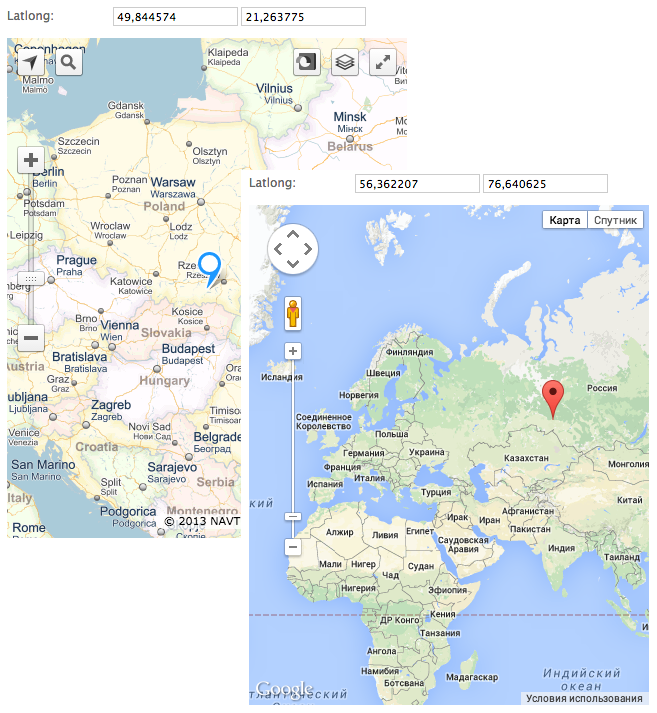
</form>Depending on what backend you are using, the correct widget will be displayed with a marker at the currently position (jQuery is required).
Settings
Support map:
Google map treasuremap.backends.google.GoogleMapBackend
Yandex map treasuremap.backends.yandex.YandexMapBackend
Other settings:
API_KEY - if need, default None
SIZE - tuple with the size of the map, default (400, 400)
ONLY_MAP - hide field lat/long, default True
MAP_OPTIONS - dict, used to initialize the map, default {'latitude': 51.562519, 'longitude': -1.603156, 'zoom': 5}. latitude and longitude is required, do not use other “LatLong Object”.
1 maintainer

Metadata
1 maintainer
Release files for django-treasuremap 0.3.4
For a detailed explanation of source distributions (sdists) and built distributions (wheels), please see the package formats documentation.
Source distribution (sdist)
| File | Size | Uploaded | Provenance | |
|---|---|---|---|---|
| django-treasuremap-0.3.4.tar.gz | 10.0 kB | Without provenance | Details |
Built distribution (wheel)
| File | Interpreter | ABI | Platform | Reset |
|---|---|---|---|---|
| django_treasuremap-0.3.4-py2.py3-none-any.whl | Python 3, Python 2 | none | any | Details |
Total release size: 22.3 kB
Release files / django-treasuremap-0.3.4.tar.gz
| Download URL | django-treasuremap-0.3.4.tar.gz |
|---|---|
| Size | 10.0 kB |
| Tags | Source |
|
SHA-256 checksum How to use checksums |
635713d68780128674c76124c8e99b8e8c82cc424b8bf5604c2d2bf29a8b729d
|
|
BLAKE2b-256 checksum How to use checksums |
dc4b10f3bc72835a0480a8ff7dff7aed37c410ce803b4f78f5fcc7c438d538a3
|
| Upload date | |
|
Uploaded using Trusted Publishing? What is trusted publishing? |
No |
| Uploaded via |
twine/3.4.1 importlib_metadata/3.10.0 pkginfo/1.7.0 requests/2.25.1 requests-toolbelt/0.9.1 tqdm/4.60.0 CPython/3.9.4
|
Release files / django_treasuremap-0.3.4-py2.py3-none-any.whl
| Download URL | django_treasuremap-0.3.4-py2.py3-none-any.whl |
|---|---|
| Size | 12.3 kB |
| Tags | Python 2 Python 3 |
|
SHA-256 checksum How to use checksums |
d5b64088431586e094cfcb1e8881ae2043cb2ff73fba858405ceabb8378bf85f
|
|
BLAKE2b-256 checksum How to use checksums |
c7bf411c191861c8d1ebabb1eddcced8ac30acef1d9e9637946f9224ce8dba74
|
| Upload date | |
|
Uploaded using Trusted Publishing? What is trusted publishing? |
No |
| Uploaded via |
twine/3.4.1 importlib_metadata/3.10.0 pkginfo/1.7.0 requests/2.25.1 requests-toolbelt/0.9.1 tqdm/4.60.0 CPython/3.9.4
|
Security for django-treasuremap 0.3.4
Provenance
Provenance describes where a file came from. On PyPI, provenance is shared via attestations, which provide a verifiable record of the build or publishing details. View details, limitations and caveats.
No provenance found
None of the files in this release were uploaded with provenance metadata.
A note on package security
PyPI is a repository for distributing packages, not a service for auditing them. While third-party security researchers and our staff do their best to detect and remove malicious packages, PyPI cannot guarantee the quality, security or suitability of any given package.














