
fanchart





Overview
The fanchart library provides functionality to create fan charts in Python.
The term fan chart was coined by the Bank of England in 1996. Since then, the BoE has used these charts to illustrate its forecasts for inflation.
The BoE introduced the fan charts aiming to communicate a more accurate representation of their forecast for medium term inflation. In particular, the charts have two key objectives:
- To convey the uncertainty in their forecasts. This is, to focus attention on the forecast distribution, rather than only on small changes to the central projection.
- To promote discussion of the risks to the economic outlook, and thus contribute to a wider debate about economic policy. Fan charts help to make it clear that monetary policy is about making decisions instead of knowing the exact rate of inflation in two years time.
For more details on the history of fan charts visit Fan Charts
Installation
Fanchart is available on pypi and can be installed as follows.
pip install fanchart
Dependencies
Fanchart relies heavily on
-
twopiecefor the implementation of the Two-Piece normal distribution -
matplotlibfor creating visualisations
Compatibility
Fanchart is tested on Python versions 3.8, 3.9, and 3.10
Getting Started
❗ 📝 Install the latest version of fanchart before starting.
This library provides two main functions fan and fan_single. In order to be able to make our first fan charts with
these functions, we need to load some data via the functions.
load_boe_history()which loads the historical data for inflation (CPI)load_boe_parameters()which loads the parameters for the quarterly projections
from fanchart import load_boe_history, load_boe_parameters

history = load_boe_history()
parameters = load_boe_parameters()
After this, we are ready to use our main functions.
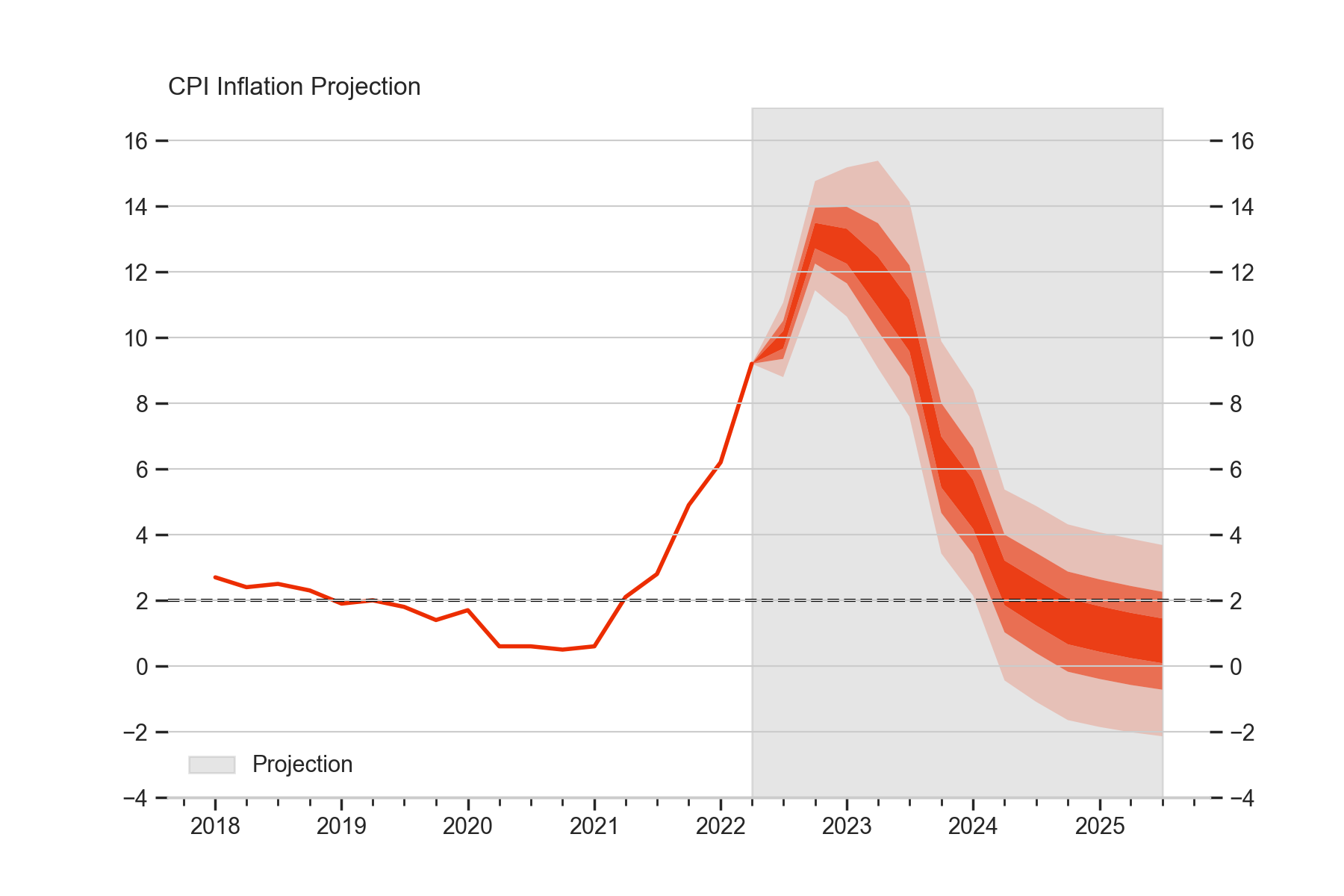
- The
fanfunction illustrates the distribution of all the forecasts available; and it has the option to display the historical values for reference.
    from fanchart import fan

    probs = [0.05, 0.20, 0.35, 0.65,0.80,  0.95]
    fan(pars=parameters, probs=probs, historic=history[history.Date >= '2018'])
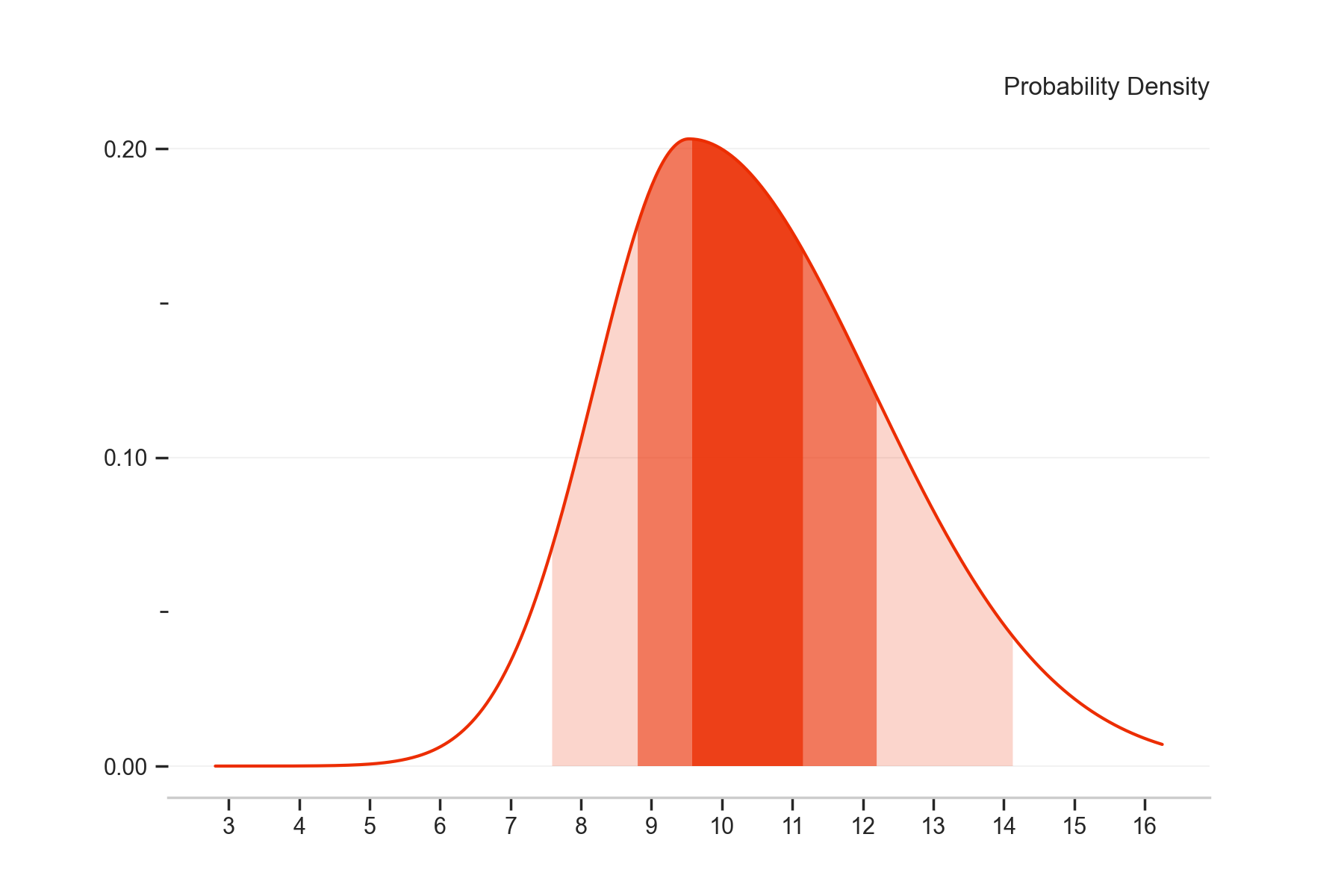
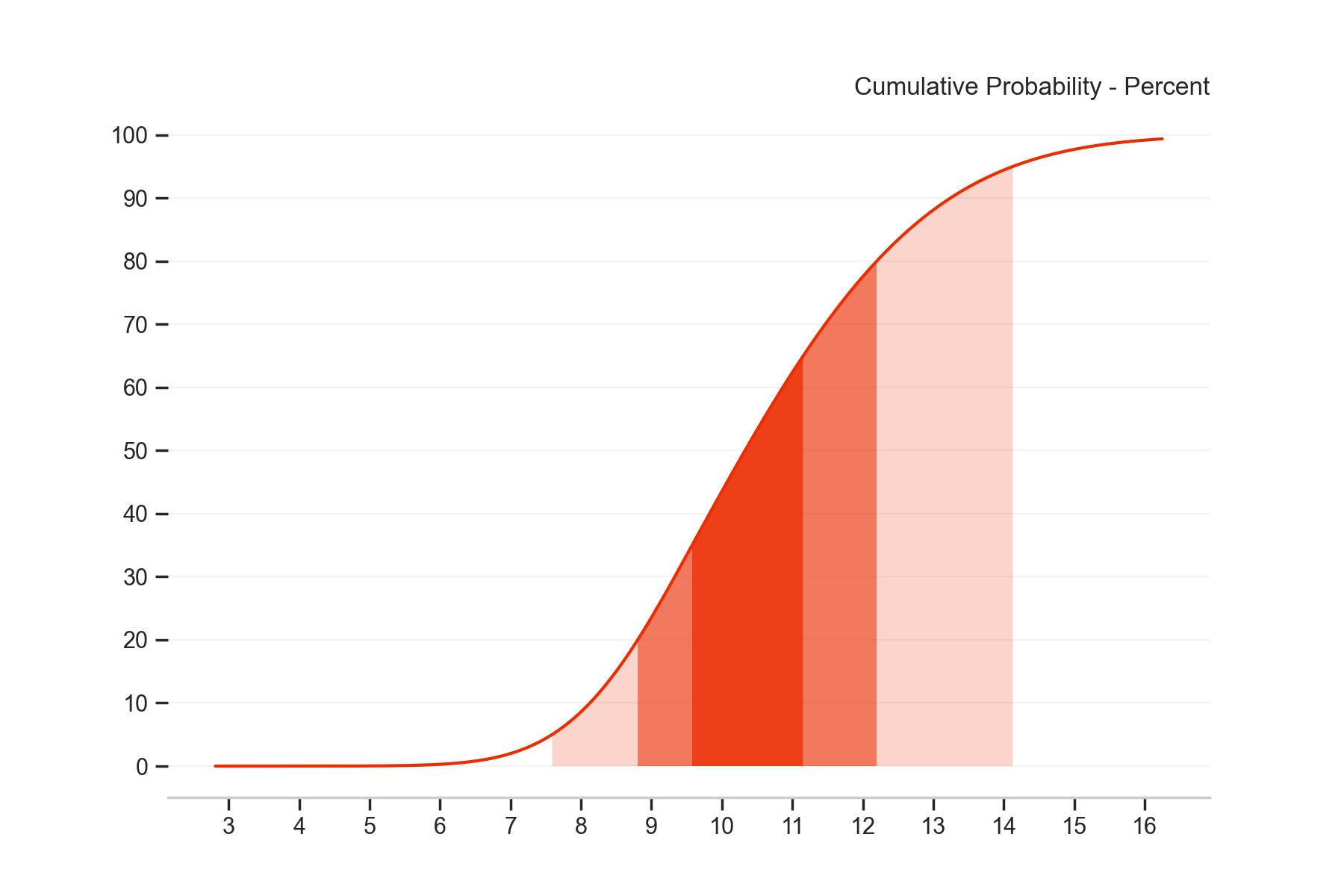
- The
fan_singlefunction illustrates the pdf/cdf of one forecast distribution
    from fanchart import fan_single

    probs = [0.05, 0.20, 0.35, 0.65,0.80,  0.95]
    fan_single(loc=9.53, sigma=1.68, gamma=1.0, probs=probs, kind='pdf')
    from fanchart import fan_single

    probs = [0.05, 0.20, 0.35, 0.65,0.80,  0.95]
    fan_single(loc=9.53, sigma=1.68, gamma=1.0, probs=probs, kind='cdf')
Thanks for Visiting! ✨
Connect with me via:
- 👾 Personal Website
⭐️ If you like this projet, please give it a star! ⭐️
1 maintainer

Metadata
1 maintainer
Release files for fanchart 1.1.0
For a detailed explanation of source distributions (sdists) and built distributions (wheels), please see the package formats documentation.
Source distribution (sdist)
| File | Size | Uploaded | Provenance | |
|---|---|---|---|---|
| fanchart-1.1.0.tar.gz | 9.0 kB | Without provenance | Details |
Built distribution (wheel)
| File | Interpreter | ABI | Platform | Reset |
|---|---|---|---|---|
| fanchart-1.1.0-py3-none-any.whl | Python 3 | none | any | Details |
Total release size: 21.0 kB
Release files / fanchart-1.1.0.tar.gz
| Download URL | fanchart-1.1.0.tar.gz |
|---|---|
| Size | 9.0 kB |
| Tags | Source |
|
SHA-256 checksum How to use checksums |
a76b2fd20b7a89f49d0b1ab78f102e781e872fe128981de00e7ad575102b45c6
|
|
BLAKE2b-256 checksum How to use checksums |
1a6757c46073468a04c75b1c85b6b99415626955e25473dbf96bd0cfa6bf9c64
|
| Upload date | |
|
Uploaded using Trusted Publishing? What is trusted publishing? |
No |
| Uploaded via |
twine/4.0.2 CPython/3.8.0
|
Release files / fanchart-1.1.0-py3-none-any.whl
| Download URL | fanchart-1.1.0-py3-none-any.whl |
|---|---|
| Size | 12.0 kB |
| Tags | Python 3 |
|
SHA-256 checksum How to use checksums |
d11725f388cf97c43708ccf3bd764bc23e3caed10363f5c8239c1aa9d206b360
|
|
BLAKE2b-256 checksum How to use checksums |
a7ba43ab175c83dd75132168e5d6f104a31b6350e0de121faf7fe8153d774849
|
| Upload date | |
|
Uploaded using Trusted Publishing? What is trusted publishing? |
No |
| Uploaded via |
twine/4.0.2 CPython/3.8.0
|
Security for fanchart 1.1.0
Provenance
Provenance describes where a file came from. On PyPI, provenance is shared via attestations, which provide a verifiable record of the build or publishing details. View details, limitations and caveats.
No provenance found
None of the files in this release were uploaded with provenance metadata.
A note on package security
PyPI is a repository for distributing packages, not a service for auditing them. While third-party security researchers and our staff do their best to detect and remove malicious packages, PyPI cannot guarantee the quality, security or suitability of any given package.














