
GRBlogtools


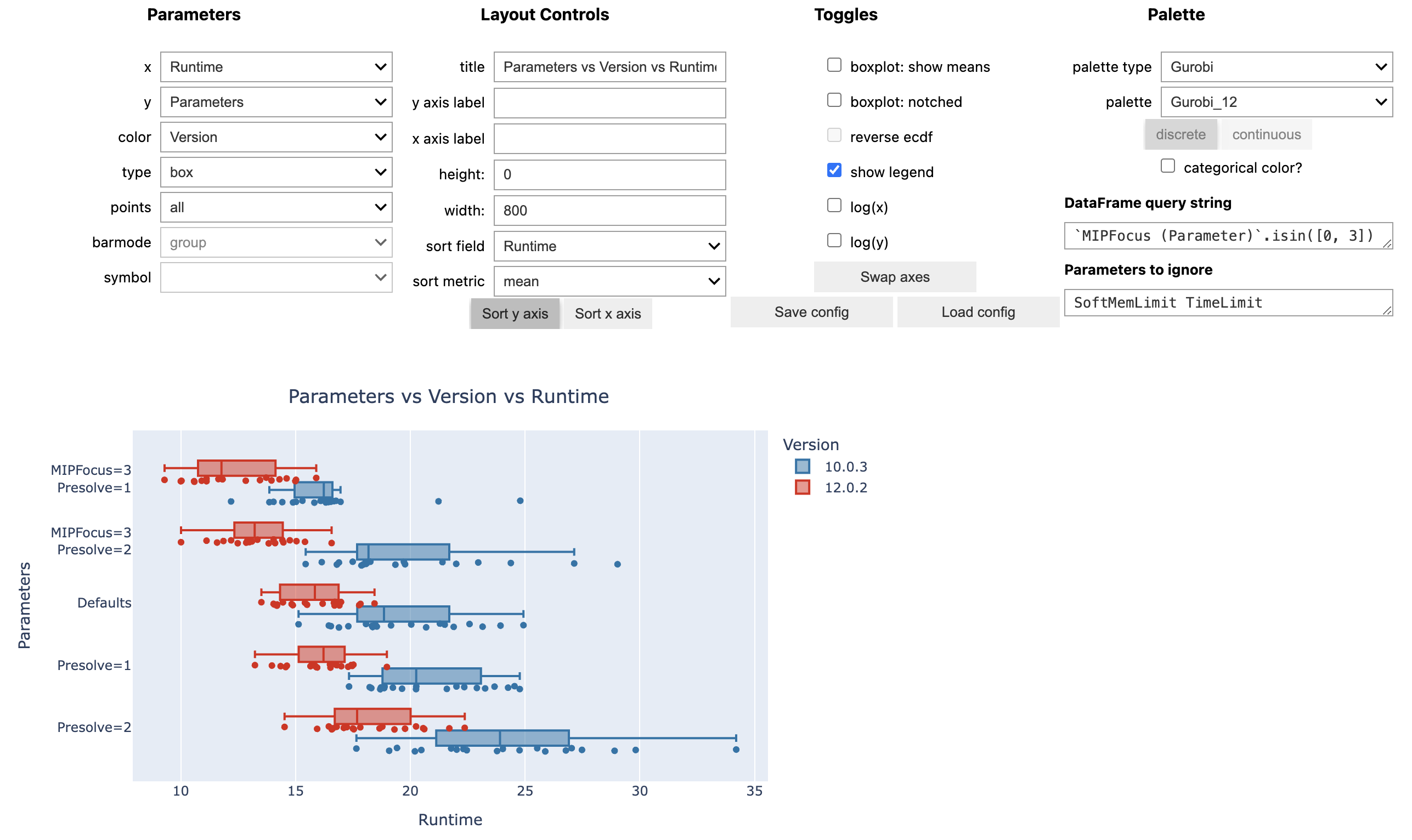
Extract information from Gurobi log files and generate pandas DataFrames or Excel worksheets for further processing. Also includes a wrapper for out-of-the-box interactive visualizations using the plotting library Plotly.
Installation
python -m pip install grblogtools
It is recommended to prepend the pip install command with python -m to ensure that the package is installed using the correct Python version currently active in your environment.
See CHANGELOG for added, removed or fixed functionality.
Usage
First, you need a set of Gurobi log files to compare, e.g.,
- results from several model instances
- comparisons of different parameter settings
- performance variability experiments involving multiple random seed runs
- ...
You may also use the provided grblogtools.ipynb notebook with the example data set to get started. Additionally, there is a Gurobi TechTalk demonstrating how to use grblogtools (YouTube):

Pandas/Plotly
-
parse log files:
import grblogtools as glt

results = glt.parse(["run1/*.log", "run2/*.log"])
summary = results.summary()
nodelog_progress = results.progress("nodelog")
Depending on your requirements, you may need to filter or modify the resulting DataFrames.
-
draw interactive charts, preferably in a Jupyter Notebook:
- final results from the individual runs:
glt.plot(summary, type="box")
- progress charts for the individual runs:
glt.plot(nodelog_progress, y="Gap", color="Log", type="line")
- progress of the norel heuristic (note, the time recorded here is since the start of norel, and does not include presolve + read time):
glt.plot(results.progress("norel"), x="Time", y="Incumbent", color="Log", type="line")
These are just examples using the Plotly Python library - of course, any other plotting library of your choice can be used to work with these DataFrames.
Excel
Convert your log files to Excel worksheets right on the command-line:
python -m grblogtools myrun.xlsx data/*.log
List all available options and how to use the command-line tool:
python -m grblogtools --help
Rename log files
The command line tool can also rename log files according to the parameters set and model solved in a given run. This is useful if your log files do not have a consistent naming scheme, or if multiple runs are logged per file and you want to extract the individual runs.
For example:
python -m grblogtools --write-to-dir nicenames summary.xlsx tests/assets/combined/*.log
separates logs for individual runs in the input files and writes copies to the 'nicenames' folder with a consistent naming scheme:
> ls nicenames
912-MIPFocus1-Presolve1-TimeLimit600-glass4-0.log
912-MIPFocus1-Presolve1-TimeLimit600-glass4-1.log
912-MIPFocus1-Presolve1-TimeLimit600-glass4-2.log
912-MIPFocus2-Presolve1-TimeLimit600-glass4-0.log
912-MIPFocus2-Presolve1-TimeLimit600-glass4-1.log
912-MIPFocus2-Presolve1-TimeLimit600-glass4-2.log
912-Presolve1-TimeLimit600-glass4-0.log
912-Presolve1-TimeLimit600-glass4-1.log
912-Presolve1-TimeLimit600-glass4-2.log
1 maintainer

Metadata
1 maintainer
Release files for grblogtools 2.2.0
For a detailed explanation of source distributions (sdists) and built distributions (wheels), please see the package formats documentation.
Source distribution (sdist)
| File | Size | Uploaded | Provenance | Actions |
|---|---|---|---|---|
| grblogtools-2.2.0.tar.gz | 26.8 kB | Without provenance | Details for grblogtools-2.2.0.tar.gz |
Built distribution (wheel)
| File | Interpreter | ABI | Platform | Actions Reset |
|---|---|---|---|---|
| grblogtools-2.2.0-py3-none-any.whl | Python 3 | none | any | Details for grblogtools-2.2.0-py3-none-any.whl |
Total release size: 70.8 kB
Release files / grblogtools-2.2.0.tar.gz
| Download URL | grblogtools-2.2.0.tar.gz |
|---|---|
| Size | 26.8 kB |
| Tags | Source |
|
SHA-256 checksum How to use checksums |
1eed848178823f75fb720913aae0e376320ea8eaf846d114db30e31b6aa21d14
|
|
BLAKE2b-256 checksum How to use checksums |
0d2e0a318eea59f9ab6e452ebe19937b5d5e644bba7c5b697f12dd5b6adcc024
|
| Upload date | |
|
Uploaded using Trusted Publishing? What is trusted publishing? |
No |
| Uploaded via |
twine/4.0.2 CPython/3.9.17
|
Release files / grblogtools-2.2.0-py3-none-any.whl
| Download URL | grblogtools-2.2.0-py3-none-any.whl |
|---|---|
| Size | 43.9 kB |
| Tags | Python 3 |
|
SHA-256 checksum How to use checksums |
87496573b34cee87f040243dd2feeed4fc385a30e297bcabfb0136f8cc78b7c8
|
|
BLAKE2b-256 checksum How to use checksums |
ae03a1fec84bd6af9783d24601734d646ce8fd29a957dbe463f44b0930ad9a45
|
| Upload date | |
|
Uploaded using Trusted Publishing? What is trusted publishing? |
No |
| Uploaded via |
twine/4.0.2 CPython/3.9.17
|
Security for grblogtools 2.2.0
Provenance
Provenance describes where a file came from. On PyPI, provenance is shared via attestations, which provide a verifiable record of the build or publishing details. View details, limitations and caveats.
No provenance found
None of the files in this release were uploaded with provenance metadata.
A note on package security
PyPI is a repository for distributing packages, not a service for auditing them. While third-party security researchers and our staff do their best to detect and remove malicious packages, PyPI cannot guarantee the quality, security or suitability of any given package.
To learn more about protecting yourself from malicious actors, visit our package security documentation.














