
Just Another Konsole YouTube-Music



Overview
My motivation for creating JAKYM came from my wish to create an application, that I could use to play music comfortably from the command line. I often play games and listen to music simultaneously, but using either Spotify or playing music in a browser takes a lot of resources from both my CPU and RAM.
I spent a lot of time looking through numerous CLI based music players, but they either require setting up a bunch of things, or required premium features to function; sometimes they didn't work at all, even after tinkering for hours.
Hence, instead of tearing my eyes out looking for a solution, I thought that I could code it myself.
So I present to you JAKYM, or "Just Another Konsole YouTube-Music": a command-line Youtube music player, written in Python with both Spotify and Youtube playlist support, easy on both memory and CPU resources.

Usage
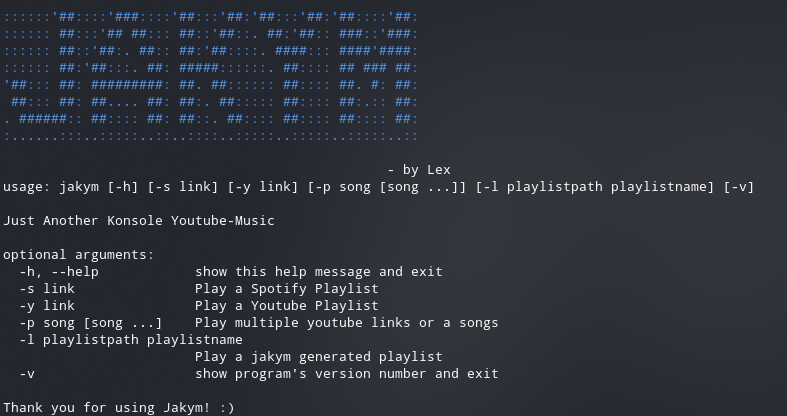
Using Command Line Options
- Run it by using jakym command
jakym.You can also specify arguments to easily play a playlist or song. The available options can be seen viajakym -h - Use
jakym -s "link"orjakym -y "link"to instanly start up by queuing a playlist without having to use the command window. - You can also use
jakym -p "song 1" "song 2" "song 3"to queue up multiple songs. - To instantly queue a saved jakym playlist run
jakym -l playlistpath playlistname. - This will launch into jakym command window.
Using Jakym Command Window
- The program opens up into the jakym command window.
- Use
commandsto view all available commands. - Enter a songname in command window to search for song or just enter its youtube link to play directly from a link.
- Jakym will queue the song once you type it and allow you to add the next song.
- The queue operates independent of the command window and plays the song on a separate thread.
- To exit the command window and hence the application simply type
exit.
Commands
- Type
spotifyto play music using spotify playlist - Type
youtubeto play music using youtube playlist - Use
rmto remove the last queued song from the playlist. - Type
shuffleto shuffle your queue. - Use
loadto load a playlist andsaveto save your playlist. Include the trailing slash in path i.e. specify path asC:\Users\Lex\Music\or/home/lex/Projects/jakym/. - Use
play,pause,next,backto control the playback. - Use
repeat all,repeat songandrepeat offto control song repetition. - Use
seekwith an integer like 10 or -10 to control the current song.
Installation
For Arch Linux users, jakym is available in the AUR. Simply use your favourate helper to get it.
To Update jakym simply run pip install --upgrade jakym
Installing ffmpeg
ffmpeg is required for this program to work correctly. Install ffmpeg by following these steps:
- On Linux - https://www.tecmint.com/install-ffmpeg-in-linux/
- On Windows - https://www.wikihow.com/Install-FFmpeg-on-Windows
Installing simpleaudio
simpleaudio is an optional pydub dependency, however it is essential for proper working of jakym as the playback depends on simpleaudio.
On Linux
- Install Dependencies by
sudo apt-get install -y python3-dev libasound2-dev - Install with:
pip install simpleaudio
On Windows
- Download the .whl file of simpleaudio from here
- Once downloaded, it can be installed using the following command :
pip install package_name.whl
Installing jakym
-
Install by using pypi :-
pip install jakym -
Run using jakym command
jakym
Violla jakym is now installed!
Enjoy jakym
How It Works
- The program starts and runs two threads, one to input music into the playlist and the other to iterate over the playlist, download the corresponding music and play it.
- The yt-dlp library does most of the heavy lifting of both parsing links and downloading them into a suitable file format.
- The pydub and simpleaudio libraries provide cross-platform audio playback without any issues but setting up simpleaudio on windows and Linux take a different approach.
- The program runs until user types exit.
Version history
| Version | Improvements |
|---|---|
| 0.4.1 | Switched Backend From youtube-dl to yt-dlp for faster downloads |
| 0.4.0 | Playback controls, Bug fixes |
| 0.3.3 | Better temporary file management, Playlist management support |
| 0.3.2 | Fixed heavy CPU usage while Idling, Added command line arguments, Fixed colour issues on Windows |
| 0.3.1 | Bug fixes and Shuffle |
| 0.3 | Added Youtube Playlist support, Improved Readme |
| 0.2 | Added Spotify playlist support, Bug fixes |
| 0.1.1 | Improved documentation, Command line integration |
| 0.1 | Initial release |
Copyright
Copyright (c) 2021 Mayank Jha
License - GNU GPL v3
1 maintainer

Metadata
1 maintainer
Release files for jakym 0.4.1
For a detailed explanation of source distributions (sdists) and built distributions (wheels), please see the package formats documentation.
Built distribution (wheel)
| File | Interpreter | ABI | Platform | Reset |
|---|---|---|---|---|
| jakym-0.4.1-py3-none-any.whl | Python 3 | none | any | Details |
Release files / jakym-0.4.1-py3-none-any.whl
| Download URL | jakym-0.4.1-py3-none-any.whl |
|---|---|
| Size | 20.9 kB |
| Tags | Python 3 |
|
SHA-256 checksum How to use checksums |
82b0eacfcb5588c82e0fd2fb758d47c859b168a97e2d354a176bd728ebbd5b3f
|
|
BLAKE2b-256 checksum How to use checksums |
4bbf6057098023fbf5d9e035d82e518ad85f81d91ca0c14b323aec1c0d91836e
|
| Upload date | |
|
Uploaded using Trusted Publishing? What is trusted publishing? |
No |
| Uploaded via |
twine/4.0.1 CPython/3.10.5
|














