




matchable
Attribute-based object matching in Python
Installation
From PyPI:
pip install matchable
Usage
matchable is built around two objects, match and Spec:
matchis used to create patterns and link them to user-specified values.Specholds a list of patterns which can be matched against arbitrary objects in order to combine their linked values.
For example:
match(object).attr > 0
This pattern matches any object which has an attribute attr that compares greater than 0.
match(dict)['key'] == 0
This pattern matches all dicts (or subclasses thereof) with an item 'key' which compares equal to 0.
Such patterns can be used to create a speficiation via the Spec class:
spec = Spec.from_patterns({
    match(object).attr > 0: 'foo',
    match(dict)['key'] == 0: 'bar',
})
A spec can be used to match other objects against its patterns and to combine the corresponding values:
>>> spec.match({'key': 0})
'bar'
>>> class Test:
...     attr = 1
...
>>> spec.match(Test())
'foo'
If no condition matches the given object, an exception is raised:
>>> spec.match({'key': 5})
[...]
matchable.exceptions.NoMatchError: No matching conditions found for object {'key': 5}
If multiple conditions match the given object, their corresponding values are combined (see the paragraph below for what "to combine" means in different contexts):
>>> class Test(dict):
...     attr = 1
...
>>> spec.match(Test(key=0))
'bar'
Here, for strings, "to combine" means to simply select the last seen value (for customizing this behavior, see the next section). For dictionaries however the standard behavior is to update their content:
>>> spec = Spec.from_patterns({
...     match(object).attr > 0: dict(x='foo'),
...     match(dict)['key'] == 0: dict(y='bar'),
... })
>>> spec.match(Test(key=0))
{'x': 'foo', 'y': 'bar'}
This is useful for combining multiple partial configurations into one.
Registering custom combinations
The example of the previous section showed that for strings the "last seen wins" strategy is chosen for combining two values. Another possibility would be to concatenate values. We can implement this in the following way:
from matchable.spec import Wrapper, WRAPPER_TYPES

class Concatenate(Wrapper):
    def __or__(self, other):
        return Concatenate(self.obj + other.obj)

WRAPPER_TYPES[str] = Concatenate
Basically we need to supply a custom Wrapper class for the corresponding type in WRAPPER_TYPES.
Since individual values are combined via lhs | rhs all this wrapper needs to do is implement the
__or__ protocol and perform the combination logic there. Here self.obj accesses the wrapped object
(string in this case). It's important to note that the wrapper needs to be registered before creating
the spec since once the spec is created it won't change the wrapper types of its values.
So now we can create the spec and match some objects:
spec = Spec.from_patterns({
    match(dict)['x'] > 0: 'foo',
    match(dict)['x'] > 1: 'bar',
})

>>> spec.match({'x': 1})
'foo'
>>> spec.match({'x': 2})
'foobar'
Patterns, Matching and the Class Hierarchy
Patterns can refer to attributes (match(obj).x) or items (match(obj)['x']) of objects of certain types
or to the type directly (either match(tp) or just tp).
During matching, if multiple patterns apply, attribute-based patterns take precedence over type-based patterns.
In fact the list of all matched patterns is sorted in a way that type-based patterns are placed on the left,
in the order of the matched object's reversed MRO,
followed by attribute-based patterns in the order of their appearance during the spec's creation.
The corresponding values are then updated from left to right where r.h.s. values update l.h.s. values (i.e. lhs | rhs).
For example for a list of strings, since they update as "last seen wins", the rightmost value would be the result.
For a list of sets the equivalent is s1 | s2 | s3, i.e. they build a union.
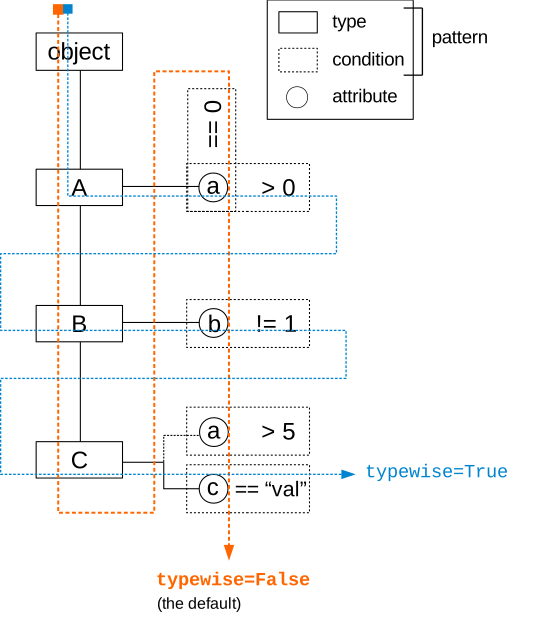
The Spec.match method also supports a typewise keyword-argument which can be used to alter the sorting of patterns
such that attribute-based patterns only take precedence over their associated type-based pattern but otherwise the matched
object's reverse MRO is respected. I.e. for typewise=True a subtype-based pattern takes predence over the attribute-based
pattern of an ancestor, while for typewise=False (the default) the opposite is true (since here type-based patterns are
sorted all the way to the left).
The following diagram visualizes the class hierarchy as well as the order of precedence for the different matching flavors.
Example
Suppose a sequence of objects that should be visualized in some way. These are the objects:
from dataclasses import dataclass

@dataclass
class Plant:
    height: float

@dataclass
class Flower(Plant):
    n_petals: int

@dataclass
class Tree(Plant):
    pass

plants = [  # some random numbers
    Flower(height=4.0, n_petals=5),
    Flower(height=3.5, n_petals=7),
    Flower(height=6.8, n_petals=4),
    Tree(height=104.6),
    Flower(height=1.8, n_petals=9),
    Tree(height=187.2),
    Tree(height=121.9),
    Flower(height=2.2, n_petals=5),
]
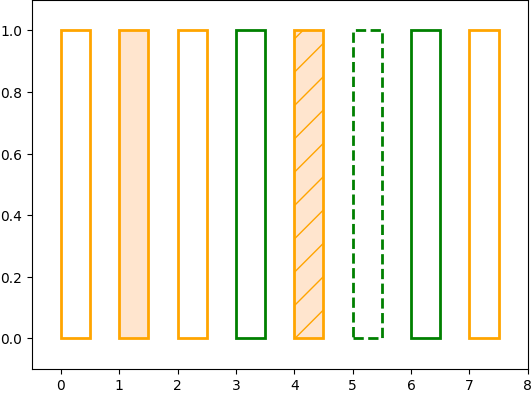
Say we want to visualize these plant objects as rectangles with different styles that represent their attributes. We can do so by creating a spec that represents the various rectangles' configurations (note that if there are multiple matches in the spec, the dicts will be merged into one):
config = Spec.from_patterns({
    match(Plant): dict(linestyle='-', linewidth=2, facecolor='none'),
    match(Flower): dict(edgecolor='orange'),
    match(Flower).height < 2.0: dict(hatch='/'),
    match(Flower).n_petals >= 7: dict(facecolor='#ff7f0e33'),
    match(Tree): dict(edgecolor='green'),
    match(Tree).height > 160: dict(linestyle='--'),
})
Then we can add the Rectangle patches as follows:
fig, ax = plt.subplots()
for i, plant in enumerate(plants):
    ax.add_patch(Rectangle((i, 0), 0.5, 1, **config.match(plant)))
This gives us the following plot:
1 maintainer

Metadata
1 maintainer
Release files for matchable 0.1.2
For a detailed explanation of source distributions (sdists) and built distributions (wheels), please see the package formats documentation.
Source distribution (sdist)
| File | Size | Uploaded | |
|---|---|---|---|
| matchable-0.1.2.tar.gz | 11.4 kB | Details |
Built distribution (wheel)
| File | Interpreter | ABI | Platform | Reset |
|---|---|---|---|---|
| matchable-0.1.2-py3-none-any.whl | Python 3 | none | any | Details |
Total release size: 20.7 kB
Release files / matchable-0.1.2.tar.gz
| Download URL | matchable-0.1.2.tar.gz |
|---|---|
| Size | 11.4 kB |
| Tags | Source |
|
SHA-256 checksum How to use checksums |
ebf27e62d6dc7f74f797a44f6b629907360649559a6a277c4be0b319e5746916
|
|
BLAKE2b-256 checksum How to use checksums |
6f136d6b3695bf748f6474d6cfd429118010cefe2c821cb1a4db7ad90c8a2904
|
| Upload date | |
|
Uploaded using Trusted Publishing? What is trusted publishing? |
No |
| Uploaded via |
poetry/1.0.8 CPython/3.8.6 Linux/5.4.0-1031-azure
|
Release files / matchable-0.1.2-py3-none-any.whl
| Download URL | matchable-0.1.2-py3-none-any.whl |
|---|---|
| Size | 9.3 kB |
| Tags | Python 3 |
|
SHA-256 checksum How to use checksums |
509812e99405fc90e87cc4c34ef0e06e574e481b1bfc602fbefa08aa6897385b
|
|
BLAKE2b-256 checksum How to use checksums |
97140b97074327ba9c59ae3cdbe989eb72a282ada9075e307b19d468750a8b11
|
| Upload date | |
|
Uploaded using Trusted Publishing? What is trusted publishing? |
No |
| Uploaded via |
poetry/1.0.8 CPython/3.8.6 Linux/5.4.0-1031-azure
|














