







📖 介绍
nonebot-plugin-cardimg 是一个基于 nonebot_plugin_htmlkit 的模板化图片渲染插件,为 NoneBot2 插件开发者提供简单易用的文本图片生成功能。
核心特性
- 多种预设模板:提供 7 种精美模板,覆盖常见使用场景
- 昼夜模式:部分模板支持自动/手动切换昼夜主题
- 随机配色:部分模板支持随机颜色主题
- 灵活配置:支持全局配置和模板特定参数
- 资源缓存:内置文件和资源缓存机制,提升性能
- 易于扩展:基于抽象基类,方便添加自定义模板
可用模板
| 模板名称 | 描述 | 特性 |
|---|---|---|
minote |
小米便签风格 | 背景图+边框+四角装饰 |
simple |
简约风格 | 纯色背景,支持昼夜模式 |
ncm_zhusha |
网易云朱砂样式 | 红色背景+白色标题框 |
ncm_card |
网易云热评卡片 | 音乐评论卡片样式 |
bili |
哔哩哔哩壁纸 | 支持昼夜模式 |
help |
帮助文档 | 支持随机颜色主题和昼夜模式 |
table |
表格展示 | 支持随机颜色主题和昼夜模式 |
🖼️ 演示效果
点击展开查看各模板渲染效果
小米便签 (minote)
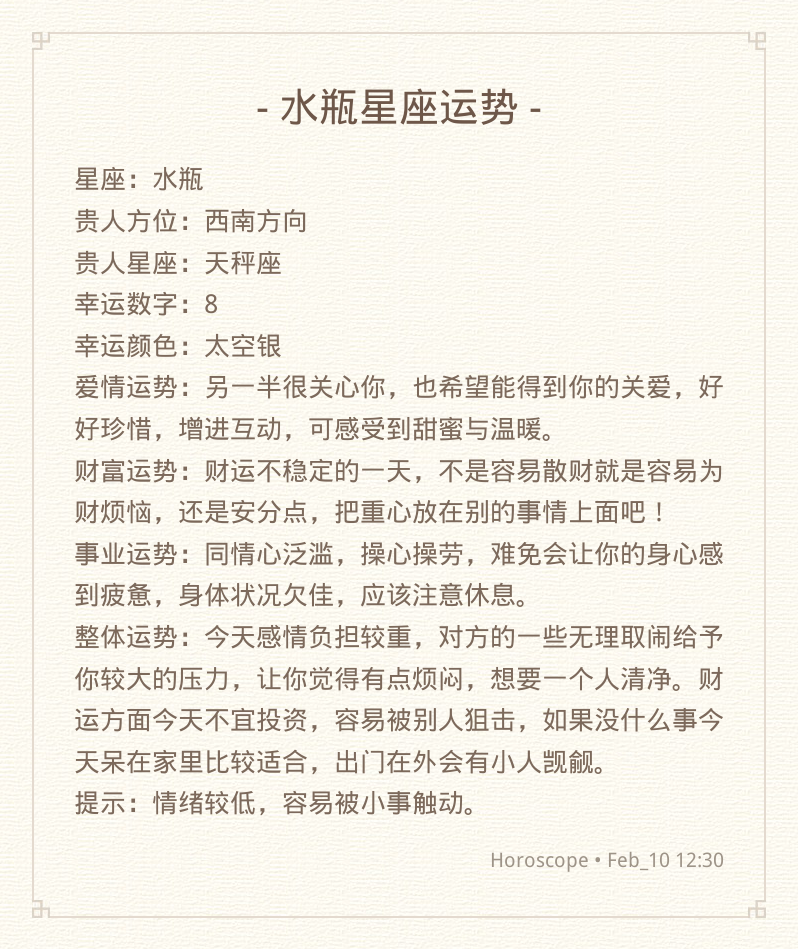
简约风格 (simple)
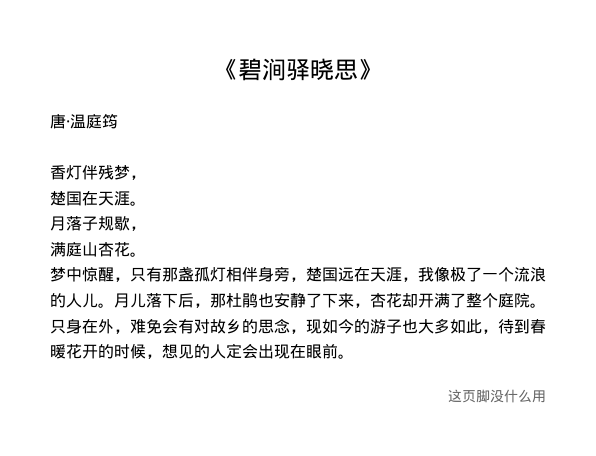
网易云朱砂 (ncm_zhusha)

网易云热评卡片 (ncm_card)

哔哩哔哩壁纸 (bili)

帮助文档 (help)
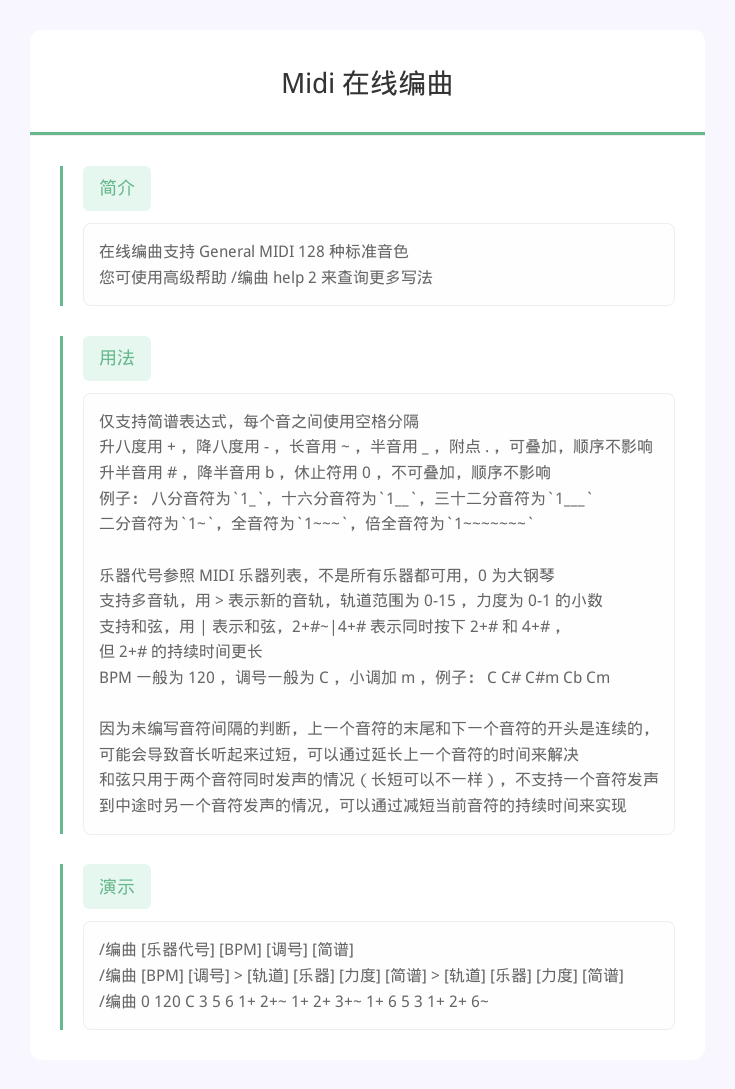
表格展示 (table)

安装
以下提到的方法 任选其一 即可
[推荐] 使用 nb-cli 安装
在 nonebot2 项目的根目录下打开命令行, 输入以下指令即可安装
nb plugin install nonebot-plugin-cardimg
使用包管理器安装
在 nonebot2 项目的插件目录下, 打开命令行, 根据你使用的包管理器, 输入相应的安装命令
pip
pip install nonebot-plugin-cardimg
pdm
pdm add nonebot-plugin-cardimg
poetry
poetry add nonebot-plugin-cardimg
conda
conda install nonebot-plugin-cardimg
打开 nonebot2 项目根目录下的 pyproject.toml 文件, 在 [tool.nonebot] 部分的 plugins 项里追加写入
[tool.nonebot]
plugins = [
    # ...
    "nonebot_plugin_cardimg"
]
⚙️ 配置
在 nonebot2 项目的 .env 文件中添加下表中的配置
| 配置项 | 必填 | 默认值 | 说明 |
|---|---|---|---|
cardimg_use_global_config |
否 | False |
是否使用全局配置作为兜底 |
cardimg_image_format |
否 | png |
全局图片格式:png 或 jpeg |
cardimg_jpeg_quality |
否 | 85 |
全局 JPEG 质量:1-100 |
🎉 使用
基础用法
from nonebot import require
require("nonebot_plugin_cardimg")
from nonebot_plugin_cardimg import render

# 渲染小米便签模板
img_bytes = await render(
    'minote',
    title='标题',
    content='这是正文内容',
    footer='页脚'
)

# 渲染简约模板(自动昼夜模式)
img_bytes = await render(
    'simple',
    title='简约标题',
    content='简约内容'
)

# 渲染帮助文档
img_bytes = await render(
    'help',
    title='帮助文档',
    items={
        '命令1': '这是命令1的说明',
        '命令2': '这是命令2的说明'
    },
    footer='更多帮助请访问...'
)

# 渲染表格
img_bytes = await render(
    'table',
    title='排行榜',
    tip='数据更新时间:2026-02-10',
    columns=['排名', '用户', '分数'],
    data=[
        ['1', '用户A', '100'],
        ['2', '用户B', '95'],
        ['3', '用户C', '90']
    ]
)
高级用法
指定渲染参数
img_bytes = await render(
    'simple',
    title='标题',
    content='内容',
    htmlkit_params={
        'max_width': 800,
        'image_format': 'jpeg',
        'jpeg_quality': 90
    }
)
手动控制昼夜模式
# 强制使用夜间模式
img_bytes = await render(
    'simple',
    title='标题',
    content='内容',
    night_mode=True
)

# 强制使用白天模式
img_bytes = await render(
    'simple',
    title='标题',
    content='内容',
    night_mode=False
)
获取可用模板列表
from nonebot_plugin_cardimg import list_templates

templates = list_templates()
print(templates)  # ['minote', 'simple', 'ncm_zhusha', 'ncm_card', 'bili', 'help', 'table']
接口方法参考
render(template, title="", content="", footer="", htmlkit_params=None, **kwargs)
渲染模板为图片
参数:
template(str): 模板名称title(str, optional): 标题content(str, optional): 正文内容footer(str, optional): 页脚htmlkit_params(dict, optional): htmlkit 渲染参数**kwargs: 模板特定参数
其中:template 是必填项,其他参数根据不同模板需求填写;htmlkit_params 是 htmlkit 插件的渲染方法参数,可用来自定义调整渲染尺寸、格式等内容。
返回:
bytes: 图片字节数据
模板特定参数:
simple/bili/help/table:night_mode(bool, optional) - 是否使用夜间模式help:items(dict) - 帮助项字典table:columns(list) - 表头列表,data(list[list]) - 表格数据,tip(str) - 提示文本
📝 开发
添加自定义模板
from pathlib import Path
from nonebot_plugin_cardimg import BaseTemplate


class MyTemplate(BaseTemplate):
    def __init__(self):
        super().__init__("my_template", Path(__file__).parent / "templates")

    async def render(self, **kwargs) -> bytes:
        options = kwargs.pop("_render_options", self.get_render_options())
        templates = {
            "title": kwargs.get("title", ""),
            "content": kwargs.get("content", ""),
        }
        return await self.to_pic_template("template.html", templates=templates, **options)
📞 联系
- 由于技术力和时间有限,本插件可能存在问题和不足,字体自定义以及图片压缩相关问题未能很好解决,欢迎优化或指正(๑˃̵ᴗ˂̵)₊♡
- 由于技术力和时间有限,本项目的描述和代码排版由AI辅助完成,如有意外的错漏混淆欢迎反馈和指正(๑˃̵ᴗ˂̵)₊♡♡
- 如有问题或建议,欢迎提交 Issue 或 Pull Request。
💡 鸣谢
- nonebot-plugin-htmlkit - HTML 转图片核心库
- nonebot-plugin-txt2img - 模板样式参考
- nonebot-plugin-zxui - 模板样式参考
- nonebot-plugin-template - 插件模板
📝 更新日志
v0.1.3 (2026-02-18)
- 移除 pydantic 版本限制,兼容 pydantic v1 和 v2
v0.1.2 (2026-02-10)
- 修复 nonebot-plugin-htmlkit 依赖版本号错误问题
- 更新项目描述
v0.1.1 (2026-02-10)
- 初始版本发布(仅在 Docker 环境下测试通过,暂未解决默认字体替换问题)
1 maintainer

Metadata
1 maintainer
Release files for nonebot-plugin-cardimg 0.1.3
For a detailed explanation of source distributions (sdists) and built distributions (wheels), please see the package formats documentation.
Source distribution (sdist)
| File | Size | Uploaded | |
|---|---|---|---|
| nonebot_plugin_cardimg-0.1.3.tar.gz | 2.0 MB | Details |
Built distribution (wheel)
| File | Interpreter | ABI | Platform | Reset |
|---|---|---|---|---|
| nonebot_plugin_cardimg-0.1.3-py3-none-any.whl | Python 3 | none | any | Details |
Total release size: 2.3 MB
Release files / nonebot_plugin_cardimg-0.1.3.tar.gz
| Download URL | nonebot_plugin_cardimg-0.1.3.tar.gz |
|---|---|
| Size | 2.0 MB |
| Tags | Source |
|
SHA-256 checksum How to use checksums |
14af2bfd8b00dd461fbb099b714874e7ddf57d6039707fd4390b6a346c8f91f4
|
|
BLAKE2b-256 checksum How to use checksums |
2ee89321249a9cf72524debd94491d4deb971a5b912fb889194fd3133f2752b2
|
| Upload date | |
|
Uploaded using Trusted Publishing? What is trusted publishing? |
No |
| Uploaded via |
twine/6.2.0 CPython/3.10.11
|
Release files / nonebot_plugin_cardimg-0.1.3-py3-none-any.whl
| Download URL | nonebot_plugin_cardimg-0.1.3-py3-none-any.whl |
|---|---|
| Size | 364.8 kB |
| Tags | Python 3 |
|
SHA-256 checksum How to use checksums |
10334680fa9c0b50d6373b46cb57a77c87c65798bc19b464379055f1dd6ddfa9
|
|
BLAKE2b-256 checksum How to use checksums |
c317807d370fcb8eecb29998b081bf845052c1941fb1ee4cdf3d904d17516a1e
|
| Upload date | |
|
Uploaded using Trusted Publishing? What is trusted publishing? |
No |
| Uploaded via |
twine/6.2.0 CPython/3.10.11
|














