
pyemcee










Description
pyemcee is a Python implementation of the affine-invariant Markov chain Monte Carlo (MCMC) ensemble sampler, based on sl_emcee by M. A. Nowak, an S-Lang/ISIS implementation of the MCMC Hammer proposed by Goodman & Weare (2010), and also implemented in Python (emcee) by Foreman-Mackey et al. (2013).
Installation
To install the last version, all you should need to do is
$ python setup.py installTo install the stable version, you can use the preferred installer program (pip):
$ pip install pyemceeor you can install it from the cross-platform package manager conda:
$ conda install -c conda-forge pyemceeThis package requires the following packages:
How to Use
The Documentation of the functions provides in detail in the API Documentation (mcfit.github.io/pyemcee/doc). This Python library creates the MCMC sampling for given upper and lower uncertainties, and propagates uncertainties of parameters into the function.
See Jupyter Notebook: Notebook.ipynb
Run Jupyter Notebook on Binder:
First, you need to load the pyemcee library as follows:
import pyemcee
import numpy as np
You need to define your function. For example:
def myfunc21(input1):
   result1 = np.sum(input1)
   result2 = input1[1] ** input1[0]
   return [result1, result2]
Then, specify the upper and lower uncertainties of the prior parameters:
input1 = np.array([1., 2.])
input1_err = np.array([0.2, 0.5])
input1_err_p = input1_err
input1_err_m = -input1_err
output1 = myfunc21(input1)
output1_num = len(output1)
Choose the appropriate uncertainty distribution. For example, for a uniform distribution, use_gaussian=0, and a Gaussian distribution use_gaussian=1. Then, specify the number of walkers and the number of iterations, e.g. walk_num=30 and iteration_num=100. You can then create the MCMC sample and propagate the uncertainties of the input parameters into your defined functions as follows:
use_gaussian=0 # uniform distribution from min value to max value
walk_num=30 # number of walkers
iteration_num=100 # number of samplers
mcmc_sim = pyemcee.hammer(myfunc21, input1, input1_err_m,
                          input1_err_p, output1, walk_num,
                          iteration_num, use_gaussian)
To determine the upper and lower errors of the function outputs, you need to run with the chosen appropriate confidence level. For example, a 1.645-sigma standard deviation can be specified with clevel=0.90. For a 1-sigma standard deviation, we have clevel=0.682:
clevel=0.68268949 # 1-sigma
output1_error = pyemcee.find_errors(output1, mcmc_sim, clevel, do_plot=1)
which shows the following distribution histograms:
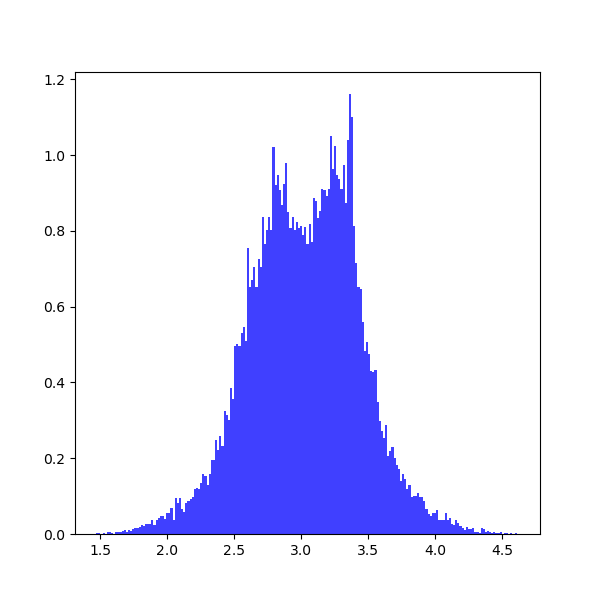
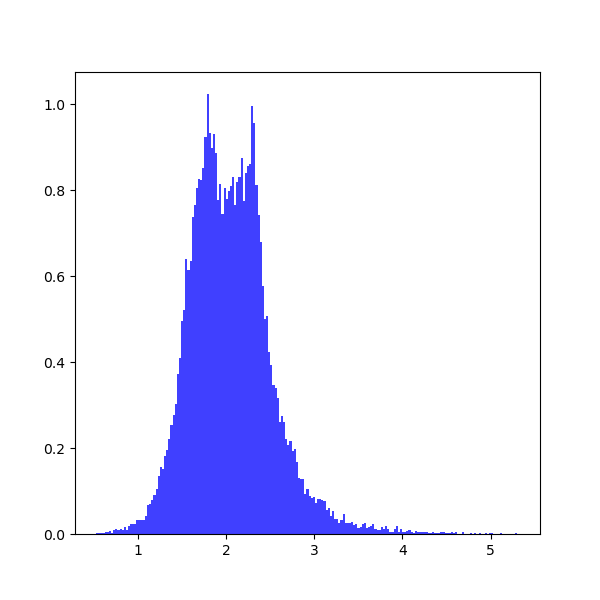
To prevent plotting, you should set do_plot=None. To print the results:
for i in range(0, output1_num):
   print(output1[i], output1_error[i,:])
which provide the upper and lower limits on each parameter:
3.0 [-0.35801017 0.35998471]
2.0 [-0.37573196 0.36297235]
For other standard deviation, you should use different confidence levels:
clevel=0.38292492 # 0.5-sigma
clevel=0.68268949 # 1.0-sigma
clevel=0.86638560 # 1.5-sigma
clevel=0.90       # 1.645-sigma
clevel=0.95       # 1.960-sigma
clevel=0.95449974 # 2.0-sigma
clevel=0.98758067 # 2.5-sigma
clevel=0.99       # 2.575-sigma
clevel=0.99730020 # 3.0-sigma
clevel=0.99953474 # 3.5-sigma
clevel=0.99993666 # 4.0-sigma
clevel=0.99999320 # 4.5-sigma
clevel=0.99999943 # 5.0-sigma
clevel=0.99999996 # 5.5-sigma
clevel=0.999999998# 6.0-sigma
Documentation
For more information on how to use the API functions from the pyemcee library, please read the API Documentation published on mcfit.github.io/pyemcee.
Learn More
Documentation |
|
Repository |
|
Issues & Ideas |
|
Conda-Forge |
|
PyPI |
|
Archive |
1 maintainer

Metadata
1 maintainer
Release files for pyemcee 0.2.6
For a detailed explanation of source distributions (sdists) and built distributions (wheels), please see the package formats documentation.
Source distribution (sdist)
| File | Size | Uploaded | Provenance | Actions |
|---|---|---|---|---|
| pyemcee-0.2.6.tar.gz | 22.7 kB | Without provenance | Details for pyemcee-0.2.6.tar.gz |
Built distribution (wheel)
| File | Interpreter | ABI | Platform | Actions Reset |
|---|---|---|---|---|
| pyemcee-0.2.6-py2.py3-none-any.whl | Python 2, Python 3 | none | any | Details for pyemcee-0.2.6-py2.py3-none-any.whl |
Total release size: 56.0 kB
Release files / pyemcee-0.2.6.tar.gz
| Download URL | pyemcee-0.2.6.tar.gz |
|---|---|
| Size | 22.7 kB |
| Tags | Source |
|
SHA-256 checksum How to use checksums |
6277bb06a133a5ab8f4cff1296ff8698ffebbdc41cce600e44b43ff199879721
|
|
BLAKE2b-256 checksum How to use checksums |
a013dbebc939751d62d2a3a489fdab06494dcfcfcf45020eb82aa80fefde0498
|
| Upload date | |
|
Uploaded using Trusted Publishing? What is trusted publishing? |
No |
| Uploaded via |
twine/4.0.2 CPython/3.9.16
|
Release files / pyemcee-0.2.6-py2.py3-none-any.whl
| Download URL | pyemcee-0.2.6-py2.py3-none-any.whl |
|---|---|
| Size | 33.4 kB |
| Tags | Python 2 Python 3 |
|
SHA-256 checksum How to use checksums |
5a44217598be0cbfa774221974a886a104f495a54bc60a6500865df596f62b78
|
|
BLAKE2b-256 checksum How to use checksums |
3efcbf2f80207fea9409595faac2a52e2a7f00abb5182acda1d51734266f954f
|
| Upload date | |
|
Uploaded using Trusted Publishing? What is trusted publishing? |
No |
| Uploaded via |
twine/4.0.2 CPython/3.9.16
|
Security for pyemcee 0.2.6
Provenance
Provenance describes where a file came from. On PyPI, provenance is shared via attestations, which provide a verifiable record of the build or publishing details. View details, limitations and caveats.
No provenance found
None of the files in this release were uploaded with provenance metadata.
A note on package security
PyPI is a repository for distributing packages, not a service for auditing them. While third-party security researchers and our staff do their best to detect and remove malicious packages, PyPI cannot guarantee the quality, security or suitability of any given package.
To learn more about protecting yourself from malicious actors, visit our package security documentation.














