



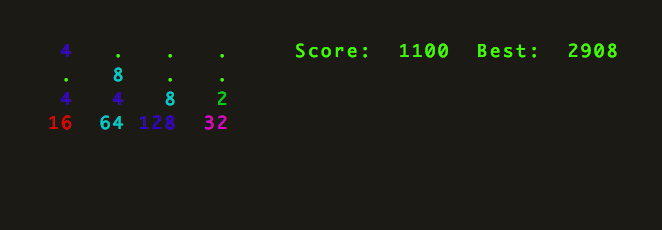
term2048 is a terminal-based version of 2048.
Install
pip install term2048To upgrade a previous installation, use:
pip install -U term2048To install via snap:
sudo snap install term2048
Install from source
git clone https://github.com/bfontaine/term2048.git && cd term2048
[sudo] python setup.py install
Play
term2048Then use arrow keys to move. VI keys (h,j,k,l) are also supported.
Use -h to check the list of available options, and --rules for the game rules. Press <space> at any time during the game to pause it. You can resume it later using term2048 --resume.
Tests
Clone this repo, then:
[sudo] make deps
make check
Note: while term2048 should work on Windows, tests are meant to run on UNIX-like OSes and term2048.keypress-related tests may fail on Windows.
Contributions
--version flag added by @aminb
--rules flag added by @cardern
Short -r and -v flags added by @yankuangshi
Resume feature added by @pravj
Snap installation method added by @LaughingLove
v0.2.0
Python 2.6 and 3.x support by @shaunduncan
Tests instructions fixed by @olafleur
Spawn probabilities fixed by @frankh
Colors improved by @idosch
hjkl keys support by @aminb
Windows support by @valtron
AZ mode by @JosephRedfern
The first file-related tests were added by @taeram
1 maintainer

Metadata
1 maintainer
Release files for term2048 0.2.7
For a detailed explanation of source distributions (sdists) and built distributions (wheels), please see the package formats documentation.
Source distribution (sdist)
| File | Size | Uploaded | Provenance | Actions |
|---|---|---|---|---|
| term2048-0.2.7.tar.gz | 10.0 kB | Without provenance | Details for term2048-0.2.7.tar.gz |
Built distribution (wheel)
| File | Interpreter | ABI | Platform | Actions Reset |
|---|---|---|---|---|
| term2048-0.2.7-py3-none-any.whl | Python 3 | none | any | Details for term2048-0.2.7-py3-none-any.whl |
Total release size: 19.8 kB
Release files / term2048-0.2.7.tar.gz
| Download URL | term2048-0.2.7.tar.gz |
|---|---|
| Size | 10.0 kB |
| Tags | Source |
|
SHA-256 checksum How to use checksums |
8163d5dddb1384d35b84627751c55c5f011618fe211726b6fc51a2992378b669
|
|
BLAKE2b-256 checksum How to use checksums |
530a911a042756afca4c826ed168665eb5c954416f1e58837430511951c373c9
|
| Upload date | |
|
Uploaded using Trusted Publishing? What is trusted publishing? |
No |
| Uploaded via |
twine/1.13.0 pkginfo/1.5.0.1 requests/2.21.0 setuptools/41.0.1 requests-toolbelt/0.8.0 tqdm/4.29.1 CPython/3.7.4
|
Release files / term2048-0.2.7-py3-none-any.whl
| Download URL | term2048-0.2.7-py3-none-any.whl |
|---|---|
| Size | 9.8 kB |
| Tags | Python 3 |
|
SHA-256 checksum How to use checksums |
c31ad7f5d28a55ae70bdf14126ff9f6f506c2ce69d6fb8181aad40db4d694232
|
|
BLAKE2b-256 checksum How to use checksums |
8d5b24df1bd49fe2bafd3358a4a09e19f04c4430551ce16ed63255438dd40c0e
|
| Upload date | |
|
Uploaded using Trusted Publishing? What is trusted publishing? |
No |
| Uploaded via |
twine/1.13.0 pkginfo/1.5.0.1 requests/2.21.0 setuptools/41.0.1 requests-toolbelt/0.8.0 tqdm/4.29.1 CPython/3.7.4
|
Security for term2048 0.2.7
Provenance
Provenance describes where a file came from. On PyPI, provenance is shared via attestations, which provide a verifiable record of the build or publishing details. View details, limitations and caveats.
No provenance found
None of the files in this release were uploaded with provenance metadata.
A note on package security
PyPI is a repository for distributing packages, not a service for auditing them. While third-party security researchers and our staff do their best to detect and remove malicious packages, PyPI cannot guarantee the quality, security or suitability of any given package.
To learn more about protecting yourself from malicious actors, visit our package security documentation.














