
ui-viewer


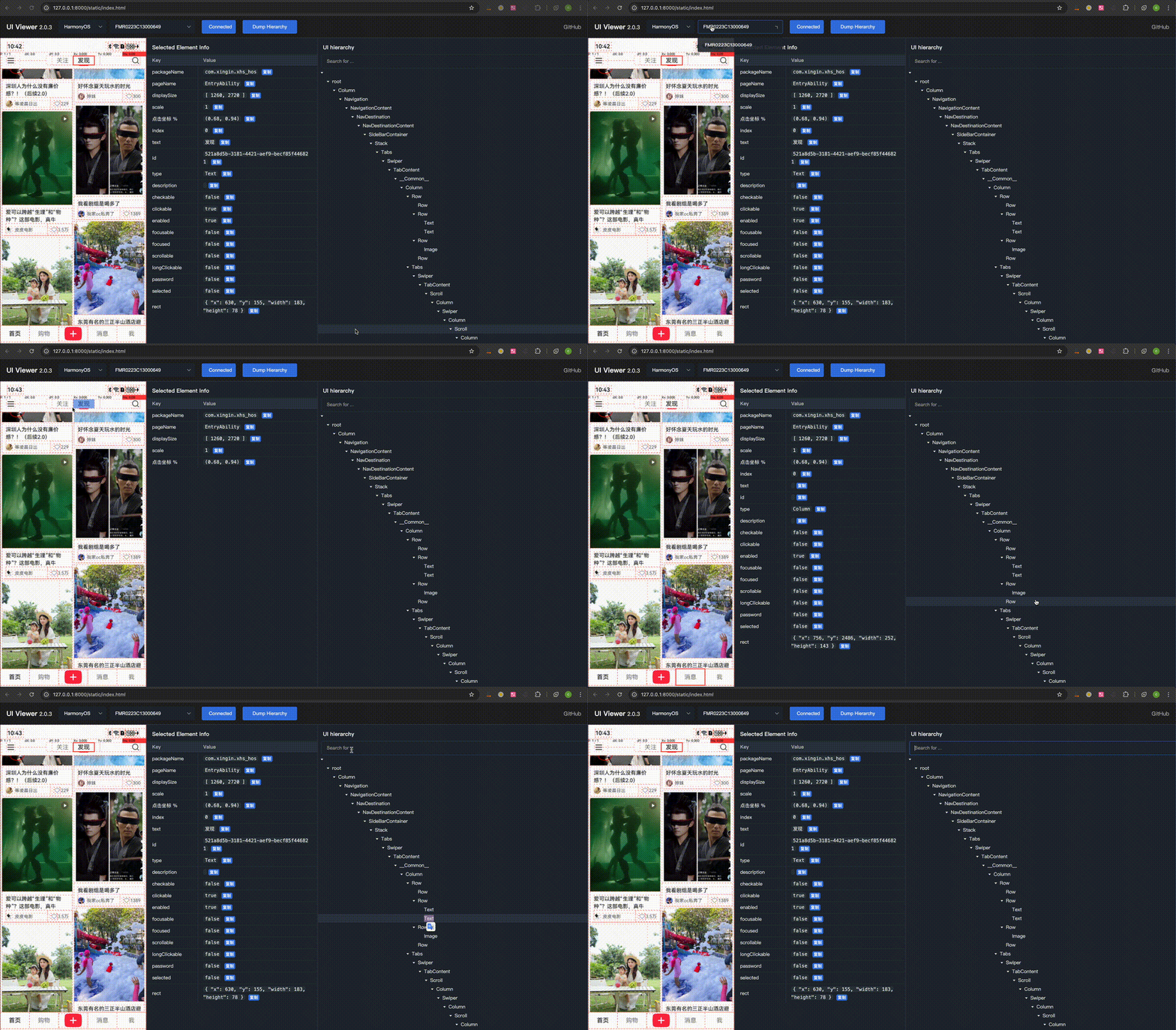
UI hierarchy inspector for Mobile App, supporting Android, iOS, and HarmonyOS NEXT.
Its features include:
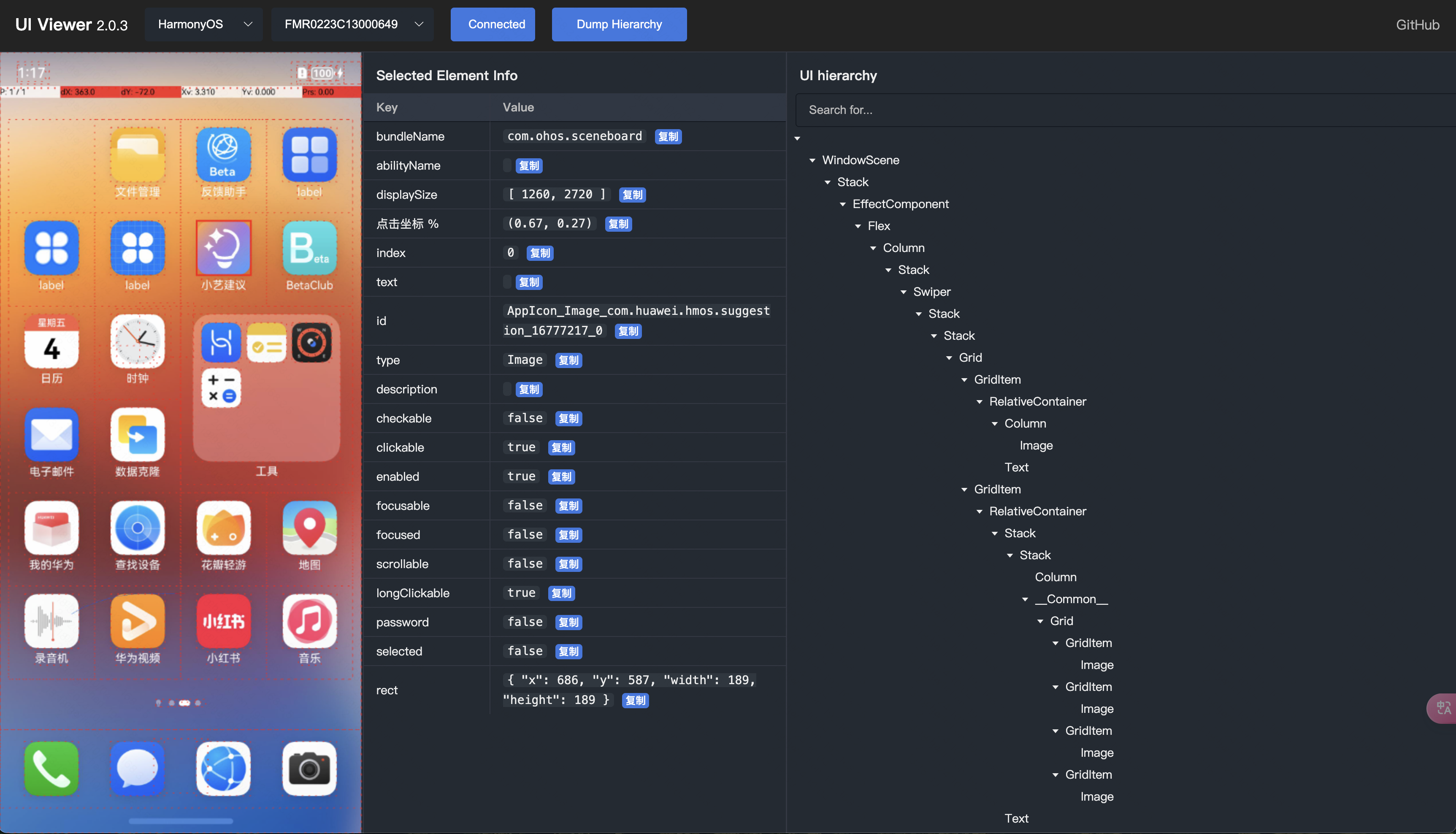
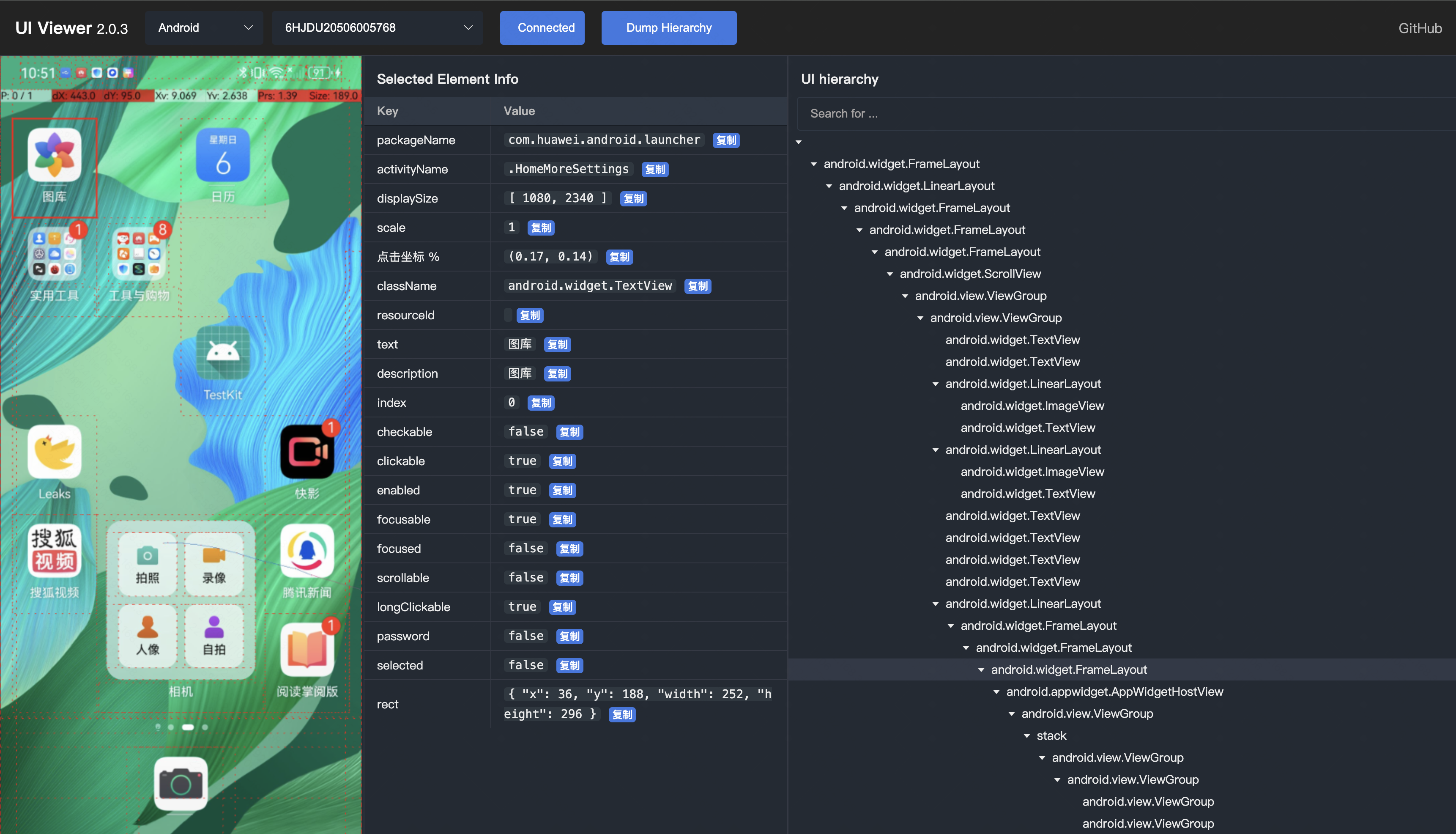
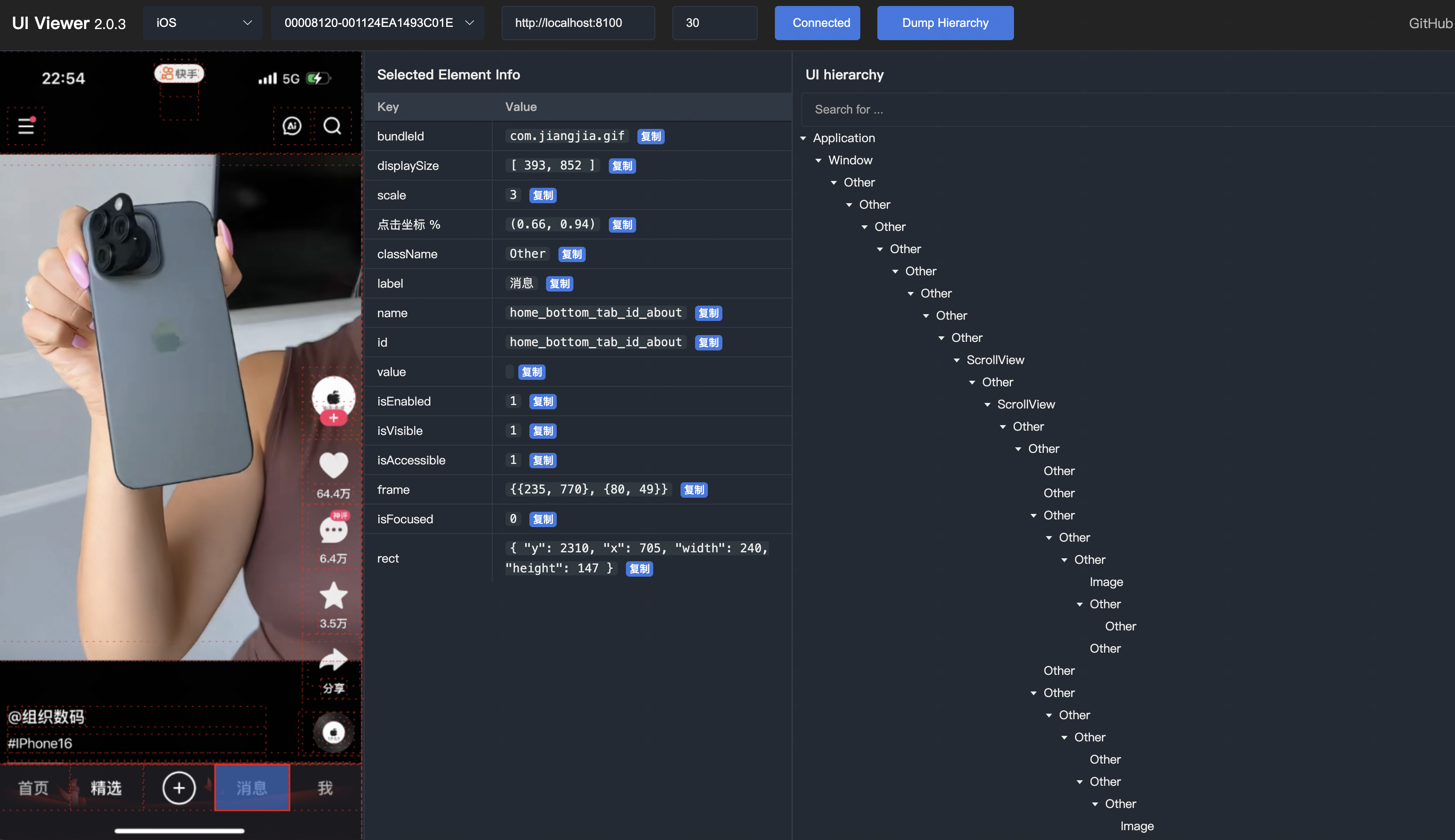
- visualize the UI hierarchy via screenshot and tree structure.
- view element properties
- auto generate XPath or XPathLite
- auto generate coordinate percentages.
- and more…
This project is developed using FastAPI and Vue. It starts locally and displays UI hierarchy through web browser.
Installation
- python3.8+
pip3 install -U uiviewer
Run
Run the following command on the terminal. (default port 8000)
uiviewer
# or
python3 -m uiviewer

INFO:     Started server process [46814]
INFO:     Waiting for application startup.
INFO:     Application startup complete.
INFO:     Uvicorn running on http://127.0.0.1:8000 (Press CTRL+C to quit)
INFO:     127.0.0.1:55080 - "GET / HTTP/1.1" 307 Temporary Redirect
INFO:     127.0.0.1:55080 - "GET /static/index.html HTTP/1.1" 200 OK
INFO:     127.0.0.1:55080 - "GET /static/css/style.css HTTP/1.1" 200 OK
INFO:     127.0.0.1:55080 - "GET /static/js/index.js HTTP/1.1" 200 OK
INFO:     127.0.0.1:55080 - "GET /static/js/api.js HTTP/1.1" 200 OK
INFO:     127.0.0.1:55082 - "GET /static/js/utils.js HTTP/1.1" 200 OK
INFO:     127.0.0.1:55082 - "GET /static/js/config.js HTTP/1.1" 200 OK
INFO:     127.0.0.1:55082 - "GET /version HTTP/1.1" 200 OK
And then open the browser to http://localhost:8000
You can also customize port to start the service.
uiviewer -p <PORT>
# or
python3 -m uiviewer -p <PORT>
Environment
If you need to connect to a remote HDC Server or ADB server for remote device debugging, you must set the required environment variables before starting uiviewer.
HarmonyOS
export HDC_SERVER_HOST=127.0.0.1  # Replace with the remote host
export HDC_SERVER_PORT=8710
Android
export ANDROID_ADB_SERVER_HOST=127.0.0.1  # Replace with the remote host
export ANDROID_ADB_SERVER_PORT=5037
Remove Environment Variables, To unset the environment variables:
unset HDC_SERVER_HOST
unset HDC_SERVER_PORT

unset ANDROID_ADB_SERVER_HOST
unset ANDROID_ADB_SERVER_PORT
Tips
-
If you are using a virtual environment, please make sure to activate it before running the command.
-
On iOS, please ensure that WDA is successfully started and wda port forwarding is successful in advance.
- First, Use
xcodeortideviceorgo-iosto launch wda.
tidevice xctest -B <wda_bundle_id>- Second, Use
tideviceoriproxyto forward the wda port,and keep it running.
tidevice relay 8100 8100- And then, To ensure the success of the browser to access
http://localhost:8100/status, return like this:
{ "value": { "build": { "productBundleIdentifier": "com.facebook.WebDriverAgentRunner", "time": "Mar 25 2024 15:17:30" }, ... "state": "success", "ready": true }, "sessionId": null }- Finally, Input the
wdaUrlin the web page, such ashttp://localhost:8100
- First, Use
-
On iOS,WDA can easily freeze when dumping high UI hierarchy. You can reduce the
maxDepthon the web page. The default is 30.
Preview
-
HarmonyOS
-
Android
-
iOS
Relevant
1 maintainer

Metadata
1 maintainer
Release files for uiviewer 1.1.6
For a detailed explanation of source distributions (sdists) and built distributions (wheels), please see the package formats documentation.
Source distribution (sdist)
| File | Size | Uploaded | Provenance | Actions |
|---|---|---|---|---|
| uiviewer-1.1.6.tar.gz | 410.5 kB | Without provenance | Details for uiviewer-1.1.6.tar.gz |
Built distribution (wheel)
| File | Interpreter | ABI | Platform | Actions Reset |
|---|---|---|---|---|
| uiviewer-1.1.6-py3-none-any.whl | Python 3 | none | any | Details for uiviewer-1.1.6-py3-none-any.whl |
Total release size: 834.0 kB
Release files / uiviewer-1.1.6.tar.gz
| Download URL | uiviewer-1.1.6.tar.gz |
|---|---|
| Size | 410.5 kB |
| Tags | Source |
|
SHA-256 checksum How to use checksums |
753e094c464fb80ffb11e8c4bf14accbbb2aacc171447081545014381a819ab0
|
|
BLAKE2b-256 checksum How to use checksums |
20f7c73570b8b18777094053259da0fb55aebe75fdcde3748153bd698370962f
|
| Upload date | |
|
Uploaded using Trusted Publishing? What is trusted publishing? |
No |
| Uploaded via |
twine/6.0.1 CPython/3.12.8
|
Release files / uiviewer-1.1.6-py3-none-any.whl
| Download URL | uiviewer-1.1.6-py3-none-any.whl |
|---|---|
| Size | 423.6 kB |
| Tags | Python 3 |
|
SHA-256 checksum How to use checksums |
0c549ee7ca6518b2956e5ddb6dd956b82122244717b0e6e39ecd7669c28d9814
|
|
BLAKE2b-256 checksum How to use checksums |
94c4c88e662b6aa76558cf851a03bd8439d0b7db013d685983ff739d101e9d93
|
| Upload date | |
|
Uploaded using Trusted Publishing? What is trusted publishing? |
No |
| Uploaded via |
twine/6.0.1 CPython/3.12.8
|
Security for uiviewer 1.1.6
Provenance
Provenance describes where a file came from. On PyPI, provenance is shared via attestations, which provide a verifiable record of the build or publishing details. View details, limitations and caveats.
No provenance found
None of the files in this release were uploaded with provenance metadata.
A note on package security
PyPI is a repository for distributing packages, not a service for auditing them. While third-party security researchers and our staff do their best to detect and remove malicious packages, PyPI cannot guarantee the quality, security or suitability of any given package.
To learn more about protecting yourself from malicious actors, visit our package security documentation.














