
VgridPandas
VgridPandas - Integrates Vgrid DGGS with GeoPandas and Pandas, inspired by H3-Pandas by Daniel Jahn.
VgridPandas supports a wide range of DGGSs, including H3, S2, A5, rHEALPix, DGGAL, DGGRID, OpenEAGGR ISEA4T, ISEA3H, EASE-DGGS, QTM, OLC, Geohash, GEOREF, MGRS, TileCode, Quadkey, Maidenhead, and GARS.








Full VgridPandas DGGS documentation is available at vgridpandas document.
To work with Vgrid in Python or CLI, use vgrid package. Full Vgrid DGGS documentation is available at vgrid document.
To work with Vgrid DGGS in QGIS, install the Vgrid Plugin.
To visualize DGGS in Maplibre GL JS, try the vgrid-maplibre library.
For an interactive demo, visit the Vgrid Homepage.
Installation
pip

pip install vgridpandas --upgrade
Key Features
- Latlon to DGGS: Convert latitude and longitude coordinates into DGGS cell IDs.
- DGGS to geo boundary: Convert DGGS cell IDs into their corresponding geographic boundaries.
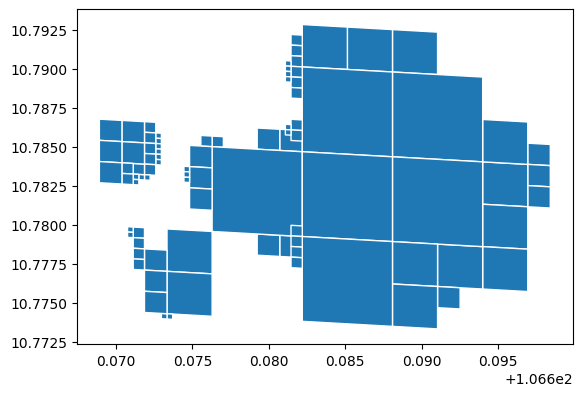
- (Multi)Linestring / (Multi)Polygon to DGGS: Convert (Multi)LineString via linetrace and (Multi)Polygon via polyfill, supporting compact option.
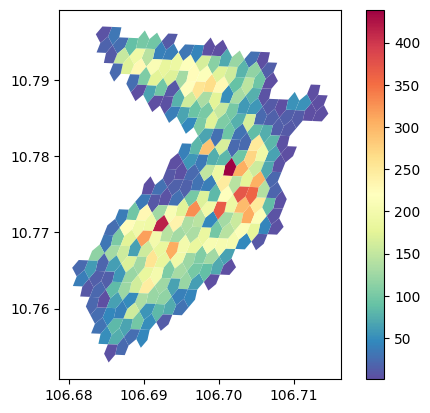
- DGGS binning: Aggregate points into DGGS cells, supporting common aggregations (count, min, max, etc.) and category-based groups.
Usage examples
Latlon to DGGS
import pandas as pd
from vgridpandas import h3pandas
df = pd.DataFrame({'lat': [10, 11], 'lon': [106, 107]})
resolution = 10
df = df.h3.latlon2h3(resolution, lat_col = 'lat', lat_col = 'lon')
df

| h3              |   lat |   lon |
|-----------------|-------|-------|
| 8a65a212199ffff |    10 |   106 |
| 8a65b0b68237fff |    11 |   107 |
DGGS to geo
df = df.h3.h32geo()
df

| h3              |   lat |   lon | geometry        |
|-----------------|-------|-------|-----------------|
| 8a65a212199ffff |    10 |   106 | POLYGON ((...)) |
| 8a65b0b68237fff |    11 |   107 | POLYGON ((...)) |
(Multi)Linestring/ (Multi)Polygon to DGGS
import geopandas as gpd
from vgridpandas import s2pandas

gdf = gpd.read_file('https://raw.githubusercontent.com/opengeoshub/vopendata/main/shape/polygon.geojson')
resolution = 18
gdf_polyfill = gdf.s2.polyfill(resolution, compact = True, predicate = "intersects")
gdf_polyfill.head()
gdf_polyfill = gdf_polyfill.s2.s22geo("s2")
gdf_polyfill.plot(edgecolor = "white")
DGGS Binning
import pandas as pd

resolution = 4
df = pd.read_csv('https://raw.githubusercontent.com/opengeoshub/vopendata/main/csv/dist1_pois.csv')
agg = 'count'
df_bin = df.a5.a5bin(resolution=resolution,
                    lat_col='lat',
                    lon_col='lon',
                    agg=agg,
                    # numeric_col=numeric_col,
                    # category_col= category_col,
                    )
df_bin.plot(
    column=f'{numeric_col}_{agg}',
    cmap='Spectral_r',
    legend=True,
    linewidth=0.2,
)
Further examples
For more examples, see the example notebooks.
1 maintainer

Metadata
1 maintainer
Release files for vgridpandas 1.0.10
For a detailed explanation of source distributions (sdists) and built distributions (wheels), please see the package formats documentation.
Source distribution (sdist)
| File | Size | Uploaded | Provenance | |
|---|---|---|---|---|
| vgridpandas-1.0.10.tar.gz | 2.9 MB | Without provenance | Details |
Built distribution (wheel)
| File | Interpreter | ABI | Platform | Reset |
|---|---|---|---|---|
| vgridpandas-1.0.10-py3-none-any.whl | Python 3 | none | any | Details |
Total release size: 3.0 MB
Release files / vgridpandas-1.0.10.tar.gz
| Download URL | vgridpandas-1.0.10.tar.gz |
|---|---|
| Size | 2.9 MB |
| Tags | Source |
|
SHA-256 checksum How to use checksums |
46c979f3d6206e8948a856fca1afcae87340f440bd43849aa41c1eea9df21b23
|
|
BLAKE2b-256 checksum How to use checksums |
f65220b52094b50df84b719905741a5a0130c2d8696aadb79460c9f7ae53d0a8
|
| Upload date | |
|
Uploaded using Trusted Publishing? What is trusted publishing? |
No |
| Uploaded via |
uv/0.10.9 {"installer":{"name":"uv","version":"0.10.9","subcommand":["publish"]},"python":null,"implementation":{"name":null,"version":null},"distro":null,"system":{"name":null,"release":null},"cpu":null,"openssl_version":null,"setuptools_version":null,"rustc_version":null,"ci":null}
|
Release files / vgridpandas-1.0.10-py3-none-any.whl
| Download URL | vgridpandas-1.0.10-py3-none-any.whl |
|---|---|
| Size | 52.1 kB |
| Tags | Python 3 |
|
SHA-256 checksum How to use checksums |
aa3582b8f0d3144d712aca107212d07e77cb6f33c7afcdf6954bfc46226cd7aa
|
|
BLAKE2b-256 checksum How to use checksums |
3619c96140b454cb3bf90e823fac281582a07c023b14753b12971c76e672fb76
|
| Upload date | |
|
Uploaded using Trusted Publishing? What is trusted publishing? |
No |
| Uploaded via |
uv/0.10.9 {"installer":{"name":"uv","version":"0.10.9","subcommand":["publish"]},"python":null,"implementation":{"name":null,"version":null},"distro":null,"system":{"name":null,"release":null},"cpu":null,"openssl_version":null,"setuptools_version":null,"rustc_version":null,"ci":null}
|
Security for vgridpandas 1.0.10
Provenance
Provenance describes where a file came from. On PyPI, provenance is shared via attestations, which provide a verifiable record of the build or publishing details. View details, limitations and caveats.
No provenance found
None of the files in this release were uploaded with provenance metadata.
A note on package security
PyPI is a repository for distributing packages, not a service for auditing them. While third-party security researchers and our staff do their best to detect and remove malicious packages, PyPI cannot guarantee the quality, security or suitability of any given package.
To learn more about protecting yourself from malicious actors, visit our package security documentation.














