






- Developer:
Chengze Shen
News
(NEW, v1.0.8) Supported reading gzipped backbone alignment files. E.g., -b backbone.fasta.gz.
Added new parameter option to allow users to specify a customized config file to override main.config. Use -c <user config file>. An example can be found at examples/user.config. For example usage please see Scenario E.
Now support PyPI installation! Please install the latest release with pip install witch-msa.
Method Overview
WITCH is a new multiple sequence alignment (MSA) tool that combines techniques from UPP and MAGUS. It aims to solve alignment problems, particularly when input sequences contain fragments. The whole pipeline can be described as follows:
Given a set of unaligned sequences S, pick at most 1,000 “full-length” sequences to form a backbone alignment B and a backbone tree T (Full-length sequences refer to sequences of lengths that are within 25% of the median length).
Create an ensemble of HMMs (eHMM, see UPP for more details) from B and T.
For each remaining unaligned sequence, align it to high-ranked HMMs to obtain a set of weighted support alignments; then, merge the support alignments using Graph Clustering Merger (GCM, an alignment merger technique introduced in MAGUS).
Transitively add the merged alignment of each query to B, and report the final alignment on S.
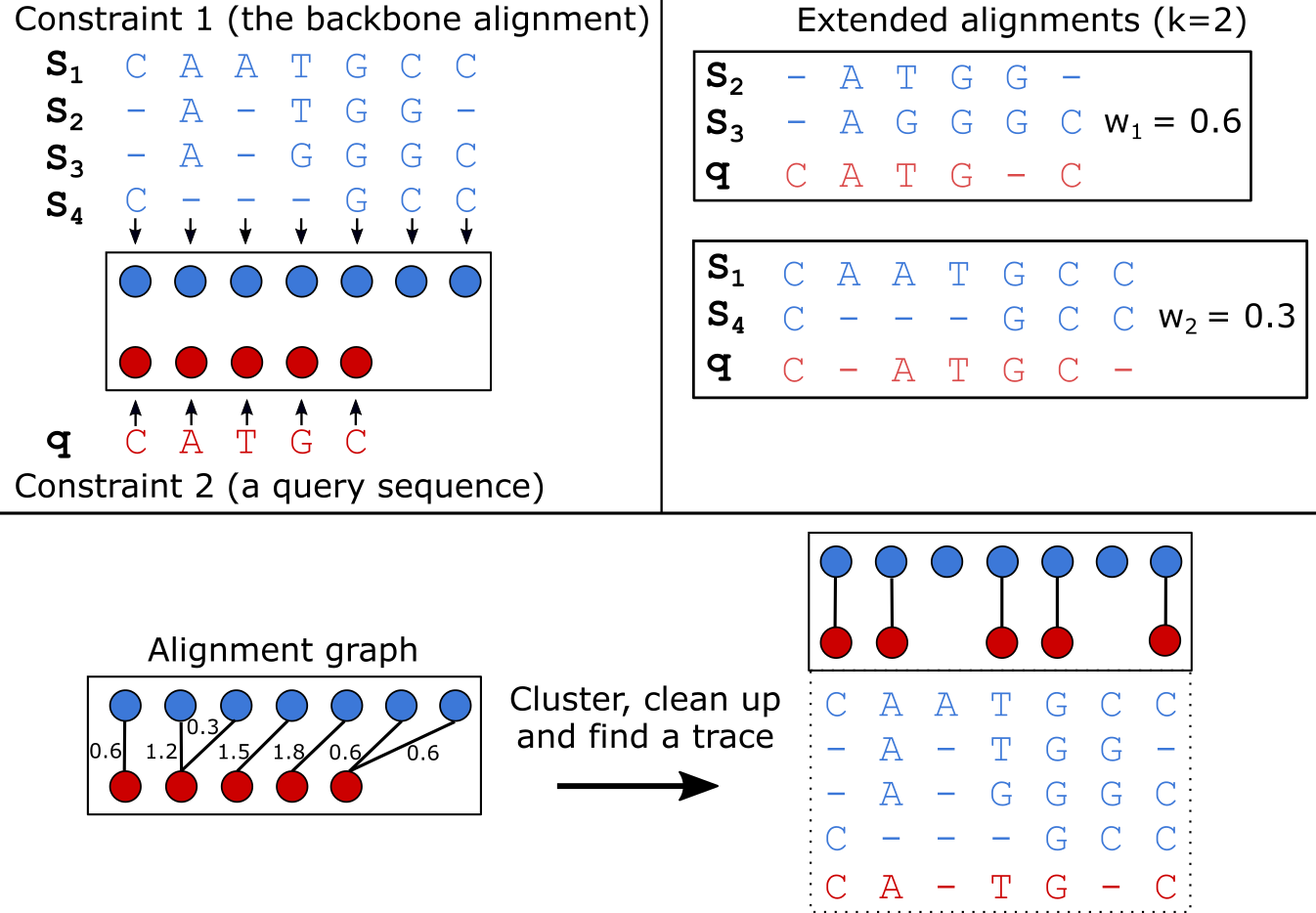
For a more detailed explanation of the WITCH algorithm, please refer to the publication below:
Publication |
|---|
Shen, Chengze, Minhyuk Park, and Tandy Warnow. “WITCH: Improved Multiple Sequence Alignment Through Weighted Consensus Hidden Markov Model Alignment.” Journal of Computational Biology, May 17, 2022. https://doi.org/10.1089/cmb.2021.0585. |
Note and Acknowledgement
WITCH includes and uses:
MAGUS (we use the Github version updated on April 5th 2021).
HMMER suites (v3.1b2 - hmmbuild, hmmsearch, hmmalign).
UPP ( v4.5.1; we use only partial functionalities).
FastTreeMP (v2.1).
MAFFT ( macOS v7.490).
MCL (linux version from MAGUS; macOS version 21-257).
(Important) Software Output Explanation
By default, WITCH will write two alignment files to the output directory:
<name>.fasta: The final alignment with the original input sequences. In this file, some columns may contain lowercase letters, representing “insertions” that do not have any homologous pairs. They are compressed to neighbor columns to save space, so that you may see lowercase letters from different rows appear in the same column–They should not be considered aligned!!
<name>.masked.fasta: The final alignment with the lowercase letters removed (i.e., sequences can be different from their inputs). This file is useful for any downstream biological analyses that rely on homologous pairs, such as phylogenetic tree estimation, phylogenetic placement, etc.
Additionally, WITCH will write logs to the following files:
<outdir>/log.txt: Main log output file.
<outdir>/debug.txt: Record command usage.
<outdir>/error.txt: Record runtime errors. Only when errors occurred.
<outdir>/runtime_breakdown.txt: Record runtime usage of each step.
Installation
This section lays out the necessary steps to run WITCH. WITCH was originally tested on Python 3.7 and passed builds on Python 3.8 to 3.12.
Now, the program fully supports Linux and macOS systems. We provide necessary binary executables for both systems, but you can supplement your own by changing the paths in the main.config file. In cases of conflicting installations (e.g., different versions of MAFFT), please supplement with the version on your system. If you experience any difficulty running WITCH, please contact Chengze Shen (chengze5@illinois.edu).
For the macOS system on the latest chips (e.g., M1/M2), you may need to compile and supply your own binaries for WITCH to run successfully. That is, change the paths of binaries in main.config (or use -c /path/to/user/config to avoid changing the default config file) to the ones on your system.
Install with PyPI (pip)
The easiest way to install WITCH is to use the PyPI distribution.
# 1. Install with pip (--user if no root access)
pip3 install witch-msa [--user]

# 2. After installation, users can run WITCH with either "witch-msa" or "witch.py" anywhere in the system.
#    First time running WITCH will create the config file at ~/.witch_msa/main.config
witch-msa [-h]   # or,
witch.py [-h]
Install from the source file
Requirements
python>=3.7
cython>=0.29
configparser>=5.0.0
DendroPy>=4.4.0
numpy>=1.15
psutil>=5.0
tqdm>=4.0.0
Installation Steps
# 1. Install via GitHub repo
git clone https://github.com/c5shen/WITCH.git

# 2. Install all requirements
# If you do not have root access, use "pip3 install -r requirements.txt --user"
cd WITCH
pip3 install -r requirements.txt

# 3. (Optional) Run setup.py to set up main.config. Please refer to "witch_msa/default.config"
#    Additionally, software binaries available in the user's environment will be prioritized for usage.
#    Use "-c" if want to install to WITCH/.witch_msa/main.config
#    Default is to ~/.witch_msa/main.config
python3 setup.py config [-c]

# 4. Execute the WITCH python script with -h to see allowed commandline parameter settings and
#    example usages.
python3 witch.py [-h]
main.config
main.config file will be created after running WITCH for the first time or created with python setup.py config [-c]. If it is not found, a config file will be automatically created at ~/.witch_msa/main.config.
user-specified config file
In addition, a user can specify a customized config file with the -c or --config-file parameter option. This user.config file will override any default settings in main.config (if they overlap). Command-line arguments still have the highest priority and will override both main.config and the user config file, if any settings overlap.
Usage
The general command to run WITCH:
python3 witch.py -i [unaligned sequence file] -d [output directory] -o [output filename]Default behavior: WITCH will pick at most 1,000 sequences from the input around the median length as the backbone sequences. Then, it uses MAGUS to align the backbone sequences and FastTree2 to estimate a tree. It uses UPP decomposition strategy to generate an eHMM, and uses HMMSearch to calculate bit scores between HMMs and unaligned sequences. Bit scores are used to calculate weights, and each unaligned sequence is aligned to top k=10 HMMs ranked by weights.
Examples
All the following examples can be found in the examples/run.sh bash script.
Scenario A
Unaligned sequences only.
python3 witch.py -i examples/data/unaligned_all.txt \
   -d scenarioA_output -o aligned.fasta
Scenario B
Unaligned sequences only; using bit scores (instead of the default weighted bit scores); using 10 HMMs to align a sequence.
python3 witch.py -i examples/data/unaligned_all.txt \
   -d scenarioB_output -o aligned.fasta -w 0 -k 10
Scenario C
Backbone alignment available; backbone tree missing; query sequences available.
python3 witch.py -b examples/data/backbone.aln.fasta \
   -q examples/data/unaligned_frag.txt -d scenarioC_output \
   -o aligned.fasta
Scenario D - additional options
Backbone alignment available; backbone tree available; query sequences available; saving weights to local; saving decomposition results for future usage (e.g., faster rerun).
python3 witch.py -b examples/data/backbone.aln.fasta \
   -e examples/data/backbone.tre -q examples/data/unaligned_frag.txt \
   -d scenarioD_output -o aligned.fasta \
   --save-weight 1 --keep-decomposition 1
Scenario E - with user-specified config file
It is the same scenario as Scenario D but with a user-specified config file.
TODO list
Add the last missing checkpoint systems (for initial HMMBuild and HMMSearch steps).
Add a sanity check for each step so that runtime errors are easier to identify.
python3 witch.py -b examples/data/backbone.aln.fasta \
   -e examples/data/backbone.tre -q examples/data/unaligned_frag.txt \
   -d scenarioE_output -o aligned.fasta \
   --save-weight 1 --keep-decomposition 1 \
--config-file user.config1 maintainer

Metadata
1 maintainer
Release files for witch-msa 1.0.10
For a detailed explanation of source distributions (sdists) and built distributions (wheels), please see the package formats documentation.
Source distribution (sdist)
| File | Size | Uploaded | Provenance | |
|---|---|---|---|---|
| witch_msa-1.0.10.tar.gz | 29.0 MB | Without provenance | Details |
Built distribution (wheel)
| File | Interpreter | ABI | Platform | Reset |
|---|---|---|---|---|
| witch_msa-1.0.10-py3-none-any.whl | Python 3 | none | any | Details |
Total release size: 58.1 MB
Release files / witch_msa-1.0.10.tar.gz
| Download URL | witch_msa-1.0.10.tar.gz |
|---|---|
| Size | 29.0 MB |
| Tags | Source |
|
SHA-256 checksum How to use checksums |
e3197c21ebef6af889ff44f388aebe6eb529c246fa4c7d961a5f608a494621c0
|
|
BLAKE2b-256 checksum How to use checksums |
f6d962aecc51217a870ac4aec8e7227016106a66cf5b5b04ef932281312b9804
|
| Upload date | |
|
Uploaded using Trusted Publishing? What is trusted publishing? |
No |
| Uploaded via |
twine/6.2.0 CPython/3.9.25
|
Release files / witch_msa-1.0.10-py3-none-any.whl
| Download URL | witch_msa-1.0.10-py3-none-any.whl |
|---|---|
| Size | 29.1 MB |
| Tags | Python 3 |
|
SHA-256 checksum How to use checksums |
3e20f8aabd39b14192b2e2efcf2511974b8e60f2ed6f7cfb72218f81ea1d6357
|
|
BLAKE2b-256 checksum How to use checksums |
6eb37406d47656dadcdfdeab973868e359d0611dc02594197ca6e537bfba6757
|
| Upload date | |
|
Uploaded using Trusted Publishing? What is trusted publishing? |
No |
| Uploaded via |
twine/6.2.0 CPython/3.9.25
|
Security for witch-msa 1.0.10
Provenance
Provenance describes where a file came from. On PyPI, provenance is shared via attestations, which provide a verifiable record of the build or publishing details. View details, limitations and caveats.
No provenance found
None of the files in this release were uploaded with provenance metadata.
A note on package security
PyPI is a repository for distributing packages, not a service for auditing them. While third-party security researchers and our staff do their best to detect and remove malicious packages, PyPI cannot guarantee the quality, security or suitability of any given package.
To learn more about protecting yourself from malicious actors, visit our package security documentation.














