
Publication-quality alignment viewer for nucleotide and amino acid sequences

Project description
tview
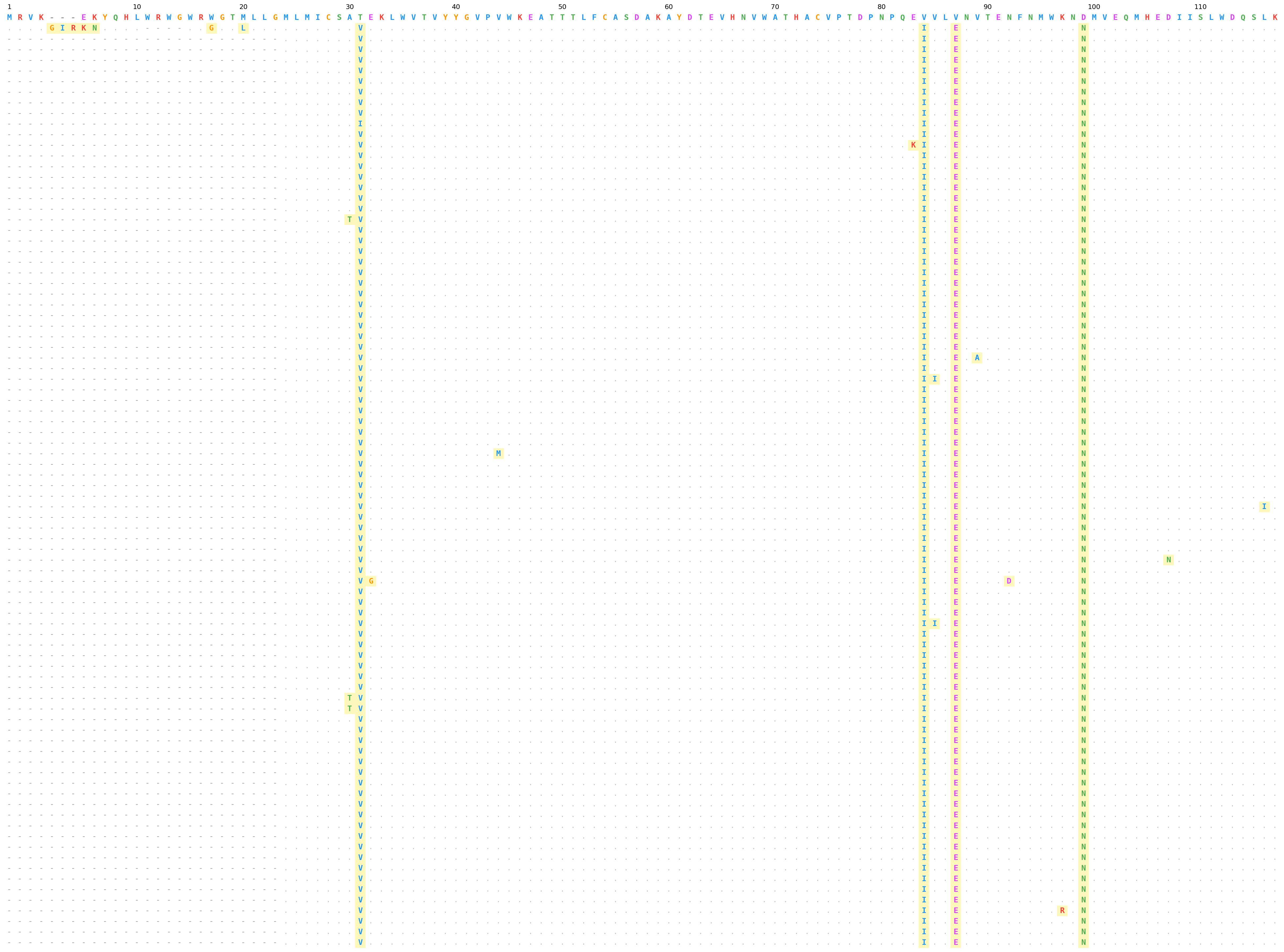
Publication-quality alignment viewer for nucleotide and amino acid sequences. A lightweight alternative to samtools tview that produces clean, stable image output.
Supports BAM files (with reference FASTA), pre-aligned FASTA (e.g. MAFFT output), and stacking multiple inputs into a single figure.



Installation
pip install tview
Installs matplotlib, click, and pysam.
Quick Start
BAM file
tview \
  --bam aligned.bam \
  --ref reference.fa \
  --region chr1:100-200 \
  -o alignment.png
Aligned FASTA (e.g. MAFFT output)
The first sequence in the file is treated as the reference.
tview \
  --fasta env_protein_aligned.fasta \
  --palette aa \
  -o env_alignment.png
Subset columns from a FASTA alignment
Use --columns with 1-based inclusive range to window into long alignments.
tview \
  --fasta aligned.fasta \
  --columns 1-120 \
  --palette aa \
  -o first_120_cols.png
Classic (black-and-white) mode
Use --classic-mode for textbook-style monochrome output — all black text on a white background with no colored highlighting. Structural conventions (. , lowercase, -) are preserved.
tview \
  --fasta aligned.fasta \
  --palette aa \
  --classic-mode \
  -o classic_output.png
Stacking Multiple Panels
Each input file becomes a vertically stacked panel separated by a thin line. Panels are labeled on the left with the filename stem.
Multiple BAMs (shared reference and region)
tview \
  --bam sample1.bam --bam sample2.bam --bam sample3.bam \
  --ref reference.fa \
  --region chr1:100-200 \
  -o stacked.png
Multiple FASTAs
tview \
  --fasta group1_aligned.fasta --fasta group2_aligned.fasta \
  --palette aa \
  --columns 1-120 \
  -o comparison.png
Mix BAM and FASTA panels
--ref and --region apply only to BAM panels; --columns applies only to FASTA panels.
tview \
  --bam reads.bam \
  --ref reference.fa \
  --region chr1:100-200 \
  --fasta protein_aligned.fasta \
  --columns 1-120 \
  -o mixed.png
BAM panels are rendered first (top), FASTA panels below.
Piping from stdin
Pass - to read file paths from stdin (one per line). Each path becomes its own panel.
# find → stacked panels
find ./alignments -name "*.fasta" -type f | \
  tview --fasta - --palette aa --columns 1-120 -o all.png

# ls with pattern
ls samples/*.bam | \
  tview --bam - --ref ref.fa --region chr1:100-200 -o all_samples.png

# single file via echo
echo "my_alignment.fasta" | \
  tview --fasta - --palette aa -o out.png
Python API
The core functions are available as a Python library:
from tview import fasta_panel, bam_panel, render_panels

# FASTA alignment
panel = fasta_panel("aligned.fasta", col_start=1, col_end=120)
render_panels([panel], "output.png", palette="aa")

# BAM alignment
panel = bam_panel("sample.bam", "reference.fa", "chr1:100-200")
render_panels([panel], "output.png")

# Stack multiple panels
panels = [
    bam_panel("sample1.bam", "ref.fa", "chr1:100-200"),
    bam_panel("sample2.bam", "ref.fa", "chr1:100-200"),
]
render_panels(panels, "stacked.png", dpi=300, fontsize=7, cell=0.14)

# Classic (black-and-white) mode
panel = fasta_panel("aligned.fasta")
render_panels([panel], "classic.png", palette="aa", classic=True)
Composing with patchworklib
draw_panels() and panel_figsize() let you draw alignments onto any
matplotlib axes, including patchworklib
Brick objects for composing multi-panel figures.
pip install patchworklib
# or
pip install tview[compose]
import patchworklib as pw
from tview import fasta_panel, draw_panels, panel_figsize

# Build alignment panel
panel = fasta_panel("aligned.fasta", col_start=1, col_end=120)
w, h = panel_figsize([panel], fontsize=7, cell=0.14)

# Draw onto a patchworklib Brick
alignment = pw.Brick(label="alignment", figsize=(w, h))
draw_panels([panel], ax=alignment, fontsize=7, palette="aa", cell=0.14)

# Compose with other plots
scatter = pw.Brick(label="scatter", figsize=(3, 3))
scatter.scatter([1, 2, 3], [4, 5, 6])

layout = alignment / scatter   # vertical stack
layout.savefig("composed.png")
This also works with standard matplotlib subplots:
import matplotlib.pyplot as plt
from tview import fasta_panel, draw_panels, panel_figsize

panel = fasta_panel("aligned.fasta")
w, h = panel_figsize([panel])
fig, (ax1, ax2) = plt.subplots(1, 2, figsize=(w + 4, max(h, 3)))

draw_panels([panel], ax1, palette="aa")
ax2.scatter([1, 2, 3], [4, 5, 6])

plt.tight_layout()
plt.savefig("side_by_side.png", dpi=300, bbox_inches="tight")
Visual Conventions
| Element | Symbol | Style |
|---|---|---|
| Match (forward) | . |
light grey |
| Match (reverse) | , |
light grey, reduced opacity |
| Mismatch | A T etc. |
colored, yellow highlight, bold |
| Mismatch (reverse) | a t etc. |
lowercase, colored, yellow highlight |
| Deletion | - |
grey dash |
| Insertion | colored bases | purple column shading |
| Gap (ref in insertion col) | - |
grey dash |
| Gap (FASTA alignment) | - |
grey dash |
Color Palettes
--palette nt (default) — Nucleotides
| Base | Color |
|---|---|
| A | green #4CAF50 |
| C | blue #2196F3 |
| G | orange #FF9800 |
| T | red #F44336 |
--palette aa — Amino Acids (Clustal-inspired)
| Group | Residues | Color |
|---|---|---|
| Hydrophobic | A V L I M F W P | blue #2196F3 |
| Positive charge | K R H | red #F44336 |
| Negative charge | D E | magenta #E040FB |
| Polar uncharged | S T N Q | green #4CAF50 |
| Special | G C Y | orange #FF9800 |
Full Argument Reference
Usage: tview [OPTIONS]

  Publication-quality alignment viewer (BAM or FASTA).

Options:
  --bam TEXT              BAM file(s) — each becomes a panel. Use '-' for stdin.
  --ref PATH              Reference FASTA (required for BAM mode).
  --region TEXT            Genomic region chr:start-end (required for BAM mode).
  --fasta TEXT             Aligned FASTA file(s) — each becomes a panel. Use '-' for stdin.
  --columns TEXT           Column range for FASTA, 1-based inclusive (e.g. 1-120).
  -o, --output TEXT        Output image path.  [default: alignment.png]
  --palette [nt|aa]        Color palette.  [default: nt]
  --dpi INTEGER            Image resolution.  [default: 300]
  --fontsize INTEGER       Base font size in points.  [default: 7]
  --cell FLOAT             Cell size in inches.  [default: 0.14]
  --classic-mode           Black-and-white rendering with no color highlighting.
  -h, --help               Show this message and exit.
| Argument | Description | Default |
|---|---|---|
--bam |
BAM file(s), each becomes a panel. Use - for stdin. |
— |
--ref |
Reference FASTA (required for BAM mode) | — |
--region |
Genomic region chr:start-end (required for BAM) |
— |
--fasta |
Aligned FASTA file(s), each becomes a panel. Use - for stdin. |
— |
--columns |
Column range for FASTA, 1-based inclusive (e.g. 1-120) |
full alignment |
-o, --output |
Output image path | alignment.png |
--palette |
Color palette: nt or aa |
nt |
--dpi |
Image resolution | 300 |
--fontsize |
Base font size in points | 7 |
--cell |
Cell size in inches (controls spacing) | 0.14 |
--classic-mode |
Black-and-white rendering with no color highlighting | False |
Tips for Publication Figures
- Use
--dpi 300(default) for print,--dpi 150for drafts. - Use
--cell 0.10for denser layouts with many sequences,--cell 0.18for fewer. - Use
--fontsize 5or6when displaying wide alignments (>100 columns). - The output format is determined by the file extension:
.png,.pdf,.svgall work. - For Nature-style figures,
.pdfor.svgoutput preserves vector text. - Use
--classic-modefor textbook-style monochrome figures that reproduce well in grayscale print.
# Vector output for publication
tview \
  --fasta aligned.fasta \
  --palette aa \
  --columns 1-120 \
  --cell 0.12 \
  --fontsize 6 \
  -o figure_2a.pdf
FASTA Input Format
The FASTA input must be pre-aligned (e.g. by MAFFT, MUSCLE, Clustal). The first sequence is used as the reference for comparison. Gap characters (-) in the alignment are preserved and rendered as grey dashes.
>HxB2_reference
MRVK---EKYQHLWRWGWRWGTMLLGMLMICS...
>sample_001
MRVKGIRKNAQHL----WRGGTLLLGMLMICS...
>sample_002
--------------------------MLMICS...
The x-axis labels count non-gap positions in the reference sequence (1, 10, 20, ...), so position numbers always correspond to the reference residue numbering regardless of gap columns.
Release history Release notifications | RSS feed


Download files
Download the file for your platform. If you're not sure which to choose, learn more about installing packages.
Source Distribution
Built Distribution
Filter files by name, interpreter, ABI, and platform.
If you're not sure about the file name format, learn more about wheel file names.
Copy a direct link to the current filters
File details
Details for the file tview-0.2.3.tar.gz.
File metadata
- Download URL: tview-0.2.3.tar.gz
- Upload date:
- Size: 559.7 kB
- Tags: Source
- Uploaded using Trusted Publishing? Yes
- Uploaded via: twine/6.1.0 CPython/3.13.7
File hashes
| Algorithm | Hash digest | |
|---|---|---|
| SHA256 |
46c9e7304d840df7fb8ec990f754a17b655dfd1fd071002f7c83b1b00a2fdc65
|
|
| MD5 |
f4e5e770fe9cac3f6c5d294150f6bc92
|
|
| BLAKE2b-256 |
de7f36bf9c690c8a69370bbd21231894de59f71cb5f034310dd12f77d88833e8
|
Provenance
The following attestation bundles were made for tview-0.2.3.tar.gz:
Publisher:
publish.yml on tmsincomb/tview
-
Statement:
-
Statement type:
https://in-toto.io/Statement/v1 -
Predicate type:
https://docs.pypi.org/attestations/publish/v1 -
Subject name:
tview-0.2.3.tar.gz -
Subject digest:
46c9e7304d840df7fb8ec990f754a17b655dfd1fd071002f7c83b1b00a2fdc65 - Sigstore transparency entry: 1004224453
- Sigstore integration time:
-
Permalink:
tmsincomb/tview@593743da17c35dd4944bb6142e1290e587226f7c -
Branch / Tag:
refs/tags/v0.2.3 - Owner: https://github.com/tmsincomb
-
Access:
public
-
Token Issuer:
https://token.actions.githubusercontent.com -
Runner Environment:
github-hosted -
Publication workflow:
publish.yml@593743da17c35dd4944bb6142e1290e587226f7c -
Trigger Event:
push
-
Statement type:
File details
Details for the file tview-0.2.3-py3-none-any.whl.
File metadata
- Download URL: tview-0.2.3-py3-none-any.whl
- Upload date:
- Size: 18.5 kB
- Tags: Python 3
- Uploaded using Trusted Publishing? Yes
- Uploaded via: twine/6.1.0 CPython/3.13.7
File hashes
| Algorithm | Hash digest | |
|---|---|---|
| SHA256 |
7baf639fdd606062774f949120e39cbbe45352f91b4df03f6565a61dbc54aaf4
|
|
| MD5 |
48506e292127fb6b19650b7dabdbecff
|
|
| BLAKE2b-256 |
ed535ed91057f83deb20aded2ff5bfc1acb7a45eb502aaf157c03c5f2e913bcd
|
Provenance
The following attestation bundles were made for tview-0.2.3-py3-none-any.whl:
Publisher:
publish.yml on tmsincomb/tview
-
Statement:
-
Statement type:
https://in-toto.io/Statement/v1 -
Predicate type:
https://docs.pypi.org/attestations/publish/v1 -
Subject name:
tview-0.2.3-py3-none-any.whl -
Subject digest:
7baf639fdd606062774f949120e39cbbe45352f91b4df03f6565a61dbc54aaf4 - Sigstore transparency entry: 1004224477
- Sigstore integration time:
-
Permalink:
tmsincomb/tview@593743da17c35dd4944bb6142e1290e587226f7c -
Branch / Tag:
refs/tags/v0.2.3 - Owner: https://github.com/tmsincomb
-
Access:
public
-
Token Issuer:
https://token.actions.githubusercontent.com -
Runner Environment:
github-hosted -
Publication workflow:
publish.yml@593743da17c35dd4944bb6142e1290e587226f7c -
Trigger Event:
push
-
Statement type:






