
Python Password Manager

Project description
Vault




Vault is a simple Python password manager. It allows you to securely save secrets with a simple CLI interface.
Features
- Secrets are stored in an encrypted SQLite database with SQLCipher
- Within the database, each password and notes are encrypted with a unique salt using AES-256 encryption with pycryptodome
- Master key is hashed with a unique salt
- Possibility to create an unlimited number of vaults
- Clipboard cleared automatically
- Automatic vault locking after inactivity
- Password suggestions with password-generator-py
- Import / Export in Json
Basic usage
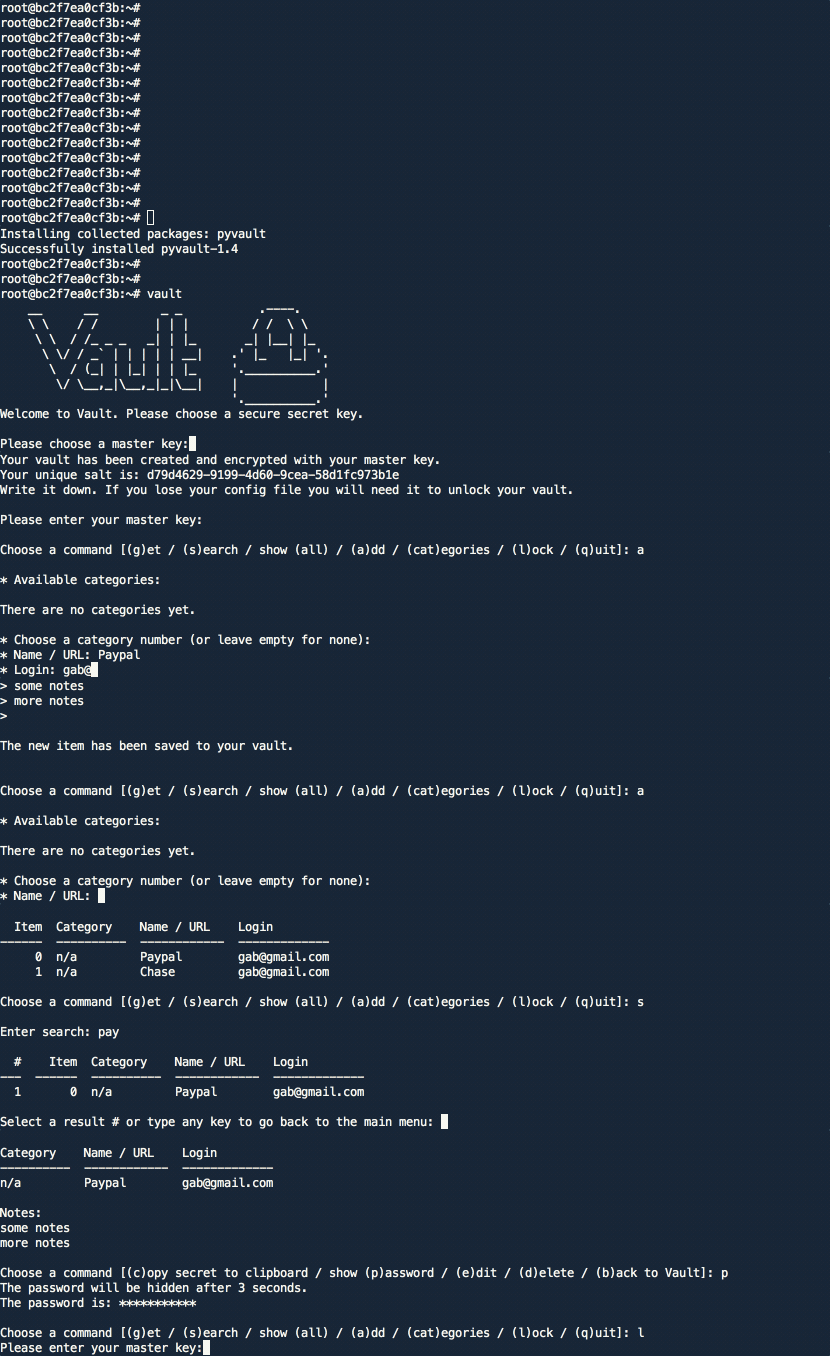
Installation and setup
Vault 2.x requires sqlcipher to be installed on your machine.
MacOS
On MacOS, you can install sqlcipher with brew:
brew install sqlcipher

# Install sqlcipher3
SQLCIPHER_VERSION="0.5.3"
pip3 install sqlcipher3==$SQLCIPHER_VERSION

# If you are getting an error "Failed to build sqlcipher3", you would need to fix the build flags:
SQLCIPHER_PATH="$(brew --cellar sqlcipher)/$(brew list --versions sqlcipher | tr ' ' '\n' | tail -1)"
C_INCLUDE_PATH=$SQLCIPHER_PATH/include LIBRARY_PATH=$SQLCIPHER_PATH/lib pip3 install sqlcipher3==$SQLCIPHER_VERSION
Then install the vault:
pip3 install pyvault

# Run setup
vault
Ubuntu / Debian
On Ubuntu/Debian, you can install sqlcipher with apt:
sudo apt update
sudo apt install -y gcc python3-dev libsqlcipher-dev xclip
Then install the vault:
pip3 install pyvault

# Run setup
vault
Using Docker
# Pull the image
docker pull gabfl/vault

# Create local directory
mkdir ~/.vault

# Launch image
docker run -v ~/.vault:/root/.vault -ti gabfl/vault
Cloning the project
# Clone project
git clone https://github.com/gabfl/vault && cd vault

# Installation
pip3 install .

# Run setup
vault
Advanced settings:
usage: vault [-h] [-t [CLIPBOARD_TTL]] [-p [HIDE_SECRET_TTL]]
             [-a [AUTO_LOCK_TTL]] [-v VAULT_LOCATION] [-c CONFIG_LOCATION]
             [-k] [-i IMPORT_ITEMS] [-x EXPORT] [-f [{json}]] [-e]

optional arguments:
  -h, --help            show this help message and exit
  -t [CLIPBOARD_TTL], --clipboard_TTL [CLIPBOARD_TTL]
                        Set clipboard TTL (in seconds, default: 15)
  -p [HIDE_SECRET_TTL], --hide_secret_TTL [HIDE_SECRET_TTL]
                        Set delay before hiding a printed password (in
                        seconds, default: 15)
  -a [AUTO_LOCK_TTL], --auto_lock_TTL [AUTO_LOCK_TTL]
                        Set auto lock TTL (in seconds, default: 900)
  -v VAULT_LOCATION, --vault_location VAULT_LOCATION
                        Set vault path
  -c CONFIG_LOCATION, --config_location CONFIG_LOCATION
                        Set config path
  -k, --change_key      Change master key
  -i IMPORT_ITEMS, --import_items IMPORT_ITEMS
                        File to import credentials from
  -x EXPORT, --export EXPORT
                        File to export credentials to
  -f [{json}], --file_format [{json}]
                        Import/export file format (default: 'json')
  -e, --erase_vault     Erase the vault and config file
Release history Release notifications | RSS feed


Download files
Download the file for your platform. If you're not sure which to choose, learn more about installing packages.
Source Distribution
Built Distribution
Filter files by name, interpreter, ABI, and platform.
If you're not sure about the file name format, learn more about wheel file names.
Copy a direct link to the current filters
File details
Details for the file 2025_assignment2_vaultpasswordmanager-1.0.1.tar.gz.
File metadata
- Download URL: 2025_assignment2_vaultpasswordmanager-1.0.1.tar.gz
- Upload date:
- Size: 32.6 kB
- Tags: Source
- Uploaded using Trusted Publishing? No
- Uploaded via: twine/6.2.0 CPython/3.11.14
File hashes
| Algorithm | Hash digest | |
|---|---|---|
| SHA256 |
5a2ac83154bfbb7bfab24d733d82137045ce6b69799719442068bf0ab3c28b39
|
|
| MD5 |
cf9d29c69021b1ee6f03d1b92ab2a6c6
|
|
| BLAKE2b-256 |
a26a8d7353272b255b8be7bff3324306dec1e9063508f0c8ac2a796d894ab754
|
File details
Details for the file 2025_assignment2_vaultpasswordmanager-1.0.1-py3-none-any.whl.
File metadata
- Download URL: 2025_assignment2_vaultpasswordmanager-1.0.1-py3-none-any.whl
- Upload date:
- Size: 47.4 kB
- Tags: Python 3
- Uploaded using Trusted Publishing? No
- Uploaded via: twine/6.2.0 CPython/3.11.14
File hashes
| Algorithm | Hash digest | |
|---|---|---|
| SHA256 |
c9b9455184168ec0d6e042f8ed9e3f3981212861c8818566b54391d0e2c03796
|
|
| MD5 |
5f9f4f576126c7434e4258f30edeafec
|
|
| BLAKE2b-256 |
13508d58e55f02fa443ce09599b27c6a66cf88b413c709d3dcec9133098e1dac
|






