
AnimeDlp
A clean and robust command-line downloader for specific anime video sites
AnimeDlp extracts direct video URLs or downloads episodes from supported anime video sites. It handles common protection cookies and session needs gracefully, and uses yt-dlp for reliable media download.


Philosophy: CIAO / CIAO-Lite defensive design.
Features
- Support for anime1.me and anime1.pw (API and HTML extract paths)
- Multi-episode series discovery where pages expose episode links
- Extract URLs only (
--extract) or download directly - Optional Cloudflare assist (
cf_clearance+ User-Agent) - Safe playback-cookie subset for anime1.me API cookies
- Fast downloads via yt-dlp with concurrent fragment support
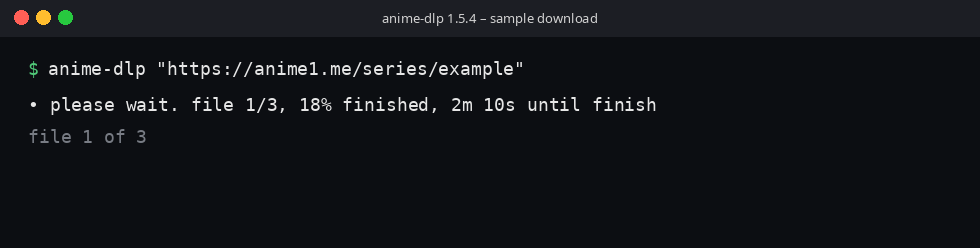
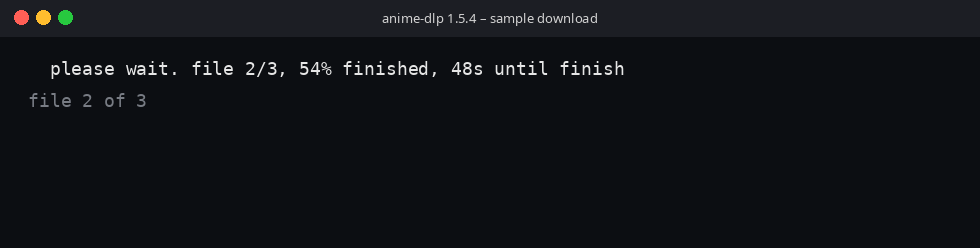
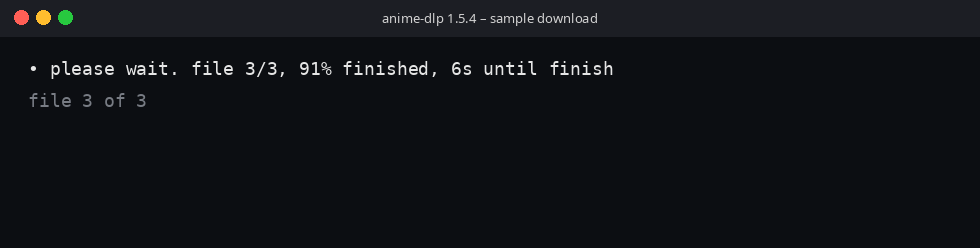
- On a terminal, a flashing bullet shows the file being saved, the file total, the percent finished, and the time until finish. The line disappears when the downloads return
- Clean logging with optional verbose debug mode
Installation
From PyPI
pip3 install AnimeDlp
From a local checkout
pip3 install -e .
# or
pip3 install .
Required dependencies
Declared in pyproject.toml and installed with the package:
requests,beautifulsoup4,lxml,yt-dlp,ChronicleLogger
Python 3.8+ is required (requires-python in packaging).
Usage
Basic command
anime-dlp "https://anime1.me/your-series-or-episode-url"
# or
python -m AnimeDlp "https://anime1.pw/your-page-url"
Options
Usage: anime-dlp [OPTIONS] URL

A clean downloader for anime1.me and anime1.pw

Positional Arguments:
  url                   URL from anime1.me or anime1.pw

Optional Arguments:
  -h, --help            show this help message and exit
  -v, --verbose         Enable debug output (cookie values redacted in logs)
  -x, --extract         Extract URLs only (no download)
  -o, --output-dir DIR  Directory for downloads (default: current directory)
  -cf, --cloudflare CF  cf_clearance cookie value (for Cloudflare protection)
  -ua, --user-agent UA  Custom User-Agent string
  --show-cookies        Print full playback cookies with --extract (default: redacted)
Examples
1. Download episodes:
anime-dlp "https://anime1.me/..."
2. Extract direct video URLs only:
anime-dlp "https://anime1.me/..." --extract
3. Bypass Cloudflare protection:
anime-dlp "https://anime1.me/..." --cloudflare "your_cf_clearance_value" --user-agent "Mozilla/5.0 ..." --verbose
Sample operation
These frames are one terminal download of three files. The bullet flashes. The file number, the percent finished, and the time until finish are read again on each flash. When the last file returns, the line is erased.
The first frame is file 1 of 3, 18% finished, with about two minutes left. The bullet is drawn.
The next flash is file 2 of 3, 54% finished, with 48 seconds left. The bullet cell is a space, so the numbers stay put.
The last file is 3 of 3, 91% finished, with 6 seconds left. The bullet is drawn again.
--extract does not show this line. A pipe or other non-terminal keeps yt-dlp's own progress and does not add this line.
How it works
- Validates the host (
anime1.meoranime1.pwonly). - Parses episode information / API tokens from the page.
- For anime1.me, calls the site API and applies needed playback cookies safely.
- Either prints sources (
--extract) or downloads with yt-dlp.
Troubleshooting
- Cloudflare block (403): Get a fresh
cf_clearancefrom your browser and pass--cloudflarewith a matching--user-agentwhen required. - Cookie-related errors: The tool uses a fixed cookie-name subset for me API downloads.
- No video found: Run with
--verbosefor detailed logs. - Unsupported host: Only anime1.me / anime1.pw are accepted.
Development / tests
pip3 install -e . pytest
python3 -m pytest -q tests/
Product law: docs/requirements/. TP map: docs/reviews/test-plan.md.
Project links
- Homepage / Repository: https://github.com/Wilgat/AnimeDlp
- Issues: https://github.com/Wilgat/AnimeDlp/issues
- PyPI: https://pypi.org/project/AnimeDlp/
Version
1.4.0 — SSOT: pyproject.toml and src/AnimeDlp/__init__.py (__version__).
License
MIT — see LICENSE.md.
Security
See SECURITY.md for reporting contact and design posture.
Disclaimer
This tool is intended for personal, educational use only. Respect the terms of service of the websites you use it with. Downloading copyrighted material may be illegal in your jurisdiction.
Made for anime fans who want a simple downloading experience.
1 maintainer

Metadata
1 maintainer
Release files for AnimeDlp 1.4.0
For a detailed explanation of source distributions (sdists) and built distributions (wheels), please see the package formats documentation.
Source distribution (sdist)
| File | Size | Uploaded | Provenance | Actions |
|---|---|---|---|---|
| animedlp-1.4.0.tar.gz | 23.0 kB | Without provenance | Details for animedlp-1.4.0.tar.gz |
Built distribution (wheel)
| File | Interpreter | ABI | Platform | Actions Reset |
|---|---|---|---|---|
| animedlp-1.4.0-py3-none-any.whl | Python 3 | none | any | Details for animedlp-1.4.0-py3-none-any.whl |
Total release size: 39.7 kB
Release files / animedlp-1.4.0.tar.gz
| Download URL | animedlp-1.4.0.tar.gz |
|---|---|
| Size | 23.0 kB |
| Tags | Source |
|
SHA-256 checksum How to use checksums |
0e8d85fd9767090c88daf972064904e7bf44fa9c5b45ff3ec21b53bf9186c722
|
|
BLAKE2b-256 checksum How to use checksums |
e896affe9005e307900c89d5e8eef1fbf886061ec98f09ee9f4829e8cf31eb9f
|
| Upload date | |
|
Uploaded using Trusted Publishing? What is trusted publishing? |
No |
| Uploaded via |
twine/6.2.0 CPython/3.12.11
|
Release files / animedlp-1.4.0-py3-none-any.whl
| Download URL | animedlp-1.4.0-py3-none-any.whl |
|---|---|
| Size | 16.7 kB |
| Tags | Python 3 |
|
SHA-256 checksum How to use checksums |
770010d80d48fe0674519848baccef9c74ec7c609569e27b2ef1bfc083c34a0b
|
|
BLAKE2b-256 checksum How to use checksums |
713197fb6f4f292fae7ee2b0a81397fc8e5ddc991ba335baf393d818208803a6
|
| Upload date | |
|
Uploaded using Trusted Publishing? What is trusted publishing? |
No |
| Uploaded via |
twine/6.2.0 CPython/3.12.11
|
Security for AnimeDlp 1.4.0
Provenance
Provenance describes where a file came from. On PyPI, provenance is shared via attestations, which provide a verifiable record of the build or publishing details. View details, limitations and caveats.
No provenance found
None of the files in this release were uploaded with provenance metadata.
A note on package security
PyPI is a repository for distributing packages, not a service for auditing them. While third-party security researchers and our staff do their best to detect and remove malicious packages, PyPI cannot guarantee the quality, security or suitability of any given package.
To learn more about protecting yourself from malicious actors, visit our package security documentation.














