
CTkTrimSlider
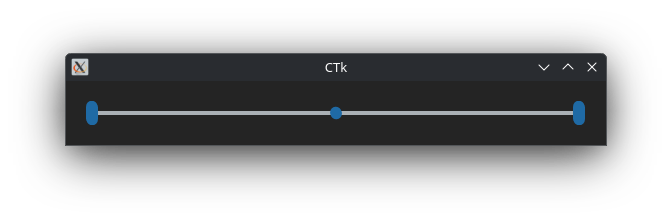
A specialized 3 button range slider for video triming, made for customtkinter
Installation
Download the source code, paste the CTkTrimSlider folder in the directory where your program is present.
Example
import tkinter
import customtkinter as ctk

from CTkTrimSlider.ctk_trimslider import CTkTrimSlider

def show_duration(value):
  duration = end_value.get() - start_value.get()
  duration_label.configure(text=str(duration))

def show_remaining(value):
  remaining = end_value.get() - current_value.get()
  remaining_label.configure(text=str(remaining))

root = ctk.CTk()

start_value = tkinter.DoubleVar(root, value=0)
end_value = tkinter.DoubleVar(root, value=100)
current_value = tkinter.DoubleVar(root, value=50)

trim_slider = CTkTrimSlider(root,
                            from_=0,
                            to=100,
                            number_of_steps=100,
                            left_button_var=start_value,
                            right_button_var=end_value,
                            center_button_var=current_value,
                            left_button_command=show_duration,
                            right_button_command=show_duration,
                            center_button_command=show_remaining)

trim_slider.grid(row=0, column=0, columnspan=2, padx=5, pady=5, sticky="nswe")

ctk.CTkLabel(root, text="Start value:").grid(row=1,column=0, padx=5, pady=5)
start_label = ctk.CTkLabel(root, textvariable=start_value)
start_label.grid(row=1, column=1, padx=5, pady=5)

ctk.CTkLabel(root, text="End value:").grid(row=2,column=0, padx=5, pady=5)
end_label = ctk.CTkLabel(root, textvariable=end_value)
end_label.grid(row=2, column=1, padx=5, pady=5)

ctk.CTkLabel(root, text="Current value:").grid(row=3,column=0, padx=5, pady=5)
current_label = ctk.CTkLabel(root, textvariable=current_value)
current_label.grid(row=3, column=1, padx=5, pady=5)

ctk.CTkLabel(root, text="Duration:").grid(row=4,column=0, padx=5, pady=5)
duration_label = ctk.CTkLabel(root, text="0")
duration_label.grid(row=4, column=1, padx=5, pady=5)

ctk.CTkLabel(root, text="Remaining:").grid(row=5,column=0, padx=5, pady=5)
remaining_label = ctk.CTkLabel(root, text=str(end_value.get() - current_value.get()))
remaining_label.grid(row=5, column=1, padx=5, pady=5)

root.mainloop()
Arguments
| Parameters | Details |
|---|---|
| master | root window, can be tkinter.Frame or CTkFrame |
| width | slider width in px |
| height | slider height in px |
| corner_radius | corner roundness of the slider |
| border_width | space around the slider rail in px |
| outer_button_length | thickness of the two outer buttons in px |
| outer_button_corner_radius | corner roundness of the two outer buttons in px |
| outer_button_length | corner roundness of center outer buttons in px |
| fg_color | background color, default as transparent |
| fg_color | foreground color, tuple: (light_color, dark_color) or single color |
| progress_color | tuple: (light_color, dark_color) or single color or "transparent", color of the slider line before the button |
| border_color | slider border color, tuple: (light_color, dark_color) or single color or "transparent", default is "transparent" |
| button_color | color of the slider buttons, tuple: (light_color, dark_color) or single color or ((light_color_1, dark_color_1), (light_color_2, light_color_2)) for separate button colors |
| button_hover_color | hover color, tuple: (light_color, dark_color) or single color |
| from_ | lower slider value |
| to | upper slider value |
| number_of_steps | number of steps in which the sliders can be positioned |
| orientation | "horizontal" (standard) or "vertical" |
| state | "normal" or "disabled" (not clickable) |
| hover | bool, enable/disable hover effect, default is True |
| left_button_command | callback function associated with the left button(bottom button in vertical orientation), receives left slider button value as argument |
| right_button_command | callback function associated with the right button(upper button in vertical orientation), receives right slider button value as argument |
| center_button_command | callback function associated with the center button, receives center slider button value as argument |
| left_button_var | tk.IntVar or tk.DoubleVar, vlaue of the left (bottom) slider button |
| right_button_var | tk.IntVar or tk.DoubleVar, vlaue of the right (upper) slider button |
| center_button_var | tk.IntVar or tk.DoubleVar, vlaue of the centerslider button |
| button_blocking | bool, set to true to keep outer (left / bottom and right / upper) buttons from moving the center button, keep false to allow outer buttons to move center button |
Methods:
-
.configure(attribute=value, ...)
All attributes can be configured and updated.
trim_slider.configure(fg_color=..., progress_color=..., button_color=..., ...)
-
.set(attribute_name, input_value,)
attribute_name can be "left_value", "right_value, or "center_value"
Will set the left, right, or center buttons value, and position depending on the attribute name.
-
.get(attribute_name)
attribute_name can be "left_value", "right_value, or "center_value"
Get cthe value of the lef, right, or center button of slider.
-
.cget("attribute_name")
Get any attribute value.
More Details
For a more extensive example using this widget and its full capabilities, please visit video_trimmer_widget
1 maintainer

Metadata
1 maintainer
Release files for CTkTrimSlider 2.2.0
For a detailed explanation of source distributions (sdists) and built distributions (wheels), please see the package formats documentation.
Source distribution (sdist)
| File | Size | Uploaded | Provenance | Actions |
|---|---|---|---|---|
| ctktrimslider-2.2.0.tar.gz | 12.9 kB | Without provenance | Details for ctktrimslider-2.2.0.tar.gz |
Built distribution (wheel)
| File | Interpreter | ABI | Platform | Actions Reset |
|---|---|---|---|---|
| ctktrimslider-2.2.0-py3-none-any.whl | Python 3 | none | any | Details for ctktrimslider-2.2.0-py3-none-any.whl |
Total release size: 26.9 kB
Release files / ctktrimslider-2.2.0.tar.gz
| Download URL | ctktrimslider-2.2.0.tar.gz |
|---|---|
| Size | 12.9 kB |
| Tags | Source |
|
SHA-256 checksum How to use checksums |
dda6cad3a0af97da53f37f15251ba334ca68358895edce856962c1270eb6a16c
|
|
BLAKE2b-256 checksum How to use checksums |
7c8f0b605986b1d484c4e095c1aba54f40192051ccdc121d9d077a134c7a48d5
|
| Upload date | |
|
Uploaded using Trusted Publishing? What is trusted publishing? |
No |
| Uploaded via |
twine/7.0.0 CPython/3.13.5
|
Release files / ctktrimslider-2.2.0-py3-none-any.whl
| Download URL | ctktrimslider-2.2.0-py3-none-any.whl |
|---|---|
| Size | 14.0 kB |
| Tags | Python 3 |
|
SHA-256 checksum How to use checksums |
fcc26259f4a66dd1f6db6476e98fefbcb747230758159f2bfc0d1c4eca776bd2
|
|
BLAKE2b-256 checksum How to use checksums |
d86e163285e168a6b3acf1d80437227832769e007e66c8bf9efa524955093c70
|
| Upload date | |
|
Uploaded using Trusted Publishing? What is trusted publishing? |
No |
| Uploaded via |
twine/7.0.0 CPython/3.13.5
|
Security for CTkTrimSlider 2.2.0
Provenance
Provenance describes where a file came from. On PyPI, provenance is shared via attestations, which provide a verifiable record of the build or publishing details. View details, limitations and caveats.
No provenance found
None of the files in this release were uploaded with provenance metadata.
A note on package security
PyPI is a repository for distributing packages, not a service for auditing them. While third-party security researchers and our staff do their best to detect and remove malicious packages, PyPI cannot guarantee the quality, security or suitability of any given package.
To learn more about protecting yourself from malicious actors, visit our package security documentation.














