
A video trim slider widget for customtkinter

Project description
CTkTrimSlider
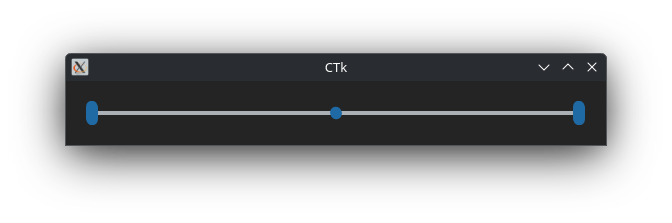
A specialized 3 button range slider for video triming, made for customtkinter
Installation
Download the source code, paste the CTkTrimSlider folder in the directory where your program is present.
Example
import tkinter
import customtkinter as ctk

from CTkTrimSlider.ctk_trimslider import CTkTrimSlider

def show_duration(value):
  duration = end_value.get() - start_value.get()
  duration_label.configure(text=str(duration))

def show_remaining(value):
  remaining = end_value.get() - current_value.get()
  remaining_label.configure(text=str(remaining))

root = ctk.CTk()

start_value = tkinter.DoubleVar(root, value=0)
end_value = tkinter.DoubleVar(root, value=100)
current_value = tkinter.DoubleVar(root, value=50)

trim_slider = CTkTrimSlider(root,
                            from_=0,
                            to=100,
                            number_of_steps=100,
                            left_button_var=start_value,
                            right_button_var=end_value,
                            center_button_var=current_value,
                            left_button_command=show_duration,
                            right_button_command=show_duration,
                            center_button_command=show_remaining)

trim_slider.grid(row=0, column=0, columnspan=2, padx=5, pady=5, sticky="nswe")

ctk.CTkLabel(root, text="Start value:").grid(row=1,column=0, padx=5, pady=5)
start_label = ctk.CTkLabel(root, textvariable=start_value)
start_label.grid(row=1, column=1, padx=5, pady=5)

ctk.CTkLabel(root, text="End value:").grid(row=2,column=0, padx=5, pady=5)
end_label = ctk.CTkLabel(root, textvariable=end_value)
end_label.grid(row=2, column=1, padx=5, pady=5)

ctk.CTkLabel(root, text="Current value:").grid(row=3,column=0, padx=5, pady=5)
current_label = ctk.CTkLabel(root, textvariable=current_value)
current_label.grid(row=3, column=1, padx=5, pady=5)

ctk.CTkLabel(root, text="Duration:").grid(row=4,column=0, padx=5, pady=5)
duration_label = ctk.CTkLabel(root, text="0")
duration_label.grid(row=4, column=1, padx=5, pady=5)

ctk.CTkLabel(root, text="Remaining:").grid(row=5,column=0, padx=5, pady=5)
remaining_label = ctk.CTkLabel(root, text=str(end_value.get() - current_value.get()))
remaining_label.grid(row=5, column=1, padx=5, pady=5)

root.mainloop()
Arguments
| Parameters | Details |
|---|---|
| master | root window, can be tkinter.Frame or CTkFrame |
| width | slider width in px |
| height | slider height in px |
| corner_radius | corner roundness of the slider |
| border_width | space around the slider rail in px |
| outer_button_length | thickness of the two outer buttons in px |
| outer_button_corner_radius | corner roundness of the two outer buttons in px |
| outer_button_length | corner roundness of center outer buttons in px |
| fg_color | background color, default as transparent |
| fg_color | foreground color, tuple: (light_color, dark_color) or single color |
| progress_color | tuple: (light_color, dark_color) or single color or "transparent", color of the slider line before the button |
| border_color | slider border color, tuple: (light_color, dark_color) or single color or "transparent", default is "transparent" |
| button_color | color of the slider buttons, tuple: (light_color, dark_color) or single color or ((light_color_1, dark_color_1), (light_color_2, light_color_2)) for separate button colors |
| button_hover_color | hover color, tuple: (light_color, dark_color) or single color |
| from_ | lower slider value |
| to | upper slider value |
| number_of_steps | number of steps in which the sliders can be positioned |
| orientation | "horizontal" (standard) or "vertical" |
| state | "normal" or "disabled" (not clickable) |
| hover | bool, enable/disable hover effect, default is True |
| left_button_command | callback function associated with the left button(bottom button in vertical orientation), receives left slider button value as argument |
| right_button_command | callback function associated with the right button(upper button in vertical orientation), receives right slider button value as argument |
| center_button_command | callback function associated with the center button, receives center slider button value as argument |
| left_button_var | tk.IntVar or tk.DoubleVar, vlaue of the left (bottom) slider button |
| right_button_var | tk.IntVar or tk.DoubleVar, vlaue of the right (upper) slider button |
| center_button_var | tk.IntVar or tk.DoubleVar, vlaue of the centerslider button |
| button_blocking | bool, set to true to keep outer (left / bottom and right / upper) buttons from moving the center button, keep false to allow outer buttons to move center button |
Methods:
-
.configure(attribute=value, ...)
All attributes can be configured and updated.
trim_slider.configure(fg_color=..., progress_color=..., button_color=..., ...)
-
.set(attribute_name, input_value,)
attribute_name can be "left_value", "right_value, or "center_value"
Will set the left, right, or center buttons value, and position depending on the attribute name.
-
.get(attribute_name)
attribute_name can be "left_value", "right_value, or "center_value"
Get cthe value of the lef, right, or center button of slider.
-
.cget("attribute_name")
Get any attribute value.
More Details
For a more extensive example using this widget and its full capabilities, please visit video_trimmer_widget
Release history Release notifications | RSS feed


Download files
Download the file for your platform. If you're not sure which to choose, learn more about installing packages.
Source Distribution
Built Distribution
Filter files by name, interpreter, ABI, and platform.
If you're not sure about the file name format, learn more about wheel file names.
Copy a direct link to the current filters
File details
Details for the file ctktrimslider-1.0.2.tar.gz.
File metadata
- Download URL: ctktrimslider-1.0.2.tar.gz
- Upload date:
- Size: 11.0 kB
- Tags: Source
- Uploaded using Trusted Publishing? No
- Uploaded via: twine/6.2.0 CPython/3.13.5
File hashes
| Algorithm | Hash digest | |
|---|---|---|
| SHA256 |
9200b633084019f3430f8c6acd8fc836b40d9913f184278c503e77487bdbbe76
|
|
| MD5 |
9b087d0123ce6e0520a411dc2af815c0
|
|
| BLAKE2b-256 |
c83b2d8f082c767312a329ef50b93be7112e5160f309e055d87cdca93ad52758
|
File details
Details for the file ctktrimslider-1.0.2-py3-none-any.whl.
File metadata
- Download URL: ctktrimslider-1.0.2-py3-none-any.whl
- Upload date:
- Size: 12.2 kB
- Tags: Python 3
- Uploaded using Trusted Publishing? No
- Uploaded via: twine/6.2.0 CPython/3.13.5
File hashes
| Algorithm | Hash digest | |
|---|---|---|
| SHA256 |
fa9333eb4c869cee45975d1fb7e1c9d3c579b34a6418e9e0057719c3ae55a61b
|
|
| MD5 |
8ef8680028fd7f3adf2f5a6fe2573832
|
|
| BLAKE2b-256 |
dcda0dc24ae89738aac95e96a41d3811cc1bf8c6e30cdb61ac299d8fcaaacf5b
|






