
ChernoffFace Python package
Introduction
This Python package implements the function chernoff_face that
generates Chernoff face diagrams.
The design, implementation strategy, and unit tests closely resemble
the Wolfram Repository Function (WFR)
ChernoffFace,
[AAf1], and the original Mathematica package
“ChernoffFaces.m”,
[AAp1].
Installation
To install from GitHub use the shell command:
python -m pip install git+https://github.com/antononcube/Python-packages.git#egg=ChernoffFace\&subdirectory=ChernoffFace
To install from PyPI:
python -m pip install ChernoffFace
Usage examples
Setup
from ChernoffFace import *
import numpy
import matplotlib.cm
Random data
Here is an example of generating a table (matplotlib figure object) of Chernoff faces over
the rows of a two-dimensional array of real numbers:
# Generate data
numpy.random.seed(32)
data = numpy.random.rand(16, 12)

# Make Chernoff faces
fig = chernoff_face(data=data,
                    titles=[str(x) for x in list(range(len(data)))],
                    color_mapper=matplotlib.cm.Pastel1)

# Display
fig.tight_layout()
matplotlib.pyplot.show()
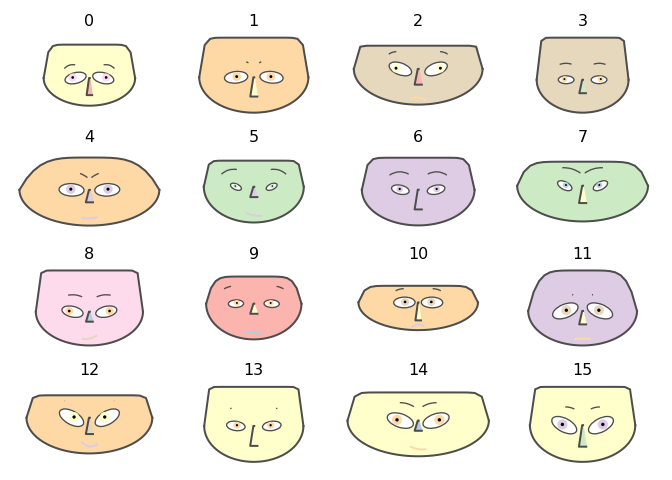
(To be clear, each face represents a row of the given array.)
Employee attitude data
Get Employee attitude data
dfData=load_employee_attitude_data_frame()
dfData.head()

##    Rating  Complaints  Privileges  Learning  Raises  Critical  Advancement
## 0      43          51          30        39      61        92           45
## 1      63          64          51        54      63        73           47
## 2      71          70          68        69      76        86           48
## 3      61          63          45        47      54        84           35
## 4      81          78          56        66      71        83           47
Rescale the variables (columns):
dfData2 = variables_rescale(dfData)
dfData2.head()

##      Rating  Complaints  Privileges  Learning    Raises  Critical  Advancement
## 0  0.066667    0.264151    0.000000  0.121951  0.400000  1.000000     0.425532
## 1  0.511111    0.509434    0.396226  0.487805  0.444444  0.558140     0.468085
## 2  0.688889    0.622642    0.716981  0.853659  0.733333  0.860465     0.489362
## 3  0.466667    0.490566    0.283019  0.317073  0.244444  0.813953     0.212766
## 4  0.911111    0.773585    0.490566  0.780488  0.622222  0.790698     0.468085
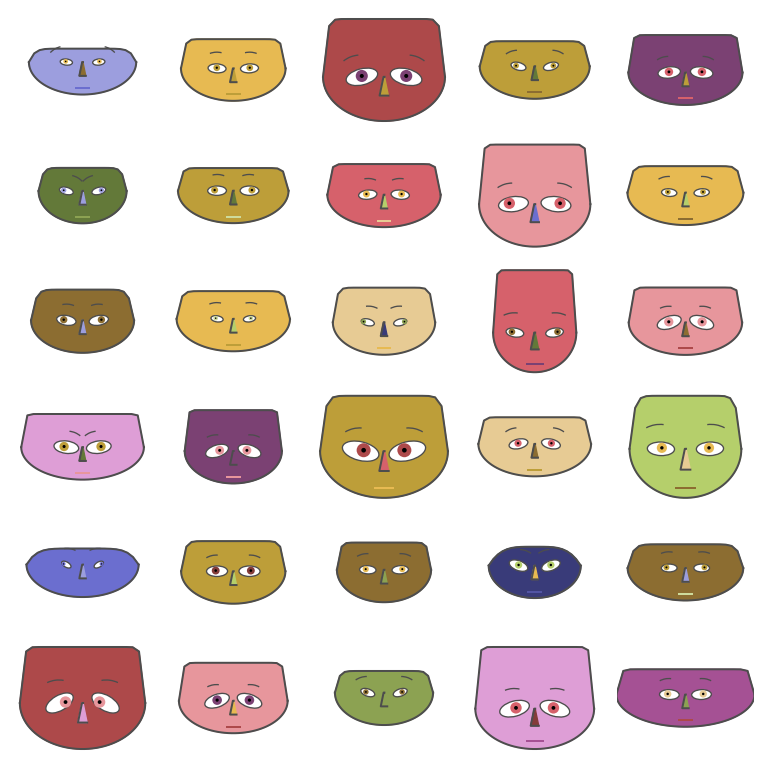
Make the corresponding Chernoff faces:
fig = chernoff_face(data=dfData2,
                    n_columns=5,
                    long_face=False,
                    color_mapper=matplotlib.cm.tab20b,
                    figsize=(8, 8), dpi=200)
Display:
fig.tight_layout()
matplotlib.pyplot.show()
USA arrests data
Get USA arrests data:
dfData=load_usa_arrests_data_frame()
dfData.head()

##     StateName  Murder  Assault  UrbanPopulation  Rape
## 0     Alabama    13.2      236               58  21.2
## 1      Alaska    10.0      263               48  44.5
## 2     Arizona     8.1      294               80  31.0
## 3    Arkansas     8.8      190               50  19.5
## 4  California     9.0      276               91  40.6
Rescale the variables:
dfData2 = variables_rescale(dfData)
dfData2.head()

##     StateName    Murder   Assault  UrbanPopulation      Rape
## 0     Alabama  0.746988  0.654110         0.440678  0.359173
## 1      Alaska  0.554217  0.746575         0.271186  0.961240
## 2     Arizona  0.439759  0.852740         0.813559  0.612403
## 3    Arkansas  0.481928  0.496575         0.305085  0.315245
## 4  California  0.493976  0.791096         1.000000  0.860465
Make the corresponding Chernoff faces using USA state names as titles:
fig = chernoff_face(data=dfData2,
                    n_columns=5,
                    long_face=False,
                    color_mapper=matplotlib.cm.tab20c_r,
                    figsize=(12, 12), dpi=200)
Display:
fig.tight_layout()
matplotlib.pyplot.show()

Additional comments
- In order to have "prettier" and "tighter" looking diagrams (Chernoff faces) by default
chernoff_facemakes wide faces.- The argument
long_facecontrols the shape of the faces. ChernoffFacein [AAf1] makes long faces.
- The argument
- Additional functions have to be implemented that summarize datasets using Chernoff faces.
- Such summary diagrams are given in [AA1, AAf1].
- For a given dataset certain color palettes (color mappers) would provide more insightful views.
- For example:
- Florida is a clear outlier in the USA arrests plot above
- Certain clustering of the states is also hinted by faces with similar colors.
- For example:
References
Articles
[AA1] Anton Antonov, “Making Chernoff faces for data visualization”, (2016), MathematicaForPrediction at WordPress.
Functions and packages
[AAf1] Anton Antonov,
ChernoffFace,
(2019), Wolfram Function
Repository.
[AAp1] Anton Antonov, Chernoff faces implementation in Mathematica, (2016), MathematicaForPrediction at GitHub.
1 maintainer

Release files for ChernoffFace 0.1.4
For a detailed explanation of source distributions (sdists) and built distributions (wheels), please see the package formats documentation.
Source distribution (sdist)
| File | Size | Uploaded | |
|---|---|---|---|
| ChernoffFace-0.1.4.tar.gz | 14.8 kB | Details |
Built distribution (wheel)
| File | Interpreter | ABI | Platform | Reset |
|---|---|---|---|---|
| ChernoffFace-0.1.4-py3-none-any.whl | Python 3 | none | any | Details |
Total release size: 31.1 kB
Release files / ChernoffFace-0.1.4.tar.gz
| Download URL | ChernoffFace-0.1.4.tar.gz |
|---|---|
| Size | 14.8 kB |
| Tags | Source |
|
SHA-256 checksum How to use checksums |
6263568df42dcef73ef40f8e772246566aedbca0ee73f96443008e211c21bf99
|
|
BLAKE2b-256 checksum How to use checksums |
8775b5b7c58567552bac73dc8314ef8c71b951ce1de00dddaee681d61c88e258
|
| Upload date | |
|
Uploaded using Trusted Publishing? What is trusted publishing? |
No |
| Uploaded via |
twine/3.6.0 importlib_metadata/4.8.2 pkginfo/1.8.1 requests/2.26.0 requests-toolbelt/0.9.1 tqdm/4.62.3 CPython/3.9.7
|
Release files / ChernoffFace-0.1.4-py3-none-any.whl
| Download URL | ChernoffFace-0.1.4-py3-none-any.whl |
|---|---|
| Size | 16.2 kB |
| Tags | Python 3 |
|
SHA-256 checksum How to use checksums |
b5cd4fbf95ad4775f35ce07d5c4a9f910523dd6be3a760864da79b9c526a9994
|
|
BLAKE2b-256 checksum How to use checksums |
0d3a84b8ce2e3afdf4b9c25348cf593c08db867724fb7b876a3f19c594386d3f
|
| Upload date | |
|
Uploaded using Trusted Publishing? What is trusted publishing? |
No |
| Uploaded via |
twine/3.6.0 importlib_metadata/4.8.2 pkginfo/1.8.1 requests/2.26.0 requests-toolbelt/0.9.1 tqdm/4.62.3 CPython/3.9.7
|














