
CraftiGames
CraftiGames Wrapper A easy to use, feature-rich, and Asynchronous warpping.
Key Features
- Wraps Pikanetwork's and JartexNetwork's API Asynchronously.
- Fast and efficient.
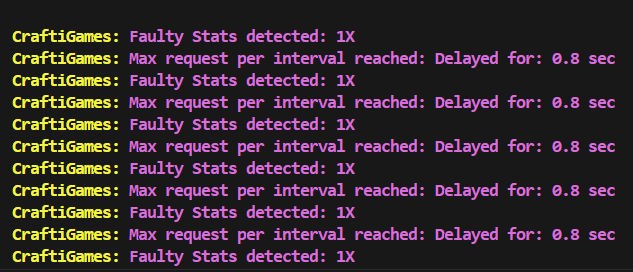
- Handles Ratelimits, ResponseErrors, faulty response.
- Covers all parts of
PikaNetwork'sandJartexNetwork's
Credits
-
Author: sti1ltyping
-
Contact: https://discord.gg/B3DQgwUgyT
-
This API wrapper is developed by the dedicated development team of
Pikachu's Stats. This same wrapper is utilized within the application.
Installing
pip install CraftiGames.py
EXAMPLES
- Profile and Stats
from  CraftiGames import Pikanetwork, PikaAnnotations
import asyncio


async def main():

    # Sending API requests with an asynchronous environment
    async with Pikanetwork(api_key='...') as api:

        profile = await api.Profile('Fireor')
        stats = await api.Stats('Fireor', "bedwars", "total", "all_modes")

    # Extracting items from the response
    username = profile.username
    rank = profile.highest_minigame_rank
    level = profile.level
    last_seen = profile.last_seen_text

    # Extracting guild from player's profile
    guild = profile.guild()

    # Assigning variables if player is not in a guild
    if guild is None:
        guild_name = None
        guild_tag = None
        guild_owner = None
        guild_level = None
        guild_mc = None

    guild_name = guild.name
    guild_tag = guild.tag
    guild_owner = guild.leader
    guild_level = guild.level
    guild_mc = guild.member_count

    # Extracting stats
    wins = stats.wins
    wins_lb = stats.wins_lb

    losses = stats.losses
    losses_lb = stats.losses

    wlr = stats.wlr
    win_rate = stats.win_rate

    # creating a templet to output
    description = f"""
    {username}'s Stats [{rank}]

    level: {level}
    last seen: {last_seen}

    Guild:
        Name: {guild_name}
        Tag: {guild_tag}
        Leader: {guild_owner}
        level: {guild_level}
        Members: {guild_mc}

    Stats:
        Wins: {wins} | #{wins_lb}
        Losses: {losses} | #{losses_lb}

        wlr: {wlr}
        win rate: {win_rate}%
    """
    print(description)


asyncio.run(main())
- Guilds
from CraftiGames import Pikanetwork, PikaAnnotations
import asyncio


async def main():

    # Sending API requests with an asynchronous environment
    async with Pikanetwork(api_key='...') as api:

        guild = await api.Guild("RIP")

    # If guild doesn't exists
    if guild is None:
        print("Guild not found!")
        return

    # Extracting items from the response
    guild_created_at = guild.created_at # UnixTimestamp usable in discord timestamp(<t:UnixTimestamp:R>)
    guild_name = guild.name
    guild_tag = guild.tag
    guild_owner = guild.leader
    guild_level = guild.level
    guild_member_count = guild.member_count

    guild_members = guild.member_list


    # creating a templet to output
    description = f"""
    Guild [<t:{guild_created_at}:R>]:

        Name: {guild_name}
        Tag: {guild_tag}
        Leader: {guild_owner}
        level: {guild_level}
        Members: {guild_member_count}

        list: {guild_members}
    """
    print(description)


asyncio.run(main())
- Recaps
from CraftiGames import Pikanetwork, PikaAnnotations
import asyncio


async def main():

    # Sending API requests with an asynchronous environment
    async with Pikanetwork(api_key='...') as api:

        recap = await api.Recap("c19218da-69fc-4c27-99f6-c607c1676ac2")

    # If recap doesn't exists
    if recap is None:
        print("Recap not found!")
        return

    # Extracting items from the response
    recap_id = recap.id
    winners = ', '.join(winner for winner in recap.winners)
    most_kills = recap.most_kills
    player_with_most_kills = recap.player_with_most_kills
    mapname = recap.map_name
    started = recap.game_start # UnixTimestamp
    duration = recap.game_duration
    link = recap.recap_link
    players = ", ".join(player for player in recap.players)

    # creating a templet to output
    description = f"""
    Recap: {recap_id} | Game started: <:t{started}:F> | Duration: {duration}:
    link: {link}

        winners: {winners}
        map: {mapname}
        most kills: {player_with_most_kills} | {most_kills}

        players: {players}
    """
    print(description)


asyncio.run(main())
- MultiProcessing
from CraftiGames import Pikanetwork, PikaAnnotations
import asyncio

# CraftiGames automates batch processing.
# No matter how big the lists are it will automatically break it into batches and fetch the responses.
players = ["Fireor", "fwgazes", "ignLone"]
guilds = ["RIP", "EKITTENS", "Menace"]

async def main():

    # Sending API requests with an asynchronous environment
    async with Pikanetwork(api_key='...') as api:

        profiles = await api.MultiProfile(players)
        stats = await api.MultiStats(players, "bedwars", "total", "all_modes")
        guilds = await api.MultiGuilds(guilds)


    for player, profile in profiles:


        if profile is None:
            print(f'Couldn\'t find any player named {player}!')

        print(player, profile.level)

    for player, stats in stats:

        if profile is None:
            print(f'Couldn\'t find any player named {player}!')

        print(player, stats.wins)

    for name, guild in guilds:

        if profile is None:
            print(f'Couldn\'t find any guild named {name}!')

        print(name, guild.totalexp)


asyncio.run(main())
How to Change Configuration
Changing the configuration is not recommended as the default settings ensure efficiency and prevent rate limits. You can still edit it for even higher efficency and logging.
from CraftiGames import config

config.update(
    Logging = True,
    Allowed_Recursion = 50,
    Batch_Size = 25,
    Batch_Delay = 0.8,
    Default_Skins = ['fwgazes', 'ignLone'],
    Interval = 1,
    Max_Requests_Per_Interval = 25,
    Delay = 0.8,
    Delay_After_Exceeding_Ratelimit = 1,
    Api_Key_Pika = "pika-api-key",
    Api_Key_Jartex = "jartex-api-key"
)
These keys are saved in settings.ini as Api-Key_Pika and
Api_Key_Jartex. The older Api_Key option remains supported and is used for
either network when that network has no separate key configured.
You can also pass a key directly to either network wrapper:
async with Pikanetwork(api_key="your-api-key") as api:
    profile = await api.Profile("Fireor")
For proxy-specific keys, pass (proxy_url, api_key) pairs in the proxies list.
String-only proxy entries continue to use the configured or constructor-level key:
async with Jartexnetwork(
    proxies=[("https://205.135.0.1:8080", "proxy-specific-api-key")]
) as api:
    profile = await api.Profile("Fireor")
PikaNetwork uses the configured Api_Key_Pika as the default key for plain
proxy strings and for pairs whose key is None:
async with Pikanetwork(
    proxies=[
        ("http://proxy-one:8080", "api-key-one"),
        ("http://proxy-two:8080", "api-key-two"),
        "http://proxy-three:8080",
    ]
) as api:
    profile = await api.Profile("Fireor")
Pika's request limiter tracks each (proxy, API key) pair independently.
Each pair gets Max_Requests_Per_Interval requests per configured Interval;
requests without a proxy use a separate bucket for the default key.
PikaNetwork API keys are sent in the X-Api-Key header on every request to
https://stats.pika-network.net/api. Each key is limited to 120 requests per
minute. config.update() writes the key to settings.ini; avoid sharing that
file or committing it.
How to reset to default configuration
from CraftiGames import config

# Reset config to default settings
config.reset()
# OR
config.update()
1 maintainer

Metadata
1 maintainer
Release files for CraftiGames.py 2.2.8
For a detailed explanation of source distributions (sdists) and built distributions (wheels), please see the package formats documentation.
Source distribution (sdist)
| File | Size | Uploaded | Provenance | |
|---|---|---|---|---|
| craftigames_py-2.2.8.tar.gz | 36.2 kB | Without provenance | Details |
Built distribution (wheel)
| File | Interpreter | ABI | Platform | Reset |
|---|---|---|---|---|
| craftigames_py-2.2.8-py3-none-any.whl | Python 3 | none | any | Details |
Total release size: 93.6 kB
Release files / craftigames_py-2.2.8.tar.gz
| Download URL | craftigames_py-2.2.8.tar.gz |
|---|---|
| Size | 36.2 kB |
| Tags | Source |
|
SHA-256 checksum How to use checksums |
48a38c778f5ebeae9a784ca443a0ad336512cd607119fff54ff1e6f76f049edc
|
|
BLAKE2b-256 checksum How to use checksums |
27382686048aa36a72cc5dda71eedb33c0e9db71499740331084cd849b91acaa
|
| Upload date | |
|
Uploaded using Trusted Publishing? What is trusted publishing? |
No |
| Uploaded via |
twine/7.0.0 CPython/3.13.15
|
Release files / craftigames_py-2.2.8-py3-none-any.whl
| Download URL | craftigames_py-2.2.8-py3-none-any.whl |
|---|---|
| Size | 57.5 kB |
| Tags | Python 3 |
|
SHA-256 checksum How to use checksums |
fc059c769cc1be15a2f29785cdd9dcfb18e0c81606d0d33933f55a7fee20a7b7
|
|
BLAKE2b-256 checksum How to use checksums |
d669b6951c9562b44656d8e759248f6ef24d417dfe09b9f5576e4a629a53d1a5
|
| Upload date | |
|
Uploaded using Trusted Publishing? What is trusted publishing? |
No |
| Uploaded via |
twine/7.0.0 CPython/3.13.15
|
Security for CraftiGames.py 2.2.8
Provenance
Provenance describes where a file came from. On PyPI, provenance is shared via attestations, which provide a verifiable record of the build or publishing details. View details, limitations and caveats.
No provenance found
None of the files in this release were uploaded with provenance metadata.
A note on package security
PyPI is a repository for distributing packages, not a service for auditing them. While third-party security researchers and our staff do their best to detect and remove malicious packages, PyPI cannot guarantee the quality, security or suitability of any given package.














