
DDownloader
DDownloader is a powerful Python-based tool and library designed to download and decrypt DRM-protected content from DASH, HLS, and ISM manifests. It provides seamless support for encrypted media streams, extracting metadata and ensuring high compatibility with various DRM standards.
Features
- Download and Decrypt: Supports DASH, HLS, and ISM manifests with seamless decryption using provided keys.
- Automatic Detection: Automatically detects manifest types (.mpd, .m3u8, .ism) and processes accordingly.
- Media Information Extraction: Extracts metadata (e.g., codec, resolution, duration) for .mp4 files and saves it in a
logs/directory. - CLI and Library Support: Flexible usage via command-line or Python library.
- Detailed Logging: Provides real-time progress and logs errors for debugging.
Requirements
-
Python: Version 3.7 or higher.
-
Required binaries:
N_m3u8DL-REfor downloading protected DRM content.mp4decryptfor decrypting protected media files.ffmpegfor re-encoding and muxer method- a proper environment variable configuration for binaries.
Installation
-
Install
DDownloaderusing pip:pip install DDownloader
Usage
-
Download Content:
 from DDownloader.modules.downloader import DOWNLOADER

 downloader = DOWNLOADER()
 downloader.manifest_url = "https://example.com/path/to/manifest"  # DASH, HLS, or ISM manifest URL
 downloader.output_name = "output.mp4"  # Desired output file name
 downloader.decryption_keys = ["12345:678910"]  # Provide decryption keys if needed
 downloader.download()  # Start the downloading and decryption process
-
Extract Media Information:
 from DDownloader.modules.helper import get_media_info

 file_path = "downloads/example.mp4"
 media_info = get_media_info(file_path)
 print(media_info)
-
Re-encoding:
 from DDownloader.modules.downloader import DOWNLOADER

 re_encode = DOWNLOADER()
 quality = ["HD", "FHD", "UHD"]
 input_content = "downloads/example.mp4"
 output_content = "/path/to/output.mp4"
 re_encode.re_encode_content(input_file=input_content,quality=quality,codec="libx265",crf=20,preset="medium")
CLI Usage
-
Download Media
DDownloader -u https://example.com/path/to/manifest -o output.mp4
-
Specify Decryption Keys
DDownloader -u https://example.com/path/to/manifest -o output.mp4 -k 12345:678910
-
Re-encoding
DDownloader -i "input.mp4" -o "output.mp4" -q "HD, FHD, UHD"
-
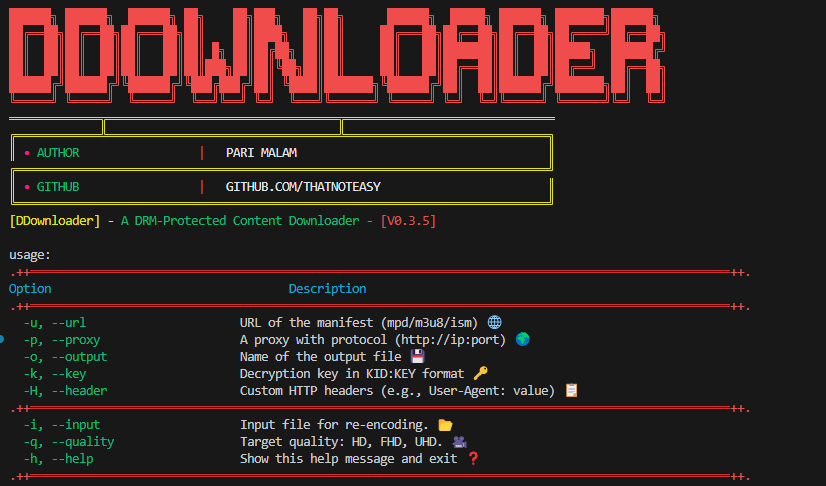
Display Help
DDownloader -h
-
1 maintainer

Metadata
1 maintainer
Release files for DDownloader 0.4.9
For a detailed explanation of source distributions (sdists) and built distributions (wheels), please see the package formats documentation.
Source distribution (sdist)
| File | Size | Uploaded | |
|---|---|---|---|
| ddownloader-0.4.9.tar.gz | 18.3 kB | Details |
Built distribution (wheel)
| File | Interpreter | ABI | Platform | Reset |
|---|---|---|---|---|
| ddownloader-0.4.9-py3-none-any.whl | Python 3 | none | any | Details |
Total release size: 41.5 kB
Release files / ddownloader-0.4.9.tar.gz
| Download URL | ddownloader-0.4.9.tar.gz |
|---|---|
| Size | 18.3 kB |
| Tags | Source |
|
SHA-256 checksum How to use checksums |
ddd9983655e9ff95cfec659ba2669138580ca2cb9a3c84bcd05c3e850cf692ba
|
|
BLAKE2b-256 checksum How to use checksums |
c0a7bf6651fcbda62120389fd42e041ab1f4f2c0fc4bbc3d26ff06c408ff5b44
|
| Upload date | |
|
Uploaded using Trusted Publishing? What is trusted publishing? |
No |
| Uploaded via |
twine/6.2.0 CPython/3.10.11
|
Release files / ddownloader-0.4.9-py3-none-any.whl
| Download URL | ddownloader-0.4.9-py3-none-any.whl |
|---|---|
| Size | 23.3 kB |
| Tags | Python 3 |
|
SHA-256 checksum How to use checksums |
6d57df5db7fa400697bf7cea98a6b76a20d4a29eec4dbe350d4fc506f152e922
|
|
BLAKE2b-256 checksum How to use checksums |
5404492b2438969c7a67b4915a09fbe753cab7623b424448c41b04c99d3e2266
|
| Upload date | |
|
Uploaded using Trusted Publishing? What is trusted publishing? |
No |
| Uploaded via |
twine/6.2.0 CPython/3.10.11
|














