
A downloader for DRM-protected & Non DRM-protected content.

Project description
DDownloader
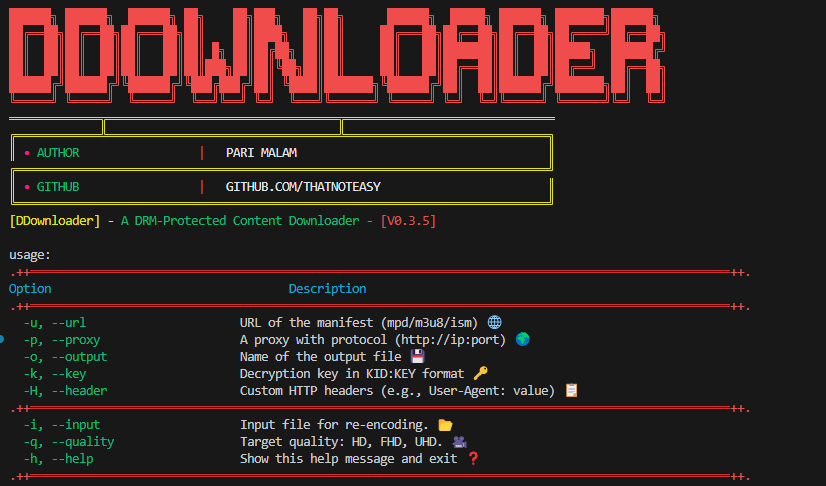
DDownloader is a powerful Python-based tool and library designed to download and decrypt DRM-protected content from DASH, HLS, and ISM manifests. It provides seamless support for encrypted media streams, extracting metadata and ensuring high compatibility with various DRM standards.
Features
- Download and Decrypt: Supports DASH, HLS, and ISM manifests with seamless decryption using provided keys.
- Automatic Detection: Automatically detects manifest types (.mpd, .m3u8, .ism) and processes accordingly.
- Media Information Extraction: Extracts metadata (e.g., codec, resolution, duration) for .mp4 files and saves it in a
logs/directory. - CLI and Library Support: Flexible usage via command-line or Python library.
- Detailed Logging: Provides real-time progress and logs errors for debugging.
Requirements
-
Python: Version 3.7 or higher.
-
Required binaries:
N_m3u8DL-REfor downloading protected DRM content.mp4decryptfor decrypting protected media files.ffmpegfor re-encoding and muxer method- a proper environment variable configuration for binaries.
Installation
-
Install
DDownloaderusing pip:pip install DDownloader
Usage
-
Download Content:
 from DDownloader.modules.downloader import DOWNLOADER

 downloader = DOWNLOADER()
 downloader.manifest_url = "https://example.com/path/to/manifest"  # DASH, HLS, or ISM manifest URL
 downloader.output_name = "output.mp4"  # Desired output file name
 downloader.decryption_keys = ["12345:678910"]  # Provide decryption keys if needed
 downloader.download()  # Start the downloading and decryption process
-
Extract Media Information:
 from DDownloader.modules.helper import get_media_info

 file_path = "downloads/example.mp4"
 media_info = get_media_info(file_path)
 print(media_info)
-
Re-encoding:
 from DDownloader.modules.downloader import DOWNLOADER

 re_encode = DOWNLOADER()
 quality = ["HD", "FHD", "UHD"]
 input_content = "downloads/example.mp4"
 output_content = "/path/to/output.mp4"
 re_encode.re_encode_content(input_file=input_content,quality=quality,codec="libx265",crf=20,preset="medium")
CLI Usage
-
Download Media
DDownloader -u https://example.com/path/to/manifest -o output.mp4
-
Specify Decryption Keys
DDownloader -u https://example.com/path/to/manifest -o output.mp4 -k 12345:678910
-
Re-encoding
DDownloader -i "input.mp4" -o "output.mp4" -q "HD, FHD, UHD"
-
Display Help
DDownloader -h
-
Release history Release notifications | RSS feed


Download files
Download the file for your platform. If you're not sure which to choose, learn more about installing packages.
Source Distribution
Built Distribution
Filter files by name, interpreter, ABI, and platform.
If you're not sure about the file name format, learn more about wheel file names.
Copy a direct link to the current filters
File details
Details for the file ddownloader-0.4.6.tar.gz.
File metadata
- Download URL: ddownloader-0.4.6.tar.gz
- Upload date:
- Size: 98.7 MB
- Tags: Source
- Uploaded using Trusted Publishing? No
- Uploaded via: twine/6.2.0 CPython/3.10.11
File hashes
| Algorithm | Hash digest | |
|---|---|---|
| SHA256 |
02fcbafae645b79e3cad0ba3e990ca06d61d5ccc5df9ec82feee77fe558ab5fd
|
|
| MD5 |
df765aeb39f8b0f2605b2d1927d70e4d
|
|
| BLAKE2b-256 |
1b0891533385fc9436b2c590a9ab52c7f37293693ec3e44115be0e2ec5e0f32d
|
File details
Details for the file ddownloader-0.4.6-py3-none-any.whl.
File metadata
- Download URL: ddownloader-0.4.6-py3-none-any.whl
- Upload date:
- Size: 99.0 MB
- Tags: Python 3
- Uploaded using Trusted Publishing? No
- Uploaded via: twine/6.2.0 CPython/3.10.11
File hashes
| Algorithm | Hash digest | |
|---|---|---|
| SHA256 |
4a7688f07d2d901f6bc71dd8fc4646d34d0e3eab023db16689f28803524182e4
|
|
| MD5 |
89c5c3235c59dda39c16d19df3aaa8d0
|
|
| BLAKE2b-256 |
521c677c3d62fcf96790d4e8c0cd81bba88695c813019c13c4667eac60d4004a
|






