
A tooltip functionality for Dash.

Project description

Dash Tooltip
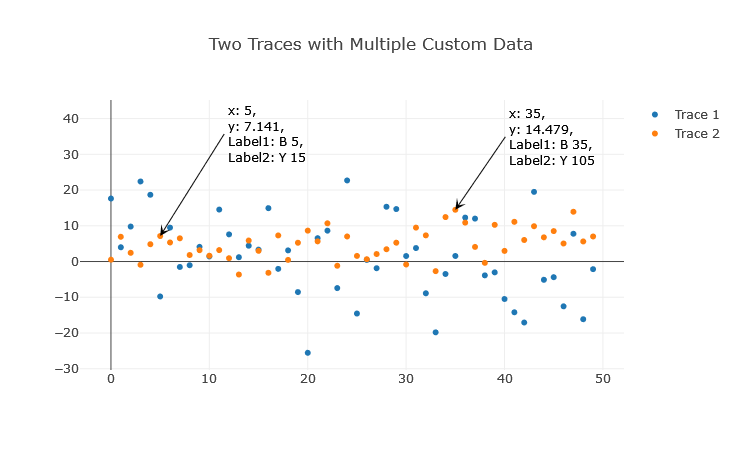
A module to add interactive editable tooltips to your Dash applications. Inspired by mplcursors and Matlab's datatip.
Installation
You can download the dash_tooltip.py module and place it in your working directory.
Basic Usage
import numpy as np
import plotly.express as px
from dash import Dash, dcc, html
from dash.dependencies import Input, Output
from dash_tooltip import tooltip

# Sample Data
np.random.seed(20)
y1 = np.random.normal(0, 10, 50)
x1 = np.arange(0, 50)
fig1 = px.scatter(x=x1, y=y1)
fig1.update_layout(title_text="Editable Title", title_x=0.5)

app1 = Dash(__name__)

#makes graph items, including tooltips editable
app1.layout = html.Div([
    dcc.Graph(
        id='graph1',
        figure=fig1,
        config={
            'editable': True,
            'edits': {
                'shapePosition': True,
                'annotationPosition': True
            }
        }
    )
])

# Add the tooltip functionality to the app
tooltip(app1)
Click on data points to add tooltips.
If dcc.Graph is configured editatble, tolltips:
- can be dragged around
- text can be edited on click
- can be deleted: click, delete text, enter. In some occasions a tooltip arrow may remain due to a Dash bug (clientside_callback not firing). In this cas, click near arrow end (mouse cursor changes to pointer), enter some text and repeat deletion and enter.
Advanced Usage
If you want to customize the tooltips, hover templates, and more:
import pandas as pd
import numpy as np
import plotly.express as px
from dash import Dash, dcc, html
from dash.dependencies import Input, Output
from dash_tooltip import tooltip

# Generate random time series data
date_rng = pd.date_range(start='2020-01-01', end='2020-12-31', freq='h')
ts1 = pd.Series(np.random.randn(len(date_rng)), index=date_rng)
ts2 = pd.Series(np.random.randn(len(date_rng)), index=date_rng)
df = pd.DataFrame({'Time Series 1': ts1, 'Time Series 2': ts2})

template = "x: %{x}<br>y: %{y:.2f}<br>ID: %{pointNumber}<br>name: %{customdata[0]}<br>unit: %{customdata[1]}"
fig10 = px.line(df, x=df.index, y=df.columns, title="Time Series Plot")

for i, trace in enumerate(fig10.data):
    trace.customdata = np.column_stack((np.repeat(df.columns[i], len(df)), np.repeat('#{}'.format(i+1), len(df))))
    trace.hovertemplate = template

app10 = Dash(__name__)

app10.layout = html.Div([
    dcc.Graph(
        id="graph-id",
        figure=fig10,
        config={
            'editable': True,
            'edits': {
                'shapePosition': True,
                'annotationPosition': True
            }
        }
    )
])

tooltip(app10, graph_ids=["graph-id"], template=template, debug=True)
Tooltip Templates with Formatting
Tooltips can be formatted using templates similar to Plotly's hovertemplates. The tooltip template allows custom formatting and the inclusion of text and values.
For example, you can use a template like "x: %{x:.2f}<br>y: %{y:.2f}" to display the x and y values with two decimal places.
Refer to Plotly’s documentation on hover text and formatting for more details on how to construct and customize your tooltip templates.
Custom Styling
custom_config = {
    'text_color': 'red',
    'arrow_color': 'blue',
    'arrow_size': 2.5,
    # ... any other customization
}
tooltip(app10, graph_ids=["graph-id"], template=template, debug=True, **custom_config)
For more examples, refer to the provided dash_tooltip_demo.py or its Jupyter counterpart dash_tooltip_demo.ipynb.
Debugging
If you encounter any issues or unexpected behaviors, enable the debug mode by setting the debug argument of the tooltip function to True. The log outputs will be written to dash_app.log in the directory where your script or application is located.
License
This project is licensed under the MIT License. See the LICENSE file for details.
Acknowledgements
- Inspired by
mplcursorsand Matlab'sdatatip.
Release history Release notifications | RSS feed


Download files
Download the file for your platform. If you're not sure which to choose, learn more about installing packages.
Source Distribution
Built Distribution
Filter files by name, interpreter, ABI, and platform.
If you're not sure about the file name format, learn more about wheel file names.
Copy a direct link to the current filters
File details
Details for the file Dash_tooltip-0.3.3.tar.gz.
File metadata
- Download URL: Dash_tooltip-0.3.3.tar.gz
- Upload date:
- Size: 23.5 kB
- Tags: Source
- Uploaded using Trusted Publishing? No
- Uploaded via: twine/4.0.2 CPython/3.11.4
File hashes
| Algorithm | Hash digest | |
|---|---|---|
| SHA256 |
c55a9852283cdd9dfe88ad613593985cda43defdc6618601658221aeed6bfda0
|
|
| MD5 |
110308d7aca2c38290f03f2081f166ad
|
|
| BLAKE2b-256 |
dbaf1610870eb51ae7ff8730edf7ddd69e8d55b3460b51ab0b1ef413ef1c04f4
|
File details
Details for the file Dash_tooltip-0.3.3-py3-none-any.whl.
File metadata
- Download URL: Dash_tooltip-0.3.3-py3-none-any.whl
- Upload date:
- Size: 25.0 kB
- Tags: Python 3
- Uploaded using Trusted Publishing? No
- Uploaded via: twine/4.0.2 CPython/3.11.4
File hashes
| Algorithm | Hash digest | |
|---|---|---|
| SHA256 |
132756e46c8c82c97656058f4dc35f6633414a353f4b41a593c4443f271d1f73
|
|
| MD5 |
ee0157236e4a4a41e4205ffe831eca1c
|
|
| BLAKE2b-256 |
62cdb5a6dbd029f92ebb5c0d893c96e630c11747f1c22c1ddb58f844691dbaf7
|






