
Discord Channel To HTML Transcripts






Purpose
A Python library for creating HTML transcripts of Discord channels. This is useful for logging, archiving, or sharing conversations from a Discord server.
The base code comes from py-discord-html-transcripts and has been adapted and improved.
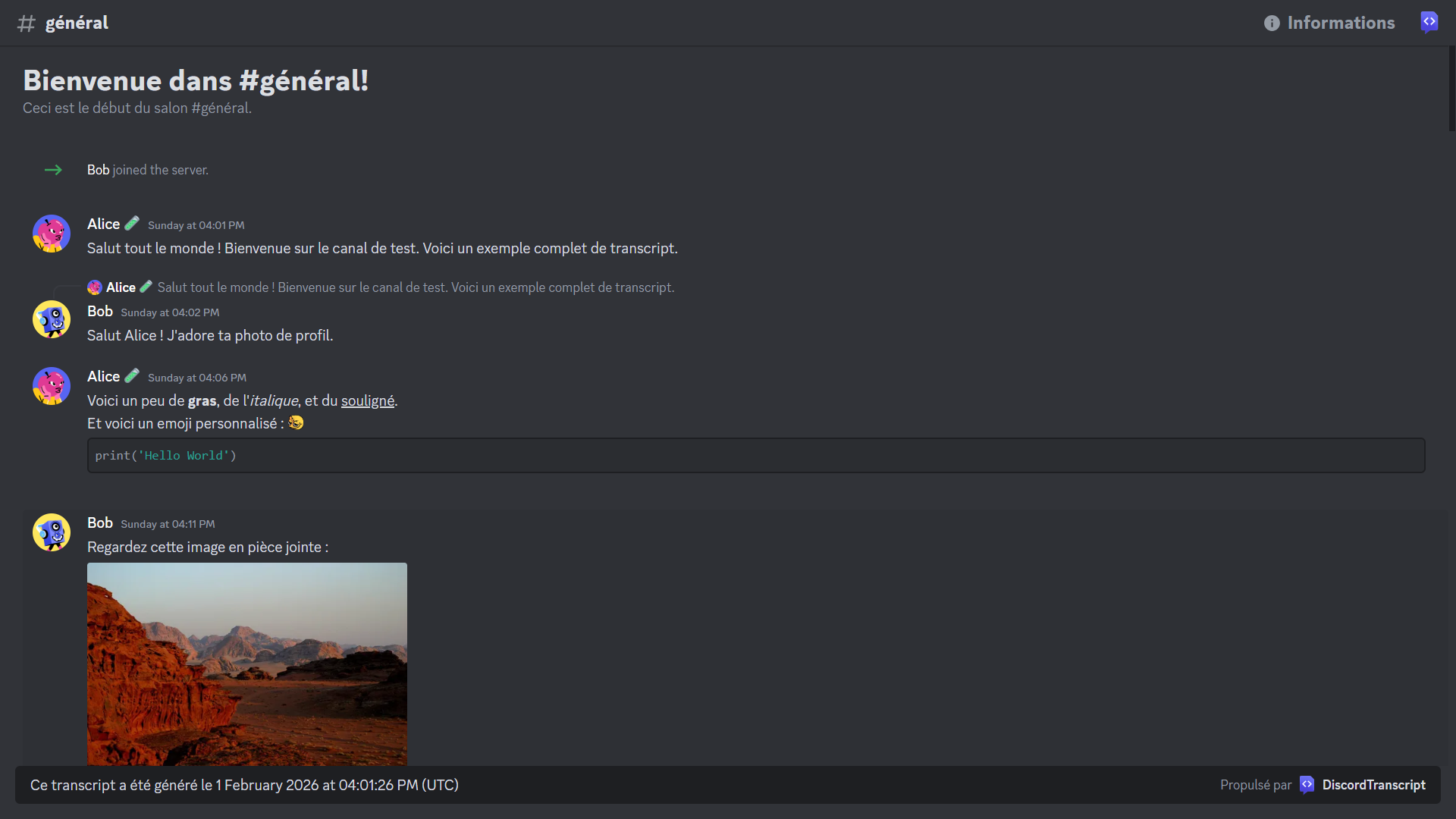
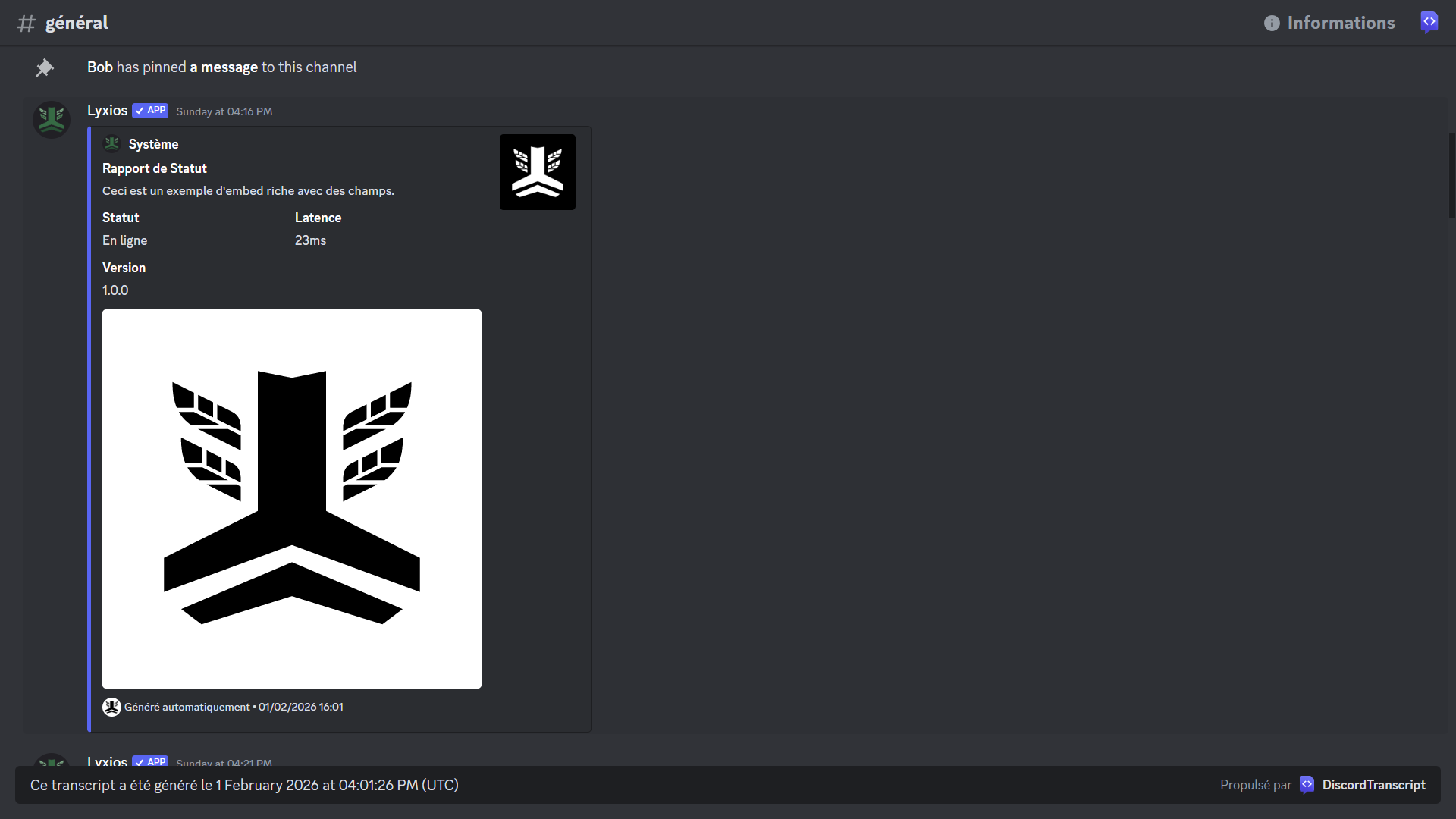
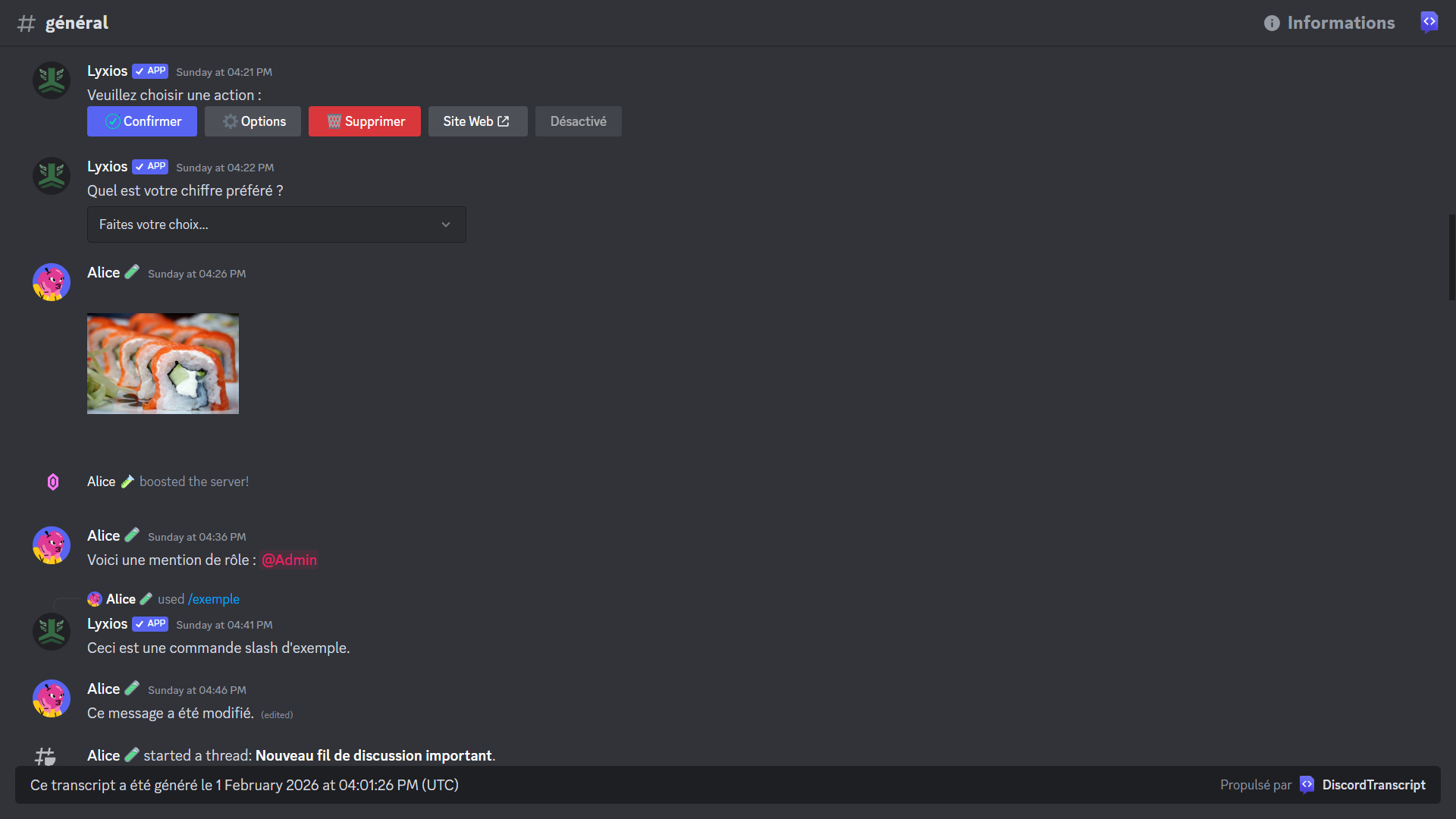
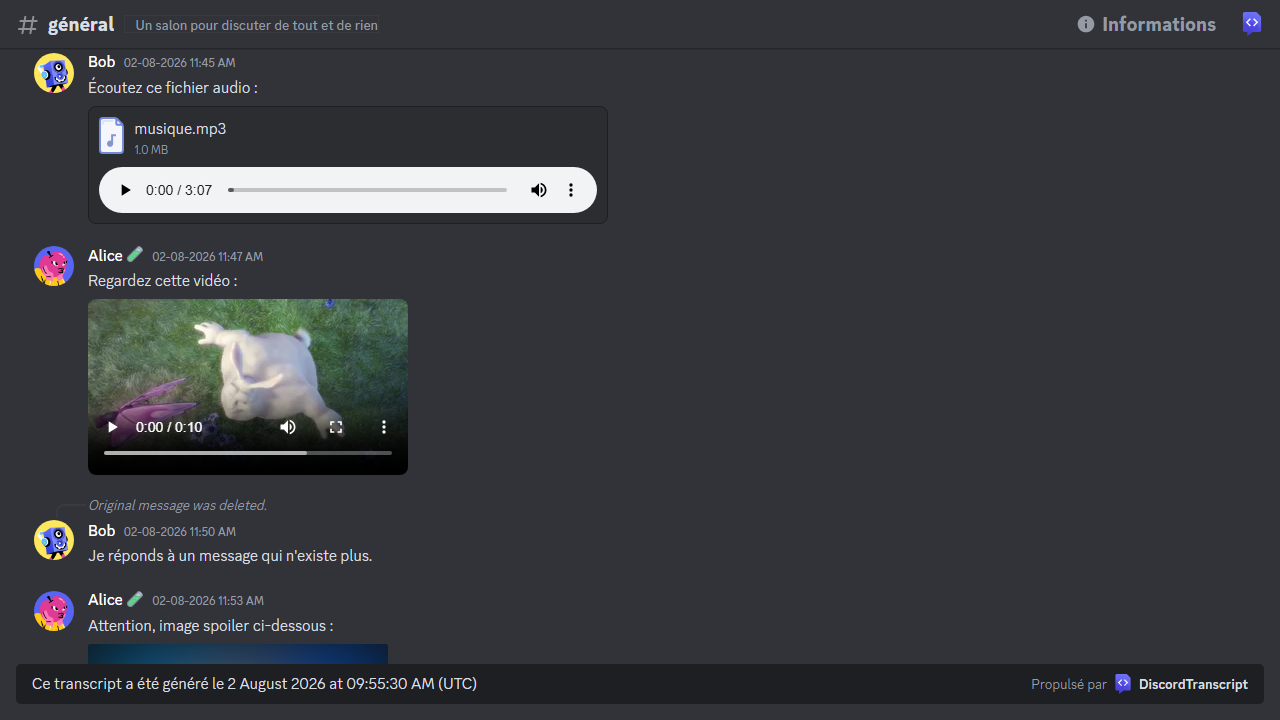
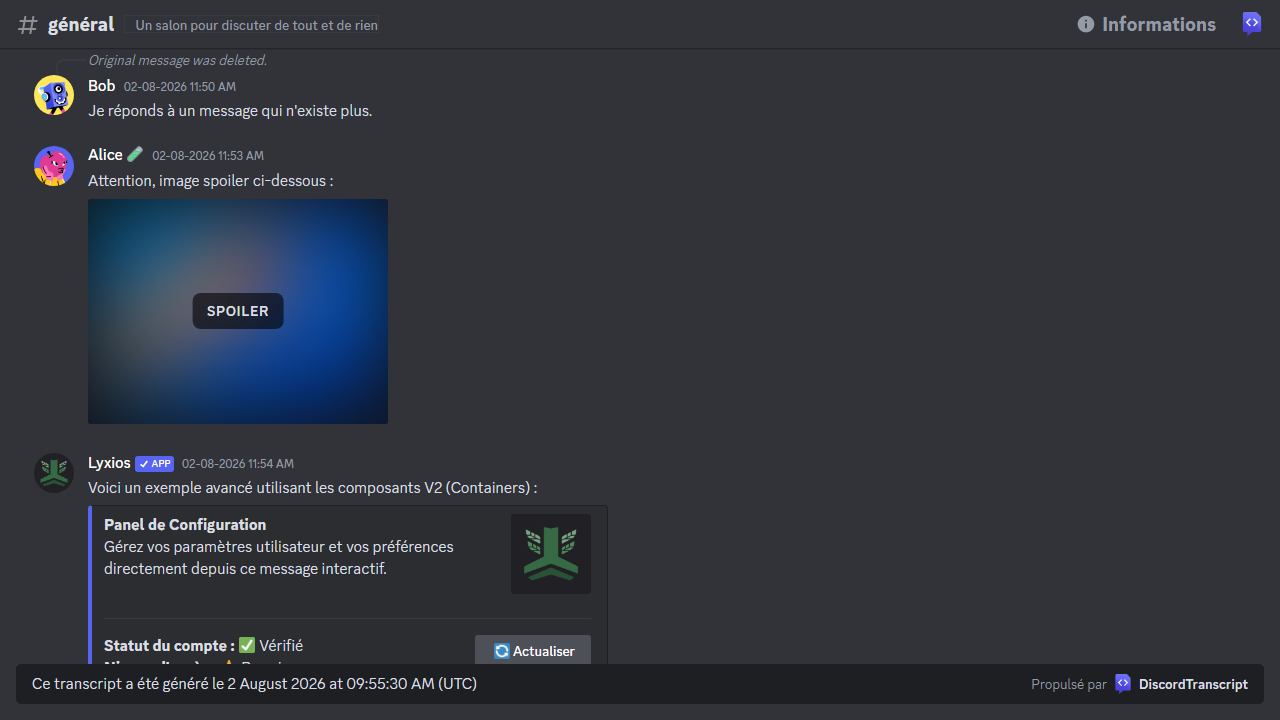
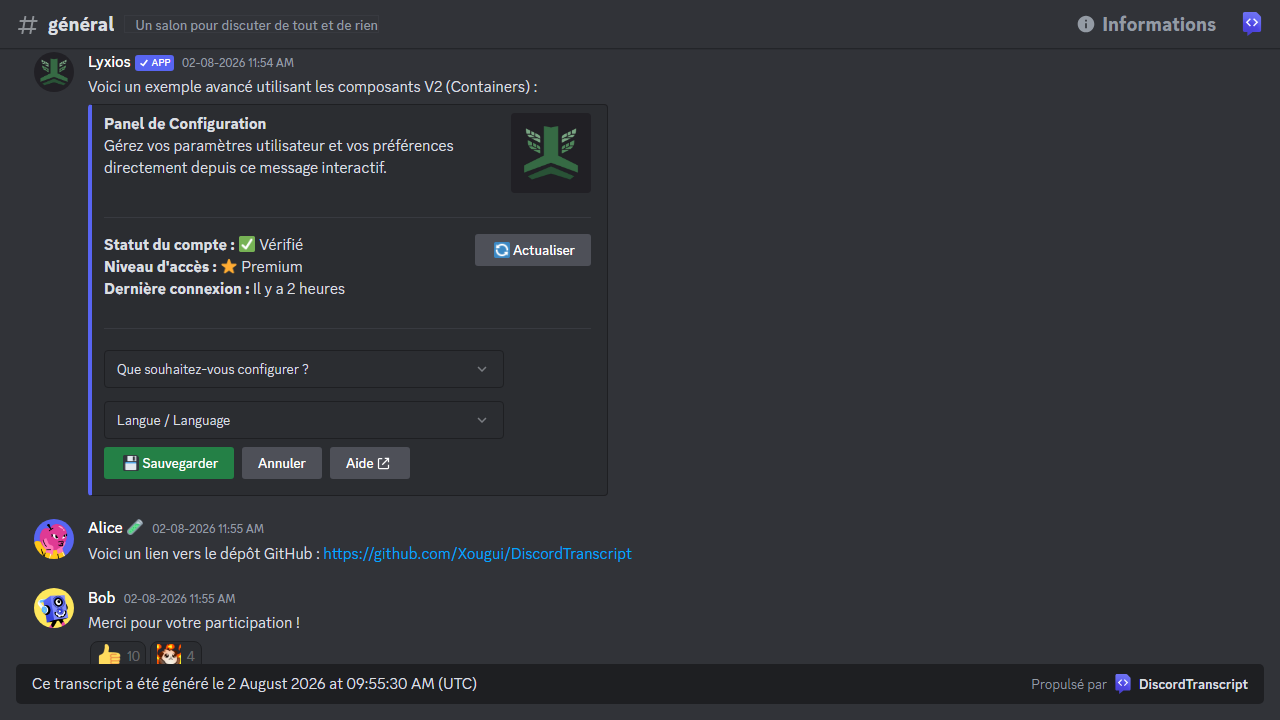
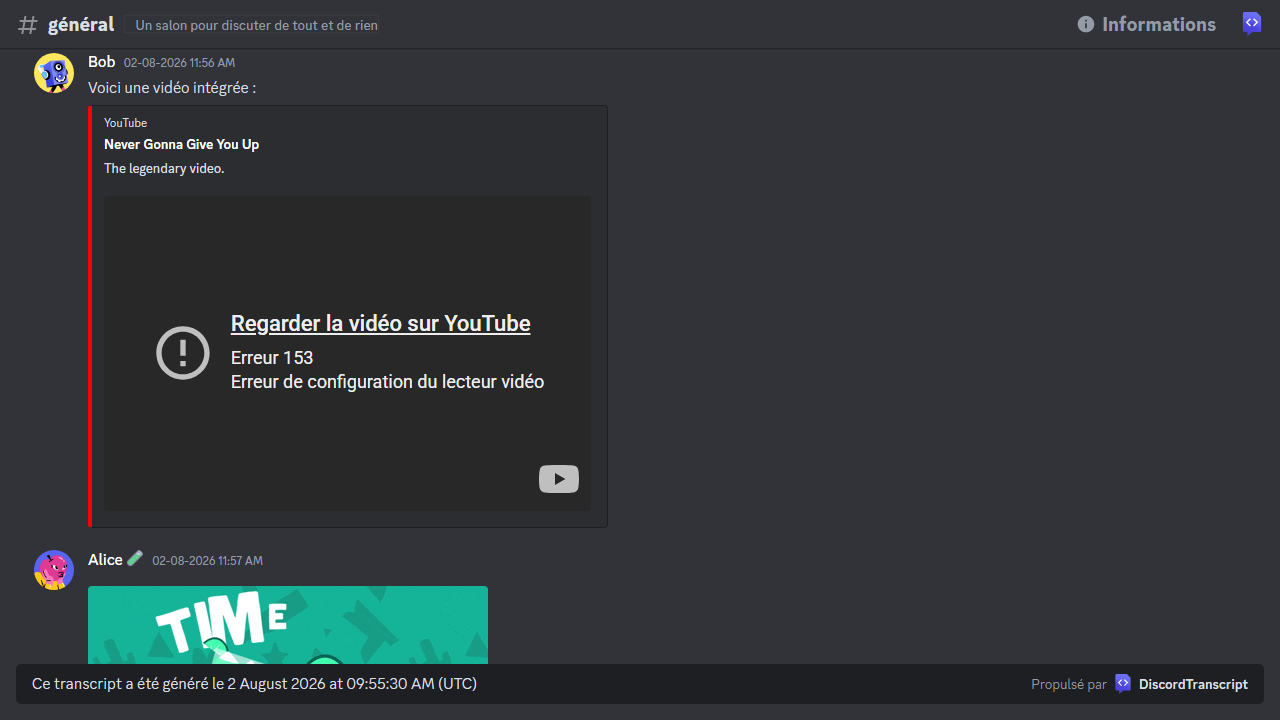
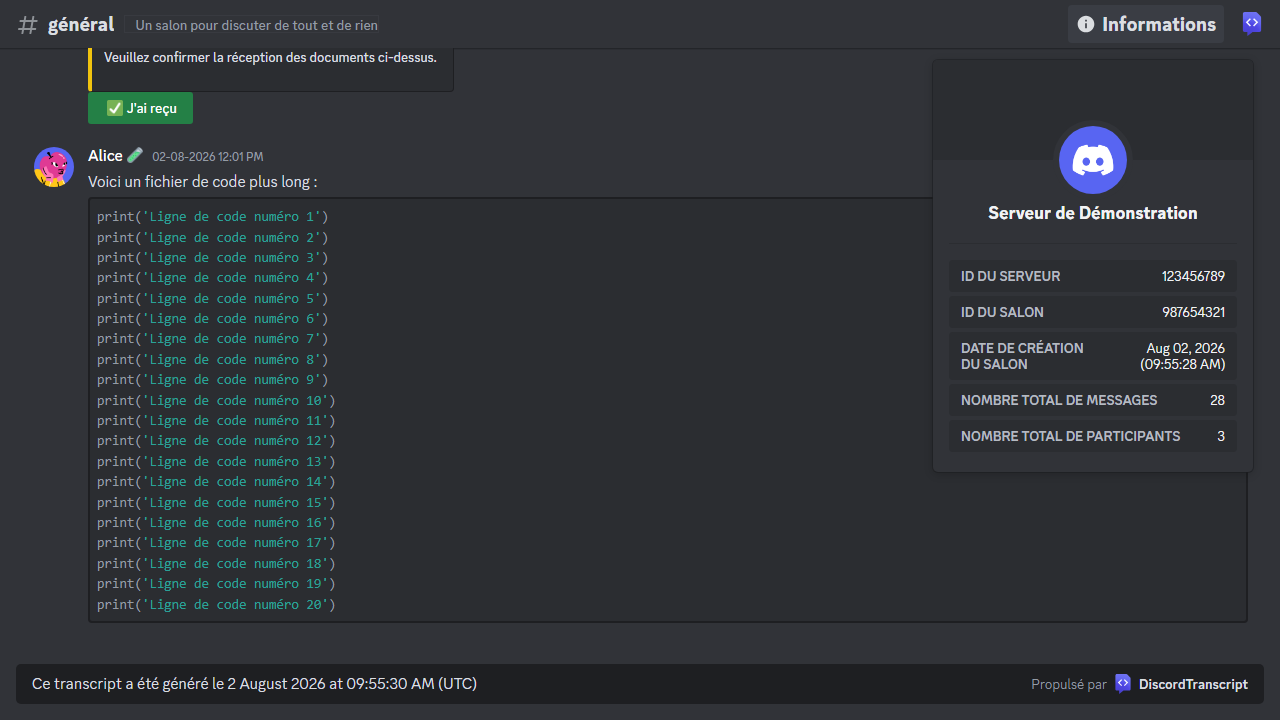
Preview
📸 Cliquez pour voir les aperçus / Click to see previews
 |
 |
 |
 |
 |
 |
 |
 |
🇫🇷 Documentation en Français
🇫🇷 Documentation en Français
Table des matières
Prérequis
- Python 3.10 ou plus récent
discord.pyv2.4.0 ou plus récent (ou un fork compatible commenextcordoudisnake)
Installation
Pour installer la librairie, exécutez la commande suivante :
pip install DiscordTranscript
NOTE : Cette librairie est une extension pour discord.py et ne fonctionne pas de manière autonome. Vous devez avoir un bot discord.py fonctionnel pour l'utiliser.
Utilisation
Il existe trois méthodes principales pour exporter une conversation : quick_export, export, et raw_export.
quick_export: La manière la plus simple d'utiliser la librairie. Elle récupère l'historique du salon, génère la transcription, puis la publie directement dans le même salon.export: La méthode la plus flexible. Elle permet de personnaliser la transcription avec plusieurs options.raw_export: Permet de créer une transcription à partir d'une liste de messages que vous fournissez.
Exemples
Utilisation de base
Exemple
import discord
import DiscordTranscript
from discord.ext import commands

intents = discord.Intents.default()
intents.members = True
intents.message_content = True

bot = commands.Bot(command_prefix="!", intents=intents)

@bot.command()
async def save(ctx: commands.Context):
    await DiscordTranscript.quick_export(ctx.channel, bot=bot)

bot.run("VOTRE_TOKEN")
Utilisation personnalisable
Exemple
import io
import discord
import DiscordTranscript
from discord.ext import commands

# ... (initialisation du bot)

@bot.command()
async def save_custom(ctx: commands.Context):
    transcript = await DiscordTranscript.export(
        ctx.channel,
        limit=100,
        tz_info="Europe/Paris",
        military_time=True,
        bot=bot,
    )

    if transcript is None:
        return

    transcript_file = discord.File(
        io.BytesIO(transcript.encode()),
        filename=f"transcript-{ctx.channel.name}.html",
    )

    await ctx.send(file=transcript_file)
Utilisation brute (raw)
Exemple
import io
import discord
import DiscordTranscript
from discord.ext import commands

# ... (initialisation du bot)

@bot.command()
async def save_purged(ctx: commands.Context):
    deleted_messages = await ctx.channel.purge(limit=50)

    transcript = await DiscordTranscript.raw_export(
        ctx.channel,
        messages=deleted_messages,
        bot=bot,
    )

    if transcript is None:
        return

    transcript_file = discord.File(
        io.BytesIO(transcript.encode()),
        filename=f"purged-transcript-{ctx.channel.name}.html",
    )

    await ctx.send("Voici la transcription des messages supprimés :", file=transcript_file)
Intégrer les pièces jointes dans le HTML
Exemple
import io
import discord
import DiscordTranscript
from DiscordTranscript.construct.attachment_handler import AttachmentToDataURIHandler
from discord.ext import commands

# ... (initialisation du bot)

@bot.command()
async def save_with_embedded_attachments(ctx: commands.Context):
    # Optionnel: personnaliser l'optimisation des images et l'encodage DataURI
    handler = AttachmentToDataURIHandler(
        only_expiring=True,        # Convertit seulement les liens Discord expirants
        optimize_images=True,      # Redimensionne et compresse les images
        max_image_dimension=1280,  # Dimension maximale (px)
        quality=80,                # Qualité de compression (1-100)
    )

    transcript = await DiscordTranscript.export(
        ctx.channel,
        attachment_handler=handler,
        bot=bot,
    )

    if transcript is None:
        return

    transcript_file = discord.File(
        io.BytesIO(transcript.encode()),
        filename=f"transcript-{ctx.channel.name}.html",
    )

    await ctx.send(file=transcript_file)
Personnaliser les couleurs du thème (Custom Colors)
Exemple
Vous pouvez générer un fichier modèle prêt à l'emploi contenant toutes les variables de couleurs modifiables :
import io
import discord
import DiscordTranscript
from discord.ext import commands

# Génère un fichier modèle de configuration des couleurs (si besoin)
DiscordTranscript.generate_custom_colors_file("my_colors.txt")

@bot.command()
async def save_themed(ctx: commands.Context):
    transcript = await DiscordTranscript.export(
        ctx.channel,
        custom_colors_file="my_colors.txt",
        bot=bot,
    )

    if transcript is None:
        return

    transcript_file = discord.File(
        io.BytesIO(transcript.encode()),
        filename=f"transcript-{ctx.channel.name}.html",
    )

    await ctx.send(file=transcript_file)
Un exemple de fichier est également disponible dans examples/custom_colors.example.txt.
Paramètres
Voici une liste des paramètres que vous pouvez utiliser dans les fonctions export() et raw_export() pour personnaliser vos transcriptions.
| Paramètre | Type | Description | Défaut |
|---|---|---|---|
messages |
List[discord.Message] |
Une liste de messages à utiliser pour la transcription. | None |
limit |
int |
Le nombre maximum de messages à récupérer. | None (illimité) |
before |
datetime.datetime |
Récupère les messages avant cette date. | None |
after |
datetime.datetime |
Récupère les messages après cette date. | None |
tz_info |
str |
Le fuseau horaire à utiliser pour les horodatages. Doit être un nom de la base de données TZ (ex: "Europe/Paris"). | "UTC" |
military_time |
bool |
Si True, utilise le format 24h. Si False, utilise le format 12h (AM/PM). |
True |
fancy_times |
bool |
Si True, utilise des horodatages relatifs (ex: "Aujourd'hui à..."). Si False, affiche la date complète. |
True |
bot |
discord.Client |
L'instance de votre bot. Nécessaire pour résoudre les informations des utilisateurs qui ont quitté le serveur. | None |
guild |
discord.Guild |
L'instance de votre serveur. Nécessaire pour résoudre les informations des membres (rôles, couleurs, etc.). | None |
attachment_handler |
AttachmentHandler |
Un gestionnaire pour contrôler la façon dont les pièces jointes sont traitées. Voir l'exemple Intégrer les pièces jointes dans le HTML. | None (les liens des pièces jointes pointent vers le CDN de Discord) |
custom_colors_file |
str | Path | os.PathLike |
Le chemin vers un fichier texte de configuration des couleurs personnalisées. | None |
language |
str |
La langue à utiliser pour la transcription. | "en" |
Note : Le paramètre messages est uniquement disponible pour la fonction raw_export().
Exemples de paramètres
Voici comment vous pouvez utiliser les paramètres pour personnaliser vos transcriptions.
-
messages: Pour créer une transcription à partir d'une liste de messages que vous avez déjà. (Uniquement pourraw_export)# Récupère les 50 derniers messages my_messages = await ctx.channel.history(limit=50).flatten() transcript = await DiscordTranscript.raw_export( ctx.channel, messages=my_messages, # Fournit la liste de messages bot=bot, )
-
limit: Pour limiter le nombre de messages à 100.transcript = await DiscordTranscript.export( ctx.channel, limit=100, # Limite à 100 messages bot=bot, )
-
beforeetafter: Pour exporter les messages d'une période spécifique.import datetime transcript = await DiscordTranscript.export( ctx.channel, # Exportera les messages envoyés entre le 10 et le 20 juin 2023 after=datetime.datetime(2023, 6, 10), # Après le 10 juin 2023 before=datetime.datetime(2023, 6, 20), # Avant le 20 juin 2023 bot=bot, )
-
tz_info: Pour afficher les heures en fonction d'un fuseau horaire (ex: heure de Paris).transcript = await DiscordTranscript.export( ctx.channel, tz_info="Europe/Paris", # Fuseau horaire de Paris bot=bot, )
-
military_time: Pour utiliser le format 12h (AM/PM) au lieu du format 24h.transcript = await DiscordTranscript.export( ctx.channel, military_time=False, # Affiche 1:00 PM au lieu de 13:00 bot=bot, )
-
fancy_times: Pour afficher la date complète au lieu de "Aujourd'hui à...".transcript = await DiscordTranscript.export( ctx.channel, fancy_times=False, # Affiche la date complète (ex: 23/09/2025) bot=bot, )
-
bot: Pour résoudre les informations des utilisateurs (même s'ils ont quitté le serveur).transcript = await DiscordTranscript.export( ctx.channel, bot=bot, # Fournit l'instance du bot )
-
guild: Pour vous assurer que les rôles et les couleurs des membres sont corrects.transcript = await DiscordTranscript.export( ctx.channel, guild=ctx.guild, # Fournit l'instance du serveur bot=bot, )
-
attachment_handler: Pour intégrer les pièces jointes directement dans le fichier HTML (avec options de compression et d'optimisation des images).from DiscordTranscript.construct.attachment_handler import AttachmentToDataURIHandler transcript = await DiscordTranscript.export( ctx.channel, # Intègre les pièces jointes en tant que Data URIs avec optimisation d'images attachment_handler=AttachmentToDataURIHandler( only_expiring=True, # Ne convertit que les URLs Discord expirantes optimize_images=True, # Compresse et redimensionne les images max_image_dimension=1280, # Taille max (px) quality=80 # Qualité (1-100) ), bot=bot, )
🇬🇧 English Documentation
🇬🇧 English Documentation
Table of Contents
Prerequisites
- Python 3.10 or newer
discord.pyv2.4.0 or newer (or a compatible fork likenextcordordisnake)
Installation
To install the library, run the following command:
pip install DiscordTranscript
NOTE: This library is an extension for discord.py and does not work standalone. You must have a functional discord.py bot to use it.
Usage
There are three main methods for exporting a conversation: quick_export, export, and raw_export.
quick_export: The simplest way to use the library. It retrieves the channel's history, generates the transcript, and then publishes it directly in the same channel.export: The most flexible method. It allows you to customize the transcript with several options.raw_export: Allows you to create a transcript from a list of messages you provide.
Examples
Basic Usage
Example
import discord
import DiscordTranscript
from discord.ext import commands

intents = discord.Intents.default()
intents.members = True
intents.message_content = True

bot = commands.Bot(command_prefix="!", intents=intents)

@bot.command()
async def save(ctx: commands.Context):
    await DiscordTranscript.quick_export(ctx.channel, bot=bot)

bot.run("YOUR_TOKEN")
Customizable Usage
Example
import io
import discord
import DiscordTranscript
from discord.ext import commands

# ... (bot initialization)

@bot.command()
async def save_custom(ctx: commands.Context):
    transcript = await DiscordTranscript.export(
        ctx.channel,
        limit=100,
        tz_info="America/New_York",
        military_time=True,
        bot=bot,
    )

    if transcript is None:
        return

    transcript_file = discord.File(
        io.BytesIO(transcript.encode()),
        filename=f"transcript-{ctx.channel.name}.html",
    )

    await ctx.send(file=transcript_file)
Raw Usage
Example
import io
import discord
import DiscordTranscript
from discord.ext import commands

# ... (bot initialization)

@bot.command()
async def save_purged(ctx: commands.Context):
    deleted_messages = await ctx.channel.purge(limit=50)

    transcript = await DiscordTranscript.raw_export(
        ctx.channel,
        messages=deleted_messages,
        bot=bot,
    )

    if transcript is None:
        return

    transcript_file = discord.File(
        io.BytesIO(transcript.encode()),
        filename=f"purged-transcript-{ctx.channel.name}.html",
    )

    await ctx.send("Here is the transcript of the deleted messages:", file=transcript_file)
Embedding Attachments in HTML
Example
import io
import discord
import DiscordTranscript
from DiscordTranscript.construct.attachment_handler import AttachmentToDataURIHandler
from discord.ext import commands

# ... (bot initialization)

@bot.command()
async def save_with_embedded_attachments(ctx: commands.Context):
    # Optional: Customize image optimization & DataURI encoding
    handler = AttachmentToDataURIHandler(
        only_expiring=True,        # Convert only expiring Discord URLs to Data URIs
        optimize_images=True,      # Resize & compress images before Base64 encoding
        max_image_dimension=1280,  # Maximum width/height in pixels
        quality=80,                # Compression quality (1-100)
    )

    transcript = await DiscordTranscript.export(
        ctx.channel,
        attachment_handler=handler,
        bot=bot,
    )

    if transcript is None:
        return

    transcript_file = discord.File(
        io.BytesIO(transcript.encode()),
        filename=f"transcript-{ctx.channel.name}.html",
    )

    await ctx.send(file=transcript_file)
Customizing Theme Colors (Custom Colors)
Example
You can generate a ready-to-use template file containing all customizable color variables:
import io
import discord
import DiscordTranscript
from discord.ext import commands

# Generate a color configuration template file (if needed)
DiscordTranscript.generate_custom_colors_file("my_colors.txt")

@bot.command()
async def save_themed(ctx: commands.Context):
    transcript = await DiscordTranscript.export(
        ctx.channel,
        custom_colors_file="my_colors.txt",
        bot=bot,
    )

    if transcript is None:
        return

    transcript_file = discord.File(
        io.BytesIO(transcript.encode()),
        filename=f"transcript-{ctx.channel.name}.html",
    )

    await ctx.send(file=transcript_file)
An example template is also available in examples/custom_colors.example.txt.
Parameters
Here is a list of parameters you can use in the export() and raw_export() functions to customize your transcripts.
| Parameter | Type | Description | Default |
|---|---|---|---|
messages |
List[discord.Message] |
A list of messages to use for the transcript. | None |
limit |
int |
The maximum number of messages to retrieve. | None (unlimited) |
before |
datetime.datetime |
Retrieves messages before this date. | None |
after |
datetime.datetime |
Retrieves messages after this date. | None |
tz_info |
str |
The timezone to use for timestamps. Must be a TZ database name (e.g., "America/New_York"). | "UTC" |
military_time |
bool |
If True, uses 24h format. If False, uses 12h format (AM/PM). |
True |
fancy_times |
bool |
If True, uses relative timestamps (e.g., "Today at..."). If False, displays the full date. |
True |
bot |
discord.Client |
Your bot's instance. Necessary to resolve user information for members who have left the server. | None |
guild |
discord.Guild |
Your server's instance. Necessary to resolve member information (roles, colors, etc.). | None |
attachment_handler |
AttachmentHandler |
A handler to control how attachments are processed. See the Embedding Attachments in HTML example. | None (attachment links point to Discord's CDN) |
custom_colors_file |
str | Path | os.PathLike |
Path to a custom colors configuration text file. | None |
language |
str |
The language to use for the transcript. | "en" |
Note: The messages parameter is only available for the raw_export() function.
Parameter Examples
Here’s how you can use the parameters to customize your transcripts.
-
messages: To create a transcript from a list of messages you already have. (Only forraw_export)# Fetches the last 50 messages my_messages = await ctx.channel.history(limit=50).flatten() transcript = await DiscordTranscript.raw_export( ctx.channel, messages=my_messages, # Provide the list of messages bot=bot, )
-
limit: To limit the number of messages to 100.transcript = await DiscordTranscript.export( ctx.channel, limit=100, # Limit to 100 messages bot=bot, )
-
beforeandafter: To export messages from a specific period.import datetime transcript = await DiscordTranscript.export( ctx.channel, # Will export messages sent between June 10th and June 20th, 2023 after=datetime.datetime(2023, 6, 10), # After June 10, 2023 before=datetime.datetime(2023, 6, 20), # Before June 20, 2023 bot=bot, )
-
tz_info: To display times in a specific timezone (e.g., New York time).transcript = await DiscordTranscript.export( ctx.channel, tz_info="America/New_York", # New York timezone bot=bot, )
-
military_time: To use 12-hour format (AM/PM) instead of 24-hour format.transcript = await DiscordTranscript.export( ctx.channel, military_time=False, # Displays 1:00 PM instead of 13:00 bot=bot, )
-
fancy_times: To display the full date instead of "Today at...".transcript = await DiscordTranscript.export( ctx.channel, fancy_times=False, # Displays the full date (e.g., 09/23/2025) bot=bot, )
-
bot: To resolve user information (even if they have left the server).transcript = await DiscordTranscript.export( ctx.channel, bot=bot, # Provide the bot instance )
-
guild: To ensure member roles and colors are correct.transcript = await DiscordTranscript.export( ctx.channel, guild=ctx.guild, # Provide the guild instance bot=bot, )
-
attachment_handler: To embed attachments directly into the HTML file (with image compression and optimization options).from DiscordTranscript.construct.attachment_handler import AttachmentToDataURIHandler transcript = await DiscordTranscript.export( ctx.channel, # Embeds attachments as Data URIs with image optimization attachment_handler=AttachmentToDataURIHandler( only_expiring=True, # Convert only expiring Discord URLs optimize_images=True, # Compress and resize images max_image_dimension=1280, # Max dimension (px) quality=80 # Quality (1-100) ), bot=bot, )
1 maintainer

Download files
Download the file for your platform. If you're not sure which to choose, learn more about installing packages.
Source Distribution
Built Distribution
Filter files by name, interpreter, ABI, and platform.
If you're not sure about the file name format, learn more about wheel file names.
Copy a direct link to the current filters
File details
Details for the file discordtranscript-1.6.1.tar.gz.
File metadata
- Download URL: discordtranscript-1.6.1.tar.gz
- Upload date:
- Size: 1.1 MB
- Tags: Source
- Uploaded using Trusted Publishing? Yes
- Uploaded via:
twine/6.1.0 CPython/3.12.9
File hashes
| Algorithm | Hash digest | |
|---|---|---|
| SHA256 |
c6cb175c5c04b810ce29f7e87817e9eb2004d2a53b5861d705137d8962daad46
|
|
| MD5 |
be8e7b5d261ab0be7e3a553ddb81d8d0
|
|
| BLAKE2b-256 |
8f030e9b3e24d2ff75c4a67ac2cbcf2027cea55820e6499d780d1f266c1732bc
|
Provenance
The following attestation bundles were made for discordtranscript-1.6.1.tar.gz:
Publisher:
publish-to-pypi.yml on Xougui/DiscordTranscript
-
Statement:
-
Statement type:
https://in-toto.io/Statement/v1 -
Predicate type:
https://docs.pypi.org/attestations/publish/v1 -
Subject name:
discordtranscript-1.6.1.tar.gz -
Subject digest:
c6cb175c5c04b810ce29f7e87817e9eb2004d2a53b5861d705137d8962daad46 - Sigstore transparency entry: 2581366874
- Sigstore integration time:
-
Permalink:
Xougui/DiscordTranscript@9defda5d9ccc9e07d3ed944d4ab355e16bf9a850 -
Branch / Tag:
refs/tags/v1.6.1 - Owner: https://github.com/Xougui
-
Access:
public
-
Token Issuer:
https://token.actions.githubusercontent.com -
Runner Environment:
github-hosted -
Publication workflow:
publish-to-pypi.yml@9defda5d9ccc9e07d3ed944d4ab355e16bf9a850 -
Trigger Event:
release
-
Statement type:
File details
Details for the file discordtranscript-1.6.1-py3-none-any.whl.
File metadata
- Download URL: discordtranscript-1.6.1-py3-none-any.whl
- Upload date:
- Size: 77.5 kB
- Tags: Python 3
- Uploaded using Trusted Publishing? Yes
- Uploaded via:
twine/6.1.0 CPython/3.12.9
File hashes
| Algorithm | Hash digest | |
|---|---|---|
| SHA256 |
9f085cac191b8cb2aec1633c910bc8c3cb548ef13a2ac0809456c68bba688427
|
|
| MD5 |
d9a78d0e95054dba66dc239bc17b90d9
|
|
| BLAKE2b-256 |
118b3a350a7f7026f6be62aa923b9cc676566342b7298ba33ee152b88d4dcebb
|
Provenance
The following attestation bundles were made for discordtranscript-1.6.1-py3-none-any.whl:
Publisher:
publish-to-pypi.yml on Xougui/DiscordTranscript
-
Statement:
-
Statement type:
https://in-toto.io/Statement/v1 -
Predicate type:
https://docs.pypi.org/attestations/publish/v1 -
Subject name:
discordtranscript-1.6.1-py3-none-any.whl -
Subject digest:
9f085cac191b8cb2aec1633c910bc8c3cb548ef13a2ac0809456c68bba688427 - Sigstore transparency entry: 2581366882
- Sigstore integration time:
-
Permalink:
Xougui/DiscordTranscript@9defda5d9ccc9e07d3ed944d4ab355e16bf9a850 -
Branch / Tag:
refs/tags/v1.6.1 - Owner: https://github.com/Xougui
-
Access:
public
-
Token Issuer:
https://token.actions.githubusercontent.com -
Runner Environment:
github-hosted -
Publication workflow:
publish-to-pypi.yml@9defda5d9ccc9e07d3ed944d4ab355e16bf9a850 -
Trigger Event:
release
-
Statement type:







