
DragonLog


Author: Andreas Schawo, DF1ASC (HamQTH, eQSL)
DragonLog is a logging program to log hamradio QSOs. Beside logging for ham radio you can also log CB radio QSOs.
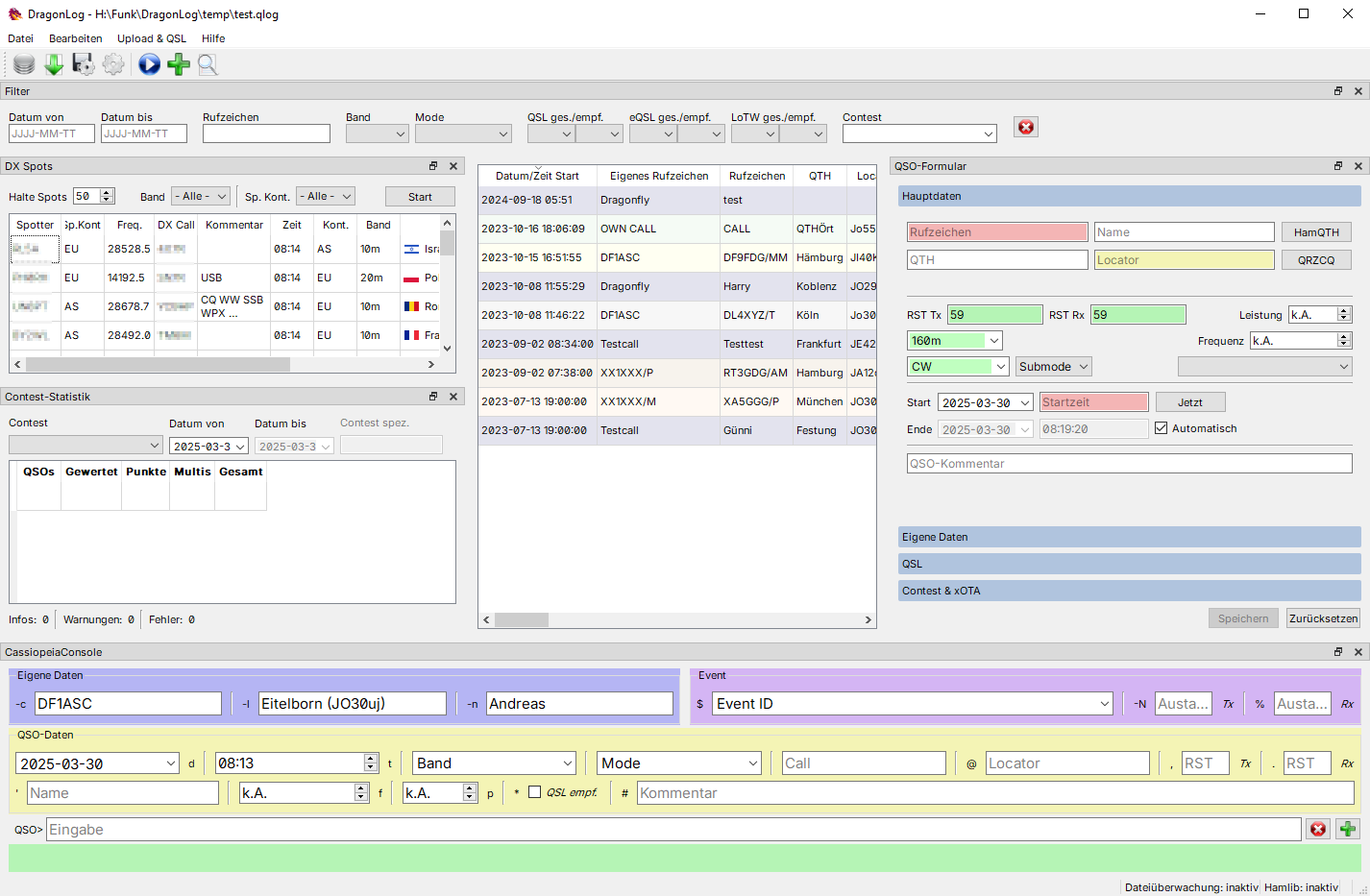
Screenshot in german translation
This README will provide only brief introduction.
For detailed instructions see
Features
- Runs on Windows, Linux and macOS
- predefined fields for logging
- input validation for callsign, RST, locator
- show worked before if a callsign is already logged
- distance calculation
- automatic time
- local callbook with immediate lookup
- OM data build of your contacts (per callsign)
- contest call history with received exchanges (per contest and callsign)
- incorporating prefixes/suffixes
- user triggered callbook search (HamQTH.com, QRZ.com and QRZCQ.com)
- single and multiple QSO log upload
- HamQTH.com
- eQSL upload, check and download
- LoTW signing, upload and check status
- QSO and QSL statistics
- log Contest and xOTA QSOs data (supported Contests see Available Contests)
- follow Contest statistics
- export Contest log as Cabrillo, EDI or special file formats
- CAT (band, frequency, mode/submode, power via hamlib integration)
- watch log files for automatic log import of WSJT-X, JS8Call, fldigi and others
- QSO log import/export
- ADIF adi/adx/adi zipped
- Excel/CSV
- log 11m band QSOs
- filter preset for recent QSOs (last week, month, half year, year)
- UTF-8 support (e.g. use german umlauts)
- convert non ASCII characters for ADIF export (for supported languages)
- integrates CassiopeiaConsole
- display DX spots from DX cluster via telnet
- selectable font and font size
- default proportional font with slashed zero (modified Inter font)
- 3 independent font sizes for application, QSO form and CassiopeiaConsole
- Read QSL-QR-Codes to QSL or import QSOs (based on work of TobbY, DG1ATN)
- Save QSL card as image (own background, text colours, include QSL-QR-Code)
Security Notes
The passwords for callbook lookup and QSO upload are securely stored in your systems key vault (e.g. Credential Manager on Windows, KWallet on KDE/Linux, Keychain on macOS).
At startup, DragonLog will inform about which service is actually in use.
DragonLog relies on the keyring module.
Copyright
DragonLog © 2023 by Andreas Schawo is licensed under CC BY-SA 4.0
1 maintainer

Metadata
1 maintainer
Release files for DragonLog 26.11
For a detailed explanation of source distributions (sdists) and built distributions (wheels), please see the package formats documentation.
Source distribution (sdist)
| File | Size | Uploaded | Provenance | Actions |
|---|---|---|---|---|
| dragonlog-26.11.tar.gz | 1.3 MB | Without provenance | Details for dragonlog-26.11.tar.gz |
Built distribution (wheel)
| File | Interpreter | ABI | Platform | Actions Reset |
|---|---|---|---|---|
| dragonlog-26.11-py3-none-any.whl | Python 3 | none | any | Details for dragonlog-26.11-py3-none-any.whl |
Total release size: 2.6 MB
Release files / dragonlog-26.11.tar.gz
| Download URL | dragonlog-26.11.tar.gz |
|---|---|
| Size | 1.3 MB |
| Tags | Source |
|
SHA-256 checksum How to use checksums |
11e1f7961ae02e562c51483142dd215f349cf77badf5e5e59c88d328d608e694
|
|
BLAKE2b-256 checksum How to use checksums |
d04215f4ab46bed51e0d070c2c4c9751cd1b9eab4d8e6cd056b139e142fe4b12
|
| Upload date | |
|
Uploaded using Trusted Publishing? What is trusted publishing? |
No |
| Uploaded via |
twine/7.0.0 CPython/3.12.3
|
Release files / dragonlog-26.11-py3-none-any.whl
| Download URL | dragonlog-26.11-py3-none-any.whl |
|---|---|
| Size | 1.4 MB |
| Tags | Python 3 |
|
SHA-256 checksum How to use checksums |
1e401cf7511bdfc0f8ab3fd3bceaf8f188729233040be1f57944b1ee351e9ec1
|
|
BLAKE2b-256 checksum How to use checksums |
1357fae9e2d9a93c8064a3b85593219da6831f96c1ab8eaf80fd4931287ed657
|
| Upload date | |
|
Uploaded using Trusted Publishing? What is trusted publishing? |
No |
| Uploaded via |
twine/7.0.0 CPython/3.12.3
|
Security for DragonLog 26.11
Provenance
Provenance describes where a file came from. On PyPI, provenance is shared via attestations, which provide a verifiable record of the build or publishing details. View details, limitations and caveats.
No provenance found
None of the files in this release were uploaded with provenance metadata.
A note on package security
PyPI is a repository for distributing packages, not a service for auditing them. While third-party security researchers and our staff do their best to detect and remove malicious packages, PyPI cannot guarantee the quality, security or suitability of any given package.
To learn more about protecting yourself from malicious actors, visit our package security documentation.














