
EvoScientist: Towards Self-Evolving AI Scientists for End-to-End Scientific Discovery


Project description


English | 简体中文
EvoScientist aims to harness vibe research by enabling self-evolving AI scientists that autonomously explore, generate insights, and iteratively improve. It is designed to be opinionated and ready to use out of the box, offering a living research system that grows alongside evolving agent skills, toolsets, and memory bases. Going beyond traditional human-in-the-loop systems, EvoScientist introduces an AI-in-human’s-loop paradigm, where AI acts as a research buddy that co-evolves with human researchers and internalises scholarly taste and scientific judgement.
Unified Control, Different Surfaces
[TODO: Add a Demo to demonstrate the different interfaces (TUI, mobile) and how they connect to the same underlying proxy system.]✨ Features
- 🤖 Multi-Agent Team — 6 sub-agents (plan, research, code, debug, analyze, write) working in concert.
- 🧠 Persistent Memory — Context, preferences, and findings survive across sessions.
- 🔬 Scientific Workflow — Intake → plan → execute → evaluate → write → verify.
- 🌐 Multi-Provider — Anthropic, OpenAI, Google, NVIDIA — one config to switch.
- 📱 Multi-Channel — CLI as the hub; Telegram, Discord, Slack, Feishu, WeChat, and more — one agent session.
- 🔌 MCP & Skills — Plug in MCP servers or install skills from GitHub on the fly.
🔥 News
- [27 Feb 2026] ⛳ EvoScientist officially debuts!
📖 Table of Contents
- 📦 Installation
- 🔑 Configuration
- ⚡ Quick Start
- 🔌 MCP Integration
- 📱 Channels
- 📚 Acknowledgments
- 🧪 EvoScientist Team
- 🤝 Contributing
📦 Installation
[!NOTE] Requires Python 3.11+. A virtual environment is strongly recommended — EvoScientist experiments may install ML libraries (PyTorch, transformers, etc.) that can conflict with your system packages. We recommend uv for fast, reliable dependency management — it handles Python versions, virtual environments, and packages in a single tool.
Install uv (if you don't have it)
# Always review scripts before piping to shell: https://astral.sh/uv/install.sh
curl -LsSf https://astral.sh/uv/install.sh | sh
Quick Install
uv pip install EvoScientist
Development Install
git clone https://github.com/EvoScientist/EvoScientist.git
cd EvoScientist
uv sync --dev
Using conda
conda create -n EvoSci python=3.11 -y
conda activate EvoSci
pip install -e ".[dev]"
Using pip
pip install EvoScientist          # quick install
pip install -e ".[dev]"           # development install
Upgrade to latest
git pull && uv sync --dev
Optional: Channel dependencies
Messaging channel integrations require extra dependencies. Install only what you need:
uv pip install "EvoScientist[telegram]"     # Telegram
uv pip install "EvoScientist[discord]"      # Discord
uv pip install "EvoScientist[slack]"        # Slack
uv pip install "EvoScientist[wechat]"       # WeChat
uv pip install "EvoScientist[qq]"           # QQ
uv pip install "EvoScientist[all-channels]" # everything
🔑 Configuration
The easiest way to configure API keys is the interactive wizard:
EvoSci onboard
It walks you through provider selection, key validation, model choice, and workspace setup.
Manual configuration via environment variables
Set at least one LLM provider key and (optionally) a search key:
# Pick one LLM provider
export ANTHROPIC_API_KEY="sk-..."   # Claude — console.anthropic.com
export OPENAI_API_KEY="sk-..."      # GPT   — platform.openai.com
export GOOGLE_API_KEY="AI..."       # Gemini — aistudio.google.com/api-keys
export NVIDIA_API_KEY="nvapi-..."   # NIM   — build.nvidia.com

# Web search (optional)
export TAVILY_API_KEY="tvly-..."    # app.tavily.com
Or use EvoSci config set to persist keys in ~/.config/evoscientist/config.yaml.
Alternatively, copy the example .env file for project-level configuration:
cp .env.example .env # then fill in your keys
[!WARNING] Never commit
.envfiles with real keys. It is already in.gitignore.
⚡ Quick Start
EvoSci # or EvoScientist — interactive mode

Run
EvoSci -hfor all CLI options.

Common examples
EvoSci -p "your question"        # single-shot mode
EvoSci -m run                     # isolated per-session workspace
EvoSci --ui textual               # alternative TUI backend
EvoSci serve                      # headless mode — channels only, no interactive prompt
In-session commands
| Command | Description |
|---|---|
/new |
Start a new session |
/current |
Show thread ID and workspace path |
/channel |
Start a messaging channel |
/skills |
List installed skills |
/install-skill <src> |
Install skill from path or GitHub |
/mcp |
List MCP servers and tool routing |
/exit |
Quit |
Script Inference
from EvoScientist import EvoScientist_agent
from langchain_core.messages import HumanMessage
from EvoScientist.utils import format_messages

thread = {"configurable": {"thread_id": "1"}}
last_len = 0

for state in EvoScientist_agent.stream(
    {"messages": [HumanMessage(content="Hi?")]},
    config=thread,
    stream_mode="values",
):
    msgs = state["messages"]
    if len(msgs) > last_len:
        format_messages(msgs[last_len:])
        last_len = len(msgs)
🔌 MCP Integration
Add external tools via MCP servers with a single command:
# Usage
EvoSci mcp add <name> <command> [-- args...]

# Example
EvoSci mcp add sequential-thinking npx -- -y @modelcontextprotocol/server-sequential-thinking
[!NOTE] For command options, config fields, tool routing, wildcard filtering, and troubleshooting, see the MCP Integration Guide.
📱 Channels
Connect messaging platforms so they share the same agent session as the CLI:
# Usage
EvoSci channel setup <channel>

# Example
EvoSci channel setup telegram
Multiple channels can run concurrently — comma-separate names in the config:
channel_enabled: "telegram,discord,slack"
The channel can also be started interactively with /channel in the CLI session.
[!NOTE] For per-channel setup guides, capability matrix, architecture details, and troubleshooting, see the Channel Integration Guide.
📚 Acknowledgments
This project builds upon the following outstanding open-source works:
- LangChain — A framework for building agents and LLM-powered applications.
- DeepAgents — The batteries-included agent harness.
We thank the authors for their valuable contributions to the open-source community.
🧪 EvoScientist Team

Xi Zhang† |
Ziheng Zhang‡ |

Dinos Papakostas‡ |

Yougang Lyu§ |
† Project Leader ‡ Core Developer § Project Correspondent
For any enquiries or collaboration opportunities, please contact: EvoScientist.ai@gmail.com
🤝 Contributing

We welcome contributions from developers and researchers at all levels. Please refer to our Contributing Guidelines to get started and help make EvoScientist more accessible.
❤️ Thanks go to these awesome contributors:

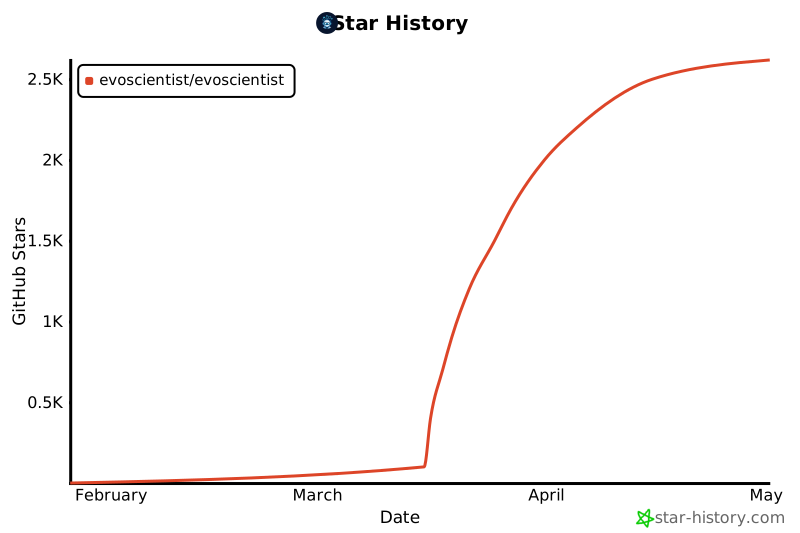
📈 Star History
📜 License
This project is licensed under the MIT License - see the LICENSE file for details.
Made with ❤️ by the EvoScientist team and the open source community for the AI scientist community.
Release history Release notifications | RSS feed


Download files
Download the file for your platform. If you're not sure which to choose, learn more about installing packages.
Source Distribution
Built Distribution
Filter files by name, interpreter, ABI, and platform.
If you're not sure about the file name format, learn more about wheel file names.
Copy a direct link to the current filters
File details
Details for the file evoscientist-0.0.1b0.tar.gz.
File metadata
- Download URL: evoscientist-0.0.1b0.tar.gz
- Upload date:
- Size: 331.3 kB
- Tags: Source
- Uploaded using Trusted Publishing? No
- Uploaded via: twine/6.2.0 CPython/3.11.14
File hashes
| Algorithm | Hash digest | |
|---|---|---|
| SHA256 |
6d217707b68f35be196ee68aeecc6ff2c5da34d760962774dbb1702ecaadee13
|
|
| MD5 |
c55114e0d517bffe69bf8b1871e9bb89
|
|
| BLAKE2b-256 |
0e41888ae11a3fbc2463d01c61c6643108f98a74cfd6caf916e32b6b1490ebc2
|
File details
Details for the file evoscientist-0.0.1b0-py3-none-any.whl.
File metadata
- Download URL: evoscientist-0.0.1b0-py3-none-any.whl
- Upload date:
- Size: 324.3 kB
- Tags: Python 3
- Uploaded using Trusted Publishing? No
- Uploaded via: twine/6.2.0 CPython/3.11.14
File hashes
| Algorithm | Hash digest | |
|---|---|---|
| SHA256 |
c51bbebb3b2bad29f35086cef8d9b5874786a61ec464a793aac6448b6096995e
|
|
| MD5 |
7ba132d88a065fda189d1508672bee60
|
|
| BLAKE2b-256 |
e3a690a217e4cd8db2c86780ebc3b3473cb0df0c989ecd5f57f3dd8581479699
|






