
Federated genome-wide association study pipeline built with Flower and PLINK
Verified details
These details have been verified by PyPIProject links
GitHub Statistics
Maintainers

Project description
FedGWAS: Federated Genome-Wide Association Study




Overview
FedGWAS is a federated pipeline for Genome-Wide Association Studies (GWAS). It uses Flower for federated execution, PLINK for genetics tooling, and privacy-preserving relay protocols for multi-client GWAS workflows. Use FedGWAS when multiple sites need to run GWAS stages together while keeping local genotype data on each client.
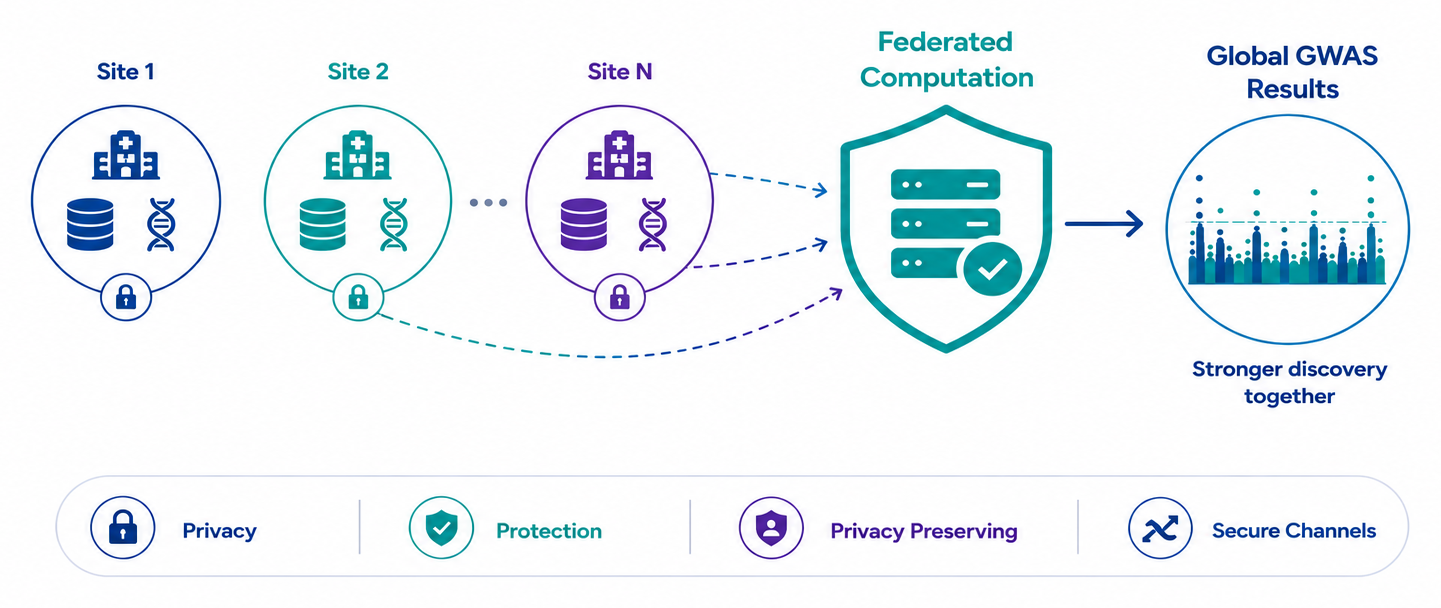
To get started and learn how to use FedGWAS, use the following resources:
- Documentation site: Documentation
- Examples gallery: Examples
- API reference: API Reference
- Technical details: Technical Details
Prerequisites
FedGWAS requires Python 3.11 or later, Flower, and PLINK 1.9+.
Install PLINK 1.9+ and make sure plink is available on PATH.
plink --version
For repository-based runs, you can also set the PLINK path in each client config if your environment does not expose plink globally.
FedGWAS Local Simulation Guide
Local simulation mode runs the full FedGWAS workflow on one machine by launching multiple simulated research centers and a federated server through Flower. Use it to validate an installation, create simulation experiments from preset settings and generated data, prototype center configs, and compare federated outputs against a centralized baseline without setting up a real federated deployment.
You can start local simulation in either of two ways:
- Recommended: install from PyPI and use
fedgwas-simcommand line interface (CLI) - Repository/local workflow: clone this repository and run the old scripts directly
Both workflows require:
- Python 3.11 or later
- PLINK 1.9+ available on
PATHor configured locally - Flower installed through the package or local environment
Recommended: PyPI CLI Workflow
Install the package:
python -m pip install FedGWAS
Verify that the simulation CLI is available:
fedgwas-sim --help
Create a standalone study directory and run the tiny two-client simulation:
mkdir my_study
cd my_study

# initialize study project directory
fedgwas-sim init
# setup data and configurations
fedgwas-sim setup-experiment syn-tiny --seed 42
# validation and run simulation
fedgwas-sim check
fedgwas-sim run --rounds 100
# evaluation and results collection
fedgwas-sim baseline generate --output data/centralized_baseline
fedgwas-sim evaluate results --baseline data/centralized_baseline --king
fedgwas-sim results collect --label tiny_run
The usage of the CLI can be found in the documentation site.
Repository/Local Script Workflow
Clone the repository if you want the old direct script workflow, bundled experiment files, cluster deployment scripts, documentation source, or developer tooling:
git clone https://github.com/sitaomin1994/FedGWAS_pipeline.git
cd FedGWAS_pipeline
python -m pip install -e .
With uv, you can install the local environment with:
git clone https://github.com/sitaomin1994/FedGWAS_pipeline.git
cd FedGWAS_pipeline
uv sync --python 3.11
Generate synthetic data:
python pipeline/simulation/simulated_data/generate_synthetic_data.py \
  --scale tiny \
  --partition-strategy even \
  --seed 42 \
  --output-dir experiments/correctness/tiny_even/data
Generate the centralized baseline:
python experiments/tools/generate_baseline.py \
  experiments/correctness/tiny_even/config.yaml
Run the federated simulation:
flwr run . local-simulation --stream
Or run with explicit release-smoke settings:
flwr run . local-simulation --stream --run-config \
  'simulation=true num-server-rounds=100 config_path="experiments/correctness/tiny_even/configs"'
Evaluate the run:
python experiments/tools/evaluation/evaluate_all.py \
  experiments/correctness/tiny_even/results_2 \
  --baseline experiments/correctness/tiny_even/data/tiny/centralized_baseline \
  --king
If you changed the active config output paths, pass the results directory from those config files instead.
Example Simulation Experiments
We have a few preset experiments with generated data and configs in the repository for testing and demonstration. You can found the details of these example experiments in the documentation and the experiment directories:
-
Tiny experiment details: experiments/correctness/tiny_even/README.md
-
Small experiment details: experiments/performance/small_even/README.md
-
real world data experiment details: experiments/real_world/real_world/README.md
FedGWAS Cluster Deployment Guide
Instead of running the pipeline in local simulation mode, you can deploy the federated server and clients on separate machines or containers. The cluster deployment guide walks through the steps to set up a real federated deployment with the current FedGWAS implementation. It also includes tips for debugging and troubleshooting common issues.
Repository Guides
- Cluster deployment guide: cluster_deployment/docs/CLUSTER_USER_GUIDE.md
Federated Protocol Summary
FedGWAS runs a stage-based federated workflow:
- Key exchange
- Encrypted seed synchronization
- Local and global QC
- Iterative KING kinship analysis
- Local logistic regression filtering
- Iterative logistic regression
- Result retention and evaluation
The server relays encrypted client-to-client payloads for selected stages and does not decrypt those payloads. See CURRENT_VERSION.md for the current privacy model, stage contracts, and limitations.
Troubleshooting (Common Issues)
plinknot found: install PLINK 1.9+ and make sure it is onPATH.- Flower uses the wrong config: pass
--run-config 'config_path="..."'. - Empty or missing results: generate the tiny synthetic data and baseline before running.
- TestPyPI or PyPI install fails for a new release: check that the version in
pyproject.tomlhas been published and that dependency resolution can reach normal PyPI.
License
FedGWAS is distributed under the MIT License. See LICENSE.
Contributors and Creator
Developed by Rutgers Institute in Data Science, Learning, and Application.
Contributors:
Project details
Verified details
These details have been verified by PyPIProject links
GitHub Statistics
Maintainers
Release history Release notifications | RSS feed


Download files
Download the file for your platform. If you're not sure which to choose, learn more about installing packages.
Source Distribution
Built Distribution
Filter files by name, interpreter, ABI, and platform.
If you're not sure about the file name format, learn more about wheel file names.
Copy a direct link to the current filters
File details
Details for the file fedgwas-0.3.2.tar.gz.
File metadata
- Download URL: fedgwas-0.3.2.tar.gz
- Upload date:
- Size: 45.0 MB
- Tags: Source
- Uploaded using Trusted Publishing? Yes
- Uploaded via: twine/6.1.0 CPython/3.13.12
File hashes
| Algorithm | Hash digest | |
|---|---|---|
| SHA256 |
0efa1a889e26f8e00ec8ea9fdb8590f5a75fa2e71d7b79710803a7818dcd5411
|
|
| MD5 |
71633074cf121d6d52d51a04f76fdb7a
|
|
| BLAKE2b-256 |
8ab2b16b944974971c3fc48322e02da5381209d05dd688f0fc00fb100a0bfe70
|
Provenance
The following attestation bundles were made for fedgwas-0.3.2.tar.gz:
Publisher:
publish-pypi.yml on sitaomin1994/FedGWAS_pipeline
-
Statement:
-
Statement type:
https://in-toto.io/Statement/v1 -
Predicate type:
https://docs.pypi.org/attestations/publish/v1 -
Subject name:
fedgwas-0.3.2.tar.gz -
Subject digest:
0efa1a889e26f8e00ec8ea9fdb8590f5a75fa2e71d7b79710803a7818dcd5411 - Sigstore transparency entry: 1825729771
- Sigstore integration time:
-
Permalink:
sitaomin1994/FedGWAS_pipeline@e728111dc44ba2923da3933d4bcc3960f1bd647c -
Branch / Tag:
refs/tags/v0.3.2 - Owner: https://github.com/sitaomin1994
-
Access:
public
-
Token Issuer:
https://token.actions.githubusercontent.com -
Runner Environment:
github-hosted -
Publication workflow:
publish-pypi.yml@e728111dc44ba2923da3933d4bcc3960f1bd647c -
Trigger Event:
release
-
Statement type:
File details
Details for the file fedgwas-0.3.2-py3-none-any.whl.
File metadata
- Download URL: fedgwas-0.3.2-py3-none-any.whl
- Upload date:
- Size: 212.9 kB
- Tags: Python 3
- Uploaded using Trusted Publishing? Yes
- Uploaded via: twine/6.1.0 CPython/3.13.12
File hashes
| Algorithm | Hash digest | |
|---|---|---|
| SHA256 |
ea66409e3e23377f4d7a5355834005ed493676a909b6e7c7dce5a0cb910814e0
|
|
| MD5 |
59fdfa036b3b6cf5e93f2576b97746e8
|
|
| BLAKE2b-256 |
55505ba48ab86b2a56602e72695f0abedc6dda48159a7848faef82a2601df779
|
Provenance
The following attestation bundles were made for fedgwas-0.3.2-py3-none-any.whl:
Publisher:
publish-pypi.yml on sitaomin1994/FedGWAS_pipeline
-
Statement:
-
Statement type:
https://in-toto.io/Statement/v1 -
Predicate type:
https://docs.pypi.org/attestations/publish/v1 -
Subject name:
fedgwas-0.3.2-py3-none-any.whl -
Subject digest:
ea66409e3e23377f4d7a5355834005ed493676a909b6e7c7dce5a0cb910814e0 - Sigstore transparency entry: 1825729797
- Sigstore integration time:
-
Permalink:
sitaomin1994/FedGWAS_pipeline@e728111dc44ba2923da3933d4bcc3960f1bd647c -
Branch / Tag:
refs/tags/v0.3.2 - Owner: https://github.com/sitaomin1994
-
Access:
public
-
Token Issuer:
https://token.actions.githubusercontent.com -
Runner Environment:
github-hosted -
Publication workflow:
publish-pypi.yml@e728111dc44ba2923da3933d4bcc3960f1bd647c -
Trigger Event:
release
-
Statement type:






